
lockwalk
Authorization test coverage for AI agent tools. lockwalk tells you which tool permissions nobody has tested, where your policy engine disagrees with what you expected, and where a denied call ran anyway. It gives CI a clear pass or fail.
lockwalk does not give your agents permissions. It checks the permissions you already set up, before you ship.
Status: alpha. The report format and the configuration may still change before 1.0.
Why
An agent acts through its tools, so the permission checks on those tools matter, though they are not everything (what it does not promise). Four problems are easy to miss:
- A tool with no rule and no test (
UNSPECIFIED). Your policy engine's own tests only cover rules that exist, so they can never say "this tool has no rule at all". lockwalk counts from the list of tools. - A decision you did not expect (
FAIL_POLICY). You write down what the answer should be. lockwalk asks your real policy engine and compares. - A deny that did not stop the tool (
FAIL_EXECUTION). The engine says no, but the code path skips the check. lockwalk can call the tool in a test subprocess, with its side effects replaced by counters, and see whether it ran. - A route that goes too far (
never_reaches,ESCALATION). When agents call other agents, a role can reach a tool through a chain nobody planned, and an agent can be allowed what the user alone is not. lockwalk maps which roles reach which tools through which agents, checks the rules you write about what must never be reached, and compares the agent's answer with the user's.
Where it fits
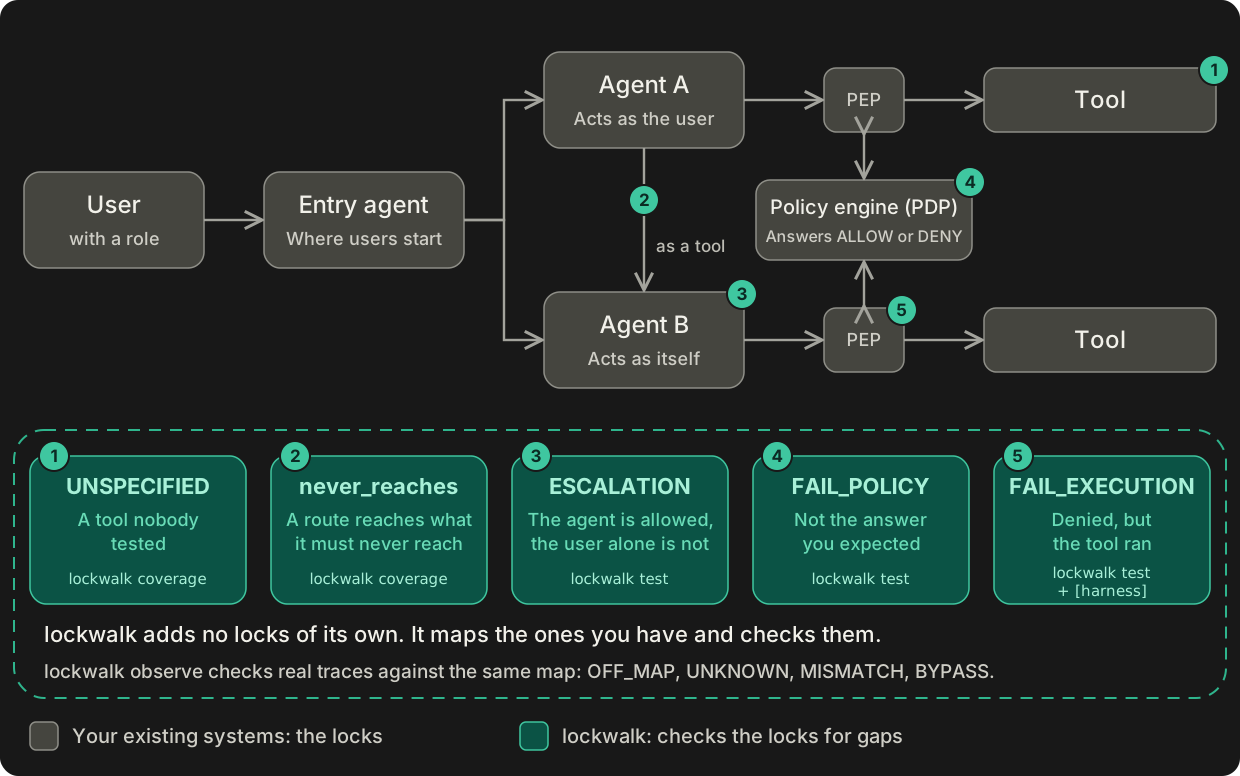
lockwalk observe compares what your agents really did, read from traces, with the map of who can
call what. It finds routes off the map, agents and tools the map does not know, the wrong identity,
and calls that skipped the check.
Words you will see
- IAM: whatever answers "may this identity do this action on this resource?"
- Policy engine: decides allow or deny, such as Cerbos, OPA or Cedar. A PDP (policy decision point) is one you ask over a network.
- Door: the code in your app that asks before a tool runs. The same thing as a PEP (policy enforcement point).
- AuthZEN: an open standard for asking a PDP over HTTP if a call is allowed.
- AuthN: checking who someone is.
- The map: the graph of which agents and tools can call each other.
- Fixture: test data for a user, agent or resource, in
fixtures.yaml. - Waiver: an accepted risk, with an owner and an expiry.
- Harness: an optional
[harness]section in.lockwalk.toml. It calls your tools in a test subprocess, with their side effects replaced by counters, to check that a denied call does not run. - Gate: the pass or fail check at the end of a run. It sets the exit code.
- Trace: a record of what an agent really did, from your tracing tool.
Who it is for
Developers and security engineers who build AI agents with tools, and want a CI check that says what has not been tested. lockwalk reads tools from a registry file you write, from MCP servers, from a JSON tool list, and from Python objects in LangChain / LangGraph, the OpenAI Agents SDK, Pydantic AI, Agno and CrewAI. For Hermes Agent, it reads a JSON export of the tools, and the traces.
It asks your IAM (whatever answers allow or deny for your agents) through AuthZEN, or through a small Python function you write for your engine. If your engine speaks AuthZEN you write no code. If not, you write that one function; there are starting points.
Install
pip install lockwalk
Python 3.11 or newer. Two optional parts:
pip install "lockwalk[mcp]"    # needed only for --mcp, to read tools from MCP servers
pip install "lockwalk[otel]"   # needed only to write trace records; observe reads them without
Python objects need no extra, only your own agent framework.
Quick start
You need two small files and nothing else. No agent runs, and no tool is called. Work in an empty
folder, because lockwalk writes a .lockwalk folder next to your files.
Save this as registry.yaml. It lists an agent and its tools. Risk is yours to declare, because
nothing else can know it.
schema_version: '1'
agents:
  - id: support-agent
    entry: true
    calls: []
tools:
  - id: read_ticket
    action: ticket:read
    risk: low
    resource_type: ticket
    supported_agents: [support-agent]
  - id: delete_customer
    action: customer:delete
    risk: critical
    resource_type: customer
    supported_agents: [support-agent]
Save this as security-spec.yaml. It says what the answers should be. It has a case for
read_ticket, and nobody wrote one for delete_customer.
schema_version: '1'
scenario_suite: quickstart
cases:
  - id: CASE-001
    actor: alice
    role: support
    agent: support-agent
    tool: read_ticket
    action: ticket:read
    resource_fixture: ticket-1
    expect: allow
Run it:
lockwalk coverage --registry registry.yaml --spec security-spec.yaml
lockwalk finds the gap and exits 1, which is what makes a CI job fail. This is an excerpt; the real output has more lines:
Tools without spec:                 1   (delete_customer, risk=critical, source=registry:registry.yaml)
High-risk tools without deny case:  1   (delete_customer)
Gate: FAIL (exit 1)
  - fail_on_unspecified_risk: delete_customer (risk=critical)
  - require_deny_case_for_risk: delete_customer (risk=critical)
The last two lines name the gate rules that failed: fail_on_unspecified_risk (a critical or
unknown-risk tool with no case) and require_deny_case_for_risk (a high-risk tool with no deny
case). You set both in the [gate] table; see
Gate and exit codes.
To fix it, add a case that says this call must be denied, at the end of security-spec.yaml.
Keep the two-space indent, so the new case lines up with CASE-001:
  - id: CASE-002
    actor: alice
    role: support
    agent: support-agent
    tool: delete_customer
    action: customer:delete
    resource_fixture: customer-1
    expect: deny
    reason: Support staff never delete customers
Run the same command again, and it prints Gate: PASS (exit 0). The full report is in
.lockwalk/coverage.json. Next to the pass you will see Untested: 2 and
Executed scenarios: 0/2. That is expected: coverage runs no agent or tool, and never asks
your IAM. It only checks that every tool has an expected answer. To ask your IAM, use
lockwalk test.
Next step: ask your policy
To ask an IAM, make two more changes in the same folder. First, save a small Python function as my_iam.py. It stands in for your IAM, and only bob may delete
a customer:
def decide(subject, action, resource, context):
    if action["name"] == "customer:delete":
        return subject["id"] == "bob"
    return True
Second, add an allow case at the end of security-spec.yaml. A deny proves little unless the
IAM allowed the same action once. delegation_mode: user says the agent acts as the user:
  - id: CASE-003
    actor: bob
    role: admin
    agent: support-agent
    delegation_mode: user
    tool: delete_customer
    action: customer:delete
    resource_fixture: customer-1
    expect: allow
lockwalk test --registry registry.yaml --spec security-spec.yaml --policy python:my_iam:decide
  CASE-002  PASS            support-agent -> delete_customer  (expect deny, IAM deny)
Gate: PASS (exit 0)
This is an excerpt too. The real output also lists warnings such as "actor 'alice' has no
fixture; sending only its id and role". They are expected here, because you wrote no
fixtures.yaml. With no fixture, lockwalk sends the IAM only the name, plus the role for a user,
and no other properties.
If decide let alice delete a customer, CASE-002 would be FAIL_POLICY. For a real engine,
see the test guide
or examples/iam_cedar.
How it works
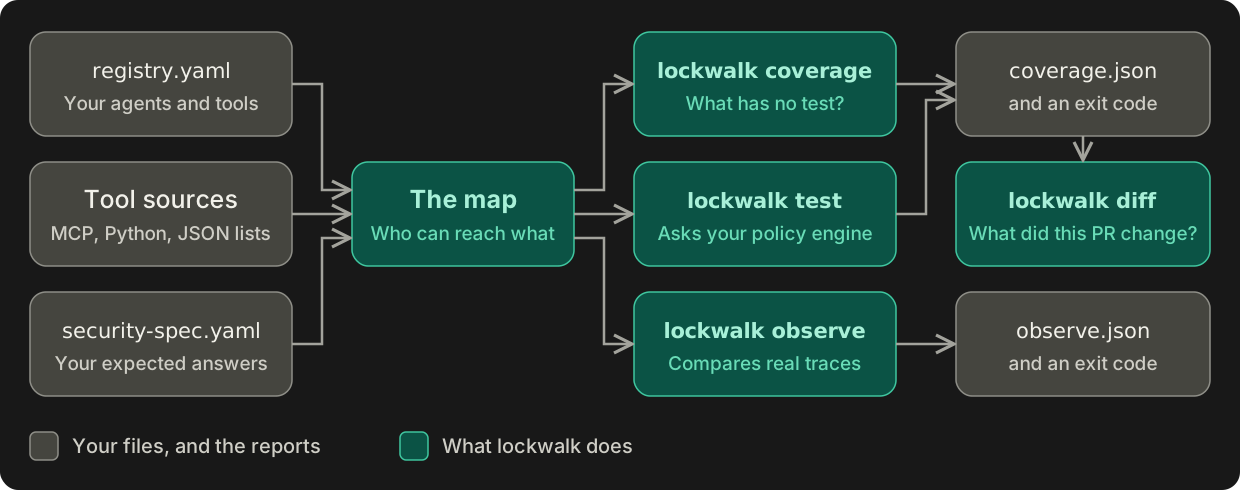
observe also needs your traces. discover and inspect are not in the picture: they show what
lockwalk found, and do not judge it.
Commands
coverage, test and observe exit 0 when they pass, 1 when a finding blocks, and 2 when the
result cannot be trusted, for example a bad configuration or an IAM that did not answer.
discover, inspect and diff only report: they exit 0, or 2 when they cannot do their job.
lockwalk discover lists the agents and tools from every source and draws the agent graph.
It never runs an agent or a tool, but it imports your Python modules and reads their properties,
which runs your code. The registry is yours to write; lockwalk does not generate one. Point
--python at module:attribute or file.py:attribute. The target can be a tool list or an
agent object, such as a LangChain tool list, an OpenAI Agents SDK Agent or a CrewAI Crew
(the coverage guide
has every form):
lockwalk discover --python my_app.agents:main_agent
lockwalk coverage checks the spec against the tool list and the roles against the routes,
and applies the gate. Like discover, it runs no agent or tool but imports your modules. It
writes .lockwalk/coverage.json; --summary shortens the output. See the
coverage guide.
lockwalk test runs everything coverage runs, then asks your real IAM each question in your
spec. Choose the IAM with --policy authzen:URL or --policy python:module:function, as in the
quick start. Options can also live in a .lockwalk.toml file (see the
coverage guide).
With a [harness] in that file, it also calls your tools in a test subprocess, with their side
effects replaced by counters, to check that a denied call does not run. See the
test guide.
lockwalk observe reads traces and compares the routes your agents really took with the map.
A route off the map, or an agent or tool the map does not know, blocks the gate. See the
observe guide.
lockwalk inspect shows the evidence behind one case (--case CASE-001), or how one trace was
read (--trace <id>).
lockwalk diff compares two coverage.json reports and lists what changed, as text, JSON or
Markdown for a pull request comment. See
lockwalk in CI.
Use it in CI
examples/ci has a GitHub Actions
workflow to copy. On every pull request it runs lockwalk coverage and shows what changed against
the target branch. coverage never asks your IAM, so a policy change is not tested there. Only
lockwalk test, in the nightly run on the default branch, asks it. Read
what a pull request can change
first.
How is this different from my policy engine's own tests?
Policy engines such as Cerbos and OpenFGA can unit-test their policies. lockwalk differs in three
ways. It counts from the list of tools, so it can say that a tool has no rule at all. With a
[harness], it tests the path from your code to the engine to the tool, not only the engine. And
your security-spec.yaml stays the same if you change engines.
What it does not promise
- Passing does not mean secure. It means the scope you declared has expected answers, and,
with
test, that your IAM gave them. - It does not stop prompt injection or data leaks. A tricked agent can misuse a tool it may use, and an allowed tool can return data it should not. lockwalk checks permissions only.
- It only sees what you point it at. It does not find every tool or agent, and a source can hide one by not reporting it. Routes chosen at run time are invisible until a trace shows them.
- It trusts your declarations. Risk levels, roles and delegation modes are written by you. It cannot check them.
- It is not a sandbox. It imports your Python modules and starts your MCP servers, so only point it at code you trust.
- It is not an IAM system, a policy engine, a gateway or an observability platform, and it gives no security score.
Reports can contain agent and tool names, local file paths, exception messages from your own
code, and, in coverage.json, waiver owners and reasons. Keep that in mind before you upload
coverage.json, evidence.jsonl or a CI artifact. Read
what lockwalk trusts and promises
before you rely on a result.
Learn more
- Documentation index
- Examples: demos, Cedar, Cerbos, Hermes Agent, IAM recipes
- Changelog, Contributing, Reporting a vulnerability
License
Apache-2.0
1 maintainer

Metadata
1 maintainer
Release files for lockwalk 0.1.0
For a detailed explanation of source distributions (sdists) and built distributions (wheels), please see the package formats documentation.
Source distribution (sdist)
| File | Size | Uploaded | Provenance | Actions |
|---|---|---|---|---|
| lockwalk-0.1.0.tar.gz | 261.8 kB | With provenance | Details for lockwalk-0.1.0.tar.gz |
Built distribution (wheel)
| File | Interpreter | ABI | Platform | Actions Reset |
|---|---|---|---|---|
| lockwalk-0.1.0-py3-none-any.whl | Python 3 | none | any | Details for lockwalk-0.1.0-py3-none-any.whl |
Total release size: 555.2 kB
Release files / lockwalk-0.1.0.tar.gz
| Download URL | lockwalk-0.1.0.tar.gz |
|---|---|
| Size | 261.8 kB |
| Tags | Source |
|
SHA-256 checksum How to use checksums |
568991768e4202685db8e0bd8c5122c7687eb3e001e743e4e4f8e9f2e7235738
|
|
BLAKE2b-256 checksum How to use checksums |
0074bc4a5d4cf6c233e65559278e8144e93332356cce46734e44c010d4276272
|
| Upload date | |
|
Uploaded using Trusted Publishing? What is trusted publishing? |
Yes |
| Uploaded via |
twine/7.0.0 CPython/3.13.16
|
Provenance
Provenance describes where a file came from. On PyPI, provenance is shared via attestations, which provide a verifiable record of the build or publishing details. View details, limitations and caveats.


PyPI Publish Attestation
PyPI verified that this artifact, at this checksum, originated from the publisher listed below.
Signed by GitHub Actions, verified by PyPI on Nov 10, 2026.
Transparency logRelease files / lockwalk-0.1.0-py3-none-any.whl
| Download URL | lockwalk-0.1.0-py3-none-any.whl |
|---|---|
| Size | 293.4 kB |
| Tags | Python 3 |
|
SHA-256 checksum How to use checksums |
6a2c3bdb8e7c4d1b661b771ac09aa9f48802b26e33f7820a5b80532ca09e1cb9
|
|
BLAKE2b-256 checksum How to use checksums |
3d89b7c6d1de89b51de3643fcb5d5cadfa4320bab36f0d18a185908c34e44017
|
| Upload date | |
|
Uploaded using Trusted Publishing? What is trusted publishing? |
Yes |
| Uploaded via |
twine/7.0.0 CPython/3.13.16
|
Provenance
Provenance describes where a file came from. On PyPI, provenance is shared via attestations, which provide a verifiable record of the build or publishing details. View details, limitations and caveats.
PyPI Publish Attestation
PyPI verified that this artifact, at this checksum, originated from the publisher listed below.
Signed by GitHub Actions, verified by PyPI on Nov 10, 2026.
Transparency logSecurity for lockwalk 0.1.0
Provenance
Provenance describes where a file came from. On PyPI, provenance is shared via attestations, which provide a verifiable record of the build or publishing details. View details, limitations and caveats.
Full provenance
Both files in this release have been uploaded with provenance metadata.
Attestation for lockwalk-0.1.0.tar.gz
PyPI Publish Attestation
PyPI verified that this artifact, at this checksum, originated from the publisher listed below.
Signed by GitHub Actions, verified by PyPI on Nov 10, 2026.
Transparency logA note on package security
PyPI is a repository for distributing packages, not a service for auditing them. While third-party security researchers and our staff do their best to detect and remove malicious packages, PyPI cannot guarantee the quality, security or suitability of any given package.
To learn more about protecting yourself from malicious actors, visit our package security documentation.













