
log-ui


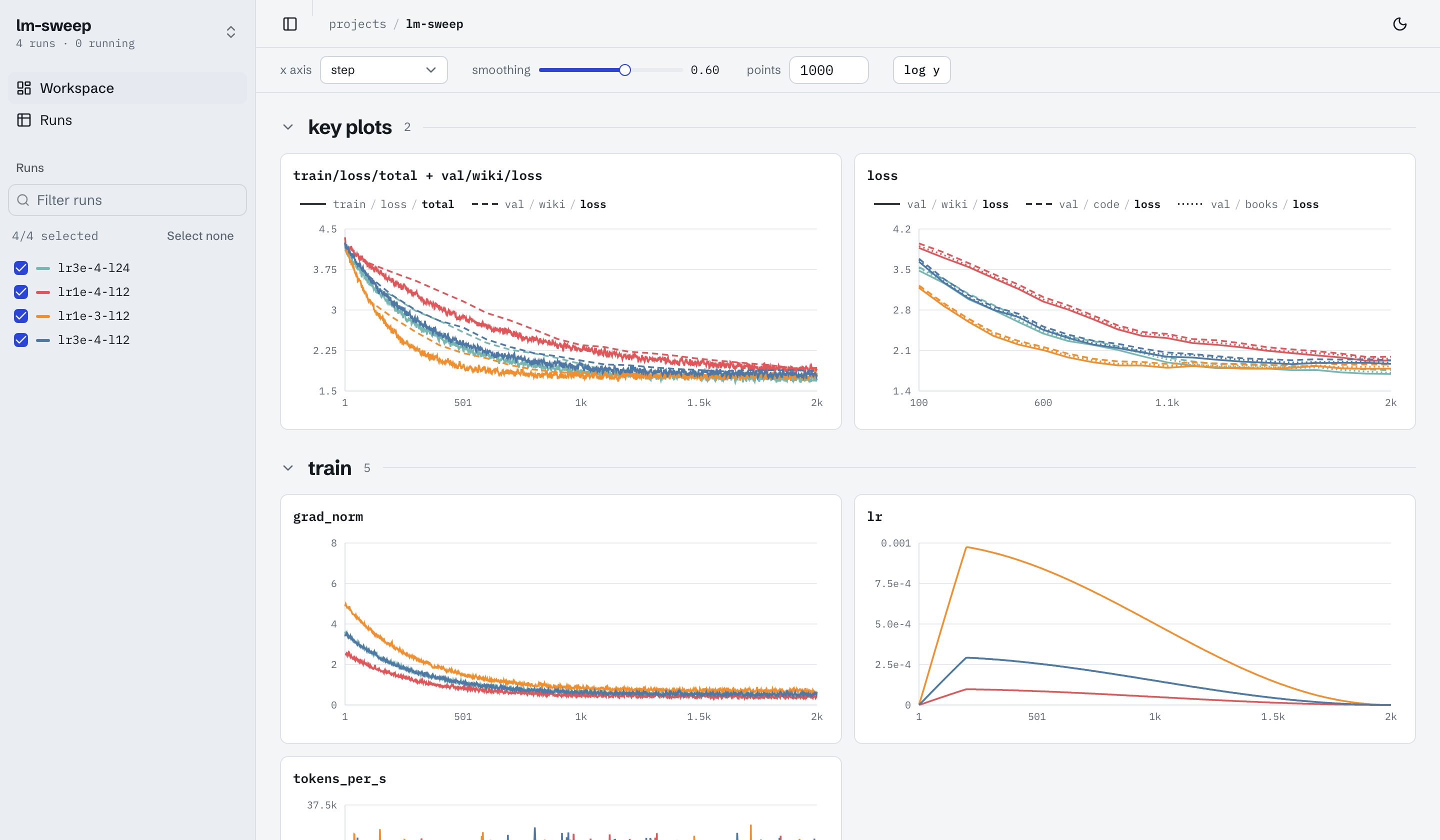
A self-hosted, wandb-style dashboard for experiments logged with trackio. One Python process serves a read-only JSON API over trackio's sqlite store and a prebuilt React app. No Node at runtime, no accounts, no cloud.
Site: https://aadityasalgarkar.github.io/log-ui/ · For LLMs: llms.txt
Install and run
uvx log-ui                          # run it without installing; serves ~/.cache/huggingface/trackio at http://127.0.0.1:8765
uvx log-ui --dir /path/to/store --project my-project --open

uv tool install log-ui              # or install the `log-ui` command (pip install log-ui works too)
uv run --with log-ui log-ui         # or run it from a throwaway environment next to your project
The latest code from main: uvx --from git+https://github.com/AadityaSalgarkar/log-ui log-ui.
No runs of your own yet? Write a synthetic store with a small learning-rate sweep and open it:
git clone https://github.com/AadityaSalgarkar/log-ui && cd log-ui && uv sync
uv run python scripts/demo_store.py /tmp/log-ui-demo
uv run log-ui --dir /tmp/log-ui-demo --project lm-sweep
Docker
A prebuilt image (linux/amd64 and linux/arm64) is published from this repository's CI:
docker run --rm -p 127.0.0.1:8765:8765 ghcr.io/aadityasalgarkar/log-ui      # bundled demo store

docker run --rm -p 127.0.0.1:8765:8765 \
  -v ~/.cache/huggingface/trackio:/data:ro \
  --read-only --tmpfs /tmp --cap-drop ALL --security-opt no-new-privileges \
  ghcr.io/aadityasalgarkar/log-ui                                         # your runs, read-only
Check it was built by this repository's workflow (signed SLSA provenance; an SBOM is attached too), or skip the registry and build it yourself from source:
gh attestation verify oci://ghcr.io/aadityasalgarkar/log-ui:latest --owner AadityaSalgarkar
docker build -t log-ui https://github.com/AadityaSalgarkar/log-ui.git     # then run `log-ui` instead
Or, from a clone, docker compose up (store path via TRACKIO_STORE, port via LOG_UI_PORT). What the
container can do, by construction:
- Read your store, never write it. It is mounted
:ro. A store on a read-only mount is read through a private snapshot in the container's/tmp, so rows still in trackio's WAL file are included. - Nothing else on disk. With
--read-only(the default incompose.yaml) the root filesystem is immutable; only an in-memory/tmpis writable. - Minimal surface. Alpine plus a Python virtualenv: no compilers, no Node, no shell tools beyond
BusyBox. Always runs as an unprivileged user (uid 10001);
--cap-drop ALL(default incompose.yaml) removes every Linux capability. - Local only. The examples publish the port on
127.0.0.1; log-ui makes no outbound connections.
What you get
- Projects: every trackio project in the store with its run count and last write.
- Workspace: pick runs in the sidebar; every logged key gets a chart, nested by its path in collapsible
groups (
loss/train/xentsits in a "train" box inside "loss"; open/closed state is remembered). Global smoothing (EMA), step / relative / wall-clock x-axis, log y, and a free-form point budget per series. - Key plots: charts at the top that overlay several metrics on one y axis, e.g.
train/losswithval/loss. Add a metric from any chart's pin menu or a plot's + picker; a metric can be in any number of key plots (A+B, A+C and A+D at once). Colour is the run; each metric gets its own line style (dash, marker, thickness), assigned automatically and changeable from the plot's legend. Shown on the workspace and run pages. - Per-chart settings: a mean ± std or min–max band over a trailing window of N raw points (never looks ahead), and fixed x/y limits. Settings persist per project in the browser. The window counts logged points, so a metric logged every 100 steps gets a band 100× wider in steps than one logged every step.
- Charts: a synced cursor across charts, a tooltip on the chart under the mouse (every line's nearest logged value, so metrics logged at different steps still show), and a full-screen view with a range brush.
- Runs table: status, steps, duration, the config columns that differ between runs, sorting, filtering and multi-select.
- Run page: charts, flattened config, last value of every key, and system metrics when logged.
- Views: declarative panels (ladder, heatmap, table, line grid, stats) contributed by plugins, for project-specific comparisons.
- Refreshes when a selected run logs new rows; dark and light themes; page state lives in the URL.
The trackio contract
log-ui is read-only and does not import trackio. Its only I/O with trackio is the on-disk sqlite store, and
all of that access lives in one module, log_ui/contract.py, which declares:
- the files it reads:
<store>/<project>.dbfor canonical project names ([A-Za-z0-9_-]+), excluding trackio'sregistry-*databases; - the tables and columns it reads (
configs,metrics,system_metrics) and how their values are encoded; - the trackio versions it is verified against (
TRACKIO_VERSIONS, currently>=0.38,<0.40).
Connections are opened with mode=ro, and each one's schema is checked when it opens. If a store lacks a
declared column, log-ui returns an unsupported trackio store error instead of guessing. On a read-only
filesystem, where SQLite cannot create the -shm file a WAL database needs, log-ui reads a snapshot of the
database and its WAL from the temp directory instead. To delete, rename or
move runs, use trackio (trackio.Api().runs(project)); log-ui picks up the change on its next read.
Configuration
| Flag | Environment | Default |
|---|---|---|
--dir |
LOG_UI_DIR, then TRACKIO_DIR |
~/.cache/huggingface/trackio |
--host |
LOG_UI_HOST |
127.0.0.1 |
--port |
LOG_UI_PORT |
8765 |
--project |
LOG_UI_PROJECT |
none (opens the project list) |
--views module:function (repeatable) |
LOG_UI_VIEWS (comma-separated) |
entry points in log_ui.views |
--stale-seconds |
120 (a run that logged within this window is "running") |
|
--open |
open a browser |
Flags override environment variables. The server binds to localhost by default; to reach it on a remote
machine, forward the port (ssh -L 8765:localhost:8765 box) rather than binding to 0.0.0.0.
API
All endpoints are read-only, return JSON under /api, and are documented interactively at /docs.
| Method | Path | Purpose |
|---|---|---|
| GET | /api/health |
version, store dir, supported trackio range |
| GET | /api/projects |
projects with run counts and last write |
| GET | /api/projects/{p}/runs |
runs with status, last step, flattened config, summary |
| GET | /api/projects/{p}/runs/{run} |
one run plus its keys and eval steps |
| GET | /api/projects/{p}/keys |
metric keys with prefix and run counts |
| GET | /api/projects/{p}/metrics?runs=a,b&keys=k1,k2&x=step&smoothing=0.5&max_points=1000&bands=k1:10 |
series per run and key; bands adds a trailing-window mean/std/min/max |
| GET | /api/projects/{p}/system?runs=a,b&bands=gpu:10 |
system metrics (GPU, CPU) when logged |
| GET | /api/projects/{p}/views |
view specs from plugins |
| GET | /api/projects/{p}/views/{id}?runs=a,b&metric=m&point=last |
resolved panels |
Views (plugins)
A view provider is a function provide(project, runs) -> list[ViewSpec]. Register it under the entry-point
group log_ui.views in your package, or pass --views my_module:provide. runs carries each run's flattened
config and summary, so a provider can derive categories from the config (datasets, species, seeds) and map
them to metric keys with templates like val/{category}/{metric}. Panel types: ladder (one line per run
across ordered categories), heatmap (runs × categories), table, lines (small multiples over steps) and
stats. See log_ui/views.py for the dataclasses.
Development
uv sync                                  # backend + test deps (tests write real stores with trackio)
uv run pytest
uv run --with ruff ruff check log_ui tests && uv run --with ruff ruff format --check log_ui tests

cd web
npm ci
npm run dev                              # Vite on :5173, proxies /api to http://127.0.0.1:8765
npm run lint && npm run typecheck && npm test
npm run build                            # writes ../log_ui/static (committed, shipped in the wheel)
The built app in log_ui/static is committed so that installing needs no Node; CI checks it matches the
sources. The project site lives in docs/ and is published with GitHub Pages.
Versions
Releases follow semantic versioning; see CHANGELOG.md and
GitHub Releases. Pin a version with
uvx log-ui@0.3.1, uv tool install log-ui==0.3.1 or ghcr.io/aadityasalgarkar/log-ui:0.3.1
(:0.3 follows the latest patch, :latest follows main).
To release: set __version__ in log_ui/__init__.py, move the Unreleased notes in CHANGELOG.md under the
new version, commit, then git tag vX.Y.Z && git push origin vX.Y.Z. CI checks the tag matches __version__,
creates the GitHub Release with the wheel and sdist, publishes to PyPI (trusted publishing, no stored token)
and publishes the image.
Roadmap
Media and table panels, artifacts, traces, alerts, sweep pages, run tags and notes, parameter importance, report authoring.
License
MIT.
1 maintainer

Metadata
1 maintainer
Release files for log-ui 0.3.1
For a detailed explanation of source distributions (sdists) and built distributions (wheels), please see the package formats documentation.
Source distribution (sdist)
| File | Size | Uploaded | |
|---|---|---|---|
| log_ui-0.3.1.tar.gz | 1.4 MB | Details |
Built distribution (wheel)
| File | Interpreter | ABI | Platform | Reset |
|---|---|---|---|---|
| log_ui-0.3.1-py3-none-any.whl | Python 3 | none | any | Details |
Total release size: 2.1 MB
Release files / log_ui-0.3.1.tar.gz
| Download URL | log_ui-0.3.1.tar.gz |
|---|---|
| Size | 1.4 MB |
| Tags | Source |
|
SHA-256 checksum How to use checksums |
80e79e581a03be22dba81f748d4ee1addca0bdec19fcc0ffe1e8737cb8e0dc02
|
|
BLAKE2b-256 checksum How to use checksums |
571cd10f0c86d4291b512cd2ed0e1b485c92f9b511d0c6f1bd2e81d7963bcea8
|
| Upload date | |
|
Uploaded using Trusted Publishing? What is trusted publishing? |
Yes |
| Uploaded via |
twine/7.0.0 CPython/3.13.14
|
Provenance
Provenance describes where a file came from. On PyPI, provenance is shared via attestations, which provide a verifiable record of the build or publishing details. View details, limitations and caveats.


PyPI Publish Attestation
PyPI verified that this artifact, at this checksum, originated from the publisher listed below.
Signed by GitHub Actions, verified by PyPI on Oct 5, 2026.
Transparency logRelease files / log_ui-0.3.1-py3-none-any.whl
| Download URL | log_ui-0.3.1-py3-none-any.whl |
|---|---|
| Size | 700.2 kB |
| Tags | Python 3 |
|
SHA-256 checksum How to use checksums |
abda497a137b38090c4e7a36d24c2a5deb61229935fd130691c27538aeed349d
|
|
BLAKE2b-256 checksum How to use checksums |
0d753c1def120a92b0801972dee20e64ea60a35cf700d55450ebd654ed38be34
|
| Upload date | |
|
Uploaded using Trusted Publishing? What is trusted publishing? |
Yes |
| Uploaded via |
twine/7.0.0 CPython/3.13.14
|
Provenance
Provenance describes where a file came from. On PyPI, provenance is shared via attestations, which provide a verifiable record of the build or publishing details. View details, limitations and caveats.
PyPI Publish Attestation
PyPI verified that this artifact, at this checksum, originated from the publisher listed below.
Signed by GitHub Actions, verified by PyPI on Oct 5, 2026.
Transparency log












