
A lightweight Python package for structured logging with automatic balance (ab) formatting for cleaner, more readable output.

Project description
logab 🐢
A lightweight Python package for structured logging with automatic balance (ab) formatting for cleaner, more readable output.
- 🤤 Python built-ins only
- 🤯 No dependencies
- 🥵 Minimal set-up
Table of Contents
🛠️ Installation
pip install logab
🔎 How to use
logab provides two functions: log_wrap() and log_init()
🌮 log_wrap()
log_wrap() is a ready-to-use wrapper with pre-configured logging. log_wrap() should be used only once at the program's entry point to configure logging globally.
Parameters:
log_file: file path for storing logs. If not specified, logs will be printed to the terminal.log_level: severity level of log messages being recorded. Defaults to "info"print_level: severity level of all messages output byprint()command. Defaults "info"
🍉 log_init()
The logab package supports logging through three methods:
- Using
print(): simple built-in Python function for basic output. - Using
logging: Python's standard logging module for structured and configurable logging. - Using
log_init(): works just like Python'slogging.getLogger(__name__), just shorter syntax so I don't have to write some boilerplate code hehe.
All three methods are compatible with the logab package, as long as they are used within the log_wrap() context. Usage example is provided in the next section.
🍻 example
import logging
from logab import log_init, log_wrap

def main_func():
    # We can log using Python's logging module
    logger_python = logging.getLogger(__name__)
    logger_python.warning("Warning message using Python's logging")
    # or logab's log_init()
    logger = log_init()
    logger.critical("Critical message using logab's log_init()")
    # or print() (default level is "info", can be configured through log_wrap())
    print("Debug message using print()")

if __name__=="__main__":
    with log_wrap(log_file="./app.log", log_level="debug", print_level="debug" ):
        logger = log_init()
        logger.info("Prepare to do main_func")
        main_func()
        logger.info("Finish main_func")
        x = 0
        print(10/x)
Output log messages in "./app.log":
PID   | Time                    | Level       | Function  |    File:No | Message
------+-------------------------+-------------+-----------+------------+-----------------------------------------
35814 | 2025-05-15 14:22:15,950 | 🔵 info     | <module>  | main.py:19 | Prepare to do main_func
35814 | 2025-05-15 14:22:15,954 | 🟡 warning  | main_func | main.py:9  | Warning message using Python's logging
35814 | 2025-05-15 14:22:15,955 | 🟣 critical | main_func | main.py:12 | Critical message using logab's log_init()
35814 | 2025-05-15 14:22:15,955 | 🟢 debug    | main_func | main.py:14 | Debug message using print()
35814 | 2025-05-15 14:22:15,955 | 🔵 info     | <module>  | main.py:21 | Finish main_func
35814 | 2025-05-15 14:22:15,958 | 🔴 error    | log_wrap  |   logab:0  | division by zero
------+-------------------------+-------------+-----------+------------+-----------------------------------------
Traceback (most recent call last):
  File "/home/namkha/Documents/mydev/logab/logab/log_utils.py", line 179, in log_wrap
    yield
  File "/home/namkha/Documents/mydev/logab/main.py", line 23, in <module>
    print(10/x)
          ~~^~
ZeroDivisionError: division by zero
------+-------------------------+-------------+-----------+------------+-----------------------------------------
35814 | 2025-05-15 14:22:15,958 | 🔵 info     | log_wrap  |   logab:0  | Execution time 0.0085 seconds
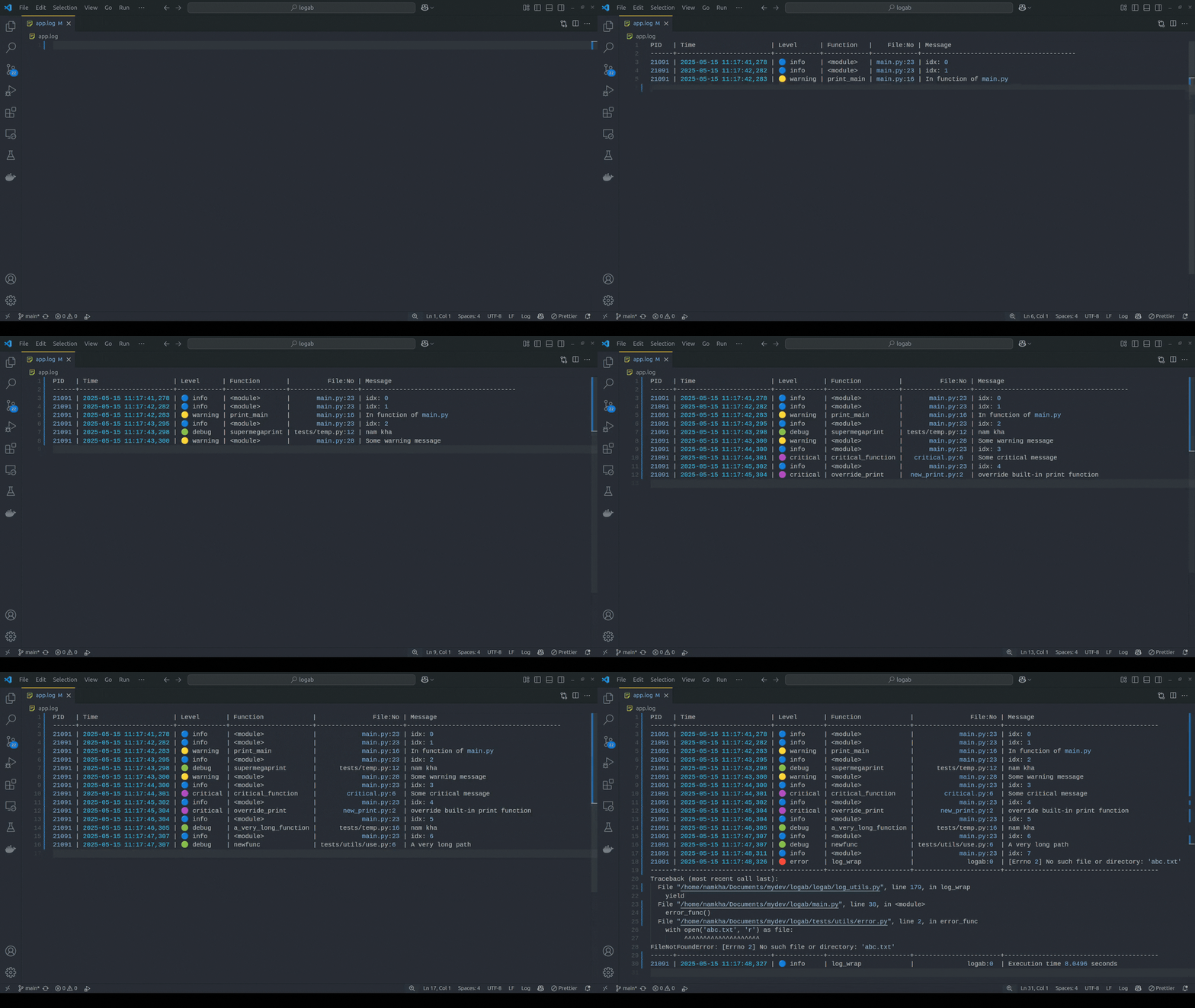
⚖️ Automatic balance
Log messages will be displayed in a table format. Each column automatically adjusts its width to fit the longest value in that column, ensuring the entire table remains clearly visible and easy to read.
⏳ Upcoming features
- Log rotation & retention: automatically create new files to handle large-size files
- Structured logging: support for structured (dict-style) logs
- Thread/process-safe logging: Ensure logging from multiple threads/proccesses is handled correctly
- ...
Release history Release notifications | RSS feed


Download files
Download the file for your platform. If you're not sure which to choose, learn more about installing packages.
Source Distribution
Built Distribution
Filter files by name, interpreter, ABI, and platform.
If you're not sure about the file name format, learn more about wheel file names.
Copy a direct link to the current filters
File details
Details for the file logab-0.1.2.tar.gz.
File metadata
- Download URL: logab-0.1.2.tar.gz
- Upload date:
- Size: 7.1 kB
- Tags: Source
- Uploaded using Trusted Publishing? No
- Uploaded via: twine/6.2.0 CPython/3.10.19
File hashes
| Algorithm | Hash digest | |
|---|---|---|
| SHA256 |
dbc935420deea9fc0869ba3f35d1cf9d45a2a8e5f73d47cfa59740875ee1d976
|
|
| MD5 |
bf4dd1fca4a2beff12d5df4d7a9c2feb
|
|
| BLAKE2b-256 |
639fe9c3a8b737704a839ec18a308734c3452e52eef59240485c5ca73d240cdb
|
File details
Details for the file logab-0.1.2-py3-none-any.whl.
File metadata
- Download URL: logab-0.1.2-py3-none-any.whl
- Upload date:
- Size: 7.9 kB
- Tags: Python 3
- Uploaded using Trusted Publishing? No
- Uploaded via: twine/6.2.0 CPython/3.10.19
File hashes
| Algorithm | Hash digest | |
|---|---|---|
| SHA256 |
897b62498ee34171d225b6e4ce71a0a9289a391db3be17124dae664afa49ca7f
|
|
| MD5 |
057d59b7b33b99689d69ceaa9b119ab9
|
|
| BLAKE2b-256 |
279110f41782d62895da96f34c49786ede2ce11bfdacc2e8fe3d933fe4b69448
|






