
Get your logs from Logentries on the comandline

This project has been archived.
The maintainers of this project have marked this project as archived. No new releases are expected.
Project description

Unmaintained: I’m no longer maintaining this package because I am no longer using Logentries. If you want to continue its maintenance please contact me.
Stream your logs from Logentries on the commandline. Provides the logentries command which makes it easy to call their Download API and pipe it around.
Setting up
Install it:
$ pip install logentries-cli
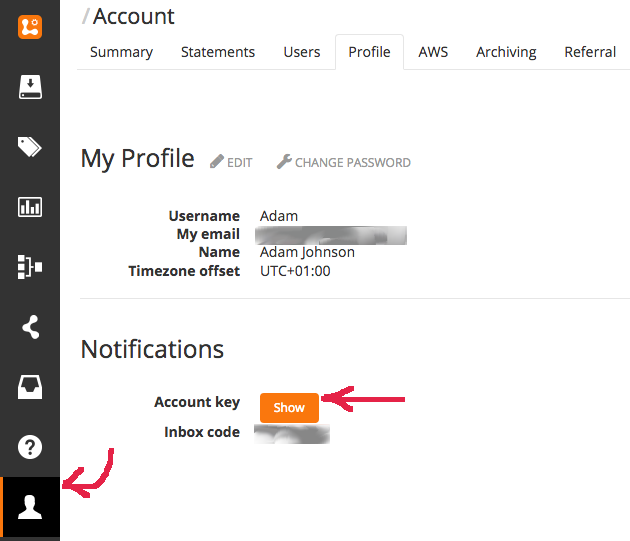
Find your Logentries account key. At time of writing, this can be found at Accounts->Profile and appears when you press the “Show” button:
(Optional) store your account key in the environment variable LOGENTRIES_ACCOUNT_KEY. You could set this up in e.g. your bashrc. Your other option is to always pass it to logentries with --account-key.
Filter your logs! Run with the syntax:
$ logentries <logset> <logname> [-f filter] [-s start] [-e end]
Verbose help for the options is provided with logentries -h.
Examples
$ logentries web nginx
With only the required arguments (logset and log) filled in, the last 20 minutes of messages from that log are downloaded. They are streamed so they play nicely with other commandline utilities.
$ logentries web nginx -f code=500
Passing a Logentries filter means that fewer messages are downloaded and you can analyze faster.
$ logentries web nginx -f 'code=500' -s '1am' -e '5 minutes ago'
A wide variety of date/time formats are supported for specifying the start and end of the time period to fetch messages for, thanks to the awesome parsedatetime and dateutil.


Download files
Download the file for your platform. If you're not sure which to choose, learn more about installing packages.
Source Distribution
Built Distribution
Filter files by name, interpreter, ABI, and platform.
If you're not sure about the file name format, learn more about wheel file names.
Copy a direct link to the current filters
File details
Details for the file logentries-cli-1.2.1.tar.gz.
File metadata
- Download URL: logentries-cli-1.2.1.tar.gz
- Upload date:
- Size: 16.8 kB
- Tags: Source
- Uploaded using Trusted Publishing? No
- Uploaded via: twine/3.1.1 pkginfo/1.5.0.1 requests/2.24.0 setuptools/41.2.0 requests-toolbelt/0.9.1 tqdm/4.46.1 CPython/3.8.3
File hashes
| Algorithm | Hash digest | |
|---|---|---|
| SHA256 |
b46550f7cfacd94988c70ff1fedb9fb02b869ed6ee5ba399fe4112eba66e4ed7
|
|
| MD5 |
be1dfb761387d89156d9c8046e218986
|
|
| BLAKE2b-256 |
5aa06f7d597da98ff01a43de6b2260fa25d85286a0528e47f9dc2e492c41fc27
|
File details
Details for the file logentries_cli-1.2.1-py2.py3-none-any.whl.
File metadata
- Download URL: logentries_cli-1.2.1-py2.py3-none-any.whl
- Upload date:
- Size: 16.6 kB
- Tags: Python 2, Python 3
- Uploaded using Trusted Publishing? No
- Uploaded via: twine/3.1.1 pkginfo/1.5.0.1 requests/2.24.0 setuptools/41.2.0 requests-toolbelt/0.9.1 tqdm/4.46.1 CPython/3.8.3
File hashes
| Algorithm | Hash digest | |
|---|---|---|
| SHA256 |
136f64e1ad8d97e9dc1da1727eb008d14e2868e1584843a48bad545f3327a302
|
|
| MD5 |
1a05d82f81c100deae6e7fa116e41d1c
|
|
| BLAKE2b-256 |
4e782f2abfe810b3926affee74d3508f180f57a1ce97ce1d1ca10e270f5195c4
|






