
The best Python observability tool! 🪵🔥
Verified details
These details have been verified by PyPIProject links
Owner
GitHub Statistics
Maintainers


Project description
Pydantic Logfire — Know more. Build faster.






From the team behind Pydantic Validation, Pydantic Logfire is an observability platform built on the same belief as our open source library — that the most powerful tools can be easy to use.
What sets Logfire apart:
- Simple and Powerful: Logfire's dashboard is simple relative to the power it provides, ensuring your entire engineering team will actually use it.
- Python-centric Insights: From rich display of Python objects, to event-loop telemetry, to profiling Python code and database queries, Logfire gives you unparalleled visibility into your Python application's behavior.
- SQL: Query your data using standard SQL — all the control and (for many) nothing new to learn. Using SQL also means you can query your data with existing BI tools and database querying libraries.
- OpenTelemetry: Logfire is an opinionated wrapper around OpenTelemetry, allowing you to leverage existing tooling, infrastructure, and instrumentation for many common Python packages, and enabling support for virtually any language. We offer full support for all OpenTelemetry signals (traces, metrics and logs).
- Pydantic Integration: Understand the data flowing through your Pydantic Validation models and get built-in analytics on validations.
See the documentation for more information.
Feel free to report issues and ask any questions about Logfire in this repository!
This repo contains the Python SDK for logfire and documentation; the server application for recording and displaying data is closed source.
Using Logfire
This is a very brief overview of how to use Logfire, the documentation has much more detail.
Install
pip install logfire
Authenticate
logfire auth
Manual tracing
Here's a simple manual tracing (aka logging) example:
from datetime import date

import logfire

logfire.configure()
logfire.info('Hello, {name}!', name='world')

with logfire.span('Asking the user their {question}', question='age'):
    user_input = input('How old are you [YYYY-mm-dd]? ')
    dob = date.fromisoformat(user_input)
    logfire.debug('{dob=} {age=!r}', dob=dob, age=date.today() - dob)
Integration
Or you can also avoid manual instrumentation and instead integrate with lots of popular packages, here's an example of integrating with FastAPI:
from fastapi import FastAPI
from pydantic import BaseModel

import logfire

app = FastAPI()

logfire.configure()
logfire.instrument_fastapi(app)
# next, instrument your database connector, http library etc. and add the logging handler


class User(BaseModel):
    name: str
    country_code: str


@app.post('/')
async def add_user(user: User):
    # we would store the user here
    return {'message': f'{user.name} added'}
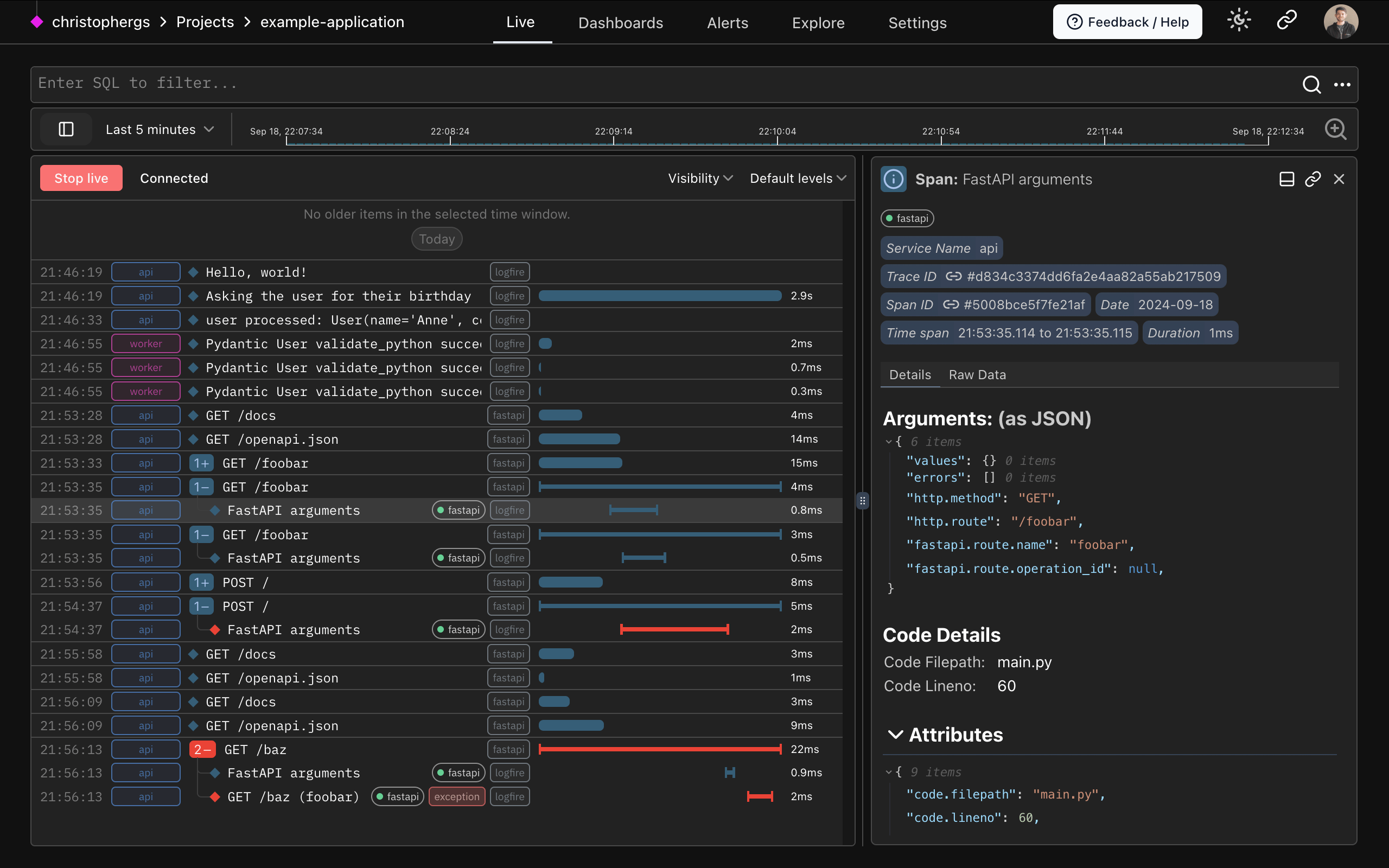
Logfire gives you a view into how your code is running like this:
Contributing
We'd love anyone interested to contribute to the Logfire SDK and documentation, see the contributing guide.
Reporting a Security Vulnerability
See our security policy.
Logfire Open-Source and Closed-Source Boundaries
The Logfire SDKs (we also have them for TypeScript and Rust) are open source, and you can use them to export data to any OTel-compatible backend.
The Logfire platform (the UI and backend) is closed source. You can self-host it by purchasing an enterprise license.
Project details
Verified details
These details have been verified by PyPIProject links
Owner
GitHub Statistics
Maintainers
Release history Release notifications | RSS feed


Download files
Download the file for your platform. If you're not sure which to choose, learn more about installing packages.
Source Distribution
Built Distribution
Filter files by name, interpreter, ABI, and platform.
If you're not sure about the file name format, learn more about wheel file names.
Copy a direct link to the current filters
File details
Details for the file logfire-4.31.1.tar.gz.
File metadata
- Download URL: logfire-4.31.1.tar.gz
- Upload date:
- Size: 1.1 MB
- Tags: Source
- Uploaded using Trusted Publishing? Yes
- Uploaded via: twine/6.1.0 CPython/3.13.7
File hashes
| Algorithm | Hash digest | |
|---|---|---|
| SHA256 |
79a2a73bf469db2f4e78aba454c3e8057e33bc9b727fda3df36cfb9d0a60516f
|
|
| MD5 |
4cf598ea48573d2139c451d812299c9c
|
|
| BLAKE2b-256 |
65c87e1f78ed26348a8bf0d619510a4765e54142274230ed4fd09ff4c5329c6a
|
Provenance
The following attestation bundles were made for logfire-4.31.1.tar.gz:
Publisher:
main.yml on pydantic/logfire
-
Statement:
-
Statement type:
https://in-toto.io/Statement/v1 -
Predicate type:
https://docs.pypi.org/attestations/publish/v1 -
Subject name:
logfire-4.31.1.tar.gz -
Subject digest:
79a2a73bf469db2f4e78aba454c3e8057e33bc9b727fda3df36cfb9d0a60516f - Sigstore transparency entry: 1262689361
- Sigstore integration time:
-
Permalink:
pydantic/logfire@f66769a32542c2268f9e0f8d0bce92508af1c2c5 -
Branch / Tag:
refs/tags/v4.31.1 - Owner: https://github.com/pydantic
-
Access:
public
-
Token Issuer:
https://token.actions.githubusercontent.com -
Runner Environment:
github-hosted -
Publication workflow:
main.yml@f66769a32542c2268f9e0f8d0bce92508af1c2c5 -
Trigger Event:
push
-
Statement type:
File details
Details for the file logfire-4.31.1-py3-none-any.whl.
File metadata
- Download URL: logfire-4.31.1-py3-none-any.whl
- Upload date:
- Size: 310.1 kB
- Tags: Python 3
- Uploaded using Trusted Publishing? Yes
- Uploaded via: twine/6.1.0 CPython/3.13.7
File hashes
| Algorithm | Hash digest | |
|---|---|---|
| SHA256 |
913e81ee53f7446356c124bd881a19a15d70b4153bccc22a3cf9bd1459963ea6
|
|
| MD5 |
330a51b78010c7ecb5211fa52db9e215
|
|
| BLAKE2b-256 |
d1af451b792816b24e65bcb1ac347d40202527605dd0307ea8afc44e858fbc2b
|
Provenance
The following attestation bundles were made for logfire-4.31.1-py3-none-any.whl:
Publisher:
main.yml on pydantic/logfire
-
Statement:
-
Statement type:
https://in-toto.io/Statement/v1 -
Predicate type:
https://docs.pypi.org/attestations/publish/v1 -
Subject name:
logfire-4.31.1-py3-none-any.whl -
Subject digest:
913e81ee53f7446356c124bd881a19a15d70b4153bccc22a3cf9bd1459963ea6 - Sigstore transparency entry: 1262689384
- Sigstore integration time:
-
Permalink:
pydantic/logfire@f66769a32542c2268f9e0f8d0bce92508af1c2c5 -
Branch / Tag:
refs/tags/v4.31.1 - Owner: https://github.com/pydantic
-
Access:
public
-
Token Issuer:
https://token.actions.githubusercontent.com -
Runner Environment:
github-hosted -
Publication workflow:
main.yml@f66769a32542c2268f9e0f8d0bce92508af1c2c5 -
Trigger Event:
push
-
Statement type:






