
English · Русский

A library and command-line tool for large logs: folds lines into templates and compares two runs.





logfold reads a log and replaces the variable parts of messages (numbers, IP addresses, UUIDs, paths) with masks. Lines
with the same text are then grouped into templates. For every template it counts the records, the first and last time it
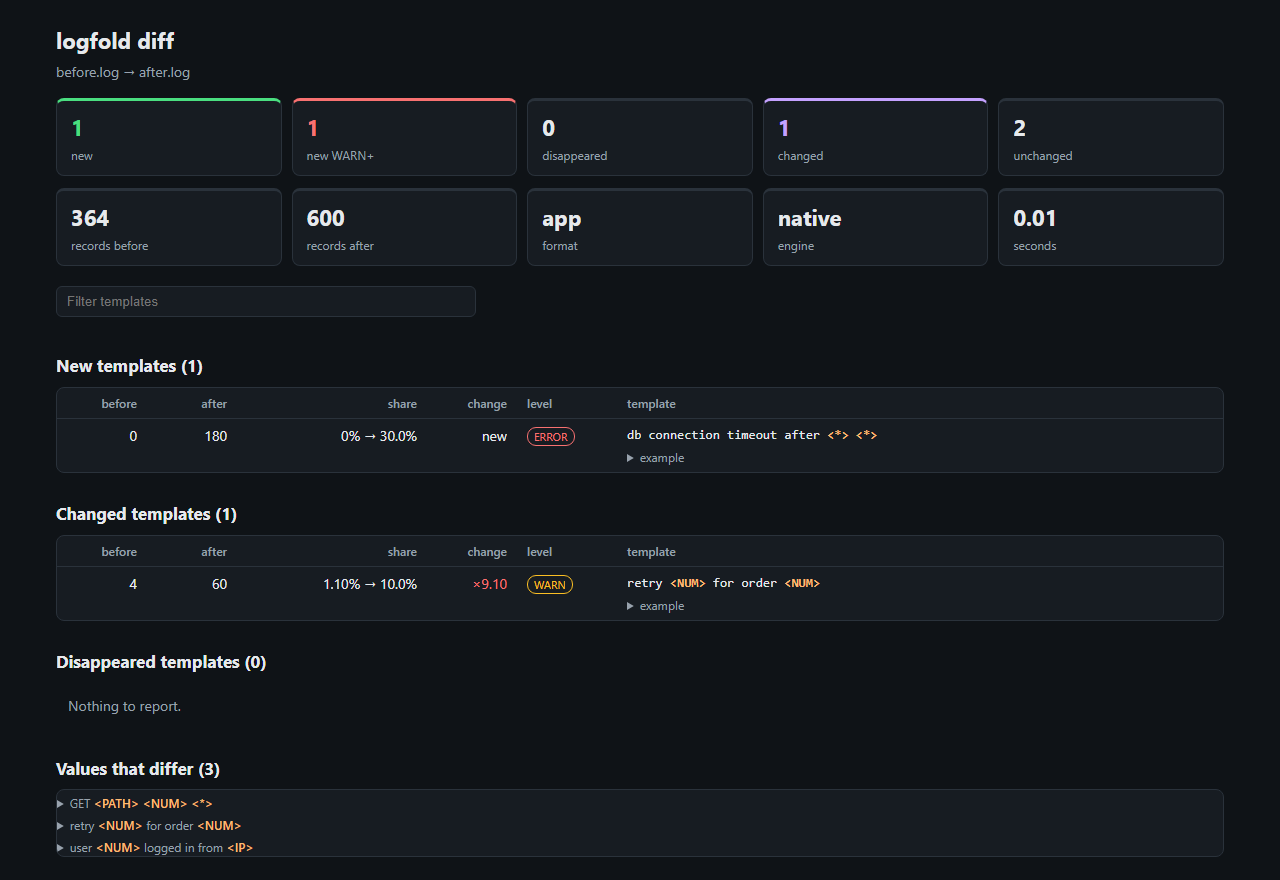
appeared, the highest severity level and an example line. The diff command compares two runs, for example before and
after a deploy, and shows the templates that are new, gone or noticeably changed in share.
The core is written in Rust; you can use it from Python or from the command line. Everything runs locally and no data is sent anywhere.
$ logfold diff before.log after.log --fail-on-new-alerts
before.log -> after.log: 364 -> 600 records, 1 new (1 WARN+), 0 disappeared, 1 changed, 2 unchanged, native engine, 0.01s

New templates (1)
    before       after    change  level  template
         0         180       new  ERROR  db connection timeout after <*> <*>

Changed templates (1)
    before       after    change       p  level  template
         4          60     x9.10  <0.001  WARN   retry <NUM> for order <NUM>
$ echo $?
2
Try it in a minute
pip install "logfold[cli]"
logfold analyze app.log --out report.html                 # the templates of one log, with counts and examples
logfold diff before.log after.log --out diff.html         # what is new, gone or changed between two runs
The reports are one HTML file each: no network requests, a strict content security policy, and every value that comes from a log is escaped.
What do you want to do?
Stop a job on a new error in CI
      - uses: AndreyKilanov/logfold@v0.5.0
        with:
          log: current.log
The action compares the log of the run with the last good one, writes the summary of the job and fails it when a new WARN, ERROR
or FATAL template appears. Without GitHub: logfold diff good.log current.log --fail-on-new-alerts (exit code 2), or a saved model,
logfold learn good.log --state model.json and logfold check current.log --state model.json. Recipes for GitHub Actions and GitLab CI:
logfold in CI.
Find what changed in an incident
logfold diff app.log --split-at 2026-10-06T12:00           # the log before a time against the log after it
logfold diff before.log after.log --new-values             # the values that only one run has
logfold diff docker:web-old docker:web-new                 # read straight from docker, kubectl or journalctl
Finding what changed in an incident goes step by step and says how to read the result.
Share a log or a report safely
logfold analyze app.log --masks all --examples none --out report.html
The mask sets hide keys, tokens, passwords, e-mail addresses, phone numbers, card numbers and IBANs before the log is mined, and
--examples none leaves the example lines out. They lower the risk and do not remove it; names and the words of the messages stay.
Sharing a log or a report safely says what each option hides and how
to check a file before it is sent.
Use it from Python
from logfold import analyze, check, diff

result = analyze("app.log")  # the format is detected
for template in result.top(10):
    print(template.count, template.level, template.text)

comparison = diff("before.log", "after.log")
comparison.new_alerts  # new WARN, ERROR and FATAL templates
comparison.to_html("diff.html")

analyze("good.log", save_state="model.json")  # a model: templates and counts, never an example line
check("model.json", "today.log").passed
The results are immutable dataclasses. logfold in a Python program says which call does what and links to the reference.
Keep a model, check a log, watch a stream
logfold learn good.log --state model.json                  # save what a good run looks like
logfold check today.log --state model.json                 # exit code 2 when the log holds anything the model does not know
logfold match model.json today.log                         # how many records fit no template
tail -F app.log | logfold stream -f app                    # print each new template when it first appears
In Python the same is logfold.Miner, which takes records in batches and tells which template a record fits.
Coming from Drain3
The calls and the settings that correspond, and what differs, are in Migrating from Drain3.
What it does
- Templates.
user alice failed login from 10.0.0.7and the other lines like it are reduced to one entry,user <*> failed login from <IP>. The algorithm is compatible with Drain3: on the 16 Loghub-2k datasets the average grouping accuracy is 0.7658 in sequential mode (the same as Drain3) and 0.7643 in parallel mode. - Comparing two runs. Shares of templates are computed from the number of records in each run, so different log
sizes do not matter. A template counts as changed when its share grew or fell by at least a factor of 2, it has at
least 10 records in either run (both thresholds are configurable) and a G-test finds the change unlikely to be noise
(
--significance, default 0.01); the most significant changes come first. Identical inputs give an empty result. - One log, several baselines.
diff app.log --split-at TIMEcompares the part of one log before a time with the part after it (--sinceand--untilbound any command to a time range).--baseline(repeatable) pools several good runs so that a template counts as new only if none of them has it, which removes the noise of rare messages. - Values.
analyze --valuescounts the values at the variable positions (top values, and the percentiles of numbers);diff --new-valueslists the values that only one of two runs has, for the templates that both have. - Exit code for CI.
--fail-on-newexits with code 2 when there are new templates,--fail-on-new-alertswhen any of them is WARN, ERROR or FATAL. A reworded message that the default matcher pairs with an old one counts as changed, not new;--matcher exactmakes the gate strict.--out FILE --appendadds a text or Markdown report to the end of a file instead of replacing it, so several steps of a job can write one job summary ($GITHUB_STEP_SUMMARY). - Safe to share. Mask sets (
secrets,pii,credentials,payment,all, your own files) hide values before they reach a template, a saved model or a report;--examples maskedornonehandles the example lines. HTML reports escape everything. - Inputs. Files, gzip, standard input, several files as one run, and
docker:NAME,kubectl:NAMESPACE/PODandjournalctl:UNITread through your own tools, read-only and bounded. The file is read as a stream, and memory use does not depend on its size. - Parallelism. A large file is cut into chunks (64 MiB by default) and the chunk trees are merged in order. For a
fixed chunk size the result does not depend on the number of threads. The strategy is chosen automatically: a large file
is mined in parallel, and sequentially when the first chunk shows that almost every line is a new message (
--strategy auto, the default). - Reports. HTML, JSON with a versioned schema, text, Markdown, CSV; for pipelines
github-summary,junit,chat-messageandprometheus. - Settings and extensions. A
logfold.tomlkeeps the options you repeat. Log formats, reports, template matchers, mask sets and sources are plugins, loaded through entry points or from a folder of.pyfiles.
Install
pip install "logfold[cli]"
Python 3.11 or newer. PyPI has prebuilt packages for Linux (x86_64, aarch64, musl), macOS (x86_64, arm64) and Windows
(x86_64), so pip installs without compiling and you do not need Rust. On any other platform pip builds the package from
source, which needs a Rust compiler. Without [cli] you get the library only.
Formats and what each was checked on
logfold formats lists the formats. --format auto (the default) picks one from a sample of the file: nginx, apache, syslog,
journald, Kubernetes, JSON lines, logfmt and others; if it is not sure it lists the candidates and asks you to pass --format.
logfold inspect app.log shows how a file is read: the format, the first records, the levels. Indented stack-trace lines are
joined to the record that started them.
Each format was compared with something outside this project, and the table says with what. A check does not promise that a format reads
every log of that program: the settings of the program that were not tried, and the limits that were found, are listed in
the table of the guide
and in logfold plugins info NAME.
| Checked on | Formats |
|---|---|
| The real program, every record compared with what it wrote (HAProxy 2.8 to 3.2, PostgreSQL 13 to 17, log4j2, logback and log4j 1.x, Docker 28) | haproxy, postgresql, postgresql-csv, log4j, docker-json |
| The job logs of this project's own GitHub Actions runs | github-actions |
| Samples and logs of other projects (Filebeat, Fluent Bit, Loki, Loghub) and generated logs | nginx, apache, nginx-error, syslog, k8s, jsonl, logfmt, app |
| Damaged logs only (fuzzing); no real program or samples yet | plain, journald, serilog-clef |
Your own format: --format regex:<pattern> or log4j:<pattern>. A log of another program with a time and a level in the same place is
read by app (<time> LEVEL message).
Options
| Multi-line records | --multiline; with --format auto it turns on by itself when indented lines are found. |
| Folding | --depth (4), --sim-th (0.4), --max-children (100), --max-templates (100000), --on-full evict (at the cap drop the least recently used templates instead of pooling new ones), --delimiters (the characters that separate tokens). The defaults are the same as in Drain3. |
| Execution | --strategy auto (default; parallel chunks, sequential for logs of unique messages), sequential, chunked; --threads, --chunk-mb; --warm-start (opt-in, chunked only: far fewer stray templates, at the price of mining the first chunk alone). |
| Logs with almost unique lines | --high-cardinality: at most 5000 templates, the rest go into catch-all templates, runs sequentially. |
| Masks | the default masks replace UUIDs, timestamps, IPs, hex values, paths and numbers; --masks secrets,pii, --masks all, --masks-file FILE add sets that run first (logfold masks list). |
| Values | analyze --values, diff --new-values (--values-templates N); logfold params TEMPLATE MESSAGE (Python: logfold.extract_parameters) gives the values of one message at the variable parts of a template. |
| Time range | --since, --until; diff --split-at TIME. |
| Levels | --level ERROR keeps the templates whose most severe level is at least that; --only-alerts is --level WARN. |
| Saved results | logfold analyze before.log --out before.json, then logfold diff before.json after.json compares them without reading the logs again. |
| Models and streams | learn, check, match, stream; --save-state and --load-state continue a run from a saved model, also in parallel. |
| Reports | the --out suffix picks the format (.html, .json, .txt, .md, .csv, .xml for JUnit, .prom), --report NAME picks one explicitly, including one from a plugin. |
Matchers for diff |
jaccard (default), jaccard-idf, overlap, rules:FILE (your own pairs), token_subset, exact: they link a reworded message to its earlier version so it is not counted as both new and gone. |
| Plugins | logfold plugins list (built-in, installed, available), info NAME, check, install NAME, new; an unknown format, report or matcher name gets a hint with the closest name or the install command. |
| Scripting | --json prints JSON to stdout, exit codes are stable (0, 1, 2 for a --fail-on-* finding), the JSON format is described by a schema in docs/schema. |
Every command and option: the command-line reference.
Speed
Measured on one machine (8 cores, Windows 11) with this version; the protocol is in
bench/PROTOCOL.md, the comparison with other tools in
bench/RESULTS.md.
| 1 thread | 16 threads | |
|---|---|---|
analyze, nginx access log, 100 MB |
0.93 s | 0.45 s |
analyze, application log, 100 MB |
0.83 s | 0.45 s |
diff of two 100 MB logs |
2.55 s | 0.69 s |
Peak memory is 46 MB with one thread and 97 to 110 MB with 16, on files of 100 MB, and does not grow with the size of the file. The
mask sets add 5 to 15% (secrets and pii) or 11 to 24% (all); --values takes three to four times as long as analyze, and
diff --new-values 1.5 to 3 times as long as diff.
Limitations
Warning. Keep these in mind before running logfold on large logs and comparing results.
- Speed was measured on Windows 11 only; on Linux and macOS correctness is tested, but speed is not.
- The parallel mode builds a tree per chunk and merges them, so on logs without masks it can return more templates than the sequential mode (HDFS without masks: 341 against 43;
--warm-startbrings it to 45 at the cost of a serial first chunk). On logs with a very large number of distinct messages the defaultautostrategy notices that after the first chunk and mines sequentially;--high-cardinalitymakes it faster still.- Saved results are compared without a recount against a shared template tree, so the same event can end up both in new and in gone; the matcher (
jaccardby default) exists for this.- The mask sets lower the risk of sharing a log and do not remove it, and a format was checked on what the table above says, not on every setting of the program.
Measurements and bug reports
logfold was measured on one machine (Windows 11, 8 cores). If you can run it on other hardware (Linux, macOS, ARM, a slower disk, more cores) or on your own logs, we would be glad to get the numbers. We also want to hear about wrong results, crashes, templates that are grouped badly, and runs that are slow or use too much memory.
- Measurements. Run the benchmark as described in
bench/README.md(the protocol is inbench/PROTOCOL.md) or time your own command, and open a performance issue. Include the wall time, throughput and peak memory, the command, the size and format of the input, the CPU and number of cores, RAM, disk type, OS, the logfold version and the number of threads. - Bugs. Open a bug report with what you expected and what happened, a
command or Python snippet that reproduces it, the output of
logfold --versionandlogfold info, and a few lines of the input with secrets removed. - A log that is not read correctly. Lines lost or split wrongly, a field in the wrong place,
-f autopicking the wrong format: use the log format form. Name the program and its version, the log settings you changed, the output oflogfold inspect FILE, and about 20 real lines with secrets removed. The formats were checked on real programs and on logs of other projects, but not on every setting; this form is how the rest gets found.
All issue forms are listed on the new issue page; how issues are written is described in CONTRIBUTING.md.
Documentation
- Guide: the typical tasks, formats, parameters, plugins, engines.
- Using logfold in CI: GitHub Actions and GitLab CI, job summary, gates, where the baseline comes from.
- Finding what changed in an incident: compare two logs or two parts of one, read the result, look inside a template.
- Sharing a log or a report safely: mask sets, examples, what stays in a report, how to check it.
- logfold in a Python program: which call does what, with links to the API reference.
- Command-line reference: commands, options, exit codes.
- Settings file:
logfold.toml. - Plugins: using and writing formats, reports and
matchers; an example package is in
examples/logfold-example-plugin. - Python API reference.
- Migrating from Drain3: the calls and settings that correspond, what differs, what logfold does not have.
- Algorithm, JSON schemas and the changelog.
Design
A pure core (masking, tokenizer, Drain-compatible tree, merge) with no I/O, adapters for files and formats, an
execution layer, a thin PyO3 shim, and a Python package on top. The algorithm is described in
docs/ALGORITHM.md. The Rust engine is the
only implementation; golden results, property tests and a comparison with Drain3 on Loghub hold it to the specification.
Development
Rules for branches, commits and the definition of done are in CONTRIBUTING.md. Report vulnerabilities privately, see SECURITY.md.
License
MIT, see LICENSE. Copyright (c) 2026 Andrey Kilanov.
1 maintainer

Metadata
1 maintainer
Release files for logfold 0.5.0
For a detailed explanation of source distributions (sdists) and built distributions (wheels), please see the package formats documentation.
Source distribution (sdist)
| File | Size | Uploaded | |
|---|---|---|---|
| logfold-0.5.0.tar.gz | 296.3 kB | Details |
Built distributions (wheels)
| File | Reset | |||
|---|---|---|---|---|
| logfold-0.5.0-cp311-abi3-win_amd64.whl | CPython 3.11 | abi3 | Windows x86-64 | Details |
| logfold-0.5.0-cp311-abi3-musllinux_1_2_x86_64.whl | CPython 3.11 | abi3 | Linux musl 1.2+ x86-64 | Details |
| logfold-0.5.0-cp311-abi3-manylinux_2_17_x86_64.manylinux2014_x86_64.whl | CPython 3.11 | abi3 | Linux glibc 2.17+ x86-64 | Details |
| logfold-0.5.0-cp311-abi3-manylinux_2_17_aarch64.manylinux2014_aarch64.whl | CPython 3.11 | abi3 | Linux glibc 2.17+ ARM64 | Details |
| logfold-0.5.0-cp311-abi3-macosx_11_0_arm64.whl | CPython 3.11 | abi3 | macOS 11.0+ ARM64 | Details |
| logfold-0.5.0-cp311-abi3-macosx_10_12_x86_64.whl | CPython 3.11 | abi3 | macOS 10.12+ x86-64 | Details |
Total release size: 11.8 MB
Release files / logfold-0.5.0.tar.gz
| Download URL | logfold-0.5.0.tar.gz |
|---|---|
| Size | 296.3 kB |
| Tags | Source |
|
SHA-256 checksum How to use checksums |
49aeac1a412996fbae2d6856a74a4d73c4197212d2b5caa1a9087f4eb166a739
|
|
BLAKE2b-256 checksum How to use checksums |
f90f58f1abc0675bd40ec5a1644689d052450db7198e85a2ff87f3f5227364d6
|
| Upload date | |
|
Uploaded using Trusted Publishing? What is trusted publishing? |
Yes |
| Uploaded via |
twine/7.0.0 CPython/3.13.14
|
Provenance
Provenance describes where a file came from. On PyPI, provenance is shared via attestations, which provide a verifiable record of the build or publishing details. View details, limitations and caveats.


PyPI Publish Attestation
PyPI verified that this artifact, at this checksum, originated from the publisher listed below.
Signed by GitHub Actions, verified by PyPI on Oct 15, 2026.
Transparency logRelease files / logfold-0.5.0-cp311-abi3-win_amd64.whl
| Download URL | logfold-0.5.0-cp311-abi3-win_amd64.whl |
|---|---|
| Size | 1.8 MB |
| Tags | CPython 3.11 Windows x86-64 abi3 |
|
SHA-256 checksum How to use checksums |
bcf41f846676e5348d05814d9cd58aa1fd8d5dd61c3f187dc677b1679c5d909a
|
|
BLAKE2b-256 checksum How to use checksums |
d4dbc766a7eff02c921ccba7385a0e7838ae1e70adc826a86ef178dce70f27da
|
| Upload date | |
|
Uploaded using Trusted Publishing? What is trusted publishing? |
Yes |
| Uploaded via |
twine/7.0.0 CPython/3.13.14
|
Provenance
Provenance describes where a file came from. On PyPI, provenance is shared via attestations, which provide a verifiable record of the build or publishing details. View details, limitations and caveats.
PyPI Publish Attestation
PyPI verified that this artifact, at this checksum, originated from the publisher listed below.
Signed by GitHub Actions, verified by PyPI on Oct 15, 2026.
Transparency logRelease files / logfold-0.5.0-cp311-abi3-musllinux_1_2_x86_64.whl
| Download URL | logfold-0.5.0-cp311-abi3-musllinux_1_2_x86_64.whl |
|---|---|
| Size | 2.2 MB |
| Tags | CPython 3.11 Linux musl 1.2+ x86-64 abi3 |
|
SHA-256 checksum How to use checksums |
9fa53527d3fba52dc9bb67af9430c5acdec5546f3314292a040064eaf7000be6
|
|
BLAKE2b-256 checksum How to use checksums |
22850d55bf784e71f6be917b54945dc2a1c607a753d9a3b901190b272354f6c9
|
| Upload date | |
|
Uploaded using Trusted Publishing? What is trusted publishing? |
Yes |
| Uploaded via |
twine/7.0.0 CPython/3.13.14
|
Provenance
Provenance describes where a file came from. On PyPI, provenance is shared via attestations, which provide a verifiable record of the build or publishing details. View details, limitations and caveats.
PyPI Publish Attestation
PyPI verified that this artifact, at this checksum, originated from the publisher listed below.
Signed by GitHub Actions, verified by PyPI on Oct 15, 2026.
Transparency logRelease files / logfold-0.5.0-cp311-abi3-manylinux_2_17_x86_64.manylinux2014_x86_64.whl
| Download URL | logfold-0.5.0-cp311-abi3-manylinux_2_17_x86_64.manylinux2014_x86_64.whl |
|---|---|
| Size | 2.0 MB |
| Tags | CPython 3.11 Linux glibc 2.17+ x86-64 abi3 |
|
SHA-256 checksum How to use checksums |
a387315825fa3d4953e4e33b1423c7c08e268bdaf6fef1e167b9923ce7ab1de9
|
|
BLAKE2b-256 checksum How to use checksums |
1dcfb15ecd296a8d060454cc9c134002f91aa52dfab5f090cbaf93c8cea8d5d2
|
| Upload date | |
|
Uploaded using Trusted Publishing? What is trusted publishing? |
Yes |
| Uploaded via |
twine/7.0.0 CPython/3.13.14
|
Provenance
Provenance describes where a file came from. On PyPI, provenance is shared via attestations, which provide a verifiable record of the build or publishing details. View details, limitations and caveats.
PyPI Publish Attestation
PyPI verified that this artifact, at this checksum, originated from the publisher listed below.
Signed by GitHub Actions, verified by PyPI on Oct 15, 2026.
Transparency logRelease files / logfold-0.5.0-cp311-abi3-manylinux_2_17_aarch64.manylinux2014_aarch64.whl
| Download URL | logfold-0.5.0-cp311-abi3-manylinux_2_17_aarch64.manylinux2014_aarch64.whl |
|---|---|
| Size | 1.8 MB |
| Tags | CPython 3.11 Linux glibc 2.17+ ARM64 abi3 |
|
SHA-256 checksum How to use checksums |
405b5826b34a18429dfcd66251f579fb29591cdb6d19e6b72c4940d6a17105bd
|
|
BLAKE2b-256 checksum How to use checksums |
74f729fe4d103710e84dd7f400669c5ff70ca33dee19616e6b1e5eb1fd44d952
|
| Upload date | |
|
Uploaded using Trusted Publishing? What is trusted publishing? |
Yes |
| Uploaded via |
twine/7.0.0 CPython/3.13.14
|
Provenance
Provenance describes where a file came from. On PyPI, provenance is shared via attestations, which provide a verifiable record of the build or publishing details. View details, limitations and caveats.
PyPI Publish Attestation
PyPI verified that this artifact, at this checksum, originated from the publisher listed below.
Signed by GitHub Actions, verified by PyPI on Oct 15, 2026.
Transparency logRelease files / logfold-0.5.0-cp311-abi3-macosx_11_0_arm64.whl
| Download URL | logfold-0.5.0-cp311-abi3-macosx_11_0_arm64.whl |
|---|---|
| Size | 1.7 MB |
| Tags | CPython 3.11 abi3 macOS 11.0+ ARM64 |
|
SHA-256 checksum How to use checksums |
075fb280d81d843f8f155f84afce6a64d68113b51a8e735dd04ae0bc6df11809
|
|
BLAKE2b-256 checksum How to use checksums |
f51f32129ad2f3e230524436f93d375dec9b6aa8a60597fdad2486b8dee53887
|
| Upload date | |
|
Uploaded using Trusted Publishing? What is trusted publishing? |
Yes |
| Uploaded via |
twine/7.0.0 CPython/3.13.14
|
Provenance
Provenance describes where a file came from. On PyPI, provenance is shared via attestations, which provide a verifiable record of the build or publishing details. View details, limitations and caveats.
PyPI Publish Attestation
PyPI verified that this artifact, at this checksum, originated from the publisher listed below.
Signed by GitHub Actions, verified by PyPI on Oct 15, 2026.
Transparency logRelease files / logfold-0.5.0-cp311-abi3-macosx_10_12_x86_64.whl
| Download URL | logfold-0.5.0-cp311-abi3-macosx_10_12_x86_64.whl |
|---|---|
| Size | 1.9 MB |
| Tags | CPython 3.11 abi3 macOS 10.12+ x86-64 |
|
SHA-256 checksum How to use checksums |
b82088cba42042bbcf0252f27943549a26092c09027af796a355ea91650b4f5f
|
|
BLAKE2b-256 checksum How to use checksums |
9b9373654352c247f2581d69cf22e95830b8bebe2e674cc439883a2805db6d65
|
| Upload date | |
|
Uploaded using Trusted Publishing? What is trusted publishing? |
Yes |
| Uploaded via |
twine/7.0.0 CPython/3.13.14
|
Provenance
Provenance describes where a file came from. On PyPI, provenance is shared via attestations, which provide a verifiable record of the build or publishing details. View details, limitations and caveats.
PyPI Publish Attestation
PyPI verified that this artifact, at this checksum, originated from the publisher listed below.
Signed by GitHub Actions, verified by PyPI on Oct 15, 2026.
Transparency log













