
A Telegram logging library with rate limiting and message queuing

Project description
LoggerBot
© N.Sikharulidze (https://ubix.pro/)
LoggerBot is a Telegram logging library that allows you to send log messages to one or multiple Telegram chats using a bot. It provides an easy-to-use interface for logging various types of messages and includes features like rate limiting and message queuing.
Table of Contents
Features
- Send log messages to one or multiple Telegram chats
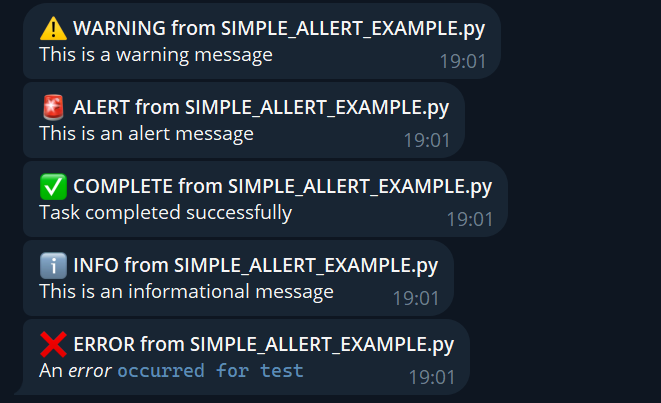
- Support for different log levels: debug, info, warning, error, critical, alert, and complete
- Rate limiting to prevent excessive API calls
- Message queuing for smooth operation
- Easy integration with existing Python logging
- Backward compatibility with the
LogBotalias - HTML formatting support for log messages
Examples
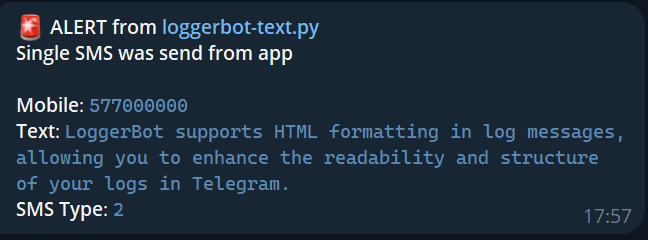
HTML Formatting log example
Regular log examples
Installation
You can install LoggerBot using pip:
pip install loggerbot
Pypi.org (https://pypi.org/project/loggerbot/)
Usage
Here's a basic example of how to use LoggerBot:
from loggerbot import TelegramLoggingBot

# Initialize the bot with your Telegram bot token and chat ID(s)
log_bot = TelegramLoggingBot("YOUR_BOT_TOKEN", ["CHAT_ID_1", "CHAT_ID_2"])

# Send log messages
log_bot.info("This is an informational message")
log_bot.warning("This is a warning message")
log_bot.error("An error occurred")
log_bot.alert("This is an important alert")
log_bot.complete("Task completed successfully")
Advanced Usage
Rate Limiting
LoggerBot includes built-in rate limiting to prevent excessive API calls. You can customize the rate limit when initializing the bot:
log_bot = TelegramLoggingBot("YOUR_BOT_TOKEN", "CHAT_ID", rate_limit=20, time_window=60)
This sets a limit of 20 messages per 60 seconds.
Setting Log Level
You can set the minimum log level for the bot:
import logging
log_bot.set_log_level(logging.DEBUG)
Using with Python's logging module
LoggerBot can be integrated with Python's built-in logging module:
import logging
from loggerbot import TelegramLoggingBot

# Create a logger
logger = logging.getLogger(__name__)
logger.setLevel(logging.INFO)

# Create a TelegramLoggingBot instance
tg_handler = TelegramLoggingBot("YOUR_BOT_TOKEN", "CHAT_ID")

# Add the TelegramLoggingBot as a handler to the logger
logger.addHandler(tg_handler)

# Now you can use the logger as usual
logger.info("This message will be sent to Telegram")
HTML Formatting for Log Messages
LoggerBot supports HTML formatting in log messages, allowing you to enhance the readability and structure of your logs in Telegram. Here are some examples of how to use HTML formatting:
# Bold text
log_bot.info("This is an <b>important</b> message")

# Italic text
log_bot.warning("Please <i>be cautious</i> when proceeding")

# Code formatting
log_bot.error("An error occurred: <code>ValueError: Invalid input</code>")

# Underlined text
log_bot.alert("This requires <u>immediate attention</u>")

# Combining multiple formats
log_bot.complete("Task <b><i>successfully</i></b> completed")

# Using line breaks
log_bot.info("This is a multi-line message.<br>It has two lines.")

# Creating a list
log_bot.info("Steps to reproduce:<br>1. Open the app<br>2. Click on settings<br>3. Select 'Advanced'")

# Adding a hyperlink
log_bot.info("For more information, visit our <a href='https://example.com'>documentation</a>")
Note: Make sure to use HTML entities for special characters like < (<), > (>), and & (&) when they're not part of HTML tags.
Register a Telegram Bot

To register a Telegram bot and obtain an API key, follow these steps:
- Open the Telegram app and search for BotFather.
- Start a chat with BotFather and use the
/newbotcommand to create a new bot. - Follow the instructions to name your bot and get a unique username.
- Once your bot is created, you will receive a Bot Token. This token is used to authenticate your bot with the Telegram API.
Contributing
Contributions are welcome! Please feel free to submit a Pull Request.
License
This project is licensed under the MIT License - see the LICENSE file for details.
Release history Release notifications | RSS feed


Download files
Download the file for your platform. If you're not sure which to choose, learn more about installing packages.
Source Distribution
Built Distribution
Filter files by name, interpreter, ABI, and platform.
If you're not sure about the file name format, learn more about wheel file names.
Copy a direct link to the current filters
File details
Details for the file loggerbot-3.8.8.tar.gz.
File metadata
- Download URL: loggerbot-3.8.8.tar.gz
- Upload date:
- Size: 8.9 kB
- Tags: Source
- Uploaded using Trusted Publishing? No
- Uploaded via: twine/5.1.1 CPython/3.12.6
File hashes
| Algorithm | Hash digest | |
|---|---|---|
| SHA256 |
50f154ca614430698c456e2963b2340b0f08f050a4bee46203bfe9c6e7cf6e00
|
|
| MD5 |
e72e3d9f5d6e9420c51b75fe27a8034a
|
|
| BLAKE2b-256 |
29f85be8bc2a01c114d88c87fcb2ea7c56adb9e3132c648c584f36c7c30b2f73
|
File details
Details for the file loggerbot-3.8.8-py3-none-any.whl.
File metadata
- Download URL: loggerbot-3.8.8-py3-none-any.whl
- Upload date:
- Size: 8.1 kB
- Tags: Python 3
- Uploaded using Trusted Publishing? No
- Uploaded via: twine/5.1.1 CPython/3.12.6
File hashes
| Algorithm | Hash digest | |
|---|---|---|
| SHA256 |
d31303911f58f67a6baefabcfb859f68e03224e8f0011241bf3ed1a32ae907ed
|
|
| MD5 |
7a96102cc7362a3692b68aa6c780cbdf
|
|
| BLAKE2b-256 |
4fb5405e4411b82dc8d8ba6107f3d3287ab2366cf584b92b2d2ee71b8b389840
|






