
LoggerML - Rich machine learning logger in the console
Log your Machine Learning training in the console in a beautiful way using rich✨ with useful information but with minimal code.
Documentation here













Installation
In a new virtual environment, install simply the package via pipy:
pip install loggerml
This package is supported on Linux, macOS and Windows. It is also supported on Jupyter Notebooks.
Quick start
Minimal usage
Integrate the LogML logger in your training loops! For instance for 4 epochs and 20 batches per epoch:
import time

from logml import Logger

logger = Logger(n_epochs=4, n_batches=20)

for _ in range(4):
    for _ in logger.tqdm(range(20)):
        time.sleep(0.1)  # Simulate a training step
        # Log whatever you want (int, float, str, bool):
        logger.log({
            'loss': 0.54321256,
            'accuracy': 0.85244777,
            'loss name': 'MSE',
            'improve baseline': True,
        })
Yields:

Note that the expected remaining time of the overall train is displayed as well as the one for the epoch. The logger also provides also the possibility to average the logged values over an epoch or a full training.
Pause and resume
You can also pause and resume the logger internal time with logger.pause() and
logger.resume(). You can check the internal time with logger.get_current_time().
Note that the resume method continues the time from the last pause.
it means that if you pause the training logger at 10 seconds, then resume it
at 20 seconds, the logger will display 10 seconds of training time. The global and
the epoch time will be updated accordingly. You can also find examples in
the documentation.
Save the logs
In Linux you can use tee to save the logs in a file and display them in the console.
However you need to use unbuffer to keep the style:
unbuffer python main.py --color=auto | tee output.log
See here for details.
Advanced usage
Now you can add a validation logger, customize the logger with your own styles and colors, compute the average of some values over batch, add a dynamic message at each batch, update the value only every some batches and more!
At initialization you can set default configuration for the logger that will be
eventually overwritten by the configuration passed to the log method.
An example with more features:
train_logger = Logger(
    n_epochs=2,
    n_batches=20,
    log_interval=2,
    name='Training',
    name_style='dark_orange',
    styles='yellow',  # Default style for all values
    sizes={'accuracy': 4},  # only 4 characters for 'accuracy'
    average=['loss'],  # 'loss' will be averaged over the current epoch
    bold_keys=True,  # Bold the keys
)
val_logger = Logger(
    n_epochs=2,
    n_batches=10,
    name='Validation',
    name_style='cyan',
    styles='blue',
    bold_keys=True,
    show_time=False,  # Remove the time bar
)
for _ in range(2):
    train_logger.new_epoch()  # Manually declare a new epoch
    for _ in range(20):
        train_logger.new_batch()  # Manually declare a new batch
        time.sleep(0.1)
        # Overwrite the default style for "loss" and add a message
        train_logger.log(
            {'loss': 0.54321256, 'accuracy': 85.244777},
            styles={'loss': 'italic red'},
            message="Training is going well?\nYes!",
        )
    val_logger.new_epoch()
    for _ in range(10):
        val_logger.new_batch()
        time.sleep(0.1)
        val_logger.log({'val loss': 0.65422135, 'val accuracy': 81.2658775})
    val_logger.detach()  # End the live display to print something else after
Yields:

Don't know the number of batches in advance?
If you don't have the number of batches in advance, you can initialize the logger
with n_batches=None. Only the available information will be displayed. For instance
with the configuration of the first example:
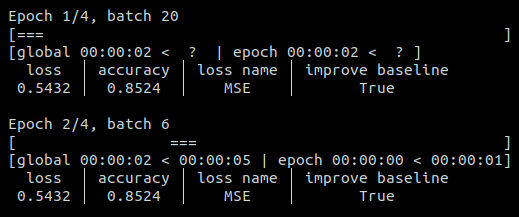
The progress bar is replaced by a cyclic animation. The eta times are not know at the first epoch but was estimated after the second epoch.
Note that if you use Logger.tqdm(dataset) and the dataset has a length, the number of
batches will be automatically set to the length of the dataset.
How to contribute
For development, install the package dynamically and dev requirements with:
pip install -e .
pip install -r requirements-dev.txt
Everyone can contribute to LogML, and we value everyone’s contributions. Please see our contributing guidelines for more information 🤗
Todo
To do:
Done:
- Allow multiple logs on the same batch
- Finalize tests for 1.0.0 major release
- Add docs sections: comparison with tqdm and how to use mean_vals (with exp tracker)
- Use regex for
styles,sizesandaveragekeys - Be compatible with notebooks
- Get back the cursor when interrupting the training
-
logger.tqdm()feature (used liketqdm.tqdm) - Doc with Sphinx
- Be compatible with Windows and Macs
- Manage a validation loop (then multiple loggers)
- Add color customization for message, epoch/batch number and time
- Add pause/resume feature
License
Copyright (C) 2023 Valentin Goldité
This program is free software: you can redistribute it and/or modify it under the terms of the MIT License. This program is distributed in the hope that it will be useful, but WITHOUT ANY WARRANTY; without even the implied warranty of MERCHANTABILITY or FITNESS FOR A PARTICULAR PURPOSE.
This project is free to use for COMMERCIAL USE, MODIFICATION, DISTRIBUTION and PRIVATE USE as long as the original license is include as well as this copy right notice at the top of the modified files.
1 maintainer

Download files
Download the file for your platform. If you're not sure which to choose, learn more about installing packages.
Source Distribution
Built Distribution
Filter files by name, interpreter, ABI, and platform.
If you're not sure about the file name format, learn more about wheel file names.
Copy a direct link to the current filters
File details
Details for the file loggerml-1.2.0.tar.gz.
File metadata
- Download URL: loggerml-1.2.0.tar.gz
- Upload date:
- Size: 5.8 MB
- Tags: Source
- Uploaded using Trusted Publishing? No
- Uploaded via:
twine/6.0.1 CPython/3.12.8
File hashes
| Algorithm | Hash digest | |
|---|---|---|
| SHA256 |
22b7cd90a48e4e11f3987d75f69c5358a72cd0d4e49412e64cf9bcaf7764ec0b
|
|
| MD5 |
b68b08b2bf308c6f818863d932241984
|
|
| BLAKE2b-256 |
8c6b19c476b3992d057fc0df448de1d777b67ca4918e1171db1b6ec67c848638
|
File details
Details for the file loggerml-1.2.0-py3-none-any.whl.
File metadata
- Download URL: loggerml-1.2.0-py3-none-any.whl
- Upload date:
- Size: 13.4 kB
- Tags: Python 3
- Uploaded using Trusted Publishing? No
- Uploaded via:
twine/6.0.1 CPython/3.12.8
File hashes
| Algorithm | Hash digest | |
|---|---|---|
| SHA256 |
bcf91c97de1a25b9d4711563717d3faab10b9abb1ee38062aac841d36af5f04a
|
|
| MD5 |
153bcfbe2a333e41663b1c90155a540e
|
|
| BLAKE2b-256 |
b4fef5630abc479fd1624ed8f4ef3d0221802c230c1577329fdd3725e6555179
|














