
loghunt




Hunt bots, scanners and botnets in nginx/apache access logs. Every flagged IP comes with the reasons it was flagged.
loghunt reads your access logs once and tells you who is attacking your site: SQL injection tools, secret-file probers, login brute-forcers, floods, and the hard one, botnets that spread a brute-force across many IPs so each one stays under every threshold.
Why
At a university hackathon I traced a 19-IP botnet through 1.4 GB of access logs (21 million
lines) with awk, grep and sed. loghunt turns that one-off investigation into a tool anyone
can run on their own server, with one principle: rules decide, and every decision is
explained, so you can check it before you block anyone.
Try it in 10 seconds
pipx install loghunt          # or: pip install loghunt
git clone https://github.com/winxtxrgit/loghunt && cd loghunt
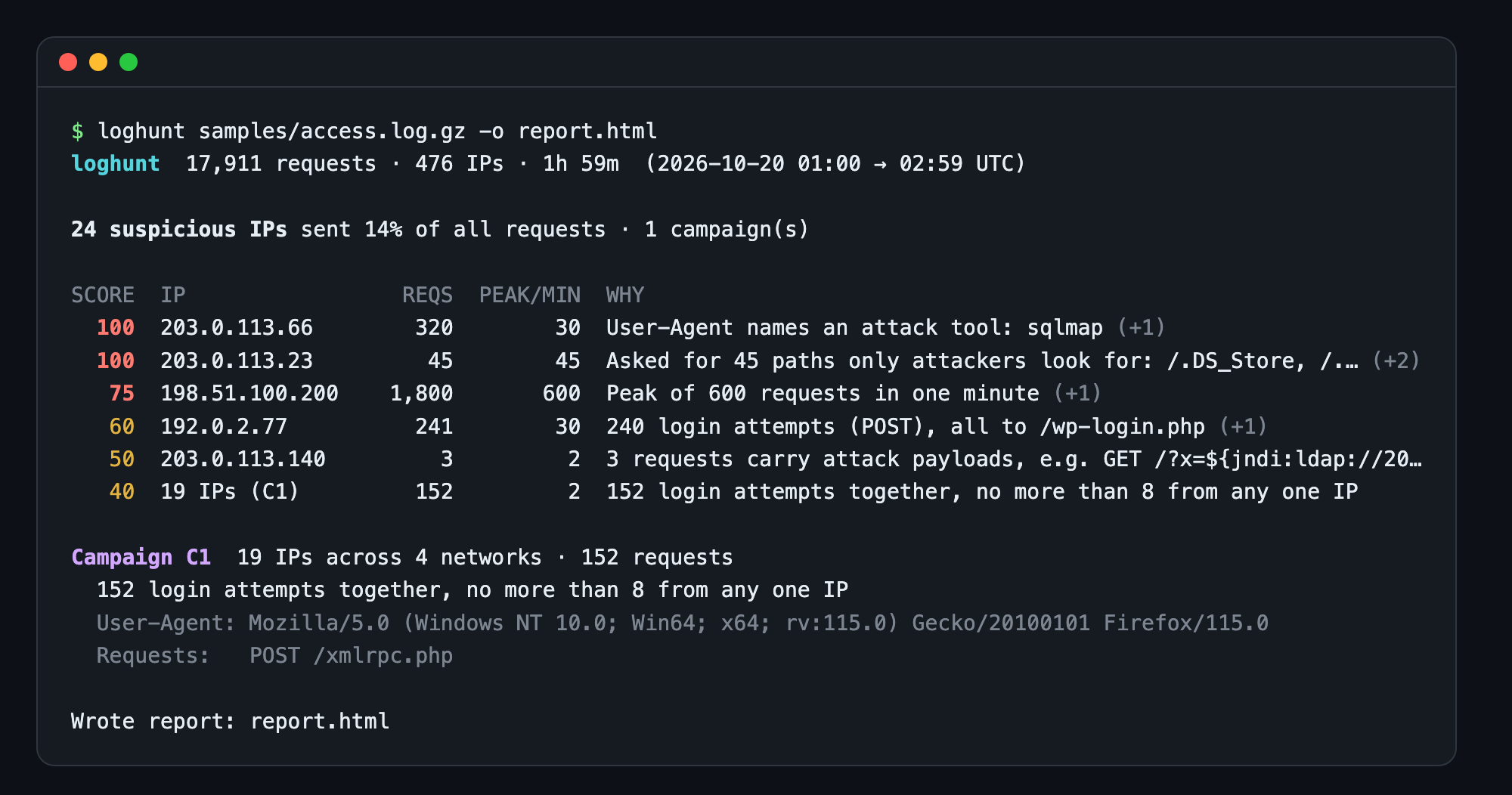
loghunt samples/access.log.gz -o report.html
The sample is a synthetic two-hour log of a small site: 450 ordinary visitors, a search-engine
crawler and an uptime check, with six attackers hidden in it. loghunt finds all six and flags
nobody else (tests/test_sample.py checks exactly that).
Usage
loghunt /var/log/nginx/access.log                     # summary in the terminal
loghunt access.log access.log.1 access.log.2.gz       # rotated logs, gzip detected by content
loghunt access.log -o report.html                     # single-file HTML report
loghunt access.log --blocklist block.txt              # suspicious IPs, one valid address per line
loghunt access.log --blocklist deny.conf --blocklist-format nginx   # or apache, ipset, nftables
loghunt access.log --json - | jq '.suspects[0]'       # machine-readable findings
zcat old/*.gz | loghunt -                             # read stdin
loghunt access.log --fail                             # exit 1 if anything is found (cron, CI)
loghunt access.log --min-score 70                     # only the worst offenders
loghunt access.log --allow 198.51.100.0/24             # never flag your own monitors (or @allow.txt)
loghunt access.log --since "2026-10-20 08:00" --until "2026-10-20 09:00"   # one incident window
--since is inclusive and --until is exclusive, so --since 2026-10-20 --until 2026-10-21 is
the whole of 20 October. Times are UTC, like every loghunt output, unless you add an offset
(2026-10-20T15:00+07:00). Counts are per window: 30 login attempts split 15/15 across the
edge of the window are only 15 inside it.
Works with the nginx and apache combined format (the default on both) and the common format. The common format has no User-Agent, so the two User-Agent rules and campaign grouping are skipped there and everything else still runs.
What it looks for
Each rule adds to an IP's score (capped at 100). IPs scoring 40 or more are reported; one weak signal alone is never enough.
| Rule | Score | Fires when |
|---|---|---|
scanner-agent |
60 | The User-Agent names an attack tool: sqlmap, nikto, nuclei, wpscan, gobuster, masscan, … |
probe-paths |
40–60 | 3+ different paths that only attackers ask for: /.env, /.git/config, /phpmyadmin/, /actuator/env, backup.zip, … |
attack-payload |
50 | The URL carries SQL injection, path traversal, XSS, Log4Shell (${jndi:) or command injection (checked after URL-decoding) |
brute-force |
45 | 20+ POSTs to a login endpoint (/wp-login.php, /xmlrpc.php, /login, …) |
flood / burst |
50 / 30 | 600+ / 120+ requests in a single minute |
error-ratio |
25 | Half or more of 20+ requests ended in a 4xx |
script-agent |
15 | No User-Agent, or an HTTP library (python-requests, Go-http-client, curl, …) |
campaign |
40 | Member of a campaign (below) |
The defaults suit a small-to-medium site. Change them with --burst, --flood,
--login-posts and --probes; campaigns use the same login and probe numbers for the group
total. The HTML report and the JSON output both record the thresholds a run used.
loghunt access.log --burst 300 --flood 1500        # a busy shop or an API
loghunt access.log --login-posts 50                # WordPress with many real logins
Campaigns: catching low-and-slow botnets
Per-IP rules miss an attacker who rents 19 machines and sends eight login attempts from each. loghunt fingerprints every IP by the exact set of requests it made plus its User-Agent. When 3 or more IPs share a fingerprint, and the group added up does something a single IP would be flagged for (20+ login attempts, 3+ probe paths, any attack payload, or a member already flagged on its own), the group becomes a campaign and every member is flagged with the reason:
Campaign C1  19 IPs across 4 networks · 152 requests
  152 login attempts together, no more than 8 from any one IP
Ordinary visitors do not group this way. Two people who both open / and /pricing in the same
browser share a fingerprint, but the group does nothing suspicious, so it is not a campaign. A
crowd of 404s is not enough either: when another site hotlinks an image you deleted, many real
browsers request the same missing file, and that is not an attack.
The HTML report
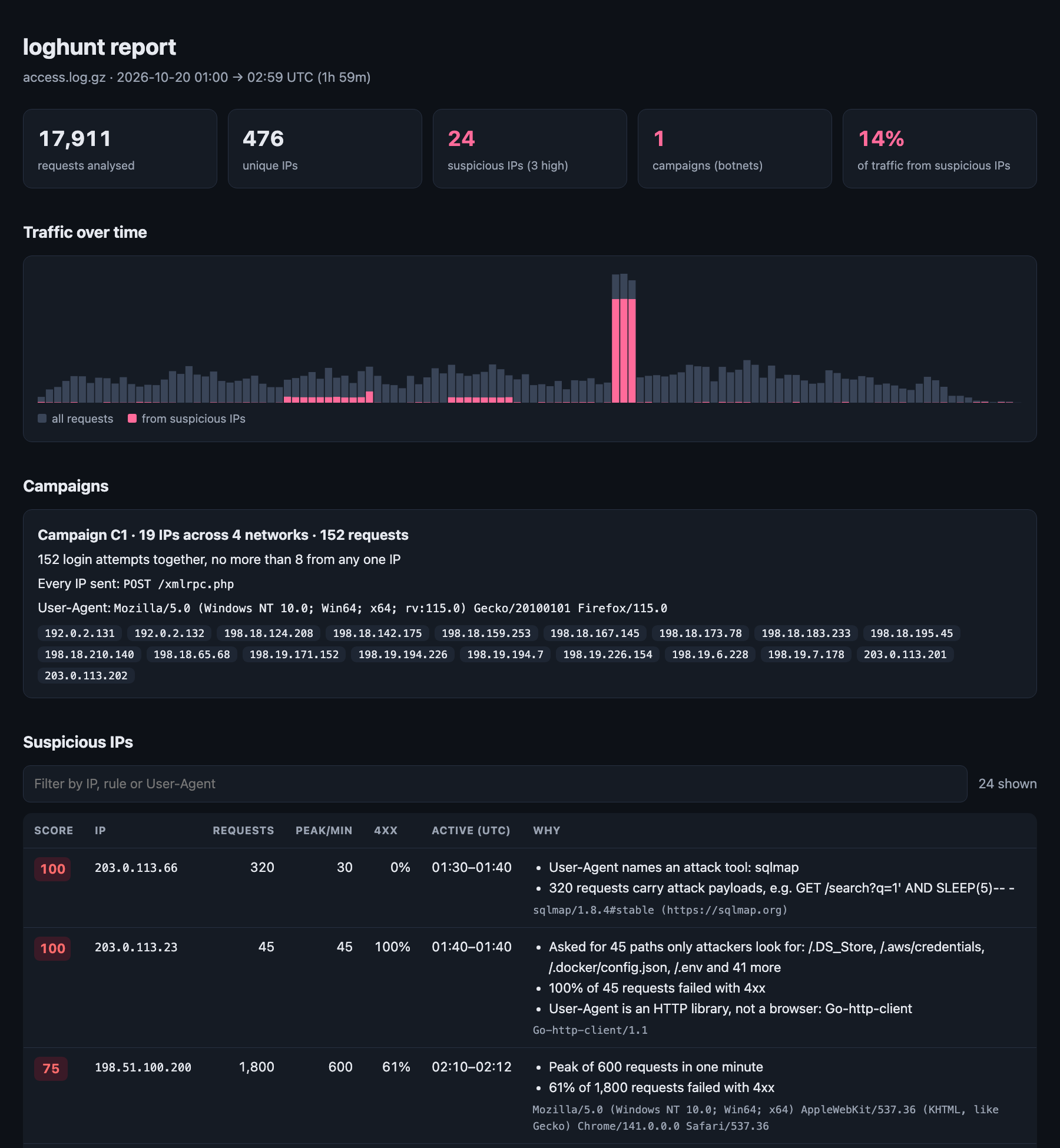
One self-contained file you can attach to an incident ticket: summary, traffic timeline with the suspicious share highlighted, campaigns with all their member IPs, and a filterable table of every suspicious IP with its reasons. Light and dark themes follow your system.
Safe to open. Everything in an access log is written by whoever sent the request, including
attackers. The report HTML-escapes every value that comes from the log and sets a
Content-Security-Policy of default-src 'none', so it loads nothing from the network.
The terminal summary prints control characters as \xNN, so a crafted log line cannot recolour
or retitle your terminal either. tests/test_report.py feeds both <script> tags and escape
sequences to keep it that way.
Speed
One pass over the log, no dependencies outside the Python standard library.
| Log | Lines | Time | Peak memory |
|---|---|---|---|
samples/access.log.gz |
17,911 | 0.2 s | 23 MB |
generate.py --visitors 60000 (465 MB) |
2,108,396 | 10.7 s | 280 MB |
Measured on an Apple M2 with Python 3.12. Memory grows with the number of distinct IPs, not the
size of the log. To reproduce: python samples/generate.py big.log --visitors 60000.
Loading the blocklist
--blocklist-format writes a file the server or firewall loads as it is. Every format contains
only well-formed IP addresses, and an IPv4 client logged as ::ffff:203.0.113.9 is written as
203.0.113.9.
| Format | Load it with |
|---|---|
plain (default) |
anything that reads one IP per line |
nginx |
include /etc/nginx/loghunt-deny.conf; in http, server or location, then nginx -s reload |
apache |
Include it inside a <Directory> or <Location> (Apache 2.4 Require rules) |
ipset |
ipset restore < file, then once: iptables -I INPUT -m set --match-set loghunt4 src -j DROP (and ip6tables with loghunt6) |
nftables |
nft -f file: a loghunt table that drops both sets |
The ipset and nftables files replace their previous contents when you load them again, so a
cron job that reruns loghunt never piles up stale entries.
Before you block anyone
- Put your own uptime checks, office NAT and scanners on the allowlist (
--allow IP,--allow CIDRor--allow @filewith one entry per line). They still count toward traffic totals, but are never flagged, grouped into a campaign or written to the blocklist. - Thresholds suit a typical small-to-medium site. A WordPress site sees real
POST /wp-login.phptraffic from its own users, so read the reasons before blocking, or raise--login-posts. - Several people behind one NAT or proxy share an IP. If your site sits behind a load balancer
or CDN, log the real client IP (nginx
real_ip_header, apachemod_remoteip), or every request will look like it came from the proxy. - If your log format puts
X-Forwarded-Forin the first column, the client chose that value. The blocklist only ever contains well-formed IP addresses, but check where they came from. - A User-Agent is whatever the client says it is. loghunt never trusts one to clear an IP, only to add a reason.
Development
python -m venv .venv && . .venv/bin/activate
pip install -e ".[dev]"
pytest
ruff check . && ruff format --check .
python samples/generate.py samples/access.log.gz   # rebuild the sample (byte-identical)
Every IP in the sample comes from ranges reserved for documentation, benchmarking and carrier NAT (RFC 5737, RFC 2544, RFC 6598), so no real address is labelled an attacker.
License
MIT © Thanut Jongteerathanachote
1 maintainer

Metadata
1 maintainer
Release files for loghunt 0.2.0
For a detailed explanation of source distributions (sdists) and built distributions (wheels), please see the package formats documentation.
Source distribution (sdist)
| File | Size | Uploaded | Provenance | Actions |
|---|---|---|---|---|
| loghunt-0.2.0.tar.gz | 223.7 kB | With provenance | Details for loghunt-0.2.0.tar.gz |
Built distribution (wheel)
| File | Interpreter | ABI | Platform | Actions Reset |
|---|---|---|---|---|
| loghunt-0.2.0-py3-none-any.whl | Python 3 | none | any | Details for loghunt-0.2.0-py3-none-any.whl |
Total release size: 252.2 kB
Release files / loghunt-0.2.0.tar.gz
| Download URL | loghunt-0.2.0.tar.gz |
|---|---|
| Size | 223.7 kB |
| Tags | Source |
|
SHA-256 checksum How to use checksums |
386f837f8478978f4a205231b583e328d5d97e6dca2e75e42a848748a04e8289
|
|
BLAKE2b-256 checksum How to use checksums |
1a87e57a12b5cbeb0c016e1e10dde1a2adf3511a6618f30b1518132b0ba0fe4a
|
| Upload date | |
|
Uploaded using Trusted Publishing? What is trusted publishing? |
Yes |
| Uploaded via |
twine/7.0.0 CPython/3.13.16
|
Provenance
Provenance describes where a file came from. On PyPI, provenance is shared via attestations, which provide a verifiable record of the build or publishing details. View details, limitations and caveats.


PyPI Publish Attestation
PyPI verified that this artifact, at this checksum, originated from the publisher listed below.
Signed by GitHub Actions, verified by PyPI on Nov 26, 2026.
Transparency logRelease files / loghunt-0.2.0-py3-none-any.whl
| Download URL | loghunt-0.2.0-py3-none-any.whl |
|---|---|
| Size | 28.5 kB |
| Tags | Python 3 |
|
SHA-256 checksum How to use checksums |
12aebb1fe18ab43192beabfeafc71dd4c05e2cc7651c0a8d92da6ed93df4bb32
|
|
BLAKE2b-256 checksum How to use checksums |
c5dde8b016aebb8931a2d17dc0c36903246e274119b5740d9649d40f793504ea
|
| Upload date | |
|
Uploaded using Trusted Publishing? What is trusted publishing? |
Yes |
| Uploaded via |
twine/7.0.0 CPython/3.13.16
|
Provenance
Provenance describes where a file came from. On PyPI, provenance is shared via attestations, which provide a verifiable record of the build or publishing details. View details, limitations and caveats.
PyPI Publish Attestation
PyPI verified that this artifact, at this checksum, originated from the publisher listed below.
Signed by GitHub Actions, verified by PyPI on Nov 26, 2026.
Transparency logSecurity for loghunt 0.2.0
Provenance
Provenance describes where a file came from. On PyPI, provenance is shared via attestations, which provide a verifiable record of the build or publishing details. View details, limitations and caveats.
Full provenance
Both files in this release have been uploaded with provenance metadata.
Attestation for loghunt-0.2.0.tar.gz
PyPI Publish Attestation
PyPI verified that this artifact, at this checksum, originated from the publisher listed below.
Signed by GitHub Actions, verified by PyPI on Nov 26, 2026.
Transparency logA note on package security
PyPI is a repository for distributing packages, not a service for auditing them. While third-party security researchers and our staff do their best to detect and remove malicious packages, PyPI cannot guarantee the quality, security or suitability of any given package.
To learn more about protecting yourself from malicious actors, visit our package security documentation.













