
Logic Bank governs SQLAlchemy update transaction logic - multi-table derivations, constraints, and actions such as sending mail or messages. Logic consists of both:
-
Rules - 40X more concise using a spreadsheet-like paradigm, and
-
Python - control and extensibility, using standard tools and techniques
The example described below is a typical example of multi-table logic.
You may find it helpful to begin with this Tutorial, using a basic example.
Update: You can use LogicBank for your own existing projects. For new projects, the recommended approach is GenAI-Logic (formerly ApiLogicServer; the git repo is still named ApiLogicServer-src) - create a complete logic-enabled JSON:API for your database, and an admin app, with 1 command (or a natural-language prompt).
This readme contains:
- Background
- Why - problems addressed
- What - what are spreadsheet-like rules
- How - usage / operation overview
- Logic Execution - sample transaction execution, reuse and scalability
- Instant Web App - built using Flask App Builder Quickstart
- Install Instructions - of Python and Logic Bank, with verify and run instructions
- Project Information
Background
Why - Simple Cocktail-Napkin Spec Explodes into Massive Legacy Code
If you've coded backend database logic - multi-table derivations and constraints - you know how much work it is, and how tedious. Whether you code it in triggers and stored procedures, in ORM events, or UI controllers, it's a lot: typically nearly half the effort for a database project.
It's also incredibly repetitive - you often get the feeling you're doing the same thing over and over.
And you're right. It's because backend logic follows patterns of "what" is supposed to happen. And your code is the "how". Suddenly, a simple cocktail napkin specification explodes into a massive amount of legacy code:
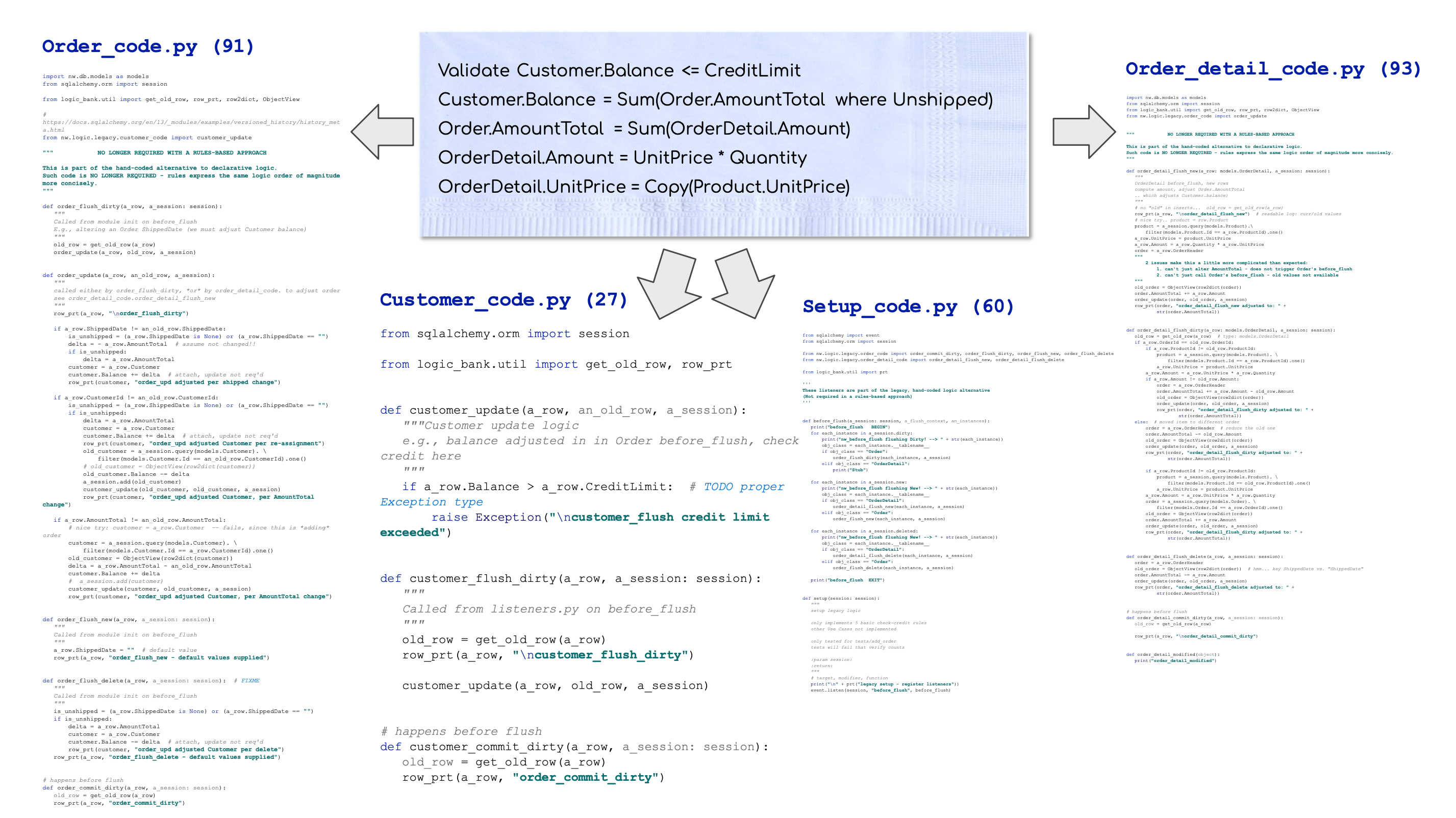
Logic Bank was designed to make the cocktail napkin spec executable.
What - Declare Spreadsheet-like Rules - 40X More Concise
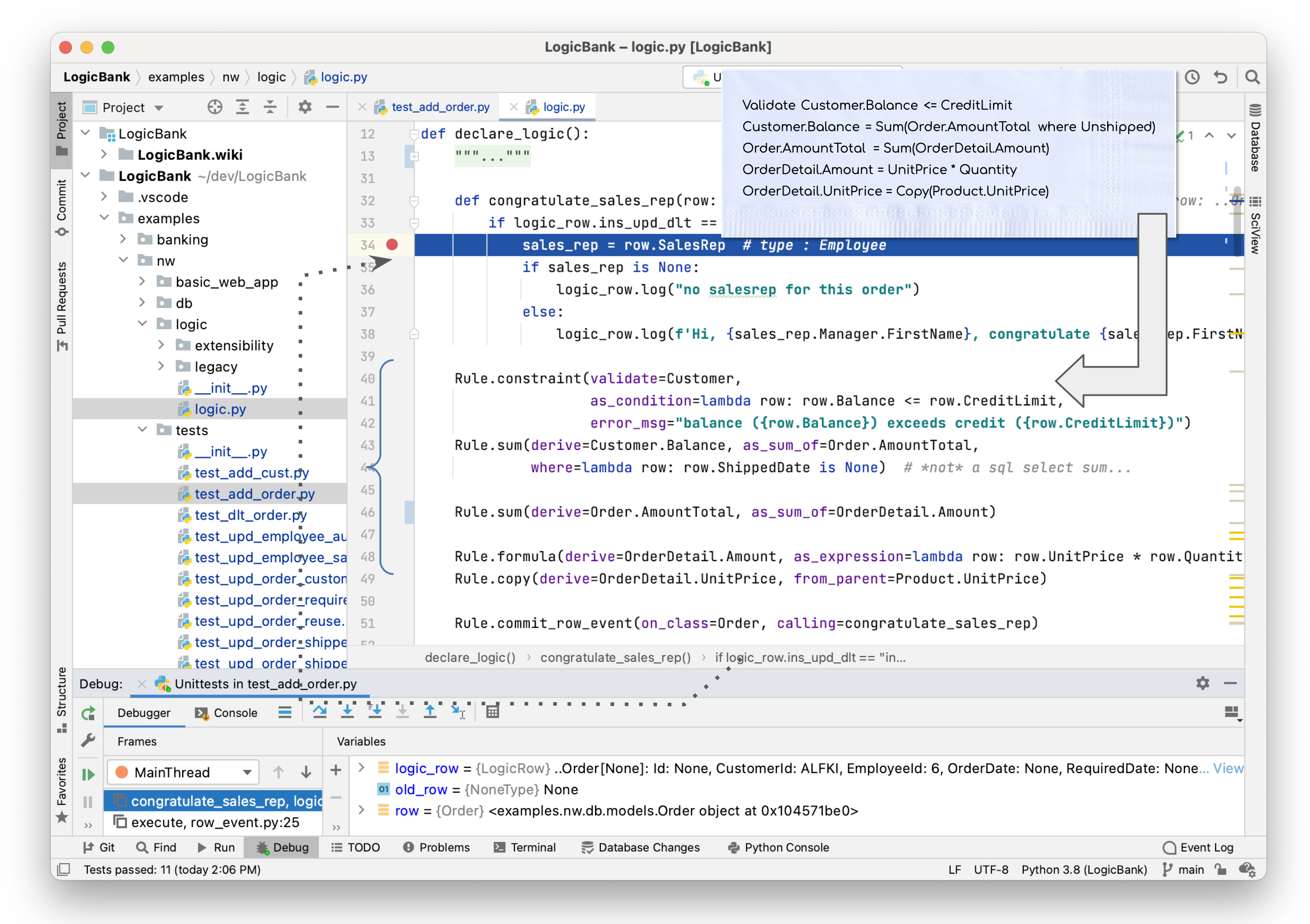
Logic Bank introduces rules that are 40X more concise than legacy code. The 5 rules below (lines 40-49) express the same logic as 200 lines of code (see them here). That's because rules are all about "what" -- spreadsheet-like expressions that automate the tedious "how":
Standard Python - Declare, Extend, Manage
Logic Bank is fully integrated with Python:
- Declare rules in Python as shown above (more details in How, below)
- Extend rules with Python (rule on line 51 invokes the Python function on line 32)
- Manage logic using your existing IDE (PyCharm, VSCode etc for code completion, debugging, etc), and source control tools and procedures
Technology Evaluation
40X is... large - do these results hold in practice? See here for additional background, and real world experience.
How - Usage and Operation Overview
-
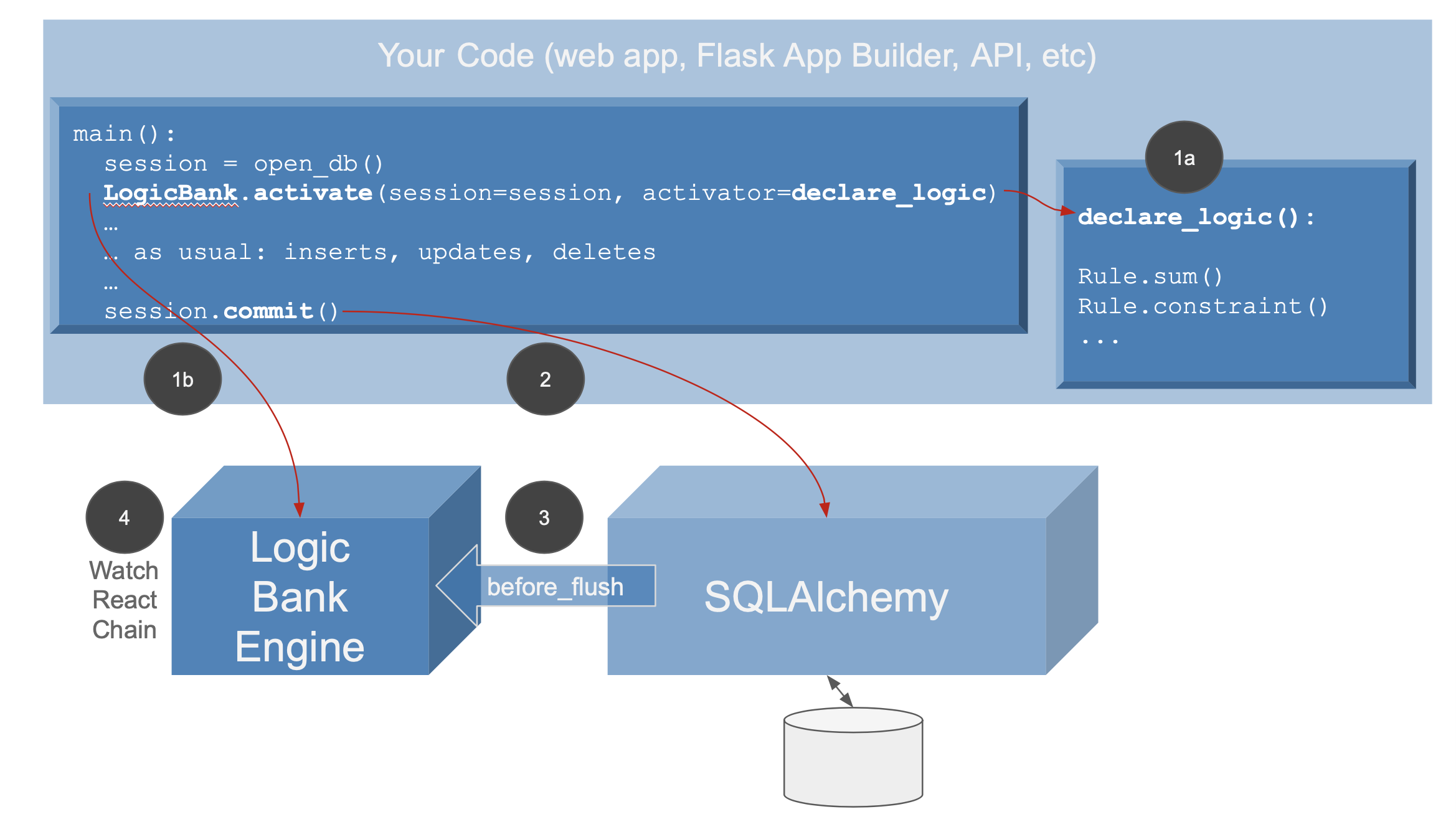
Declare and Activate (see example above):
a. Create a
declare_logicfunction (above, line 12), and declare your rules usingRule.(e.g., with IDE code completion)b. After opening your database, call
activateto register your rules, and establish Logic Bank as a listener for SQLAlchemybefore_flushevents -
Your application operates as usual: makes calls on
SQLAlchemyfor inserts, updates and deletes and issuessession.commit()- By bundling transaction logic into SQLAlchemy data access, your logic is automatically shared, whether for hand-written code (Flask apps, APIs)
-
The Logic Bank engine handles SQLAlchemy
before_flushevents onMapped Tables, so executes when you issuesession.commit() -
The logic engine operates much like a spreadsheet:
- watch for changes at the attribute level
- react by running rules that referenced changed attributes, which can
- chain to still other attributes that refer to those changes. Note these might be in different tables, providing automation for multi-table logic
Logic does not apply to updates outside SQLAlchemy, nor to SQLAlchemy batch updates or unmapped sql updates.
Let's see how logic operates on a typical, multi-table transaction.
Logic Execution: Add Order - Watch, React, Chain
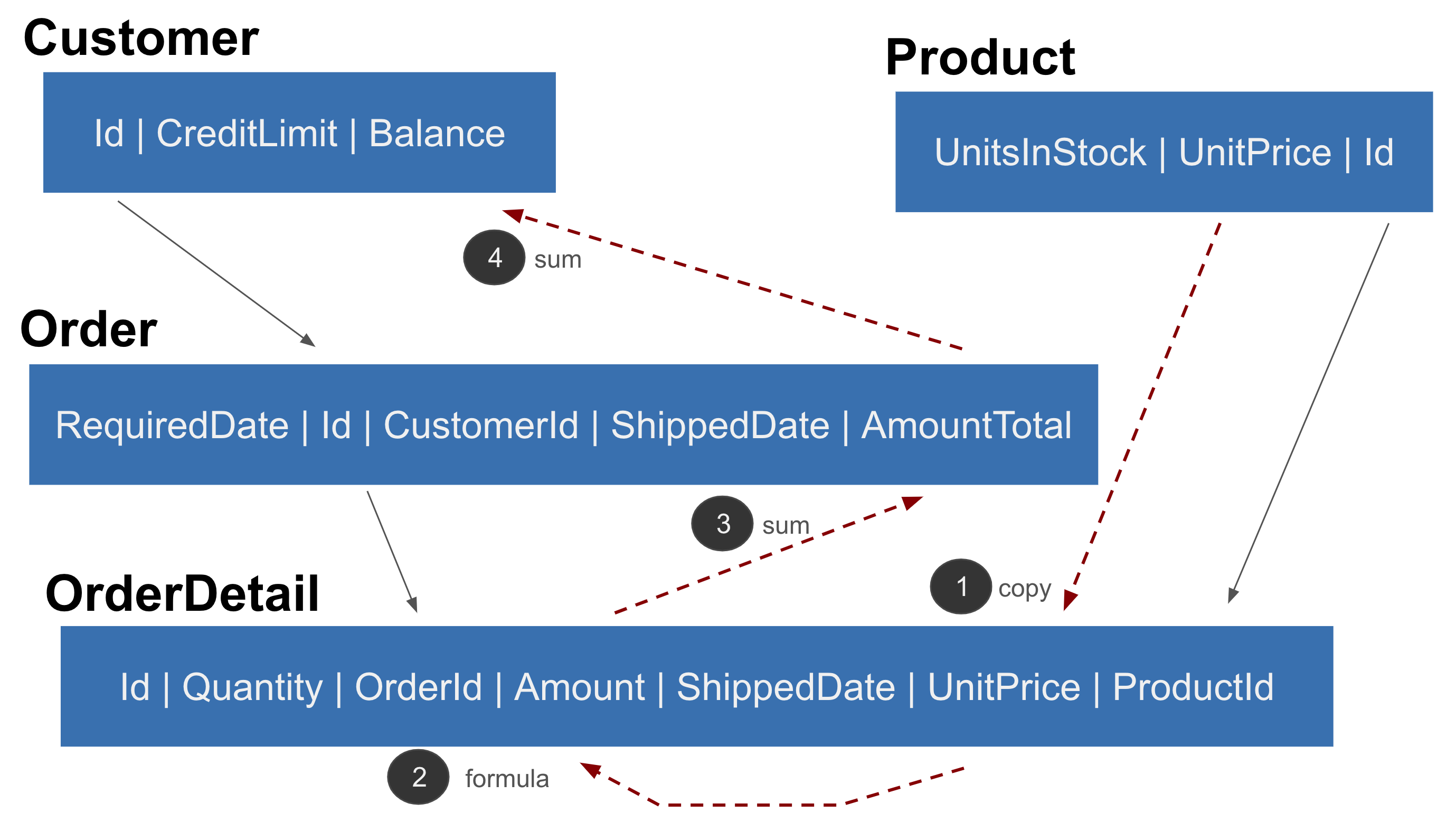
The add_order example illustrates how
Watch / React / Chain operates to
check the Credit Limit as each OrderDetail is inserted:
-
The
OrderDetail.UnitPrice(copy, line 49) references Product, so inserts cause it to be copied -
Amount(formula, line 48) watchesUnitPrice, so its new value recomputesAmount -
AmountTotal(sum, line 46) watchesAmount, soAmountTotalis adjusted (more on adjustment, below) -
Balance(sum, line 43) watchesAmountTotal, so it is adjusted -
And the Credit Limit constraint (line 40) is checked (exceptions are raised if constraints are violated, and the transaction is rolled back)
All of the dependency management to see which attributes have changed, logic ordering, the SQL commands to read and adjust rows, and the chaining are fully automated by the engine, based solely on the rules above.
Spreadsheet-like Automatic Reuse
Just as a spreadsheet reacts to inserts, updates and deletes to a summed column, rules automate adding, deleting and updating orders. This is how 5 rules represent the same logic as 200 lines of code.
Check out more examples:
- Ship Order illustrates cascade, another form of multi-table logic
- Banking is a complex transaction using the command pattern
Scalability: Automatic Prune / Optimize logic
Scalability requires more than clustering - SQLs must be pruned and optimized. For example, the balance rule:
- is pruned if only a non-referenced column is altered (e.g., Shipping Address)
- is optimized into a 1-row adjustment update instead of an expensive SQL aggregate
For more on how logic automates and optimizes multi-table transactions, click here.
An Agile Perspective
The core tenant of agile is
Working software, driving collaboration, for rapid iterations
Here's how rules can help.
Working Software Now
The examples above illustrate how just a few rules can replace pages of code.
Iteration - Automatic Ordering
Rules are self-ordering - they recognize their interdependencies, and order their execution and database access (pruning, adjustments etc) accordingly. This means:
-
order is independent - you can state the rules in any order and get the same result
-
maintenance is simple - just make changes, additions and deletions, the engine will reorganize execution order and database access, automatically
Installation
First, follow the instructions to verify / install Python, then install Logic Bank.
Python Installation
The first section below verifies whether your Python environment is current. The following section explains how to install a current Python environment.
Verify Pre-reqs: Python 3.8, virtualenv, pip3
Ensure you have these pre-reqs:
python --version
# requires 3.8 or higher (Relies on `from __future__ import annotations`, so requires Python 3.8)

pip --version
# version 19.2.3 or higher... you might be using pip3

pyenv --version
# 1.2.19 or higher
Install Python (if required)
If you are missing any, install them as described here. Skip this step if your pre-reqs are fine.
To install Python:
-
Python3.8
- Run the windows installer
- Be sure to specify "add Python to Path"
- On mac/Unix, consider using homebrew, as described here
- Run the windows installer
-
virtualenv - see here (e.g.,
pip install virtualenv)- on PC, see these instructions
-
An IDE - optional - any will do (I've used PyCharm and VSCode, install notes here), though different install / generate / run instructions apply for running programs.
Issues? Try here.
Install LogicBank
This procedure installs the Logic Bank source code, including examples you can explore.
To use Logic Bank in your own project:
pip install LogicBank
In your IDE or Command Line:
# optionally fork, and then (WARNING - remove hyphens if you download the zip)
git clone https://github.com/valhuber/LogicBank.git
cd LogicBank
# windows: python -m venv venv
virtualenv venv
# For windows: .\venv\Scripts\activate
source venv/bin/activate
pip install -r requirements.txt
Warning - if you just download the zip, be sure to remove the hyphen from the name.
Warning - if you use an IDE, be sure to activate the virtual environment, and verify you are running a proper version of Python.
Verify and Run
Run the nw/tests
Run the nw/tests programs under your IDE or the
command line; start with test_add_order and test_upd_order_shipped,
and see the walk-throughs here.
The tests use unittest - you can run them as follows:
cd examples/nw/tests
python -m unittest test_add_order.py
python test_add_order.py  # or, run it like this

python -m unittest discover -p "test*.py"  # run all tests
Note: the console log depicts logic execution
Log lines are long - consider copying them to a text editor to view with / without word wrap
Or, run in an IDE - they look like this.
Next Steps
Run the Tutorial
First, run the 10 minute Tutorial. You will see how to create, run and debug a rule in a simple, running example.
Explore Sample Transactions
Then, check out the Examples - note the navigation bar on the right. Key samples:
- Ship Order illustrates cascade, another form of multi-table logic
- Allocation illustrates extensibility, providing a reusable pattern for a provider to allocate to a set of recipients
- Banking is a complex transaction using the command pattern
- Referential Integrity illustrates referential integrity support
A good way to proceed is to
- Clear the log
- Run the test
- Review the log, and the rules that drove the processing
Articles
There a few articles that provide some orientation to Logic Bank:
- Extensible Rules - defining new rule types, using Python
- Declarative - exploring multi-statement declarative technology
- Automate Business Logic With Logic Bank - general introduction, discussions of extensibility, manageability and scalability
- Agile Design Automation With Logic Bank - focuses on automation, design flexibility and agile iterations
See also the LogicBankExamples project
The Logic Bank Examples (setup instructions here)
contains the same examples, but not the logic_bank engine source code.
It uses the logic engine via pip install, as you would for your own projects:
pip install logicbank
This is not required here, and requires the same pre-reqs noted above
Project Information
Revisions
Revisions are described here.
What's in the project
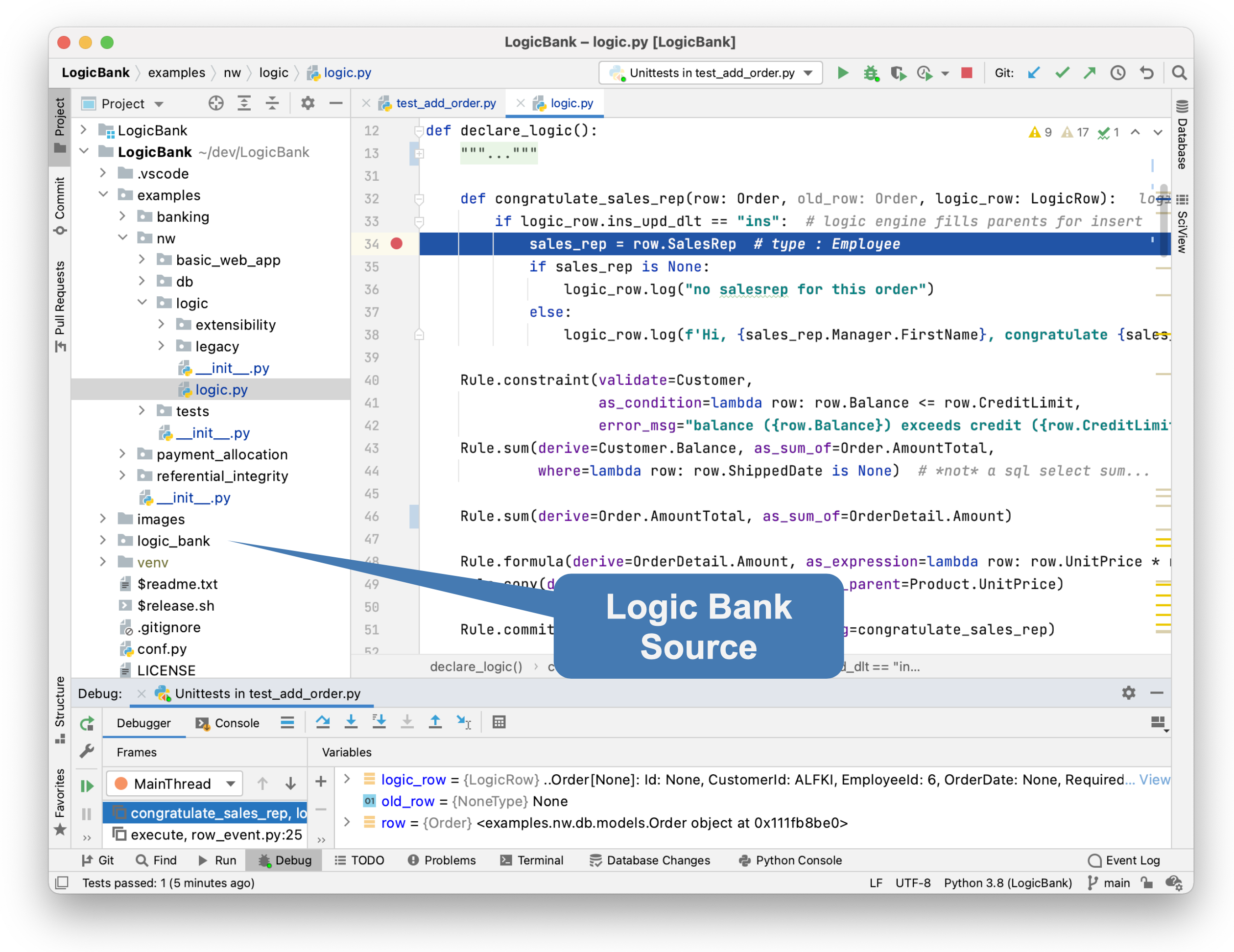
Logic Bank consists of:
-
Several test database systems -
nw,banking,referential_integrityandpayment_allocation; these contain-
Databases sqlite (no install required) and models
-
Test folders that run key transactions - just run the scripts (note the logs)
-
Logic - rules (and for
nw, the manuallegacycode for contrast to rules)
-
-
The
nwsample illustrates comparisons of Business logic, both by code and by rules (shown above). -
The
logic_bankengine source code
Internals
To explore:
-
Click here for install / operations procedures
-
Click here for a short overview of internal logic execution
Acknowledgements
There are many to thank:
- Tyler Band, for testing and the Banking example
- Max Tardiveau, for testing
- Nishanth Shyamsundar, for PC testing
- Michael Holleran, for collaboration
- Mike Bayer, for suggestions on leveraging Python typing and remarkable responsiveness
- Achim Götz, for reporting an issue in FAB Quick Start use of Logic Base
- Gloria, for many reviews... and golden patience
1 maintainer

Release files for logicbank 1.34.3
For a detailed explanation of source distributions (sdists) and built distributions (wheels), please see the package formats documentation.
Source distribution (sdist)
| File | Size | Uploaded | |
|---|---|---|---|
| logicbank-1.34.3.tar.gz | 70.2 kB | Details |
Built distribution (wheel)
| File | Interpreter | ABI | Platform | Reset |
|---|---|---|---|---|
| logicbank-1.34.3-py3-none-any.whl | Python 3 | none | any | Details |
Total release size: 145.5 kB
Release files / logicbank-1.34.3.tar.gz
| Download URL | logicbank-1.34.3.tar.gz |
|---|---|
| Size | 70.2 kB |
| Tags | Source |
|
SHA-256 checksum How to use checksums |
c3674c93c00de7ed8d2ac78cf9247456683ffa2110f63dd83fd11b9e54dbb35e
|
|
BLAKE2b-256 checksum How to use checksums |
b7e5a5b942a5bc3bd8928a799a08c4484eae7e32253cc85b4dc8cc5e23f92255
|
| Upload date | |
|
Uploaded using Trusted Publishing? What is trusted publishing? |
No |
| Uploaded via |
twine/6.1.0 CPython/3.13.5
|
Release files / logicbank-1.34.3-py3-none-any.whl
| Download URL | logicbank-1.34.3-py3-none-any.whl |
|---|---|
| Size | 75.2 kB |
| Tags | Python 3 |
|
SHA-256 checksum How to use checksums |
5b589f0e6a650409a40d53b4a8c8b9315ad60fb2f240635abac3a7e5b8b46a5b
|
|
BLAKE2b-256 checksum How to use checksums |
d02b726b4a4098a3bfca510cd90bfaf491586c95f0a21d9dce7d8a031c21cc79
|
| Upload date | |
|
Uploaded using Trusted Publishing? What is trusted publishing? |
No |
| Uploaded via |
twine/6.1.0 CPython/3.13.5
|














