
Beautiful & Simple Python Logger with Multi-threaded Multi-line Dynamic Logging Support

Project description
LogMagix-Yuge
Beautiful & Simple Python Logger with Multi-threaded Multi-line Dynamic Logging Support
🚀 Quick Start
from logmagix import Logger, LogLevel

# Choose your logging style (1 = ColorLogger, 2 = SimpleLogger)
log = Logger(
    style=1,  # Default colorful style
    prefix="MyApp",
    github_repository="https://github.com/sexfrance/logmagix",
    level=LogLevel.DEBUG,
    log_file="logs/app.log"  # Optional log file
)

# Basic logging
log.info("Hello World!")
log.success("Operation completed!")
log.warning("Something might be wrong")
log.error("An error occurred")
log.critical("Fatal error", exit_code=1)
🔥 功能特性
- 多线程多行动态日志 - v3.0 新增! 同时显示多个线程的进度
- 固定位置模式 - v3.1 新增! 任务完成后保持在原位置,视觉稳定
- 支持多种日志级别: success, warning, failure, debug, critical, info 等
- 使用 ANSI 转义序列自定义颜色
- 带时间戳的日志消息,便于追踪
- 内置动画加载器,视觉效果出色
- 线程安全操作,自动槽位管理
- 自动扩展槽位和队列等待处理溢出
- 非 TTY 环境下优雅降级
- 支持将日志保存到文件
- 可自定义日志和加载器前缀
- ASCII 艺术字显示,用于个性化问候、系统信息和品牌展示
- 简单灵活的 API,多种使用方式
- 可自定义
HomeASCII 艺术字的文本对齐
⚙️ Installation
To install the package locally, clone the repository and run:
pip install .
You can also install it via pip from PyPI:
pip install logmagix-yuge
🔧 Usage
Importing the Package
from logmagix import Logger, Loader, Home
Logging
Initialize the Logger class to log messages with different levels:
log = Logger()

# Success message
log.success("Operation completed successfully!")

# Failure message
log.failure("Something went wrong!")

# Warning message
log.warning("This is a warning!")

# Informational message
log.info("Informational log message")

# Debug message
log.debug("Debugging log message")

# Critical message (also terminates the program with optional exit code)
log.critical("Critical failure encountered", exit_code=1)
Log Levels
LogMagix provides several logging levels to help categorize the severity and type of log messages. You can configure the minimum log level to display based on your requirements:
DEBUG: For detailed debug messages.INFO: For informational messages.WARNING: For warning messages.SUCCESS: For successful operations.FAILURE: For non-critical errors.CRITICAL: For critical errors; may terminate the program.
You can set the minimum logging level on initialization by passing a LogLevel value to the Logger constructor. For example:
from logmagix import Logger, LogLevel

log = Logger(level=LogLevel.WARNING)
With this setting, only WARNING, SUCCESS, FAILURE, and CRITICAL messages will display.
🎨 Logging Styles
LogMagix offers two distinct logging styles:
Style 1: ColorLogger (Default)
log = Logger(style=1) # or just Logger()
Features colorful, detailed output with customizable prefixes and ANSI color formatting.
Style 2: SimpleLogger
log = Logger(style=2)
Provides a minimalist, clean output format with basic color coding.
Style Comparison
# Style 1 (ColorLogger)
log1 = Logger(prefix="ColorLogger")
log1.success("Operation successful!")
# Output: [ColorLogger] [12:34:56] [Success] -> Operation successful!

# Style 2 (SimpleLogger)
log2 = Logger(style=2, prefix="SimpleLogger")
log2.success("Operation successful!")
# Output: 12:34:56 » SUCCESS ➔ Operation successful!
Log File Saving
You can specify a log file path to save logs to a file for further review or debugging. The logger will automatically strip ANSI color codes from messages saved to the log file for readability. Log files are appended with each new logging session.
log = Logger(log_file="logs/app.log")
log.success("This message will also be saved to app.log")
To view logs saved to the file, open the specified path and review the recorded entries, which include timestamped log messages for tracking system state over time.
🚀 多线程多行动态日志 (v3.0 新增!)
MultiLineLoader 类允许你同时显示多个线程的进度,每个线程占据自己的行。非常适合并行任务执行!
Basic Usage
from logmagix import MultiLineLoader
import threading
import time

# Method 1: Context Manager (Recommended)
with MultiLineLoader(slots=5, prefix="MyApp") as loader:
    def worker(task_name):
        handle = loader.reserve(task_name)
        handle.update("Initializing...")
        time.sleep(1)
        handle.update("Processing...")
        time.sleep(1)
        handle.done("Completed!")

    threads = []
    for i in range(5):
        t = threading.Thread(target=worker, args=(f"Task-{i+1}",))
        threads.append(t)
        t.start()

    for t in threads:
        t.join()

# Method 2: Manual Control
loader = MultiLineLoader(slots=3, auto_collapse=True).start()
handle = loader.reserve("Download")
handle.update("Downloading file...")
time.sleep(2)
handle.done("Download complete!")
loader.stop()
Features
- Thread-Safe: All operations are protected with RLock and Condition
- Dynamic Rendering: Real-time updates with ANSI cursor control
- Auto-Expand: Automatically adds slots up to 80% of terminal height
- Queue Waiting: Threads wait for free slots when all are occupied
- Status Icons: ✓ (success), ✗ (failure), ⚠ (warning)
- Auto-Collapse: Optional automatic collapse when all tasks complete
- Graceful Fallback: Automatically switches to sequential logging in non-TTY environments
Handle Methods
handle = loader.reserve("TaskName")

# Update progress
handle.update("Processing step 1...")

# Mark as completed (green ✓)
handle.done("Task completed successfully!")

# Mark as failed (red ✗)
handle.fail("Task failed!")

# Mark with warning (yellow ⚠)
handle.warn("Task completed with warnings")
配置选项
loader = MultiLineLoader(
    slots=5,                    # 初始槽位数量
    prefix="MyApp",             # 所有行的前缀
    refresh_rate=0.1,           # 刷新间隔(秒)
    auto_collapse=False,        # 所有任务完成后自动折叠
    auto_expand=True,           # 需要时自动扩展槽位
    max_height_ratio=0.8,       # 最大槽位数占终端高度的比例
    logger=None,                # 可选的 Logger 实例
    fixed_slots=False           # v3.1 新增: 启用固定位置模式
)
固定位置模式 (v3.1 新增!) 🆕
固定位置模式确保每个任务分配到槽位后永远占据该位置,完成后只改变状态显示,位置不变。非常适合需要长期监控多个任务状态的场景。
使用方法
from logmagix import MultiLineLoader
import threading
import time

def worker(loader, name, duration):
    handle = loader.reserve(name)
    handle.update("处理中...")
    time.sleep(duration)
    handle.done("完成!")

# 启用固定位置模式
with MultiLineLoader(slots=5, fixed_slots=True) as loader:
    threads = []
    for i in range(5):
        t = threading.Thread(target=worker, args=(loader, f"任务{i+1}", i+1))
        threads.append(t)
        t.start()

    for t in threads:
        t.join()
视觉效果
初始状态:
[⠋] 任务1: 处理中...  <- 槽位 0
[⠙] 任务2: 处理中...  <- 槽位 1
[⠹] 任务3: 处理中...  <- 槽位 2

任务2 完成后:
[⠋] 任务1: 处理中...  <- 槽位 0,位置不变
[✓] 任务2: 完成!      <- 槽位 1,位置不变,只变图标
[⠹] 任务3: 处理中...  <- 槽位 2,位置不变

新增任务4:
[⠋] 任务1: 处理中...  <- 槽位 0
[✓] 任务2: 完成!      <- 槽位 1
[⠹] 任务3: 处理中...  <- 槽位 2
[⠙] 任务4: 处理中...  <- 槽位 3,新增在最下面
固定位置模式 vs 正常模式
| 特性 | 固定位置模式 (fixed_slots=True) |
正常模式 (fixed_slots=False) |
|---|---|---|
| 任务位置 | 固定不变 | 完成后移到历史记录 |
| 槽位复用 | 不复用,每个任务永久占据槽位 | 完成后槽位可被新任务复用 |
| 视觉稳定性 | 极高,易于追踪特定任务 | 中等,任务会移动 |
| 适用场景 | 长期监控,任务数量≤终端高度 | 大量顺序任务,需要槽位复用 |
| 内存占用 | 随任务数量增长 | 固定,只占用槽位数量 |
何时使用固定位置模式?
✅ 推荐使用:
- 需要同时监控多个长期运行的任务
- 任务数量相对固定且不超过终端高度
- 需要快速定位特定任务的状态
- 类似"仪表盘"的监控场景
❌ 不推荐使用:
- 任务数量非常大(>50个)
- 任务快速创建和完成,需要频繁复用槽位
- 只关心当前正在运行的任务,不关心已完成的任务
🔄 Loading Animation
The Loader class now supports custom prefixes and can be used in two ways:
from logmagix import Loader
import time

# Method 1: Context Manager
with Loader(
    prefix="MyApp",
    desc="Processing...",
    end="Completed!",
    timeout=0.1
):
    time.sleep(2)  # Your task here

# Method 2: Manual Control
loader = Loader(
    prefix="MyApp",
    desc="Loading...",
    end="Done!",
    timeout=0.05
).start()
time.sleep(2)  # Your task here
loader.stop()
Custom Log and Loader Prefix
Both the Logger and Loader classes allow for customizing the prefix shown before each message:
Logger Prefix:
log = Logger(prefix=".myapp/logs")
log.success("This message has a custom log prefix!")
Loader Prefix:
loader = Loader(prefix=".myapp/loader", desc="Loading with a custom loader prefix...")
loader.start()
time.sleep(5)  # Simulate a task
loader.stop()
ASCII Art and Greeting (New Home Class)
The Home class lets you display customized ASCII art text along with system information, such as a welcome message, username, or credits.
Using the Home Class:
home_screen = Home(
    text="LogMagix",
    align="center",
    adinfo1="discord.cyberious.xyz",
    adinfo2="v1.0",
    credits="Developed by sexfrance",
    clear = False, # To clear the console, default is True
)

home_screen.display()
This will display the ASCII art version of "LogMagix" in the center of the terminal, along with optional adinfo1 and adinfo2 texts at the bottom. The terminal width is automatically detected to align the text properly.
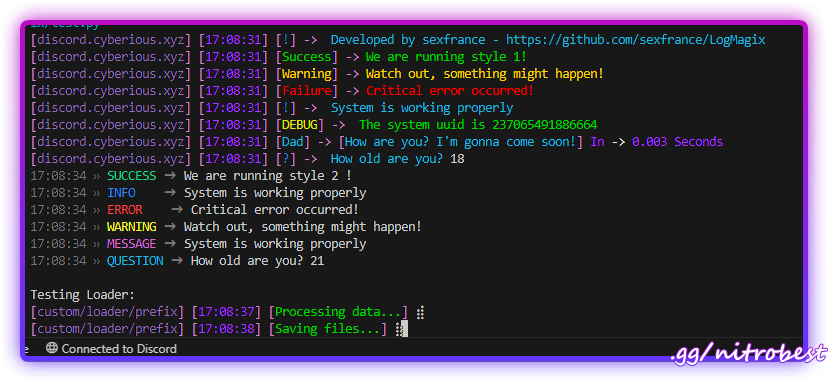
Full Example
Here’s an example showing both logging, loader, and the new Home class functionality:
from logmagix import Logger, Home, Loader, LogLevel
import time
import uuid

# Test ColorLogger (Style 1 - Default)
log1 = Logger(
    prefix="ColorLogger",
    github_repository="https://github.com/sexfrance/LogMagix",
    level=LogLevel.DEBUG,
    log_file="logs/color.log"
)

start_time = time.time()
log1.success("We are running style 1!")
log1.warning("Watch out, something might happen!")
log1.failure("Critical error occurred!")
log1.info("System is working properly")
log1.debug(f"The system uuid is {uuid.getnode()}")
log1.message("Dad", f"How are you? I'm gonna come soon!", start=start_time, end=time.time())
log1.question("How old are you? ")

# Test SimpleLogger (Style 2)
log2 = Logger(
    style=2,
    prefix="SimpleLogger",
    level=LogLevel.INFO,
    log_file="logs/simple.log"
)

start_time = time.time()
log2.success("We are running style 2 !")
log2.info("System is working properly")
log2.error("Critical error occurred!")
log2.warning("Watch out, something might happen!")
log2.message("System is working properly")
log2.debug(f"The system uuid is {uuid.getnode()}")
log2.question("How old are you? ")

# Test loader with custom prefix and context manager
print("\nTesting Loader:")
with Loader(prefix="custom/loader/prefix", desc="Processing data..."):
    time.sleep(2)  # Simulate task

# Use loader with custom prefix and start/stop methods
loader = Loader(prefix="custom/loader/prefix", desc="Saving files...", end="Done !", timeout=0.05).start()
time.sleep(2)  # Simulate task
loader.stop()


# Display home screen
home_screen = Home(
    text="LogMagix",
    align="center",
    adinfo1="Test Suite",
    adinfo2="v1.0.0",
    credits="Testing Framework",
    clear=True
)
home_screen.display()

# Test critical error (commented out as it exits the program)
log1.critical("Critical error occurred!")
Customization in Home Class
- text: The text to be displayed in ASCII art.
- align: Align the ASCII art text to "left", "center", or "right" in the terminal.
- adinfo1 and adinfo2: Additional information displayed below the ASCII art.
- credits: Optional credits or user information.
📹 Preview
❗ Requirements
LogMagix requires:
coloramafor cross-platform color support in the terminal.pystylefor creating the colored text effects.
To install dependencies, run:
pip install colorama pystyle
©️ License
LogMagix is licensed under the MIT License. See the LICENSE file for more details.
🖥️ Contributing
Contributions are welcome! Feel free to fork the repository, make changes, and submit a pull request.
👤 Author
LogMagix is developed and maintained by sexfrance.






Download files
Download the file for your platform. If you're not sure which to choose, learn more about installing packages.
Source Distribution
Built Distribution
Filter files by name, interpreter, ABI, and platform.
If you're not sure about the file name format, learn more about wheel file names.
Copy a direct link to the current filters
File details
Details for the file logmagix_yuge-3.2.0.tar.gz.
File metadata
- Download URL: logmagix_yuge-3.2.0.tar.gz
- Upload date:
- Size: 25.0 kB
- Tags: Source
- Uploaded using Trusted Publishing? No
- Uploaded via: twine/6.2.0 CPython/3.10.11
File hashes
| Algorithm | Hash digest | |
|---|---|---|
| SHA256 |
8dea2fc0b70d342815ecfb1d77880a95efe304ace68a3838910d783cf3c5e8b4
|
|
| MD5 |
0162a8e8a97a1ba96abb5c4ddc5357a4
|
|
| BLAKE2b-256 |
0cea082ca4ed9bebdfd5c934679089f7c5a72a1a6f932b9272bc0ab2636a59ab
|
File details
Details for the file logmagix_yuge-3.2.0-py3-none-any.whl.
File metadata
- Download URL: logmagix_yuge-3.2.0-py3-none-any.whl
- Upload date:
- Size: 18.7 kB
- Tags: Python 3
- Uploaded using Trusted Publishing? No
- Uploaded via: twine/6.2.0 CPython/3.10.11
File hashes
| Algorithm | Hash digest | |
|---|---|---|
| SHA256 |
85d0d64cfb11201992bd77bd3a0cc2e6d01642bb37ea0f879bf1b6f34eadf51b
|
|
| MD5 |
7a1b6cdbad8cf2064c474c89d90c3ba2
|
|
| BLAKE2b-256 |
dd222f723be5c79b1661e035a561d6dc8a13cdafa6b0539c9cde3664c4e3fba9
|






