
LOGOS — Autonomous Research Intelligence Agent. 6-agent AI research pipeline with persistent memory, human-in-the-loop clarifications, and story-driven CLI.

Project description
LOGOS: Autonomous Multi-Agent Research Intelligence System
LOGOS is a production-grade, multi-agent reasoning and competitive intelligence pipeline built on Microsoft Azure AI Foundry. It is designed to assist market analysts, executives, and investment firms in scanning industry trends, profiling competitors, assessing strategic risks, and compiling comprehensive strategy reports.
Technical Architecture Overview
LOGOS implements a sequential, context-accumulating multi-agent pipeline composed of six specialized reasoning agents. The system utilizes Microsoft Azure AI Foundry's model orchestration layer, stateful agent runtime, and Model Context Protocol (MCP) search tools to deliver highly grounded and cited analysis.
                         [ User Query / CLI / API ]
                                     │
                                     ▼
                      [ SQLite Persistent Memory Load ]
                                     │
                                     ▼
                    [ Human-in-the-Loop Clarification ]
                                     │
                                     ▼
                       [ Azure AI Foundry Workflow ]
                                     │
           ┌─────────────────────────┼─────────────────────────┐
           ▼                         ▼                         ▼
      Planner Agent           Researcher Agent        Industry News Scanner
      (GPT o4 Mini)            (GPT o4 Mini)            (GPT-4.1 Mini)
           │                         │                         │
           └─────────────────────────┼─────────────────────────┘
                                     │
                                     ▼
           ┌─────────────────────────┼─────────────────────────┐
           ▼                         ▼                         ▼
    Competitive Intel           Analyst Agent             Writer Agent
     (GPT-4.1 Mini)            (GPT-4.1 Mini)             (GPT-4.1)
           │                         │                         │
           └─────────────────────────┼─────────────────────────┘
                                     │
                                     ▼
                      [ SQLite Persistent Memory Sync ]
                                     │
                                     ▼
                           [ Final Strategy Report ]
Core Features and Capabilities
- 6-Agent Sequential Execution Pipeline: Orchestrates distinct analytical stages from initial query decomposition to the final markdown report compilation.
- Dual Integration APIs: Leverages the high-performance Responses API for visual-workflow-backed agents and the stateful Agents Thread & Run API for pre-deployed cloud assistants.
- Model Context Protocol (MCP) Grounding: Integrates Tavily Web Search and Azure AI Web Search (Bing) to query real-time data indices without relying on static pre-training.
- Input & Output Guardrails: Implements strict safety validation layers to redact sensitive personally identifiable information (PII) and ensure content compliance.
- Short-Term and Long-Term Memory: Utilizes a persistent SQLite store (
memory.db) to profile user preferences, track entity mention frequencies, and log past strategic insights. - FastAPI REST API & Command-Line Interfaces: Features a dual-interface delivery model (an interactive REPL CLI and a fully documented FastAPI backend).
- Azure Container Registry (ACR) Deployment: Pre-configured container builds uploaded to the
reasoningagentregistryfor deployment on the stateful, hosted Foundry Agent Service.
Agent Persona and Character Design
The system divides labor across six specialized agents, each fine-tuned with specific system instructions and model deployment targets:
- Planner Agent (
planner-agent): Decomposes the primary business goal into structured sub-tasks. It estimates execution times and defines required tools. - Researcher Agent (
researcher-agent): Executes live searches via the MCP toolboxes to fetch verified data and source URLs. - Industry News Scanner (
industry-news-trend-scanner): Focuses on breaking developments and near-term market signals from the last 3-6 months. - Competitive Landscape Researcher (
competitive-landscape-researcher): Maps industry competitors, assesses market share, and identifies product differentiation gaps. - Analyst Agent (
analyst-agent): Performs qualitative analysis, categorizes evidence strength, and builds a probability-impact risk matrix. - Writer Agent (
writer-agent): Synthesizes the aggregated findings and drafts the final formal report using a standard corporate strategy template.
Documentation Index
Detailed design specs, execution logs, and guides are organized within the docs/ directory:
- Agent Design and Multi-Agent Architecture: Breakdown of prompt structures, A2A communication, SQLite memory structures, and the HITL interface.
- Hackathon Alignment and Requirements Mapping: Alignment matrices mapping how LOGOS emulates Work IQ, Foundry IQ, and Fabric IQ layers.
- Developer Guide and Local Execution Manual: Step-by-step setup guides for configuring virtual environments,
.envparameters, and running CLI tests. - Microsoft Azure AI Foundry Usage Guide: Deep dive into Azure SDK project client calls, Responses API, Agents Thread API, and ACR deployment patterns.
Quick Start & Installation
Local Developer Installation
LOGOS can be installed in editable developer mode to modify source files:
# Clone the repository
git clone https://github.com/madhesh60/logos_reasoning_agent.git
cd logos_reasoning_agent

# Create and activate a virtual environment
python -m venv .venv
source .venv/bin/activate  # Windows: .venv\Scripts\activate

# Install dependencies and editable package
pip install -e .
pip install -e .[dev]
CLI Command Execution
# Launch the interactive research shell (REPL)
logos

# Execute a query directly and save the report
logos -q "Evaluate the 2026 market prospects for hydrogen fuel cells."

# Bypass cloud API calls (Local Emulation Mode)
logos --no-a2a -q "Summarize advancements in solid-state batteries."

# Run a diagnostics check on model endpoints
logos --model-test
Checking Agent Memory & Personalization
To view or print the agent's persisted memory database:
- Launch the interactive shell:
logos
(Or if running directly via python:python logos/cli.py) - Once the greeting banner displays, type
memoryat the prompt:> memory
This prints a clean, beautifully formatted panel containing Personalization Details, Recent investigations history, and Frequently researched entities. - You can also view your bookmarked findings by typing:
> insights
FastAPI Web Server Execution
# Launch the API server locally
uvicorn main:app --reload --port 8000
- Interactive Swagger UI: http://localhost:8000/docs
- ReDoc Technical Specifications: http://localhost:8000/redoc
Production Deployment Workflow
LOGOS is containerized and ready to be pushed to your cloud environment:
- Build the Container Image:
docker build -t reasoningagentregistry.azurecr.io/logos-research-agent:latest .
- Authenticate & Push to Azure Container Registry (
reasoningagentregistry):az acr login --name reasoningagentregistry docker push reasoningagentregistry.azurecr.io/logos-research-agent:latest
- Provision in Azure AI Foundry: Deploy the pushed container image as a managed hosted agent within the Foundry Agent Service, attaching Managed Identities (Entra ID) for secure keyless access to Azure OpenAI and Azure Search endpoints.
System Observability and Verification
LOGOS outputs structured JSON logging formatted by structlog, making it directly indexable by monitoring solutions like Azure Monitor and Application Insights.
Run the unit test suite to verify pipeline integrity:
pytest tests/test_agents.py -v
Hackathon Submissions & Demos
This section lists the system validation runs and screenshots showcasing the working state of the agent, its memory, traces, containerization, and security guardrails.
LOGOS Demo Video
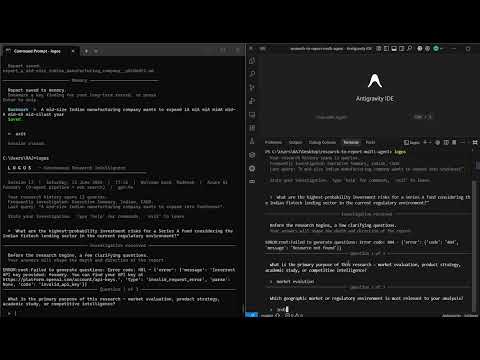
Watch the LOGOS Autonomous Multi-Agent Research System in action.
1. System Architecture

2. Conversation & Execution Trace

3. User Personalization & Short-Term Memory

memory inside the interactive shell to review the customized profile, domain focus, and tracked research history.
4. Running Container & Registry Deployment

reasoningagentregistry.azurecr.io), ready to be pulled by Azure AI Foundry Hosted Agent Services.
5. Input and Output Security Guardrails


6. FoundryIQ - Project Knowledge Base

7. Workflow Visualizer

8. Python Package Installation (PyPI View)

9. Multi-Agent Setup

License
MIT License
Copyright (c) 2026
Permission is hereby granted, free of charge, to any person obtaining a copy of this software and associated documentation files (the "Software"), to deal in the Software without restriction, including without limitation the rights to use, copy, modify, merge, publish, distribute, sublicense, and/or sell copies of the Software, and to permit persons to whom the Software is furnished to do so, subject to the following conditions:
The above copyright notice and this permission notice shall be included in all copies or substantial portions of the Software.
THE SOFTWARE IS PROVIDED "AS IS", WITHOUT WARRANTY OF ANY KIND, EXPRESS OR IMPLIED, INCLUDING BUT NOT LIMITED TO THE WARRANTIES OF MERCHANTABILITY, FITNESS FOR A PARTICULAR PURPOSE AND NONINFRINGEMENT. IN NO EVENT SHALL THE AUTHORS OR COPYRIGHT HOLDERS BE LIABLE FOR ANY CLAIM, DAMAGES OR OTHER LIABILITY, WHETHER IN AN ACTION OF CONTRACT, TORT OR OTHERWISE, ARISING FROM, OUT OF OR IN CONNECTION WITH THE SOFTWARE OR THE USE OR OTHER DEALINGS IN THE SOFTWARE.


Download files
Download the file for your platform. If you're not sure which to choose, learn more about installing packages.
Source Distribution
Built Distribution
Filter files by name, interpreter, ABI, and platform.
If you're not sure about the file name format, learn more about wheel file names.
Copy a direct link to the current filters
File details
Details for the file logos_research-1.0.5.tar.gz.
File metadata
- Download URL: logos_research-1.0.5.tar.gz
- Upload date:
- Size: 48.0 kB
- Tags: Source
- Uploaded using Trusted Publishing? Yes
- Uploaded via: twine/6.1.0 CPython/3.13.12
File hashes
| Algorithm | Hash digest | |
|---|---|---|
| SHA256 |
e5eeb97d7e444e86a9cc1f958bc2f1a665827b0bb07cd9315c1be37c8b3adf6d
|
|
| MD5 |
97cfc38658e8ce64a1523e52aaff6e74
|
|
| BLAKE2b-256 |
d41257cf0fbef35cc4c459b024fbce98605bf2d35f4ed1400239a5b3fe4adcb5
|
Provenance
The following attestation bundles were made for logos_research-1.0.5.tar.gz:
Publisher:
publish.yml on madhesh60/logos_reasoning_agent
-
Statement:
-
Statement type:
https://in-toto.io/Statement/v1 -
Predicate type:
https://docs.pypi.org/attestations/publish/v1 -
Subject name:
logos_research-1.0.5.tar.gz -
Subject digest:
e5eeb97d7e444e86a9cc1f958bc2f1a665827b0bb07cd9315c1be37c8b3adf6d - Sigstore transparency entry: 1818499432
- Sigstore integration time:
-
Permalink:
madhesh60/logos_reasoning_agent@df6f488d7b6c2715cb21808fad77ebe8d2ebb89a -
Branch / Tag:
refs/tags/v1.0.5 - Owner: https://github.com/madhesh60
-
Access:
public
-
Token Issuer:
https://token.actions.githubusercontent.com -
Runner Environment:
github-hosted -
Publication workflow:
publish.yml@df6f488d7b6c2715cb21808fad77ebe8d2ebb89a -
Trigger Event:
release
-
Statement type:
File details
Details for the file logos_research-1.0.5-py3-none-any.whl.
File metadata
- Download URL: logos_research-1.0.5-py3-none-any.whl
- Upload date:
- Size: 57.0 kB
- Tags: Python 3
- Uploaded using Trusted Publishing? Yes
- Uploaded via: twine/6.1.0 CPython/3.13.12
File hashes
| Algorithm | Hash digest | |
|---|---|---|
| SHA256 |
2771ceffd36ea42cc4705f6a35d675640c2f1ba3d9cad38fc1b5dee3318d5799
|
|
| MD5 |
c6f2df614b99fb06e2d6b0fdc925f4cf
|
|
| BLAKE2b-256 |
9c3503a126ea8be91c2ae90bd66841336388b03e1bdca6754b1d4598a7fff61f
|
Provenance
The following attestation bundles were made for logos_research-1.0.5-py3-none-any.whl:
Publisher:
publish.yml on madhesh60/logos_reasoning_agent
-
Statement:
-
Statement type:
https://in-toto.io/Statement/v1 -
Predicate type:
https://docs.pypi.org/attestations/publish/v1 -
Subject name:
logos_research-1.0.5-py3-none-any.whl -
Subject digest:
2771ceffd36ea42cc4705f6a35d675640c2f1ba3d9cad38fc1b5dee3318d5799 - Sigstore transparency entry: 1818499450
- Sigstore integration time:
-
Permalink:
madhesh60/logos_reasoning_agent@df6f488d7b6c2715cb21808fad77ebe8d2ebb89a -
Branch / Tag:
refs/tags/v1.0.5 - Owner: https://github.com/madhesh60
-
Access:
public
-
Token Issuer:
https://token.actions.githubusercontent.com -
Runner Environment:
github-hosted -
Publication workflow:
publish.yml@df6f488d7b6c2715cb21808fad77ebe8d2ebb89a -
Trigger Event:
release
-
Statement type:






