
LogosAI


Build AI agents in 4 lines. Orchestrate 63+ agents. Self-evolving. Observable.
LogosAI is a Python framework for building, orchestrating, and evolving AI agents. Create a single agent with minimal code, or build a multi-agent system where agents collaborate, debate, learn from each other, and improve themselves autonomously — with full observability via LogosPulse.
pip install logosai
Architecture
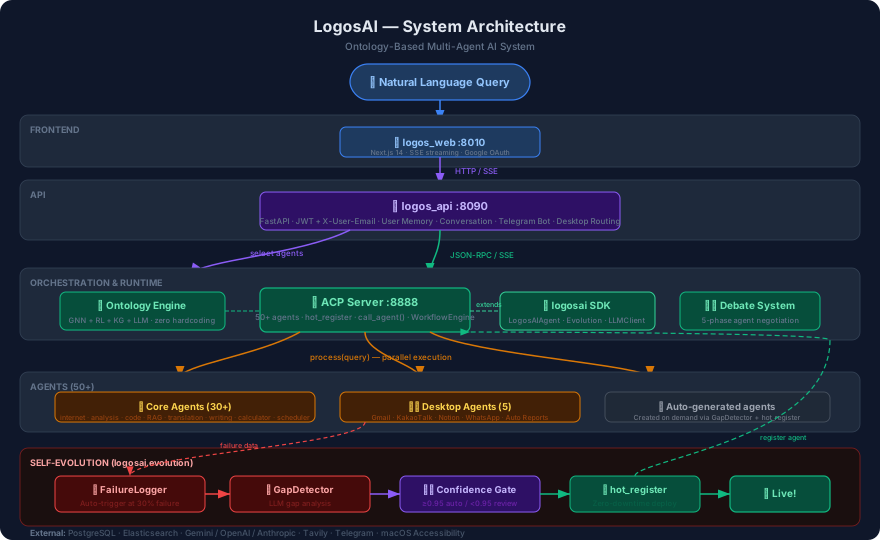
Why LogosAI?
| LogosAI | LangGraph | CrewAI | OpenAI SDK | OpenClaw | Claude Agent SDK | Google ADK | |
|---|---|---|---|---|---|---|---|
| Agent creation | 4 lines | 30+ lines | 15+ lines | 10+ lines | — | 10+ lines | 10+ lines |
| Tool Use (function calling) | ✅ Auto-inject | ✅ | ✅ | ✅ | ✅ | ✅ | ✅ |
| ReAct (Think→Act→Observe) | ✅ react() |
✅ | ✅ | ✅ | — | ✅ | ✅ |
| Persistent Memory | ✅ PostgreSQL/SQLite + embedding search | ✅ | ✅ | Limited | Local | Limited | Limited |
| LLM Streaming | ✅ Token-by-token | ✅ | — | ✅ | ✅ | ✅ | ✅ |
| Structured Output | ✅ Pydantic schema | ✅ | ✅ | ✅ | — | ✅ | ✅ |
| Error Recovery | ✅ @retry + re-prompt | ✅ | ✅ | ✅ | — | ✅ | ✅ |
| Self-evolution | ✅ Auto-fix + deploy | — | — | — | — | — | — |
| Observability | ✅ LogosPulse (OTel-style traces) | Partial | — | — | — | — | ✅ OTel native |
| Desktop control | ✅ Gmail, KakaoTalk, Notion | — | — | — | ✅ 20+ channels | — | — |
| Browser search | ✅ Real Chrome | — | — | — | ✅ | — | — |
| Agent-to-agent | ✅ call_agent() built-in |
Manual | Manual | — | — | ✅ | ✅ |
| Agent debate | ✅ 5-phase voting | — | — | — | — | — | — |
| Sub-agent spawn | ✅ spawn_agent() |
✅ | ✅ | — | — | ✅ | ✅ |
| Mixin architecture | ✅ Composable mixins | — | — | — | — | — | — |
| Ontology-based routing | ✅ GNN+RL+KG | — | — | — | — | — | — |
| LLM providers | OpenAI, Anthropic, Gemini, Ollama | OpenAI-centric | OpenAI-centric | OpenAI only | Multiple | Claude only | Google-centric |
Quick Start
1. One-Line LLM Call
import asyncio
from logosai import quick_llm

async def main():
    answer = await quick_llm("What is the capital of France?")
    print(answer)  # "The capital of France is Paris."

asyncio.run(main())
2. Build an Agent (4 Lines)
from logosai import agent, AgentResponse

@agent(name="Joke Agent", description="Tells jokes about any topic")
async def joke_agent(query, context=None, llm=None):
    response = await llm.invoke(f"Tell a short joke about: {query}")
    return AgentResponse.success(content={"answer": response.content})
3. Build an Agent (Class-Based)
from logosai import SimpleAgent, AgentResponse

class TranslatorAgent(SimpleAgent):
    agent_name = "Translator"
    agent_description = "Translates text between languages"

    async def handle(self, query, context=None):
        translation = await self.ask_llm(f"Translate to English: {query}")
        return AgentResponse.success(content={"answer": translation})
4. Run a Multi-Agent Server
from logosai import SimpleAgent, AgentResponse
from logosai.acp import SimpleACPServer

class MathAgent(SimpleAgent):
    agent_name = "Math Agent"
    agent_description = "Solves math problems"

    async def handle(self, query, context=None):
        answer = await self.ask_llm(f"Calculate: {query}")
        return AgentResponse.success(content={"answer": answer})

server = SimpleACPServer(port=9000)
server.add(MathAgent())
server.run()
# List agents
curl localhost:9000/jsonrpc -H "Content-Type: application/json" \
  -d '{"jsonrpc":"2.0","id":1,"method":"list_agents"}'

# SSE streaming
curl -N "localhost:9000/stream?query=3+5&agent_id=math_agent"
5. LLM Client (Multi-Provider)
from logosai import LLMClient

client = LLMClient(provider="google", model="gemini-2.5-flash-lite")
await client.initialize()

response = await client.invoke("Explain async/await in Python")
print(response.content)
Supported: openai, anthropic, google (Gemini), ollama
Installation
pip install logosai          # Core framework
pip install logosai[llm]     # + LLM providers (OpenAI, Anthropic, Gemini)
pip install logosai[all]     # + All optional dependencies
Features
Core
@agentdecorator — 4-line agent creationSimpleAgent— Class-based withask_llm()helperquick_llm()— One-shot LLM callLLMClient— Unified multi-provider client (OpenAI, Anthropic, Gemini, Ollama)LogosAIAgent— Full-featured base with async lifecycle and mixin composition
Multi-Agent Orchestration
- SimpleACPServer — Host agents with JSON-RPC + SSE streaming
- Message Bus — Pub/sub with topic routing and priorities
- Workflow Engine — Sequential, parallel, hybrid with enriched data pipeline
- Dynamic Routing — Tag-based auto-discovery, no hardcoded routes
- Data Flow — Previous agent results automatically injected into next agent's query
- Document Search — Semantic search across project docs (LLM-indexed, "where is this info?")
Agent Communication (4 Levels)
L1: call_agent()      — Data passing (query → result)
L2: Debate System     — 5-phase workflow negotiation (propose → vote → consensus)
L3: Collaboration     — ask_opinion(), share_finding(), request_help()
L4: Learning          — share_learning(), get_learnings() (persisted across sessions)
# L1: Call another agent
result = await self.call_agent("internet_agent", "Seoul weather")

# L3: Ask for opinion (not just data — shares reasoning)
opinion = await self.ask_opinion("analysis_agent",
    "Is this a seasonal pattern?",
    my_analysis={"pattern": "March spike", "confidence": 0.6})

# L4: Share what you learned (persisted for all agents)
await self.share_learning(
    pattern="Gmail compose overlay breaks JS selectors",
    solution="Add &fs=1 to compose URL",
    tags=["gmail", "chrome"])

# L4: Learn from others
learnings = await self.get_learnings(tags=["gmail"])
Agentic AI (v0.12) — Mixin Architecture
LogosAIAgent is built from five composable mixins, each independently usable:
| Mixin | File | Capabilities |
|---|---|---|
| ToolUseMixin | mixins/tool_use.py |
register_tool(), run_with_tools(), register_tool_object() |
| MemoryMixin | mixins/memory.py |
memorize(), recall(), forget() — embedding hybrid search |
| ReactMixin | mixins/react.py |
react() — Think→Act→Observe loop |
| PlanningMixin | mixins/planning.py |
plan(), plan_stream() — Goal decomposition tree |
| MultiAgentMixin | mixins/multi_agent.py |
call_agent(), delegate(), spawn_agent() |
# Tool Use — 3 ways to register tools
agent.register_tool("calc", "Calculator", calc_func, params)          # existing
agent.register_tool_object(Tool(name="calc", category="math", ...))   # new: Tool dataclass
agent.register_tool_object(@tool_decorator(...))                       # new: auto-parse signature

# ReAct — Think → Act → Observe loop
result = await agent.react(
    "Calculate compound interest: $10K at 8% for 5 years, then convert to KRW",
    tools=BUILTIN_TOOLS, tool_executors=BUILTIN_EXECUTORS,
)
# → Thought: "Need to calculate compound interest"
# → Action: calculator(10000 * 1.08**5) → $14,693
# → Thought: "Now convert to KRW"
# → Action: calculator(14693 * 1380) → ₩20,276,340
# → Final Answer: "₩20,276,340"

# Persistent Memory — embedding hybrid search
await agent.memorize("user_pref", "User prefers Korean", importance=0.9)
memories = await agent.recall("user")  # Auto-injected into LLM context
# Semantic: query "수도 날씨" finds memory "서울 기온" via cosine similarity

# Goal Decomposition
plan = await agent.plan("Build a web scraper for news articles")
# → Sub-goals: fetch → parse → store → deduplicate → schedule
async for step in agent.plan_stream("Build a web scraper"):
    print(step)  # Streams decomposition steps in real-time

# Structured Output — enforce JSON schema
from pydantic import BaseModel
class Weather(BaseModel):
    city: str
    temperature: float

result = await agent.ask_llm_structured("Seoul weather", Weather)
# → Weather(city="Seoul", temperature=22.5)

# Dynamic Sub-Agent — create specialists at runtime
translator = agent.spawn_agent("translator", "Translates text", my_func)
results = await agent.delegate([
    {"agent_id": "translator", "query": "Hello"},
    {"agent_id": "calculator", "query": "1+1"},
], parallel=True)

# LLM Streaming — token-by-token
async for chunk in agent.ask_llm_stream("Tell me about AI"):
    print(chunk, end="")
Capabilities: Tool Use · ReAct · Memory (embedding search) · Goal Decomposition · Streaming · Structured Output · Error Recovery · Context Management
Document Generation — Desktop Native
Generate professional documents through natural language:
"SpaceX 회사 정보를 PPT로 만들어줘"
→ internet_agent (search) → pptx_generator_agent (generate)
→ PowerPoint opens and builds slides in real-time

"Docker 매뉴얼을 워드로 만들어줘"
→ docx_generator_agent → Word document with tables, charts, metrics
| Feature | Details |
|---|---|
| PPT Generation | 101 themes × 15 layouts, Desktop Native (AppleScript) + python-pptx fallback |
| DOCX Generation | 8 doc_types × 8 themes, Hybrid mode (python-docx tables + Desktop Native text) |
| Google Maps | Place search + directions + interactive map rendering |
| File Search | Spotlight + find + grep — local filesystem search with content matching |
| Capability Protocol | Agent auto-composition via DAG (Level B composite + Level C autonomous) |
Observability — LogosPulse
OpenTelemetry-style tracing and metrics for every agent execution:
Root Span (agent.process)
├── LLM Span (llm.gemini-2.5-flash-lite) — intent extraction      ~120ms
└── LLM Span (llm.gemini-2.5-flash-lite) — response generation    ~1.8s
from logosai.utils.pulse_client import PulseClient

# Fire-and-forget — zero overhead (~0.01ms/span)
pulse = PulseClient(endpoint="http://localhost:8095")
await pulse.record_execution(agent_id, query, result, duration_ms)
await pulse.record_llm_call(model, tokens_in, tokens_out, latency_ms)
await pulse.record_span(trace_id, parent_id, name, metadata)
Dashboard (port 8096): Execution history · LLM cost tracking · Span tree visualization · User feedback (👍/👎) · Adaptive learning loop
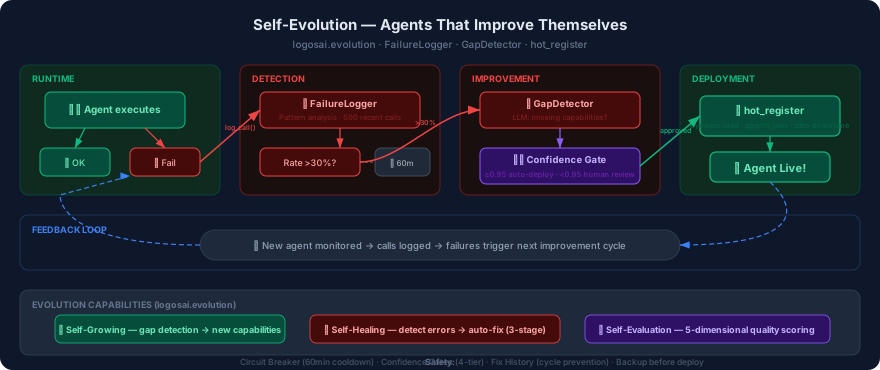
Self-Evolution
from logosai.evolution import EvolutionSystem, EvolutionConfig

config = EvolutionConfig(enabled=True, llm_provider="google")
evolution = EvolutionSystem(agent, config)
await evolution.enable()
Capabilities: Self-Healing · Self-Growing · Self-Evaluation
Safety: Circuit Breaker (3 failures → 1h cooldown) · Confidence Gates · Fix History
FORGE Agent Builder (Optional)
pip install logosai-forge
from logosai_forge import ForgeClient

forge = ForgeClient()
result = await forge.create_agent("Calculate BMI from weight and height")
result = await forge.improve_agent(code, failure_log)      # Fix bugs
result = await forge.enhance_agent(code, "add caching")    # Add features
Autonomous evolution loop:
Agent fails → FailureLogger → 30% threshold → FORGE improves
→ Confidence Gate (≥0.95) → RollbackManager backup
→ hot_register (zero-downtime deploy) → EvolutionMonitor tracks
Desktop Agent
Control your desktop through natural language — 63+ agents, each independent:
desktop_agent (dynamic LLM router — no hardcoded routes)
├── call_agent("kakaotalk_agent")       → KakaoTalk messaging
├── call_agent("mail_desktop_agent")    → Gmail read/compose/attach
├── call_agent("notion_desktop_agent")  → Notion pages/todos
├── call_agent("multi_ai_inquiry_agent") → ChatGPT/Claude/Gemini compare
├── call_agent("auto_report_agent")     → Scheduled search + delivery
└── screen_analyzer (lightweight 0.1s + Vision 3s fallback)
| Feature | macOS | Ubuntu |
|---|---|---|
| Gmail read/compose/reply/attach | ✅ | ✅ Chrome CDP |
| KakaoTalk messaging | ✅ AppleScript | ❌ |
| Notion read/create/todos | ✅ Keyboard + Vision | ✅ |
| Multi-AI Inquiry | ✅ App + Chrome | ✅ Chrome |
| Auto Reports (scheduled) | ✅ | ✅ |
| ScreenAnalyzer (lightweight + Vision) | ✅ | ✅ |
| Intent Verification | ✅ | ✅ |
ScreenAnalyzer: Lightweight check first (~0.1s AppleScript/JS) → Vision fallback only when needed (~3s). Intent Verification: verifies all preconditions before irreversible actions. No Trace: closes windows and restores previous app after completion (Cmd+W, not Cmd+Q).
Auto Reports
"Every morning at 8am, search Seoul weather and send via KakaoTalk"
"If Bitcoin exceeds $80,000, notify me by email"
Conditional execution · AI summary · Multi-channel (KakaoTalk/Gmail/Telegram)
Web management: http://localhost:8010/auto-reports
Testing
54 tests across framework core, Agentic AI, and observability:
pytest logosai/tests/ -v           # Framework + Agentic AI tests
pytest logos_pulse/tests/ -v      # Observability + tracing tests
Key coverage: Tool Use · ReAct · Persistent Memory · Goal Decomposition · Span Tracing · Feedback API · Learning Loop · SSE Bidirectional · Interaction Engine (31 tests + 7 evaluations)
Documentation
| Guide | Description |
|---|---|
| ACP Protocol | Agent Communication Protocol — endpoints, call_agent(), Auto Reports |
| Building Agentic AI | LLM integration, collaboration, debate, evolution |
| Building an ACP Server | Deploy multi-agent servers with JSON-RPC + SSE |
| Samples | Runnable examples — ResearchAgent, calculator, hello world |
Full Stack Quick Start
macOS:
curl -fsSL https://raw.githubusercontent.com/maior/logosai-framework/main/install-macos.sh | bash
Ubuntu / Debian:
curl -fsSL https://raw.githubusercontent.com/maior/logosai-framework/main/install-ubuntu.sh | bash
cd ~/logosai
./start.sh       # Start all services
./stop.sh        # Stop all services
./status.sh      # Check what's running
| Service | Port | Description |
|---|---|---|
| logos_web | 8010 | Next.js frontend — chat, admin, auto reports, architecture |
| logos_api | 8090 | FastAPI backend — auth, streaming, memory, Telegram bot |
| ACP Server | 8888 | Agent runtime — 63+ agents, self-evolution, L3/L4, Desktop Native |
| LogosPulse API | 8095 | Observability backend — execution traces, LLM metrics, costs |
| LogosPulse UI | 8096 | Observability dashboard — span tree, feedback, learning loop |
| PostgreSQL | 5432 | Database |
Requirements
Core: Python 3.11+, aiohttp, pydantic, loguru
LLM (pip install logosai[llm]): openai, anthropic, google-genai, langchain
Desktop Agent: macOS: Peekaboo + Accessibility · Ubuntu: xdotool, xclip, scrot
Full Stack: Node.js 18+, PostgreSQL 14+
Related Repositories
| Repository | Description |
|---|---|
| logosai-ontology | Multi-agent orchestration (GNN+RL+KG+LLM) |
| logosai-api | FastAPI backend server |
| logosai-web | Next.js frontend |
| logosai-pulse | Agent Observability (traces, metrics, feedback) |
License
MIT — Copyright (c) 2023-2026 LogosAI
1 maintainer

Download files
Download the file for your platform. If you're not sure which to choose, learn more about installing packages.
Source Distribution
Built Distribution
Filter files by name, interpreter, ABI, and platform.
If you're not sure about the file name format, learn more about wheel file names.
Copy a direct link to the current filters
File details
Details for the file logosai-0.12.0.tar.gz.
File metadata
- Download URL: logosai-0.12.0.tar.gz
- Upload date:
- Size: 433.8 kB
- Tags: Source
- Uploaded using Trusted Publishing? No
- Uploaded via:
twine/6.1.0 CPython/3.11.0
File hashes
| Algorithm | Hash digest | |
|---|---|---|
| SHA256 |
0103f12b80146146fc317b140994475e060245a1be5c4525aad6b1652b6f2320
|
|
| MD5 |
85daf0cacec22519749a49f1c7089f4b
|
|
| BLAKE2b-256 |
f317cd64042ff6f335ddd085cb393144301706c7939de52765ddd272d120633c
|
File details
Details for the file logosai-0.12.0-py3-none-any.whl.
File metadata
- Download URL: logosai-0.12.0-py3-none-any.whl
- Upload date:
- Size: 516.5 kB
- Tags: Python 3
- Uploaded using Trusted Publishing? No
- Uploaded via:
twine/6.1.0 CPython/3.11.0
File hashes
| Algorithm | Hash digest | |
|---|---|---|
| SHA256 |
642f7db683ccb1971c0d71e0d764ab8575363d73b221b7e73c7302bbbee94176
|
|
| MD5 |
9dfef3ef958e749fc8d6b6ca9a3a21e1
|
|
| BLAKE2b-256 |
d7217bd5ac879aaa2fc55aa8e6af0cb3270474fa10ddbb020aa01323eb08b6e0
|














