
logplane
A local control plane for AI agents. logplane assigns work, recovers from crashes, holds risky actions for human approval, and enforces cost caps, and it drives all of it from an append-only event log instead of a mutable task board.
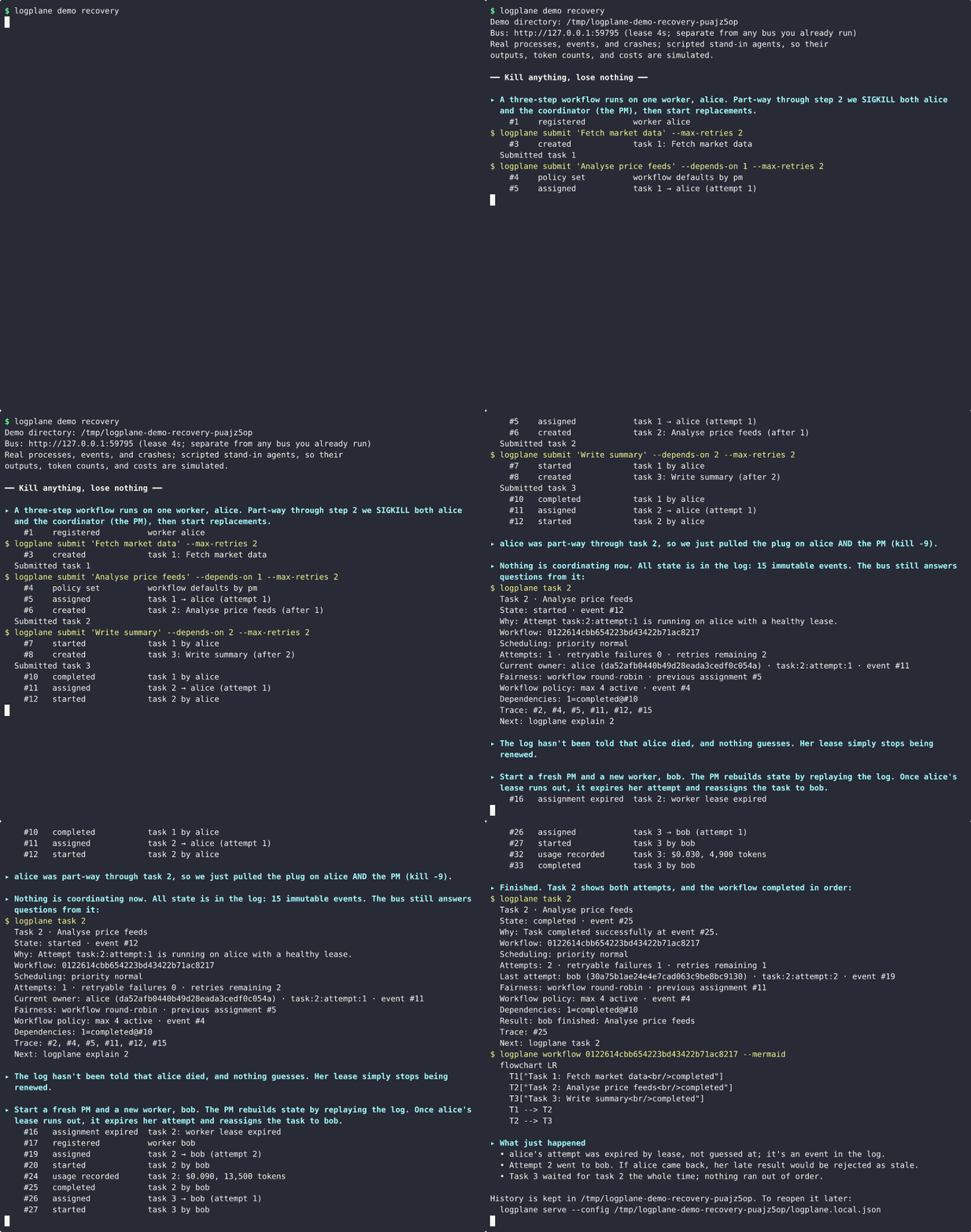
Agent workflows fail in ordinary ways. A worker crashes mid-task, the coordinator restarts, two runners pick up the same job, an agent needs a human answer, or a retry repeats an external action. A kanban-style board only shows where a card was last moved. logplane records what actually happened, as immutable events, and derives current state by replaying them. Ownership, retries, dependencies, and human decisions are all events, so a crash loses nothing and every state can be explained.
See it in a minute
python3 -m venv .venv && . .venv/bin/activate   # Python 3.10+
python -m pip install logplane

logplane demo recovery       # kill the worker and the coordinator mid-task
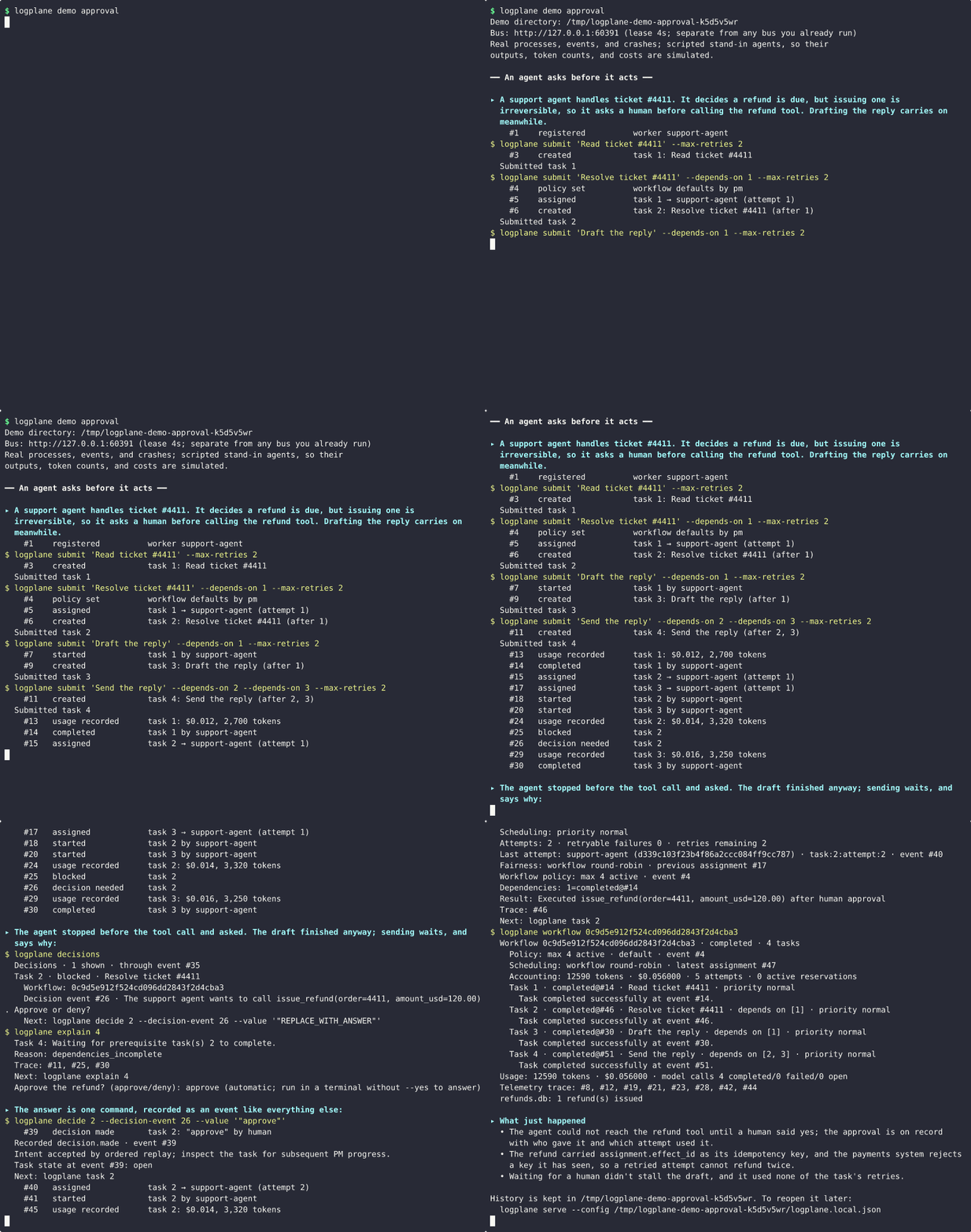
logplane demo approval       # an agent asks before an irreversible tool call
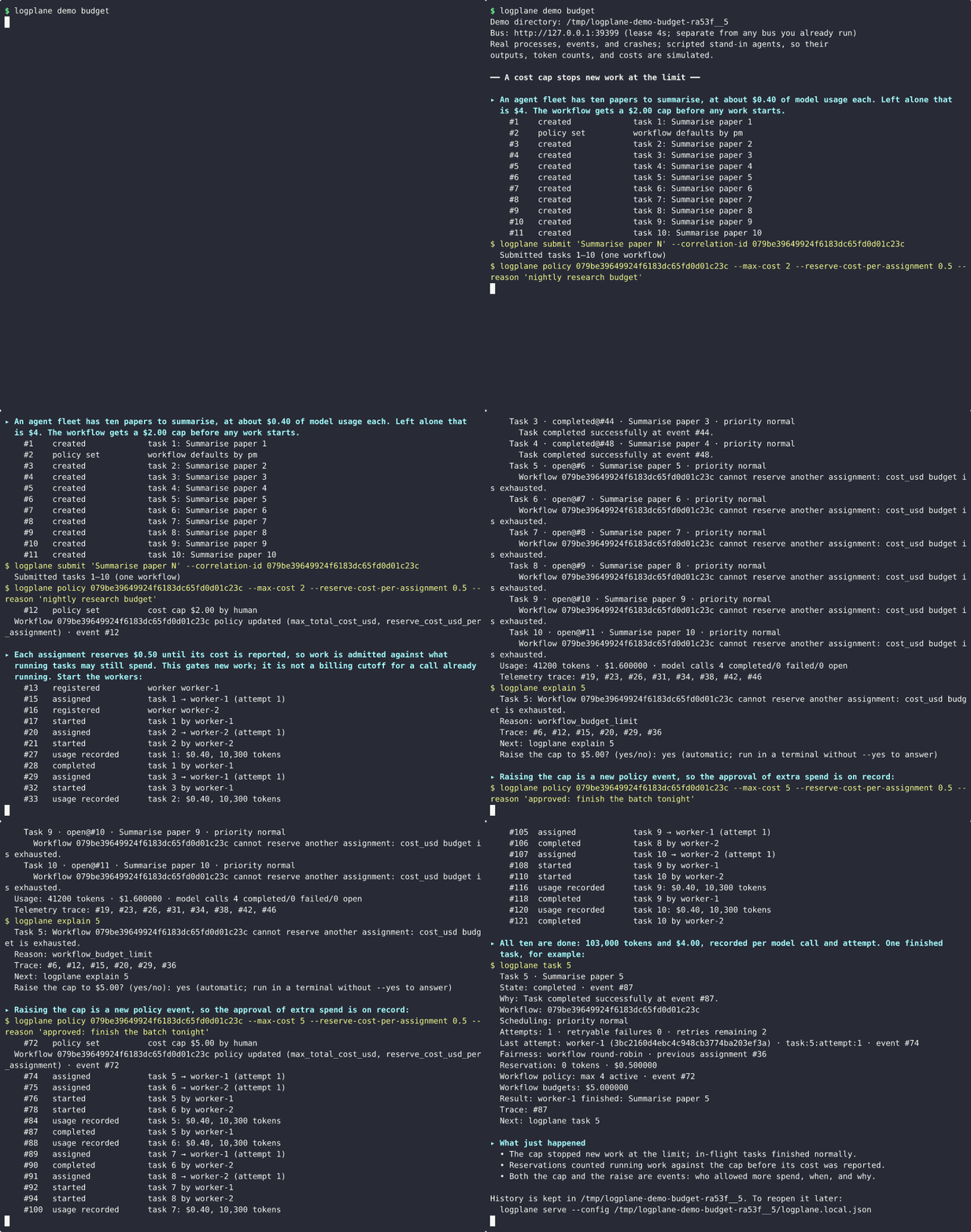
logplane demo budget         # a cost cap stops a runaway bill
logplane demo audit-triage   # parallel reviewers, a human severity call,
                              # findings submitted once despite a crash
Each demo starts its own bus, coordinator, and workers as real processes in a
throwaway directory, narrates what happens, and keeps the history for you to
inspect. The crashes are real kill -9s. None of it touches your other
logplane data.
Watch logplane demo approval: an agent asks before an irreversible tool call
Watch logplane demo budget: a cost cap stops a runaway bill
What you get
- Crash recovery by design. Workers hold leases. A dead worker's attempt is expired and reassigned, and a restarted coordinator rebuilds state by replay.
- One owner per task. Only the current attempt can advance a task, and late results from a lost worker are rejected.
- Dependencies. Tasks form a DAG, wait for upstream results, and propagate failure downstream.
- Humans in the loop. An agent can block with a question, such as approval
for a risky tool call.
logplane decideanswers it, and the answer is on record. - Spend limits. Model calls report tokens and cost per task and attempt. Workflow budgets stop new work at a cap, and raising the cap is an event too.
- Retry-safe external effects.
assignment.effect_id(...)is stable across attempts, so a retry can skip work a crashed attempt already did. - Bring your own agents. Wrap a Python object, a CLI, or an HTTP service. logplane never needs your agent's internals.
- Explainable state.
logplane task,explain, andworkflow --mermaidanswer "why is this waiting?" from the log.
It is local-first: one machine, SQLite, loopback only. See trust and scope for what it does not do yet.
How it works
The bus never stores a mutable card as truth. Every action (a task created, an attempt assigned, a worker's result, a human decision) is an immutable SQLite event. The project manager (PM) derives current state by replaying those events and reconciles anything missing, so any process can crash and restart without losing ownership state.
- You and your tools publish intent: tasks, dependencies, policies, decisions, cancellations.
- The PM replays the log, assigns work to live workers, and records lease expiries, retries, decision requests, and terminal states.
- Workers execute only assignments addressed to their current process and report one outcome per attempt.
- Every view (
task,explain,workflow) is rebuilt from the log.
Four identities keep retries and replays unambiguous: correlation_id (one
workflow), task_id (one logical outcome), assignment_id (one execution
attempt), and instance_id (one worker process). The normal lifecycle is
task.created → task.assigned → task.started → task.completed; recovery,
human input, cancellation, and pauses are explicit events too.
How logplane works covers the full lifecycle, components, invariants, crash recovery, and trust model.
Install
Use macOS or Linux with Python 3.10+; native Windows is not supported (see the tested-platform policy).
python3 -m venv .venv && . .venv/bin/activate   # python3 --version must be 3.10+
python -m pip install logplane
logplane init
logplane init writes logplane.local.json and a .logplane/ data directory
in the current directory, so run it in the folder that should keep the bus's
history. If your default python3 is older than 3.10, create .venv with a
supported interpreter such as python3.11.
To run the examples or work on logplane itself, install from source instead:
git clone https://github.com/dekizk/logplane.git && cd logplane
python3 -m venv .venv && . .venv/bin/activate
python -m pip install -e .
Create the environment in .venv, not in the repository root. The editable
install keeps this checkout as the source of the logplane command, so rerun
python -m pip install -e . after pulling changes that add modules. Record
git rev-parse HEAD when reporting trial results.
Run your own bus
Run these in four terminals from the folder where you ran logplane init,
with .venv activated in each.
The generated configuration binds only to loopback and keeps runtime data in
the ignored .logplane/ directory.
# terminal 1
logplane serve

# terminal 2
logplane pm

# terminal 3
logplane demo-worker alice

# terminal 4
RESPONSE=$(logplane submit "Verify the logplane quick start" --json)
TASK_ID=$(printf '%s' "$RESPONSE" | python -c \
  'import json,sys; print(json.load(sys.stdin)["payload"]["task_id"])')
CORRELATION_ID=$(printf '%s' "$RESPONSE" | python -c \
  'import json,sys; print(json.load(sys.stdin)["correlation_id"])')
printf 'Task: %s\nWorkflow: %s\n' "$TASK_ID" "$CORRELATION_ID"
After about one second, verify the bus, task, and derived workflow:
logplane doctor
logplane task "$TASK_ID"
logplane workflow "$CORRELATION_ID"
The expected state is a healthy schema-v2 bus with one healthy worker, a
completed task whose last attempt belongs to alice, and a one-task
completed workflow. The demo worker emits no model telemetry, so
tokens not reported and cost not reported are expected rather than errors.
Machine-readable pass/fail checks
logplane task "$TASK_ID" --json | python -c '
import json, sys
task = json.load(sys.stdin)
assert task["status"] == "completed", task
assert task["assignment_active"] is False, task
print("PASS: task is completed with no active assignment")
'

logplane workflow "$CORRELATION_ID" --json | python -c '
import json, sys
workflow = json.load(sys.stdin)
assert workflow["status"] == "completed", workflow
assert workflow["task_count"] == 1, workflow
print("PASS: workflow reports one completed task")
'
If the task is still assigned or started, wait briefly and check again. If
logplane doctor keeps warning, the PM, worker, or bus is probably using a
different URL; see connecting to the bus.
If logplane is not found, check that .venv is activated in that terminal
before reinstalling. logplane tasks and
logplane workflows find IDs again if you lose them, and
logplane workflow "$CORRELATION_ID" --mermaid prints the workflow as a
Mermaid flowchart: another projection over the log, never an editable board.
These checks inspect projected state; they do not prove exactly-once execution or external effects. To stop, press Ctrl-C in the worker terminal, then the PM, then the server. Local history is preserved.
Try dependencies, decisions, and failures
The demo worker can deliberately block, fail, or work slowly so you can watch the other paths without writing an agent. Use one outcome flag per worker; the outcome happens once for that task ID.
logplane demo-worker alice --block 2           # task 2 asks a human for a decision
logplane demo-worker alice --fail 2            # one retryable failure
logplane demo-worker alice --fail-permanently 2
logplane demo-worker alice --delay 30          # slow enough to kill mid-task
submit --depends-on builds a DAG from the command line; repeat it for
fan-in. Dependents inherit the upstream workflow automatically (IDs below
assume a fresh bus):
logplane submit "Research options"                                  # task 1
logplane submit "Design storage" --depends-on 1                     # task 2
logplane submit "Write docs" --depends-on 1                         # task 3
logplane submit "Ship it" --depends-on 2 --depends-on 3             # task 4
A lease expiry or retryable failure consumes one retry, and submit defaults
to no retries. If you plan to use --fail or kill a worker mid-task, submit
with --max-retries 2 (or higher) so the next attempt is allowed; otherwise
the task correctly ends failed.
Everyday commands
| Command | What it does |
|---|---|
logplane submit TITLE |
Create a task (--depends-on, --capability, --max-retries, --priority, --context) |
logplane tasks / workflows / decisions |
List work, workflows, and pending questions with next-step commands |
logplane task ID / explain ID |
Show one task's state and exactly why it is waiting or finished |
logplane workflow ID |
Show a workflow's tasks, dependencies, policy, and token/cost usage (--mermaid for a diagram) |
logplane tail ID |
Follow a workflow's events live |
logplane decide / retry / cancel |
Answer a decision, grant more retries, or cancel a task |
logplane pause / resume / supersede |
Pause or resume a task or workflow, or replace a task with new intent |
logplane policy / agent-policy |
Set workflow concurrency and budgets, or per-agent limits |
logplane workers / doctor |
Check worker leases and overall bus health |
logplane adapter check / adapter run |
Verify and run an existing agent as a worker |
logplane backup / verify-backup / restore |
Verified local backups (recovery operations) |
Finite commands accept --json for scripts. Operating logplane
covers every command, scheduling, fairness, budgets, and controls in detail.
Connect your own agent
Wrap an existing agent instead of rewriting it. A Python object with run()
becomes a worker:
from logplane import BusClient, Completed, PythonAgentAdapter, WorkerRuntime

class ExistingAgent:
    def run(self, assignment):
        result = do_existing_work(
            goal=assignment.goal,
            context=assignment.context,
            idempotency_key=assignment.effect_id("do-existing-work"),
        )
        return Completed("agent finished", {"result_ref": result.ref})

bus = BusClient("http://127.0.0.1:8765", actor="existing-agent")
WorkerRuntime(
    bus,
    name="existing-agent",
    executor=PythonAgentAdapter(ExistingAgent()),
    capacity=2,
    capabilities=["python"],
).run()
Check the contract before connecting it to a live bus:
logplane adapter check --python-target my_package.agent:ExistingAgent
CLI and HTTP agents use the same versioned protocol through a small JSON
config. Use assignment.effect_id(...) for any irreversible external effect so
a retry cannot repeat it. Integrating agents covers the
adapters, the safety contract, telemetry, and safe adoption alongside an
existing system; examples/ has copyable Python, CLI,
HTTP, and real-agent integrations.
Documentation
| Page | Contents |
|---|---|
| How logplane works | Event log, identities, lifecycle, components, invariants, crash recovery, trust model |
| Operating logplane | Commands, decisions, retries, cancellation, pauses, DAGs, scheduling, fairness, budgets |
| Integrating agents | Python, CLI, and HTTP adapters, safety contract, telemetry, adoption modes |
| Event contracts and the HTTP API | Envelope, topics, limits, reading and publishing events |
| Local recovery operations | Artifact audits, backup and restore, task-index rebuilds, PM snapshots |
| Compatibility and support | Platforms, versioned surfaces, upgrades, release checks |
| Roadmap and release notes | Direction, remaining v1.0 gates, and what changed in each release |
Trust and scope
logplane is for local, single-user orchestration on one trusted host:
- Perimeter auth is opt-in. Set
LOGPLANE_TOKENto require a bearer token on every data route; without it, anyone who can reach the port can publish. - Actors are self-reported. The token authenticates clients, not
identities, so any authorized client may publish as any actor, including
pm. - It is not distributed. Run one PM per bus and one uvicorn worker; the PM lock is per machine and event wake-ups are per process.
See the trust model and scope for details.
Development
python -m pip install -r requirements-dev.txt
python -m pytest -q
python -m build
The suite focuses on orchestration failures (restarts, stale attempts, retry exhaustion, races, DAG propagation, adapter contracts, telemetry isolation) and includes live runs of every demo. See running the release checks for the full pre-release procedure.
Status and license
logplane was called agent-bus before v0.13.0; if you used it under that name, follow the migration steps.
Current release: v0.13.1, the rename to logplane and a src/ layout. See the
release notes and the roadmap for the path to
v1.0. Licensed under the MIT License. Copyright (c) 2026 deki. See
credits and acknowledgements.
1 maintainer

Metadata
1 maintainer
Release files for logplane 0.13.1
For a detailed explanation of source distributions (sdists) and built distributions (wheels), please see the package formats documentation.
Source distribution (sdist)
| File | Size | Uploaded | Provenance | |
|---|---|---|---|---|
| logplane-0.13.1.tar.gz | 336.0 kB | With provenance | Details |
Built distribution (wheel)
| File | Interpreter | ABI | Platform | Reset |
|---|---|---|---|---|
| logplane-0.13.1-py3-none-any.whl | Python 3 | none | any | Details |
Total release size: 470.3 kB
Release files / logplane-0.13.1.tar.gz
| Download URL | logplane-0.13.1.tar.gz |
|---|---|
| Size | 336.0 kB |
| Tags | Source |
|
SHA-256 checksum How to use checksums |
7090a130e3c6785b5cd36d78474ae1827777ec13a84253cbc4f55f523b43c620
|
|
BLAKE2b-256 checksum How to use checksums |
af14d90b6ff32f4432a15617cecf3f4dba8aa039edce1b36f74b5d27203b6418
|
| Upload date | |
|
Uploaded using Trusted Publishing? What is trusted publishing? |
Yes |
| Uploaded via |
twine/7.0.0 CPython/3.13.14
|
Provenance
Provenance describes where a file came from. On PyPI, provenance is shared via attestations, which provide a verifiable record of the build or publishing details. View details, limitations and caveats.


PyPI Publish Attestation
PyPI verified that this artifact, at this checksum, originated from the publisher listed below.
Signed by GitHub Actions, verified by PyPI on Oct 21, 2026.
Transparency logRelease files / logplane-0.13.1-py3-none-any.whl
| Download URL | logplane-0.13.1-py3-none-any.whl |
|---|---|
| Size | 134.3 kB |
| Tags | Python 3 |
|
SHA-256 checksum How to use checksums |
2ff931bd77396d73cd3cad31a0f9582386d0c60dc796234ac7599a10e74cd886
|
|
BLAKE2b-256 checksum How to use checksums |
0cf3f49bdae253fb505397f9d26489d50ce9ca3d6ff1150096a3d2c76b4d3eab
|
| Upload date | |
|
Uploaded using Trusted Publishing? What is trusted publishing? |
Yes |
| Uploaded via |
twine/7.0.0 CPython/3.13.14
|
Provenance
Provenance describes where a file came from. On PyPI, provenance is shared via attestations, which provide a verifiable record of the build or publishing details. View details, limitations and caveats.
PyPI Publish Attestation
PyPI verified that this artifact, at this checksum, originated from the publisher listed below.
Signed by GitHub Actions, verified by PyPI on Oct 21, 2026.
Transparency logSecurity for logplane 0.13.1
Provenance
Provenance describes where a file came from. On PyPI, provenance is shared via attestations, which provide a verifiable record of the build or publishing details. View details, limitations and caveats.
Full provenance
All 2 files in this release have been uploaded with provenance metadata.
Attestation for logplane-0.13.1.tar.gz
PyPI Publish Attestation
PyPI verified that this artifact, at this checksum, originated from the publisher listed below.
Signed by GitHub Actions, verified by PyPI on Oct 21, 2026.
Transparency logA note on package security
PyPI is a repository for distributing packages, not a service for auditing them. While third-party security researchers and our staff do their best to detect and remove malicious packages, PyPI cannot guarantee the quality, security or suitability of any given package.














