
Replay SecOps logs with updated timestamps.

Project description
NOTE: The full documentation for Logstory is at: https://chronicle.github.io/logstory/
Logstory
Logstory is used to update timestamps in telemetry (i.e. logs) and then replay them into a Google Security Operations (SecOps) tenant. Each usecase tells an infosec story, a "Log Story."
Usecases
The stories are organized as "usecases", which always contain events and may contain entities, reference lists, and/or YARA-L 2.0 Detection Rules. Each usecase includes a README.md file to describe its use.
Only the RULES_SEARCH_WORKSHOP is included with the PyPI package. Learning about and installing addition usecases is described in usecases.
Installation
Logstory has a command line interface (CLI), written in Python, that is most easily installed from the Python Package Index (PyPI):
$ pip install logstory
The logstory CLI interface has subcommands, which take arguments like so:
logstory usecase_replay RULES_SEARCH_WORKSHOP
These are explained in depth later in this doc.
Configuration
After the subcommand, Logstory uses Google's Abseil library for parameterization of the CLI (aka "flags"). Once installed, it is easiest to configure the CLI flags in an Abseil flagfile like this one:
logstory usecase_replay RULES_SEARCH_WORKSHOP \
--customer_id=01234567-0123-4321-abcd-01234567890a \
--credentials_path=/usr/local/google/home/dandye/.ssh/malachite-787fa7323a7d_bk_and_ing.json \
--timestamp_delta=1d  # optional
Customer ID
(Required) This is your Google SecOps tenant's UUID4, which can be found at:
https://${code}.backstory.chronicle.security/settings/profile
Credentials Path
(Required) The credentials provided use the Google Security Operations Ingestion API. This is NOT the newer RESTful v1alpha Ingestion API (yet, but that is future work).
Getting API authentication credentials
"Your Google Security Operations representative will provide you with a Google Developer Service Account Credential to enable the API client to communicate with the API."[reference]
Update: you can now download the ingestion authentication file from your SecOps tenant's settings page:
https://${code}.backstory.chronicle.security/settings/collection-agent
Timestamp BTS
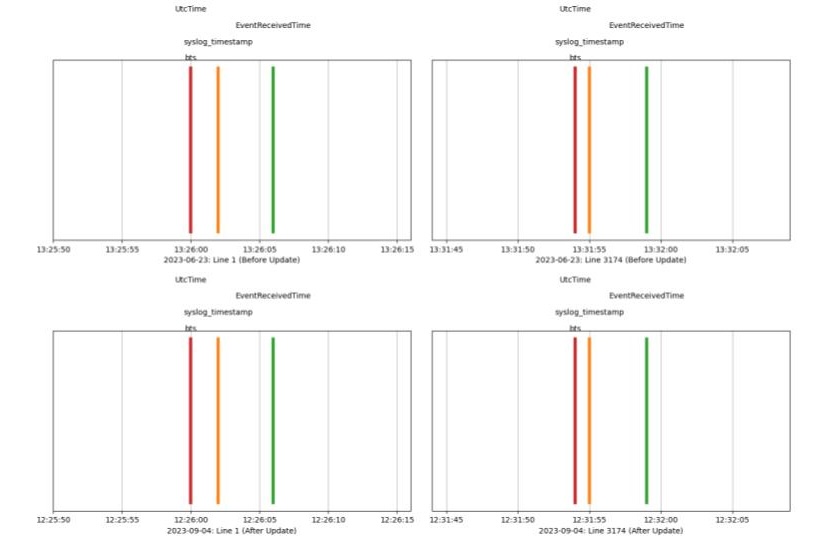
(Optional, default=1d) Updating timestamps for security telemetry is tricky. The .log files in the usecases have timestamps in many formats and we need to update them all to be recent while simultaneously preserving the relative differences between them. For each usecase, Logstory determines the base timestamp "bts" for the first timestamp in the first logfile and all updates are relative to it.
The image below shows that original timestamps on 2023-06-23 (top two subplots) were updated to 2023-09-24, the relative differences between the three timestamps on the first line of the first log file before (top left) and the last line of the logfile (top right) are preserved both interline and intraline on the bottom two subplots. The usecase spans an interval of 5 minutes and 55 seconds both before and after updates.
Timestamp Delta
When timestamp_delta is set to 0d (zero days), only year, month, and day are updated (to today) and the hours, minutes, seconds, and milliseconds are preserved. That hour may be in the future, so when timestamp_delta is set to 1d the year, month, and day are set to today minus 1 day and the hours, minutes, seconds, and milliseconds are preserved.
Tip: For best results, use a cron jobs to run the usecase daily at 12:01am with --timestamp_delta=1d.
You may also provide Nh for offsetting by the hour, which is mainly useful if you want to replay the same log file multiple times per day (and prevend deduplication). Likewise, Nm offsets by minutes. These can be combined. For example, on the day of writing (Dec 13, 2024)--timestamp_delta=1d1h1m changes an original timestamp from/to:
2021-12-01T13:37:42.123Z1
2024-12-12T12:36:42.123Z1
The hour and minute were each offset by -1 and the date is the date of execution -1.
Flags and flag files
Assuming your flagfile is named config.cfg, you can use it to define all of the required flags and then invoke with:
logstory usecase_replay_logtype RULES_SEARCH_WORKSHOP POWERSHELL --flagfile=config.cfg
That updates timestamps and all uploads from a single logfile in a single usecase. The following updates timestamps and uploads only entities (rather than events) from and overrides the timestamp_delta in the flagfile (if it is specified):
logstory usecase_replay_logtype RULES_SEARCH_WORKSHOP POWERSHELL \
 --flagfile=config.cfg \
 --timestamp_delta=0d \
 --entities
You can increase verbosity with by prepending the python log level:
PYTHONLOGLEVEL=DEBUG logstory usecase_replay RULES_SEARCH_WORKSHOP \
 --flagfile=config.cfg \
 --timestamp_delta=0d
For more usage, see logstory --help
Usecases
Usecases are meant to be self-describing, so check out the metadata in each one.
Tip: It is strongly recommended to review each usecase before ingestion rather than importing them all at once.
As shown in the ReadMe for the Rules Search Workshop,
If your usecases were distributed via PyPI (rather than git clone), they will be installed in <venv>/site-packages/logstory/usecases
You can find the absolute path to that usecase dir with:
python -c 'import os; import logstory; print(os.path.split(logstory.__file__)[0])'
/usr/local/google/home/dandye/miniconda3/envs/venv/lib/python3.13/site-packages/logstory
Adding more usecases
We've chosen to distribute only a small subset of the available usecases. Should you choose to add more, you should read the metadata and understand the purpose of each one before adding them.
For the PyPI installed package, simply curl the new usecase into the <venv>/site-packages/logstory/usecases directory.
For example, first review the ReadMe for the EDR Workshop usecase: https://storage.googleapis.com/logstory-usecases-20241216/EDR_WORKSHOP/EDR_WORKSHOP.md
Then download the usecase into that dir. For example:
gsutil rsync -r \
gs://logstory-usecases-20241216/EDR_WORKSHOP \
~/miniconda3/envs/pkg101_20241212_0453/lib/python3.13/site-packages/logstory/usecases/
To make that easier:
❯ logstory usecases_list_available

Available usecases in bucket 'logstory-usecases-20241216':
- EDR_WORKSHOP
- RULES_SEARCH_WORKSHOP
['EDR_WORKSHOP', 'RULES_SEARCH_WORKSHOP']
❯ logstory usecase_get EDR_WORKSHOP

Available usecases in bucket 'logstory-usecases-20241216':
- EDR_WORKSHOP
- RULES_SEARCH_WORKSHOP
Downloading EDR_WORKSHOP/EDR_WORKSHOP.md to [redacted]/logstory/usecases/EDR_WORKSHOP/EDR_WORKSHOP.md
Downloading EDR_WORKSHOP/EVENTS/CS_DETECTS.log to [redacted]/logstory/src/logstory/usecases/EDR_WORKSHOP/EVENTS/CS_DETECTS.log
Downloading EDR_WORKSHOP/EVENTS/CS_EDR.log to [redacted]/logstory/src/logstory/usecases/EDR_WORKSHOP/EVENTS/CS_EDR.log
Downloading EDR_WORKSHOP/EVENTS/WINDOWS_SYSMON.log to [redacted]/logstory/src/logstory/usecases/EDR_WORKSHOP/EVENTS/WINDOWS_SYSMON.log
❯ logstory usecase_list
Unknown command: usecase_list
❯ logstory usecases_list
#
# EDR_WORKSHOP
#
...
Releases
This project uses automated releases triggered by GitHub Releases. Maintainers create releases through the GitHub interface, and automation handles building, testing, and publishing to PyPI.
For contributors: no special release actions needed - just submit quality pull requests.
For maintainers: see CONTRIBUTING.md - Releases for the release process.
Contributing
Interested in contributing? Check out the contributing guidelines. Please note that this project is released with a Code of Conduct. By contributing to this project, you agree to abide by its terms.
See CONTRIBUTING.md for details.
License
Apache 2.0; see LICENSE for details.
Disclaimer
This project is not an official Google project. It is not supported by Google and Google specifically disclaims all warranties as to its quality, merchantability, or fitness for a particular purpose.


Download files
Download the file for your platform. If you're not sure which to choose, learn more about installing packages.
Source Distribution
Built Distribution
Filter files by name, interpreter, ABI, and platform.
If you're not sure about the file name format, learn more about wheel file names.
Copy a direct link to the current filters
File details
Details for the file logstory-0.1.4.tar.gz.
File metadata
- Download URL: logstory-0.1.4.tar.gz
- Upload date:
- Size: 1.5 MB
- Tags: Source
- Uploaded using Trusted Publishing? No
- Uploaded via: twine/6.1.0 CPython/3.12.9
File hashes
| Algorithm | Hash digest | |
|---|---|---|
| SHA256 |
f84cdf250df4600b79c38638e6a88ed8ff8961615047e6cd53e0aa26eb58cf76
|
|
| MD5 |
14cb3782c588cffa2f18074c71f65c0d
|
|
| BLAKE2b-256 |
d219ab0838a41aea26f5da0a3e618de8884717353f00f6f998a78f1f67fc95ae
|
File details
Details for the file logstory-0.1.4-py3-none-any.whl.
File metadata
- Download URL: logstory-0.1.4-py3-none-any.whl
- Upload date:
- Size: 1.6 MB
- Tags: Python 3
- Uploaded using Trusted Publishing? No
- Uploaded via: twine/6.1.0 CPython/3.12.9
File hashes
| Algorithm | Hash digest | |
|---|---|---|
| SHA256 |
003dac3383bb021c7483623c2e27cdca2d7decc7fcb4f61b7f084193984a57f8
|
|
| MD5 |
5cb28bad31ea88b53f53263440706e5b
|
|
| BLAKE2b-256 |
4e7c663bdd6bdac2197df4d35d184d204bcaa0d4a687bba4378cea7e6ff8a7ea
|






