
Robust and effective logging for Python 2 and 3

Project description
logzero



Robust and effective logging for Python 2 and 3.
- Documentation: https://logzero.readthedocs.io
- GitHub: https://github.com/metachris/logzero
Features
- Easy logging to console and/or (rotating) file.
- Provides a fully configured standard Python logger object.
- JSON logging (with integrated python-json-logger)
- Pretty formatting, including level-specific colors in the console.
- No dependencies
- Windows color output supported by colorama
- Robust against str/bytes encoding problems, works with all kinds of character encodings and special characters.
- Multiple loggers can write to the same logfile (also across multiple Python files and processes).
- Global default logger with logzero.logger and custom loggers with logzero.setup_logger(..).
- Compatible with Python 2 and 3.
- All contained in a single file.
- Licensed under the MIT license.
- Heavily inspired by the Tornado web framework.
Example Usage
from logzero import logger

logger.debug("hello")
logger.info("info")
logger.warning("warn")
logger.error("error")

# This is how you'd log an exception
try:
    raise Exception("this is a demo exception")
except Exception as e:
    logger.exception(e)

# JSON logging
import logzero
logzero.json()

logger.info("JSON test")

# Start writing into a logfile
logzero.logfile("/tmp/logzero-demo.log")
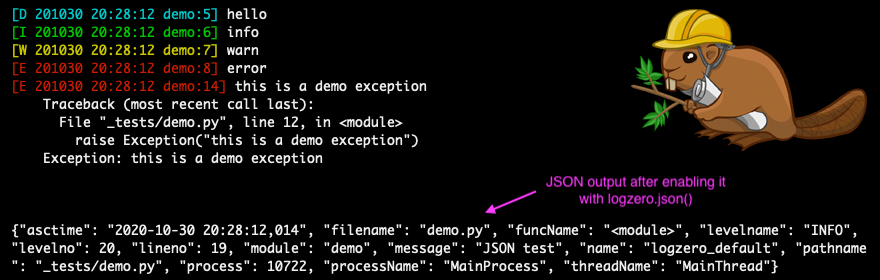
This is the output:
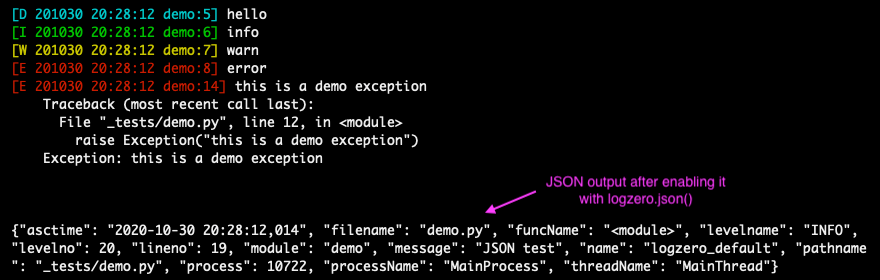
Note: You can find more examples in the documentation: https://logzero.readthedocs.io
JSON logging
JSON logging can be enabled for the default logger with logzero.json(), or with setup_logger(json=True) for custom loggers:
>>> logzero.json()
>>> logger.info("test")
{"asctime": "2020-10-21 10:42:45,808", "filename": "<stdin>", "funcName": "<module>", "levelname": "INFO", "levelno": 20, "lineno": 1, "module": "<stdin>", "message": "test", "name": "logzero_default", "pathname": "<stdin>", "process": 76179, "processName": "MainProcess", "threadName": "MainThread"}

>>> my_logger = setup_logger(json=True)
>>> my_logger.info("test")
{"asctime": "2020-10-21 10:42:45,808", "filename": "<stdin>", "funcName": "<module>", "levelname": "INFO", "levelno": 20, "lineno": 1, "module": "<stdin>", "message": "test", "name": "logzero_default", "pathname": "<stdin>", "process": 76179, "processName": "MainProcess", "threadName": "MainThread"}
The logged JSON object has these fields:
{
  "asctime": "2020-10-21 10:43:40,765",
  "filename": "test.py",
  "funcName": "test_this",
  "levelname": "INFO",
  "levelno": 20,
  "lineno": 9,
  "module": "test",
  "message": "info",
  "name": "logzero",
  "pathname": "_tests/test.py",
  "process": 76204,
  "processName": "MainProcess",
  "threadName": "MainThread"
}
Exceptions logged with logger.exception(e) have these additional JSON fields:
{
  "levelname": "ERROR",
  "levelno": 40,
  "message": "this is a demo exception",
  "exc_info": "Traceback (most recent call last):\n  File \"_tests/test.py\", line 15, in test_this\n    raise Exception(\"this is a demo exception\")\nException: this is a demo exception"
}
Take a look at the documentation for more information and examples:
- Documentation: https://logzero.readthedocs.io.
Installation
Install logzero with pip:
# Create and activate a virtualenv in ./venv/
python3 -m venv venv
. venv/bin/activate

# Install logzero
python -m pip install logzero

# Download and run demo.py
wget https://raw.githubusercontent.com/metachris/logzero/master/examples/demo.py
python demo.py
If you don't have pip installed, this Python installation guide can guide you through the process.
Alternatively, if you use the Anaconda distribution:
$ conda config --add channels conda-forge
$ conda install logzero
You can also install logzero from the public Github repo:
$ git clone https://github.com/metachris/logzero.git
$ cd logzero
$ python setup.py install
Contributors
- Chris Hager
- carlodr
- Brian Lenz
- David Martin
- Zakaria Zajac (creator of python-json-logger)
Development
Getting started
$ git clone https://github.com/metachris/logzero.git
$ cd logzero

# Activate virtualenv
$ python3 -m venv venv
$ . venv/bin/activate

# Install main and dev dependencies
$ pip install -e .
$ pip install -r requirements_dev.txt

# Run the tests
$ make test

# Run the linter
$ make lint

# Generate the docs (will auto-open in Chrome)
$ make docs

# You can enable watching mode to automatically rebuild on changes:
$ make servedocs
To test with Python 2.7, you can use Docker:
docker run --rm -it -v /Users/chris/stream/logzero:/mnt python:2.7 /bin/bash
Now you have a shell with the current directory mounted into /mnt/ inside the container.
Notes
- pytest is the test runner
- CI is run with Github actions.
- Download stats: https://pepy.tech/project/logzero
Changelog
See the changelog here: https://github.com/metachris/logzero/blob/master/HISTORY.md
Feedback
All kinds of feedback and contributions are welcome.
- Create an issue
- Create a pull request
- @metachris

History
1.6.1 (2020-11-15)
- JSON logging with UTF-8 enabled by default (PR 357)
1.6.0 (2020-10-29)
- JSON logging support (PR 344)
- Ability to easily change colors (#82)
- Allow creating a root logger (#342)
- Bugfix: file logging with lower loglevel than stream (PR 338)
- Running tests with Python up to 3.9
- Dependency updates
1.5.0 (2018-03-07)
logzero.syslog(..)(PR 83)
1.4.0 (2018-03-02)
- Allow Disabling stderr Output (PR 83)
1.3.0 (2017-07-19)
- Color output now works in Windows (supported by colorama)
1.2.1 (2017-07-09)
- Logfiles with custom loglevels (eg. stream handler with DEBUG and file handler with ERROR).
1.2.0 (2017-07-05)
- Way better API for configuring the default logger with logzero.loglevel(..), logzero.logfile(..), etc.
- Built-in rotating logfile support.
import logging
import logzero
from logzero import logger

# This log message goes to the console
logger.debug("hello")

# Set a minimum log level
logzero.loglevel(logging.INFO)

# Set a logfile (all future log messages are also saved there)
logzero.logfile("/tmp/logfile.log")

# Set a rotating logfile (replaces the previous logfile handler)
logzero.logfile("/tmp/rotating-logfile.log", maxBytes=1000000, backupCount=3)

# Disable logging to a file
logzero.logfile(None)

# Set a custom formatter
formatter = logging.Formatter('%(name)s - %(asctime)-15s - %(levelname)s: %(message)s');
logzero.formatter(formatter)

# Log some variables
logger.info("var1: %s, var2: %s", var1, var2)
1.1.2 (2017-07-04)
- Better reconfiguration of handlers, doesn't remove custom handlers anymore
1.1.0 (2017-07-03)
- Bugfix: Disabled color logging to logfile
1.1.0 (2017-07-02)
- Global default logger instance (logzero.logger)
- Ability to reconfigure the default logger with (logzero.setup_default_logger(..))
- More tests
- More documentation
1.0.0 (2017-06-27)
- Cleanup and documentation
0.2.0 (2017-06-12)
- Working logzero package with code and tests
0.1.0 (2017-06-12)
- First release on PyPI.
Release history Release notifications | RSS feed


Download files
Download the file for your platform. If you're not sure which to choose, learn more about installing packages.
Source Distribution
Built Distribution
Filter files by name, interpreter, ABI, and platform.
If you're not sure about the file name format, learn more about wheel file names.
Copy a direct link to the current filters
File details
Details for the file logzero-1.6.3.tar.gz.
File metadata
- Download URL: logzero-1.6.3.tar.gz
- Upload date:
- Size: 577.4 kB
- Tags: Source
- Uploaded using Trusted Publishing? No
- Uploaded via: twine/3.2.0 pkginfo/1.6.1 requests/2.25.0 setuptools/50.3.2 requests-toolbelt/0.9.1 tqdm/4.51.0 CPython/3.8.6
File hashes
| Algorithm | Hash digest | |
|---|---|---|
| SHA256 |
1435284574e409b8ec8b680f276bca04cab41f93d6eff4dc8348b7630cddf560
|
|
| MD5 |
5515689a4b3d1f755ce3b52c26a6cc48
|
|
| BLAKE2b-256 |
adcc33ad2acde76def72c1926770d6a69f2f625e491cb76e3fd81f115fade14b
|
File details
Details for the file logzero-1.6.3-py2.py3-none-any.whl.
File metadata
- Download URL: logzero-1.6.3-py2.py3-none-any.whl
- Upload date:
- Size: 16.0 kB
- Tags: Python 2, Python 3
- Uploaded using Trusted Publishing? No
- Uploaded via: twine/3.2.0 pkginfo/1.6.1 requests/2.25.0 setuptools/50.3.2 requests-toolbelt/0.9.1 tqdm/4.51.0 CPython/3.8.6
File hashes
| Algorithm | Hash digest | |
|---|---|---|
| SHA256 |
1b84ee4c8fdabf7023877ff17cb456d82564097704eb6c4ee37952bd8ce0800f
|
|
| MD5 |
39edff95613ea6b2f2bf174488d827d9
|
|
| BLAKE2b-256 |
7ef7369920be5b4e9c1a05f5e10bae62b1eca4e01b0b235541865ff53f4d2b6a
|






