
Local Kubernetes Environment Manager - Simplified local K8s development with Kind
Verified details
These details have been verified by PyPIProject links
GitHub Statistics
Maintainers

Project description
LoKO - Local Kubernetes Oasis - simplified Kubernetes development environments




A Python CLI utility to manage local Kubernetes environments with Kind, providing simplified configuration management, version upgrades, DNS, wildcard certificates, local container registry, and extensive customization options.
Features
- 🚀 Easy Setup: Initialize local Kubernetes clusters with a single command
- 🔄 Smart Version Management: Upgrade component versions using Renovate-style comments
- 💾 Automatic Backups: Config files are automatically backed up before upgrades
- 🎨 Custom Templates: Use your own Jinja2 templates for configuration generation
- ⚙️ Extensive CLI Overrides: Override any configuration value via command-line flags
- 📦 Built-in Local Registry: Local container registry with TLS support
- 🔒 Automatic HTTPS: Built-in certificate management with mkcert
- 🌐 Local DNS: Automatic DNS configuration for local development
- 📈 Metrics & Monitoring: Built-in metrics-server for resource monitoring and HPA support
- 📊 Comprehensive Status: Detailed view of cluster resources with
loko status - 🎯 Advanced Node Scheduling: Flexible node labeling and workload placement
- 🔧 Service Presets: Pre-configured settings for common services (MySQL, PostgreSQL, Valkey, etc.)
- 🛠️ Helm-based Deployment: Deploy services from public repositories (groundhog2k, etc.)
- 🗂️ Centralized Helm Repos: Define repositories once, reference everywhere
- 🔑 Automatic Secrets Management: Automatically generate, fetch and save service credentials
Prerequisites
- Python 3.9 or higher
- Docker
- Kind
- mkcert (for HTTPS certificates)
- Helm
- Helmfile (optional, for service deployment)
- (optional) nss (for macOS) or libnss3-tools (for Linux) - needed for Firefox to trust mkcert certificates
Installation
From PyPI (recommended)
Using pip:
pip install loko-k8s
Using uv:
uv tool install loko-k8s
From Source
git clone https://github.com/bojanraic/loko.git
cd loko
pip install -e .
Using uv (for development)
git clone https://github.com/bojanraic/loko.git
cd loko
uv sync
uv run loko --help
Quick Start
-
Check prerequisites:
loko check-prerequisites -
Generate a default configuration:
loko generate-config -
Initialize your environment:
loko init -
Create the full environment:
loko create
Demo
Watch Loko in action - see the complete workflow from installation to cluster validation:
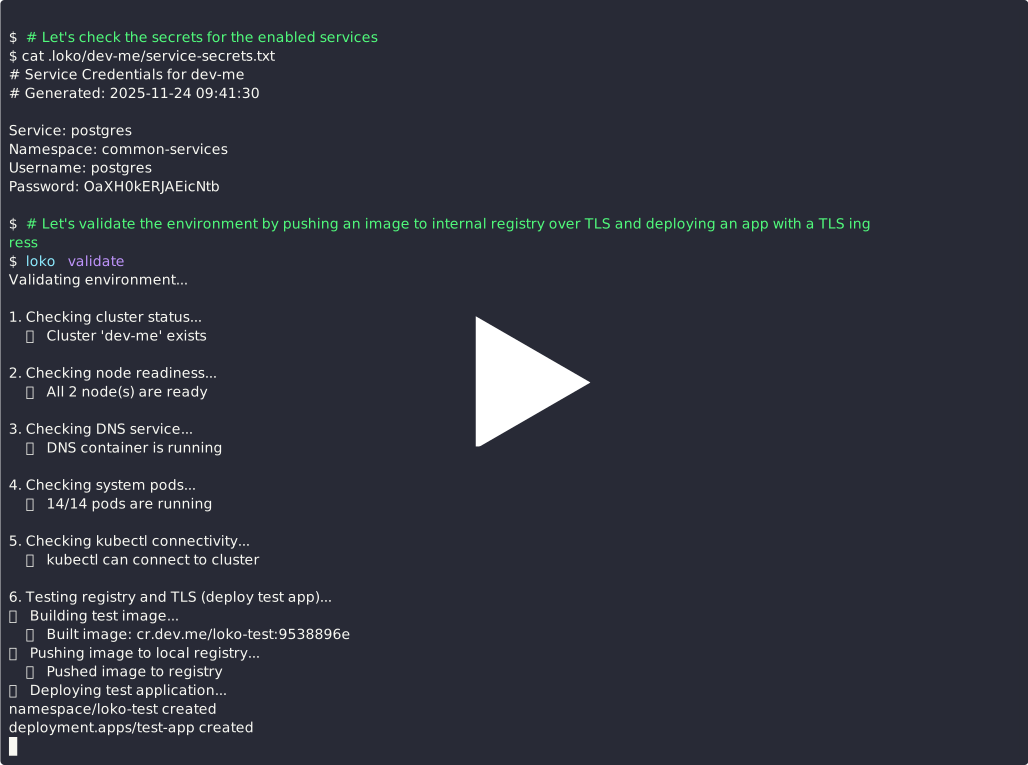
Demo highlights:
- Installing loko
- Generating a default configuration with auto-detected IP
- Creating a local Kubernetes cluster with Kind
- Deploying services (Traefik, container registry, PostgreSQL) with Helm
- Validating the cluster setup
- Checking environment status
- Upgrading component versions
- Viewing service secrets & connecting to PostgreSQL and test application
- Stopping and starting environment
- Installing shell completion (via
--install-completion)
Commands
Environment Lifecycle
loko init- Initialize environment (generate configs, setup certs, network)loko create- Create full environment with complete workflowloko start- Start all cluster containersloko stop- Stop all cluster containersloko destroy- Destroy the environmentloko recreate- Destroy and recreate the environmentloko clean- Destroy environment and remove all artifacts
Status & Validation
loko status- Show comprehensive environment statusloko validate- Validate the environmentloko check-prerequisites- Check if required tools are installed
Configuration & Secrets
loko generate-config- Generate default loko.yamlloko config upgrade- Upgrade component versions using Renovate commentsloko config helm-repo-add- Add Helm repositories to configloko config helm-repo-remove- Remove Helm repositories from configloko secrets- Fetch and display service credentialsloko config presets- View available service presets (coming soon)
Checking Cluster Status
Use the status command to get a comprehensive overview of your local Kubernetes environment:
loko status
This will display:
- Cluster Status: Overall health of the Kubernetes cluster
- Container Status: Status of all related containers (nodes, DNS, etc.)
- Node Status: List of all nodes with their roles and status
- DNS Status: Status of the local DNS service
Version Management & Upgrades
Loko uses Renovate-style comments in your configuration file to track and upgrade component versions. This approach allows you to:
- Keep component versions up-to-date
- Track version sources directly in your config
- Automatically query Docker Hub and Helm repositories for latest versions
How It Works
Add Renovate comments above the version fields in your loko.yaml:
kubernetes:
  image: kindest/node
  # renovate: datasource=docker depName=kindest/node
  tag: v1.34.0

internal-components:
  # renovate: datasource=helm depName=traefik repositoryUrl=https://traefik.github.io/charts
  - traefik: "37.3.0"

services:
  system:
    - name: mysql
      config:
        chart: groundhog2k/mysql
        # renovate: datasource=helm depName=mysql repositoryUrl=https://groundhog2k.github.io/helm-charts
        version: 3.0.7
Supported Datasources
- Docker Hub (
datasource=docker): Fetches latest tags from Docker Hub - Helm Repositories (
datasource=helm): Fetches latest chart versions from Helm repos
Running Upgrades
loko config upgrade
This will:
- 🔍 Scan your config for Renovate comments
- 🌐 Query each datasource for the latest version (in parallel)
- 💾 Create a backup (
loko-prev.yaml) - ✅ Update versions in place
- 📋 Show a summary of changes
Performance: Helm repository checks are performed in parallel, significantly reducing upgrade time when checking multiple repositories. For example, checking 5 repositories completes ~1.3x faster than sequential checks.
Example output:
Upgrading component versions...

🔍 Checking kindest/node (docker)...
🔍 Checking traefik (helm)...
🔍 Checking mysql (helm)...

Updates found:
  kindest/node: v1.32.0 → v1.34.0
  traefik: 31.2.0 → 37.3.0
  mysql: 3.0.5 → 3.0.7

💾 Backup created: loko-prev.yaml
✅ Updated 3 version(s) in loko.yaml

⏱️  Total fetch time: 8.18s (Helm ops: 8.18s)
Restoring from Backup
If an upgrade causes issues, easily revert:
mv loko-prev.yaml loko.yaml
Managing Helm Repositories
Loko provides commands to manage Helm repositories in your configuration file. This allows you to:
- Add custom Helm repositories for service deployments
- Manage repositories with a simple CLI interface
- Use added repositories with services and version upgrades
Adding Repositories
Add one or more Helm repositories in a single command:
# Add a single repository
loko config helm-repo-add \
  --helm-repo-name bitnami \
  --helm-repo-url https://charts.bitnami.com/bitnami

# Add multiple repositories at once
loko config helm-repo-add \
  --helm-repo-name bitnami --helm-repo-url https://charts.bitnami.com/bitnami \
  --helm-repo-name jetstack --helm-repo-url https://charts.jetstack.io
Removing Repositories
Remove one or more repositories:
# Remove a single repository
loko config helm-repo-remove --helm-repo-name bitnami

# Remove multiple repositories
loko config helm-repo-remove \
  --helm-repo-name bitnami \
  --helm-repo-name jetstack
Using Added Repositories
Added repositories appear in your config and can be referenced:
environment:
  helm-repositories:
    - name: bitnami
      url: https://charts.bitnami.com/bitnami/
    - name: jetstack
      url: https://charts.jetstack.io/

  services:
    user:
      - name: my-app
        config:
          repo:
            ref: bitnami          # Reference the added repository
          chart: bitnami/nginx
          version: 1.0.0
Managing Service Credentials
Service credentials (database passwords, etc.) are automatically generated during deployment. To view them:
loko secrets
This fetches credentials from the cluster and displays them. Credentials are also saved to:
<base-dir>/<env-name>/service-secrets.txt
Example services with auto-generated credentials:
- MySQL (root password)
- PostgreSQL (postgres password)
- MongoDB (root password)
- RabbitMQ (admin password)
- Valkey (default password)
Directory Structure
When you run loko init or loko create, a .local directory is created (configurable via base-dir).
.
├── loko.yaml                       # Main configuration file
├── .local/                            # Default directory for cluster data and configs
│   └── <env-name>/                    # Environment-specific directory (e.g. dev-me)
│       ├── certs/                     # TLS certificates and keys
│       │   ├── rootCA.pem             # Root CA certificate
│       │   ├── <domain>.pem           # Domain certificate
│       │   ├── <domain>-key.pem       # Domain private key
│       │   └── <domain>-combined.pem  # Combined cert and key
│       ├── config/                    # Generated configuration files
│       │   ├── cluster.yaml           # KinD cluster configuration
│       │   ├── containerd.yaml        # Container runtime config
│       │   ├── dnsmasq.conf           # Local DNS configuration
│       │   └── helmfile.yaml          # Helm releases definition
│       ├── logs/                      # Kubernetes node logs
│       ├── storage/                   # Persistent volume data
│       ├── kubeconfig                 # Cluster access configuration
│       └── service-secrets.txt        # Generated service credentials
Note: The
.localdirectory is git-ignored by default.
Service Management
The environment manages development services (databases, message queues, etc.) through Helm deployments.
Service Types and DNS Structure
-
System Services (
service.local.domain):- Core infrastructure services (databases, message queues, etc.)
- Direct DNS resolution (e.g.,
mysql.dev.me,postgres.dev.me) - No wildcard resolution for security
-
Applications (
${LOCAL_APPS_DOMAIN}):- Custom applications and services
- Either under
.appssubdomain (service.apps.local.domain) or direct domain (service.local.domain) - Configurable via
use-apps-subdomainsetting
-
Core Infrastructure:
- Registry service (e.g.,
cr.dev.me)
- Registry service (e.g.,
Accessing Services
Once the environment is running, services are accessible through:
-
Direct Port Access:
# Example for PostgreSQL
psql -h localhost -p 5432 -U postgres
-
Domain Names:
# Example for system service
psql -h postgres.dev.me -U postgres
-
Service Credentials:
- Passwords are automatically generated and stored in
<local-dir>/<env-name>/service-secrets.txt - Or fetch them with:
loko secrets
- Passwords are automatically generated and stored in
Using the Local Container Registry
The environment includes a local container registry accessible at <registry-name>.<local-domain>.
-
Push Images:
docker tag myapp:latest cr.dev.me/myapp:latest
docker push cr.dev.me/myapp:latest
-
Use in Kubernetes:
image: cr.dev.me/myapp:latest
Node Scheduling and Workload Placement
The environment supports advanced node scheduling configurations to separate infrastructure and application workloads.
Node Labels
Configure custom labels in loko.yaml:
nodes:
  labels:
    control-plane:
      tier: "infrastructure"
    worker:
      tier: "application"
Scheduling Flags
internal-components-on-control-plane: Forces infrastructure components (Traefik, registry) to run only on control-plane nodes.run-services-on-workers-only: Forces application services (databases, etc.) to run only on worker nodes.
OCI Registry and Helm Chart Validation
Loko includes validation workflows for testing OCI registry functionality.
Run validation with:
loko validate
This runs a comprehensive check including:
- Cluster status and node readiness
- DNS service health
- System pods status
- Kubectl connectivity
- Registry & TLS Validation: Builds a test image, pushes to local registry, deploys a test app, and verifies connectivity.
Configuration
The environment is configured through loko.yaml. You can generate a default one with loko generate-config.
Schema Structure
environment:
  # General settings
  name: string                    # Name of the environment
  base-dir: string                # Base directory for storage
  expand-env-vars: boolean        # Whether to expand OS and k8s-env variables

  # Centralized repository definitions
  helm-repositories: array        # List of Helm repositories

  # Provider configuration
  provider:
    name: string                  # Provider name (currently only "kind" supported)
    runtime: string               # Container runtime (docker or podman)

  # Kubernetes configuration
  kubernetes:
    api-port: integer             # API server port
    image: string                 # Node image
    tag: string                   # Node image tag

  # Node configuration
  nodes:
    servers: integer              # Number of control-plane nodes
    workers: integer              # Number of worker nodes
    allow-scheduling-on-control-plane: boolean
    internal-components-on-control-plane: boolean

  # Network configuration
  local-ip: string                # Local IP for DNS resolution
  local-domain: string            # Domain name
  local-dns-port: integer         # DNS resolver port (default 53)
  local-lb-ports: array           # Load balancer ports
  use-apps-subdomain: boolean     # Use apps subdomain
  apps-subdomain: string          # Subdomain for apps

  # Registry configuration
  registry:
    name: string
    storage:
      size: string

  # Internal components
  internal-components: array      # List of internal components with versions

  # Service configuration
  use-service-presets: boolean    # Whether to use service presets
  run-services-on-workers-only: boolean
  enable-metrics-server: boolean
  services:
    system: array                 # List of system services to deploy
    user: array                   # List of user-defined services
CLI Overrides
Loko provides extensive CLI options to override almost any configuration value during initialization:
loko init --name my-cluster --workers 3 --registry-storage 50Gi --no-schedule-on-control
See loko init --help for all available overrides.
Custom DNS Port
Loko runs a lightweight DNS container on your machine so that services such as postgres.dev.me resolve locally. By default it binds to the standard DNS port 53, but some hosts already listen on that port. If you need to avoid a conflict, set local-dns-port in loko.yaml (or pass --local-dns-port to loko init). Loko will start the DNS container on the specified port and automatically update the /etc/resolver/<domain> entry so lookups continue to work.
Troubleshooting
-
DNS Resolution Issues
- Verify local DNS container is running:
loko status - Check DNS configuration:
cat /etc/resolver/<your-domain>
- Verify local DNS container is running:
-
Certificate Issues
- Regenerate certificates:
loko init(will re-run certificate setup) - Verify cert location:
ls <local-dir>/<env-name>/certs/
- Regenerate certificates:
-
Service Access Issues
- Validate environment:
loko validate - Verify ingress:
kubectl get ingress -A - Check credentials:
loko secrets
- Validate environment:
-
OCI Registry Issues
- Test registry connectivity:
docker pull cr.dev.me/test:latest - Run validation:
loko validate
- Test registry connectivity:
-
Version Upgrade Issues
- Restore from backup:
mv loko-prev.yaml loko.yaml - Check Renovate comment syntax in config file
- Restore from backup:
Development
Setup
git clone https://github.com/bojanraic/loko.git
cd loko
uv sync
uv run loko --help
Running Tests
uv run loko --help
uv run loko init --help
License
This project is licensed under the MIT License - see the LICENSE file for details.
Project details
Verified details
These details have been verified by PyPIProject links
GitHub Statistics
Maintainers


Download files
Download the file for your platform. If you're not sure which to choose, learn more about installing packages.
Source Distribution
Built Distribution
Filter files by name, interpreter, ABI, and platform.
If you're not sure about the file name format, learn more about wheel file names.
Copy a direct link to the current filters
File details
Details for the file loko_k8s-0.0.7.tar.gz.
File metadata
- Download URL: loko_k8s-0.0.7.tar.gz
- Upload date:
- Size: 49.2 kB
- Tags: Source
- Uploaded using Trusted Publishing? Yes
- Uploaded via: twine/6.1.0 CPython/3.13.7
File hashes
| Algorithm | Hash digest | |
|---|---|---|
| SHA256 |
dbcc0b086e2d7a053e9719c81d2bec4054bd8ce2d86b9476d3ebde839264dd32
|
|
| MD5 |
70645f3319dd33e3b3e15cd49e0360fd
|
|
| BLAKE2b-256 |
e24e78b09eb8e231fbe7294c1c54c1c6d4c175eddd96f94705601c32a2d72236
|
Provenance
The following attestation bundles were made for loko_k8s-0.0.7.tar.gz:
Publisher:
publish.yml on bojanraic/loko
-
Statement:
-
Statement type:
https://in-toto.io/Statement/v1 -
Predicate type:
https://docs.pypi.org/attestations/publish/v1 -
Subject name:
loko_k8s-0.0.7.tar.gz -
Subject digest:
dbcc0b086e2d7a053e9719c81d2bec4054bd8ce2d86b9476d3ebde839264dd32 - Sigstore transparency entry: 731662496
- Sigstore integration time:
-
Permalink:
bojanraic/loko@bcdef276f5a3e39566a53c98c10605c0da755331 -
Branch / Tag:
refs/tags/0.0.7 - Owner: https://github.com/bojanraic
-
Access:
public
-
Token Issuer:
https://token.actions.githubusercontent.com -
Runner Environment:
github-hosted -
Publication workflow:
publish.yml@bcdef276f5a3e39566a53c98c10605c0da755331 -
Trigger Event:
release
-
Statement type:
File details
Details for the file loko_k8s-0.0.7-py3-none-any.whl.
File metadata
- Download URL: loko_k8s-0.0.7-py3-none-any.whl
- Upload date:
- Size: 61.8 kB
- Tags: Python 3
- Uploaded using Trusted Publishing? Yes
- Uploaded via: twine/6.1.0 CPython/3.13.7
File hashes
| Algorithm | Hash digest | |
|---|---|---|
| SHA256 |
0a56f27fe1e6072f20b877e7cf9feab963cd9720f02dbb98476aa64386d6f780
|
|
| MD5 |
ae4f988cc984ba4dd4798b949d149701
|
|
| BLAKE2b-256 |
66e5c77135d6be518b6e4fefa2c21c33830731df5fa035a02cf0ebd6aea4e498
|
Provenance
The following attestation bundles were made for loko_k8s-0.0.7-py3-none-any.whl:
Publisher:
publish.yml on bojanraic/loko
-
Statement:
-
Statement type:
https://in-toto.io/Statement/v1 -
Predicate type:
https://docs.pypi.org/attestations/publish/v1 -
Subject name:
loko_k8s-0.0.7-py3-none-any.whl -
Subject digest:
0a56f27fe1e6072f20b877e7cf9feab963cd9720f02dbb98476aa64386d6f780 - Sigstore transparency entry: 731662498
- Sigstore integration time:
-
Permalink:
bojanraic/loko@bcdef276f5a3e39566a53c98c10605c0da755331 -
Branch / Tag:
refs/tags/0.0.7 - Owner: https://github.com/bojanraic
-
Access:
public
-
Token Issuer:
https://token.actions.githubusercontent.com -
Runner Environment:
github-hosted -
Publication workflow:
publish.yml@bcdef276f5a3e39566a53c98c10605c0da755331 -
Trigger Event:
release
-
Statement type:






