
A TUI wrapper around `catt`.

Project description




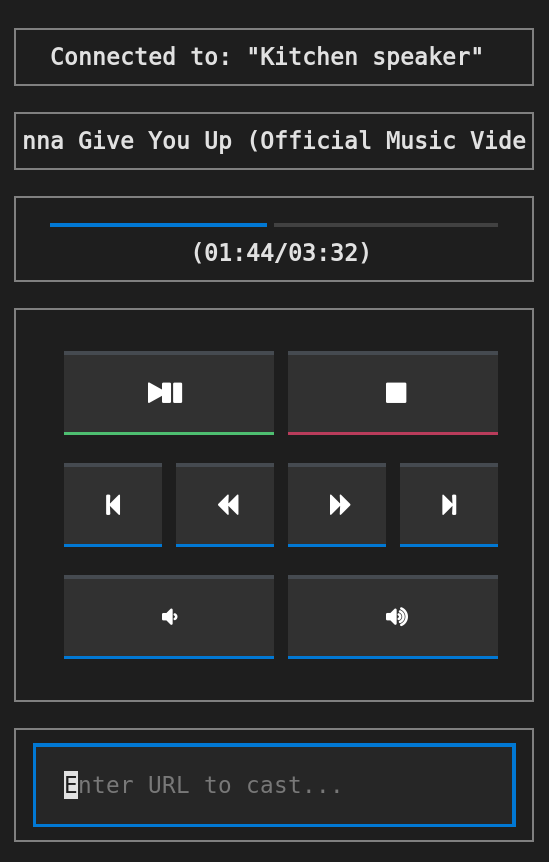
A TUI wrapper around catt, enabling you to cast to and control your chromecast devices.
Dependencies
Python 3.10+ (older versions >= 3.6 might work, but are not tested)
catt (will be installed automatically)
yt-dlp (will be installed automatically)
Optional: A font containing FontAwesome icons to allow displaying of fancy icons on buttons. The freely available NerdFont collection is recommended. Fancy icons can be disabled and replaced by text (see below).
Installation
pip install lolcattQuckstart
At first we need to determine the name of the chromecast device we want to cast to. To do so, run lolcatt --scan. A default device and device aliases can be set in the catt configuration file ~/.config/catt/config.cfg. See catt’s documentation for more information. To start the UI, run lolcatt -d '<device name or alias>' (or simply lolcatt if a default device is set).
To cast, paste either a URL or a path to a local file into the input field and press enter. To add a URL or path to the playback queue instead of playing immediately, hit Ctrl+s instead of enter. To view and navigate in the queue, tap the name of the currently playing item. To seek, tap the progress bar. To change chromecast device, tap the name of the currently active device (currently only devices with set aliases can be selected in this way).
For URLs, all websites supported by yt-dlp (which handles media download under the hood) are supported. Find a list of supported websites here. For local media, most common video and image formats are supported.
Youtube playlists are supported, and each contained video will be added to the playback queue. By specifying a cookie file in the config (per default under ~/.config/lolcatt/config.toml), you can also access private YouTube playlists such as “Watch Later” (https://www.youtube.com/playlist?list=WL), and ensure played YouTube videos are marked as watched.
Troubleshooting
If button icons are not displayed correctly, ensure you are using a font containing FontAwesome icons. Alternatively, you can disable the use of fancy icons in the config file.
If casting does not work for no apparent reason, ensure you have the latest version of yt_dlp installed: pip install --upgrade yt-dlp.
If you encounter any other issues, please open an issue.
Credits
This package was created with Cookiecutter and the LokiLuciferase/cookiecutter-pypackage project template.
Release history Release notifications | RSS feed


Download files
Download the file for your platform. If you're not sure which to choose, learn more about installing packages.
Source Distribution
Built Distribution
Filter files by name, interpreter, ABI, and platform.
If you're not sure about the file name format, learn more about wheel file names.
Copy a direct link to the current filters
File details
Details for the file lolcatt-0.5.1.tar.gz.
File metadata
- Download URL: lolcatt-0.5.1.tar.gz
- Upload date:
- Size: 50.7 kB
- Tags: Source
- Uploaded using Trusted Publishing? No
- Uploaded via: twine/5.1.1 CPython/3.12.4
File hashes
| Algorithm | Hash digest | |
|---|---|---|
| SHA256 |
aec5a795111f0a3087b99fbb8c4d7ca41b9cb0b458af59d920eefeabb8a17064
|
|
| MD5 |
036d3a40b1d7550e47629dda07a58652
|
|
| BLAKE2b-256 |
cb7499314d4f78edc55ca2f2b251c7203eb9909292fb1a1d32b8a7eac35d19f1
|
File details
Details for the file lolcatt-0.5.1-py3-none-any.whl.
File metadata
- Download URL: lolcatt-0.5.1-py3-none-any.whl
- Upload date:
- Size: 19.1 kB
- Tags: Python 3
- Uploaded using Trusted Publishing? No
- Uploaded via: twine/5.1.1 CPython/3.12.4
File hashes
| Algorithm | Hash digest | |
|---|---|---|
| SHA256 |
c395de71c05ae9214ba77c61414ec6e20ccffbc1d452ed21af6eed744ed08ce8
|
|
| MD5 |
1652f398ea32aa1e1a4075e6e4e3fcec
|
|
| BLAKE2b-256 |
e09d119998a36b3838b65cb9ddc66c75e41af5d756107b0ea5634a66de682aee
|






