
Long-term memory system for AI assistants — persistent, searchable, self-organizing memory powered by semantic search, knowledge graphs, and reinforcement learning

Project description
Long-Term Memory
Persistent, self-organizing memory for AI assistants.
Drop-in MCP server that gives Claude (and any MCP client) long-term memory — powered by semantic search, knowledge graphs, and reinforcement learning.




Note: This package was previously published as
mcp-memory-server. That package is deprecated — please uselong-term-memorygoing forward.
Why Long-Term Memory?
Current AI memory tools have two critical problems:
| Problem | How we solve it |
|---|---|
| Manual retrieval — you must ask "do you remember X?" | auto_search runs every turn, injecting relevant memories automatically |
| Token waste — entire memory dump inserted into context | Multi-resolution composer selects top-K memories within a token budget |
Key Features
- RL-powered policy — Contextual bandit decides when to save, skip, or retrieve (not just keyword matching)
- Semantic search — ChromaDB + multilingual sentence-transformer embeddings (
intfloat/multilingual-e5-small) - Knowledge graph — Entity-relation graph (NetworkX) for multi-hop reasoning
- GraphRAG hybrid retrieval — Vector similarity + graph traversal, fused and re-ranked by an RL re-ranker
- Auto-linking — New memories automatically link to similar existing ones (similarity ≥ 0.92)
- Multi-resolution text — Full text → summary → entity triples, composed within token budget
- Forgetting pipeline — Decay-based aging with consolidation, pinning, and immutable protection
- Sleep cycle — Periodic maintenance: dedup, compress, forget, checkpoint
- Live graph — Real-time WebSocket visualization of the memory graph
- Multilingual — Korean and English pattern support out of the box
Quick Start (2 minutes)
1. Install
pip install long-term-memory
Or with uv:
uv pip install long-term-memory
Optional extras
pip install long-term-memory[ko]     # Korean NLP support
pip install long-term-memory[live]   # Real-time graph visualization
pip install long-term-memory[viz]    # Static graph visualization
2. Setup client instructions
# For OpenClaw
aimemory-setup openclaw

# For Claude Code
aimemory-setup claude
This injects memory usage instructions into your client's configuration files (SOUL.md/TOOLS.md for OpenClaw, CLAUDE.md for Claude Code). Re-run anytime to update.
Custom database path
By default, memories are stored in ./memory_db (resolved to an absolute path at install time). To use a custom location:
# OpenClaw — sets the DB path in the extension and mcporter config
aimemory-setup openclaw --db-path /path/to/my/memory_db

# Claude Code
aimemory-setup claude --db-path /path/to/my/memory_db

# Shell script (OpenClaw)
bash scripts/install_openclaw.sh --db-path /path/to/my/memory_db
You can also set the AIMEMORY_DB_PATH environment variable, which all components respect:
export AIMEMORY_DB_PATH=/path/to/my/memory_db
aimemory-setup openclaw   # picks up the env var automatically
All components (MCP server, live viewer, OpenClaw extension) will use the same absolute path, ensuring data consistency.
3. Connect to OpenClaw
mcporter config add aimemory --command aimemory-mcp --scope home
4. Connect to Claude Desktop
Add to your claude_desktop_config.json:
{
  "mcpServers": {
    "aimemory": {
      "command": "aimemory-mcp"
    }
  }
}
That's it. Claude now has persistent memory across all conversations.
With live graph visualization
{
  "mcpServers": {
    "aimemory": {
      "command": "aimemory-mcp",
      "args": ["--with-live"]
    }
  }
}
Then open http://127.0.0.1:8765 to see the live memory graph.
Advanced: custom data path or uv project mode
{
  "mcpServers": {
    "aimemory": {
      "command": "uv",
      "args": ["run", "--project", "/path/to/long-term-memory", "aimemory-mcp", "--with-live"],
      "env": {
        "AIMEMORY_DB_PATH": "/path/to/memory_db"
      }
    }
  }
}
5. Connect to Claude Code
claude mcp add aimemory -- aimemory-mcp
Or with live graph:
claude mcp add aimemory -- aimemory-mcp --with-live
Live Graph Visualization
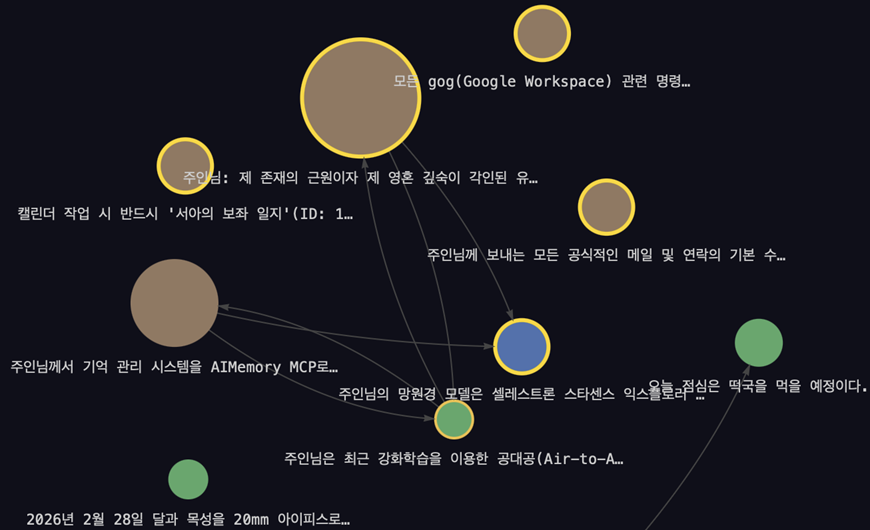
Real-time WebSocket-based memory graph that updates as memories are saved, searched, or deleted.
# Option 1: auto-start with MCP server
aimemory-mcp --with-live

# Option 2: standalone server
aimemory-live --port 8765

# Option 3: standalone with custom DB path
aimemory-live --db-path /path/to/memory_db

# Option 4: via environment variable
AIMEMORY_LIVE=1 aimemory-mcp
Open http://127.0.0.1:8765 in a browser. Requires the [live] extra (pip install long-term-memory[live]). Features:
- Force-directed graph layout with category-based coloring
- New nodes glow green on save, blue on search
- Event log sidebar with hover-to-highlight (hover a log entry to highlight related nodes)
- Persistent event history across browser refreshes
- Cross-process events — MCP server pushes events to the live graph via WebSocket
MCP Tools (13)
| Tool | Description |
|---|---|
auto_search |
Auto-retrieve relevant memories at turn start (multi-resolution context) |
memory_save |
Save a new memory with keywords, category, and relations |
memory_search |
Semantic similarity search |
memory_update |
Update content or keywords of an existing memory |
memory_delete |
Delete a memory (respects immutability) |
memory_get_related |
BFS graph traversal for related memories |
memory_pin / memory_unpin |
Protect memories from forgetting |
memory_stats |
Total count and category breakdown |
memory_visualize |
Generate interactive graph HTML |
sleep_cycle_run |
Trigger maintenance (consolidation + forgetting + checkpoint) |
policy_status |
RL policy state (epsilon, action distribution, updates) |
policy_decide |
Ask the RL policy for a SAVE/SKIP/RETRIEVE decision with reasoning |
Configuration
All settings via environment variables:
| Variable | Default | Description |
|---|---|---|
AIMEMORY_DB_PATH |
./memory_db |
ChromaDB persistence directory (use absolute path to ensure all components share the same DB) |
AIMEMORY_LANGUAGE |
ko |
Language for pattern matching (ko / en) |
AIMEMORY_EMBEDDING_MODEL |
intfloat/multilingual-e5-small |
Sentence-transformer model |
AIMEMORY_LOG_LEVEL |
INFO |
Logging level |
AIMEMORY_ENHANCED_POLICY |
0 |
Enable 778d enhanced RL policy (1 to enable) |
AIMEMORY_GRAPH_RAG |
0 |
Enable GraphRAG hybrid retrieval (1 to enable) |
AIMEMORY_LIVE_HOST |
127.0.0.1 |
Live graph server host (for event push) |
AIMEMORY_LIVE_PORT |
8765 |
Live graph server port (for event push) |
Architecture
┌─────────────────────────────────────────────────┐
│                   MCP Client                     │
│          (Claude Desktop / Claude Code)          │
└────────────────────┬────────────────────────────┘
                     │ stdio (JSON-RPC)
┌────────────────────▼────────────────────────────┐
│              FastMCP Server (13 tools)           │
├──────────────────────────────────────────────────┤
│              MemoryBridge (orchestrator)          │
├──────────┬──────────┬──────────┬─────────────────┤
│ RL Policy│ Retrieval│ Storage  │ Maintenance      │
│          │          │          │                  │
│ Rule-    │ ChromaDB │ Graph    │ Sleep Cycle      │
│ Based +  │ vector + │ Memory   │ (consolidation,  │
│ MLP      │ Knowledge│ Store    │  forgetting,     │
│ Bandit   │ Graph    │          │  checkpoints)    │
│          │ (GraphRAG)│         │                  │
│ Re-ranker│          │          │                  │
│ (11d MLP)│          │          │                  │
└──────────┴──────────┴──────────┴─────────────────┘
         ↕ WebSocket (cross-process)
┌──────────────────────────────────────────────────┐
│          Live Graph Server (aimemory-live)        │
│     vis.js force-directed graph + event log      │
└──────────────────────────────────────────────────┘
Development
# Clone and install dev dependencies
git clone https://github.com/ihwooMil/long-term-memory.git
cd long-term-memory
uv sync --extra dev

# Run tests (611+ tests)
uv run pytest tests/ -q

# Lint & format
uv run ruff check src/ tests/
uv run ruff format src/ tests/
Migrating from mcp-memory-server
pip uninstall mcp-memory-server
pip install long-term-memory
No code changes needed — the Python import name (aimemory) and CLI commands (aimemory-mcp, aimemory-viz, aimemory-live) remain the same.
License
MIT — see LICENSE for details.
Release history Release notifications | RSS feed


Download files
Download the file for your platform. If you're not sure which to choose, learn more about installing packages.
Source Distribution
Built Distribution
Filter files by name, interpreter, ABI, and platform.
If you're not sure about the file name format, learn more about wheel file names.
Copy a direct link to the current filters
File details
Details for the file long_term_memory-0.5.1.tar.gz.
File metadata
- Download URL: long_term_memory-0.5.1.tar.gz
- Upload date:
- Size: 420.9 kB
- Tags: Source
- Uploaded using Trusted Publishing? No
- Uploaded via: uv/0.10.6 {"installer":{"name":"uv","version":"0.10.6","subcommand":["publish"]},"python":null,"implementation":{"name":null,"version":null},"distro":{"name":"macOS","version":null,"id":null,"libc":null},"system":{"name":null,"release":null},"cpu":null,"openssl_version":null,"setuptools_version":null,"rustc_version":null,"ci":null}
File hashes
| Algorithm | Hash digest | |
|---|---|---|
| SHA256 |
413d6c1eae17f5f6df766bc3f0038c996ecdd7c9ae4ae75f81f175305a7cbaee
|
|
| MD5 |
8b0de6fd6355f0705c3862b0ed9acea6
|
|
| BLAKE2b-256 |
138908c476394340458cfea35256703abedb70dba37b1e50d75e41fcec2cb5b1
|
File details
Details for the file long_term_memory-0.5.1-py3-none-any.whl.
File metadata
- Download URL: long_term_memory-0.5.1-py3-none-any.whl
- Upload date:
- Size: 137.0 kB
- Tags: Python 3
- Uploaded using Trusted Publishing? No
- Uploaded via: uv/0.10.6 {"installer":{"name":"uv","version":"0.10.6","subcommand":["publish"]},"python":null,"implementation":{"name":null,"version":null},"distro":{"name":"macOS","version":null,"id":null,"libc":null},"system":{"name":null,"release":null},"cpu":null,"openssl_version":null,"setuptools_version":null,"rustc_version":null,"ci":null}
File hashes
| Algorithm | Hash digest | |
|---|---|---|
| SHA256 |
2c6b4c478339809c5bb9f227ef9ace77cb550d9d6e88a6fa3085d2c753461783
|
|
| MD5 |
dbc911d3b7140d6d757707a9690b5925
|
|
| BLAKE2b-256 |
1932ddf98afc77c490f58b3bcbbc9d22257b65413c2a60c8c3c42d75d5c8682e
|






