




Local Optima Networks
lonkit is a Python library for constructing, analyzing, and visualizing Local Optima Networks (LONs) for both continuous and discrete optimization problems. LONs provide a powerful way to understand the structure of fitness landscapes, revealing how local optima are connected and how difficult it may be to find global optima.
Features
- Basin-Hopping Sampling: Efficient exploration of continuous fitness landscapes using configurable Basin-Hopping
- Iterated Local Search: Discrete LON construction via ILS with built-in problems (Number Partitioning, NK Landscape, OneMax)
- LON Construction: Automatic construction of Local Optima Networks from sampling data
- CMLON Support: Compressed Monotonic LONs for cleaner landscape analysis
- Rich Metrics: Compute landscape metrics including funnel analysis and neutrality
- Beautiful Visualizations: 2D and 3D plots with support for animated GIFs
Installation
pip install lonkit
Exporting 3D plots to images or GIFs also requires Chrome/Chromium. If it is not
installed, run kaleido_get_chrome after installing lonkit. See the
installation guide.
Or install from source:
git clone https://github.com/helix-agh/lonkit.git
cd lonkit
pip install -e .
Quick Start
import numpy as np
from lonkit import compute_lon, LONVisualizer, BasinHoppingSamplerConfig

# Define an objective function
def rastrigin(x: np.ndarray) -> float:
    return 10 * len(x) + np.sum(x**2 - 10 * np.cos(2 * np.pi * x))

# Construct the LON
config = BasinHoppingSamplerConfig(
    n_runs=20,
    n_iter_no_change=500,
    seed=42
)
lon = compute_lon(
    rastrigin,
    dim=2,
    lower_bound=-5.12,
    upper_bound=5.12,
    config=config
)

metrics = lon.compute_metrics()
print(f"Number of funnels: {metrics['n_funnels']}")
print(f"Global funnels: {metrics['n_global_funnels']}")

# Visualize
viz = LONVisualizer()
viz.plot_2d(lon, output_path="lon_2d.png")
viz.plot_3d(lon, output_path="lon_3d.png")
 |
 |
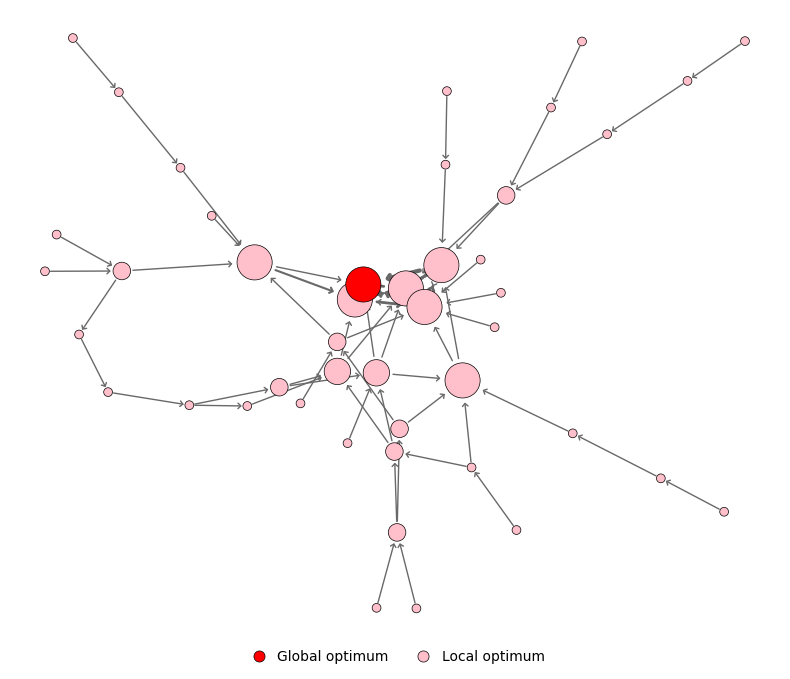
plot_2d(lon) |
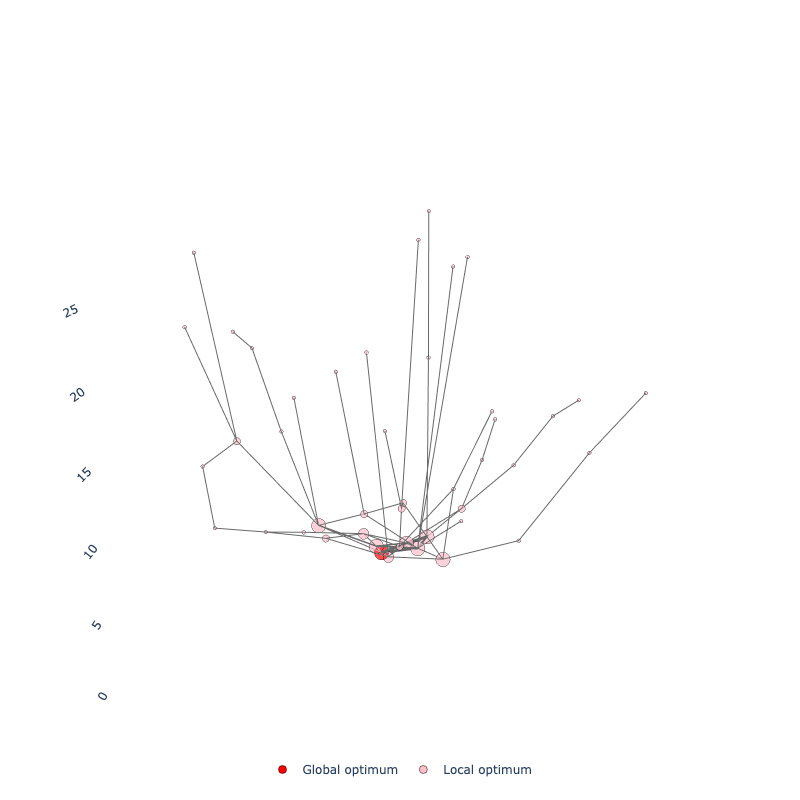
plot_3d(lon): fitness on the Z-axis |
Nodes are local optima and edges are transitions between them, with node size and edge width growing with how often they were visited.
Compressed Monotonic LONs (CMLONs)
CMLONs are a compressed representation where nodes with equal fitness that are connected get merged. This provides a cleaner view of the landscape's funnel structure.
# Convert LON to CMLON
cmlon = lon.to_cmlon()

# Analyze CMLON-specific metrics
cmlon_metrics = cmlon.compute_metrics()
|
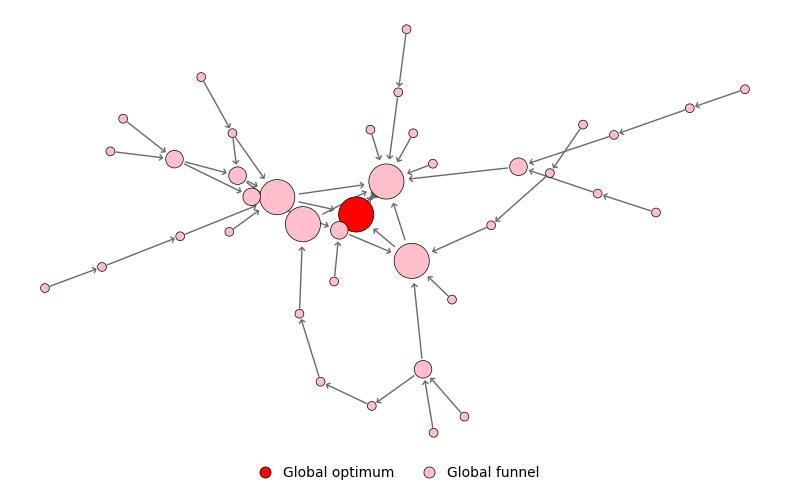 |
| LON: 45 optima | CMLON: 39 optima |
Custom Sampling Configuration
from lonkit import BasinHoppingSampler, BasinHoppingSamplerConfig

config = BasinHoppingSamplerConfig(
    n_runs=50,                   # Number of independent runs
    n_iter_no_change=1000,       # Stop after this many consecutive non-improving perturbations
    step_size=0.05,              # Perturbation size
    step_mode="percentage",      # "percentage" or "fixed"
    coordinate_precision=4,      # Precision for identifying optima
    fitness_precision=None,      # Precision for fitness values (None = full double)
    seed=42                      # For reproducibility
)

sampler = BasinHoppingSampler(config)

# Define search domain
domain = [(-5.12, 5.12), (-5.12, 5.12)]

# Run sampling
result = sampler.sample(rastrigin, domain)
lon = sampler.sample_to_lon(result)
Discrete Optimization Problems
lonkit also supports Local Optima Networks for discrete optimization problems using Iterated Local Search (ILS).
Quick Start (Discrete)
from lonkit import NumberPartitioning, ILSSampler, ILSSamplerConfig, LONVisualizer

# Define problem instance
problem = NumberPartitioning(n=20, k=0.5, instance_seed=1)

# Configure and run ILS sampling
config = ILSSamplerConfig(n_runs=50, n_iter_no_change=100, seed=42)
sampler = ILSSampler(config)
result = sampler.sample(problem)

# Build LON and CMLON
lon = sampler.sample_to_lon(result)
cmlon = lon.to_cmlon()

# Compute metrics
print(lon.compute_metrics())
print(cmlon.compute_metrics())

# Visualize
viz = LONVisualizer()
viz.plot_2d(cmlon, output_path="npp_cmlon.png")
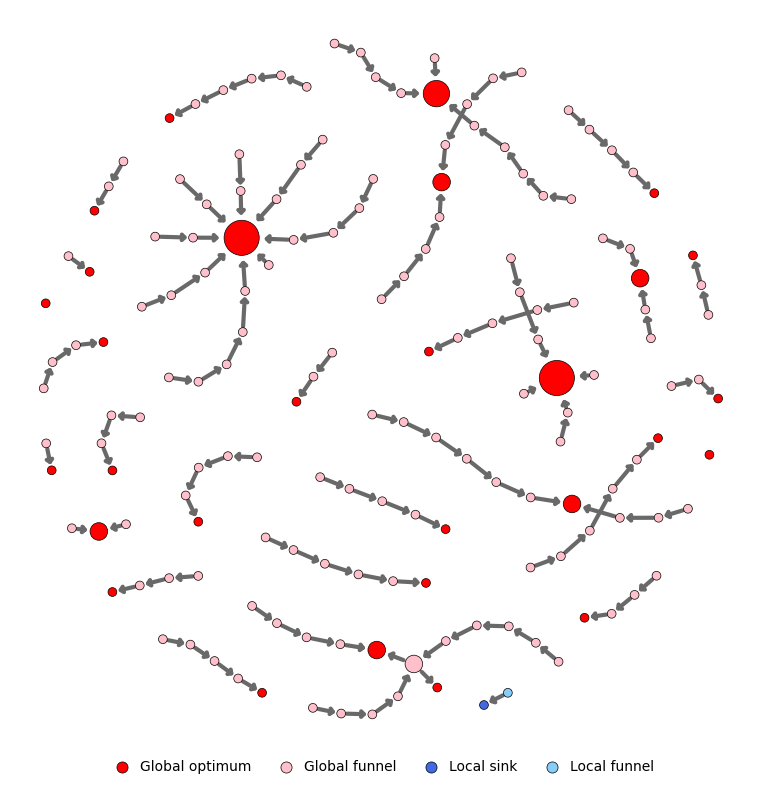
Unlike Rastrigin, this Number Partitioning instance has many separate funnels: most of them end in a global optimum (red), and one ends in a worse local sink (blue).
Custom Discrete Problems
You can define your own discrete problem by subclassing DiscreteProblem. For bitstring problems, inherit from BitstringProblem instead; it provides random_solution(), local_search(), perturb(), and solution_id() out of the box. You only need to implement evaluate().
Documentation
For full documentation, visit: https://helix-agh.github.io/lonkit
Contributing
Contributions are welcome! Please feel free to submit a Pull Request.
1 maintainer

Metadata
1 maintainer
Release files for lonkit 0.9.0
For a detailed explanation of source distributions (sdists) and built distributions (wheels), please see the package formats documentation.
Source distribution (sdist)
| File | Size | Uploaded | |
|---|---|---|---|
| lonkit-0.9.0.tar.gz | 14.0 MB | Details |
Built distribution (wheel)
| File | Interpreter | ABI | Platform | Reset |
|---|---|---|---|---|
| lonkit-0.9.0-py3-none-any.whl | Python 3 | none | any | Details |
Total release size: 14.1 MB
Release files / lonkit-0.9.0.tar.gz
| Download URL | lonkit-0.9.0.tar.gz |
|---|---|
| Size | 14.0 MB |
| Tags | Source |
|
SHA-256 checksum How to use checksums |
a737ec6fb6d3970052f9a50dc9ed10ca985db75019c6b36b4b2b149af95f9aa7
|
|
BLAKE2b-256 checksum How to use checksums |
c4ab5cbedbc7e8b1e32e26b4b77866f11c97bf3cd54dc42328f9f4b9dedf4ccc
|
| Upload date | |
|
Uploaded using Trusted Publishing? What is trusted publishing? |
Yes |
| Uploaded via |
twine/7.0.0 CPython/3.13.14
|
Provenance
Provenance describes where a file came from. On PyPI, provenance is shared via attestations, which provide a verifiable record of the build or publishing details. View details, limitations and caveats.


PyPI Publish Attestation
PyPI verified that this artifact, at this checksum, originated from the publisher listed below.
Signed by GitHub Actions, verified by PyPI on Oct 15, 2026.
Transparency logRelease files / lonkit-0.9.0-py3-none-any.whl
| Download URL | lonkit-0.9.0-py3-none-any.whl |
|---|---|
| Size | 41.4 kB |
| Tags | Python 3 |
|
SHA-256 checksum How to use checksums |
e471a845398951f69d446784d487a2537210ceb2a35a26f13f515c62b211f565
|
|
BLAKE2b-256 checksum How to use checksums |
373c1bd7a36eb35244a7db0eb843d7d9c6e3867bc9f90736d55ee1d69ff2e212
|
| Upload date | |
|
Uploaded using Trusted Publishing? What is trusted publishing? |
Yes |
| Uploaded via |
twine/7.0.0 CPython/3.13.14
|
Provenance
Provenance describes where a file came from. On PyPI, provenance is shared via attestations, which provide a verifiable record of the build or publishing details. View details, limitations and caveats.
PyPI Publish Attestation
PyPI verified that this artifact, at this checksum, originated from the publisher listed below.
Signed by GitHub Actions, verified by PyPI on Oct 15, 2026.
Transparency log













