
lonoboard

A live dashboard for the machines running your AI models, drawn like a 1990s ANSI BBS.
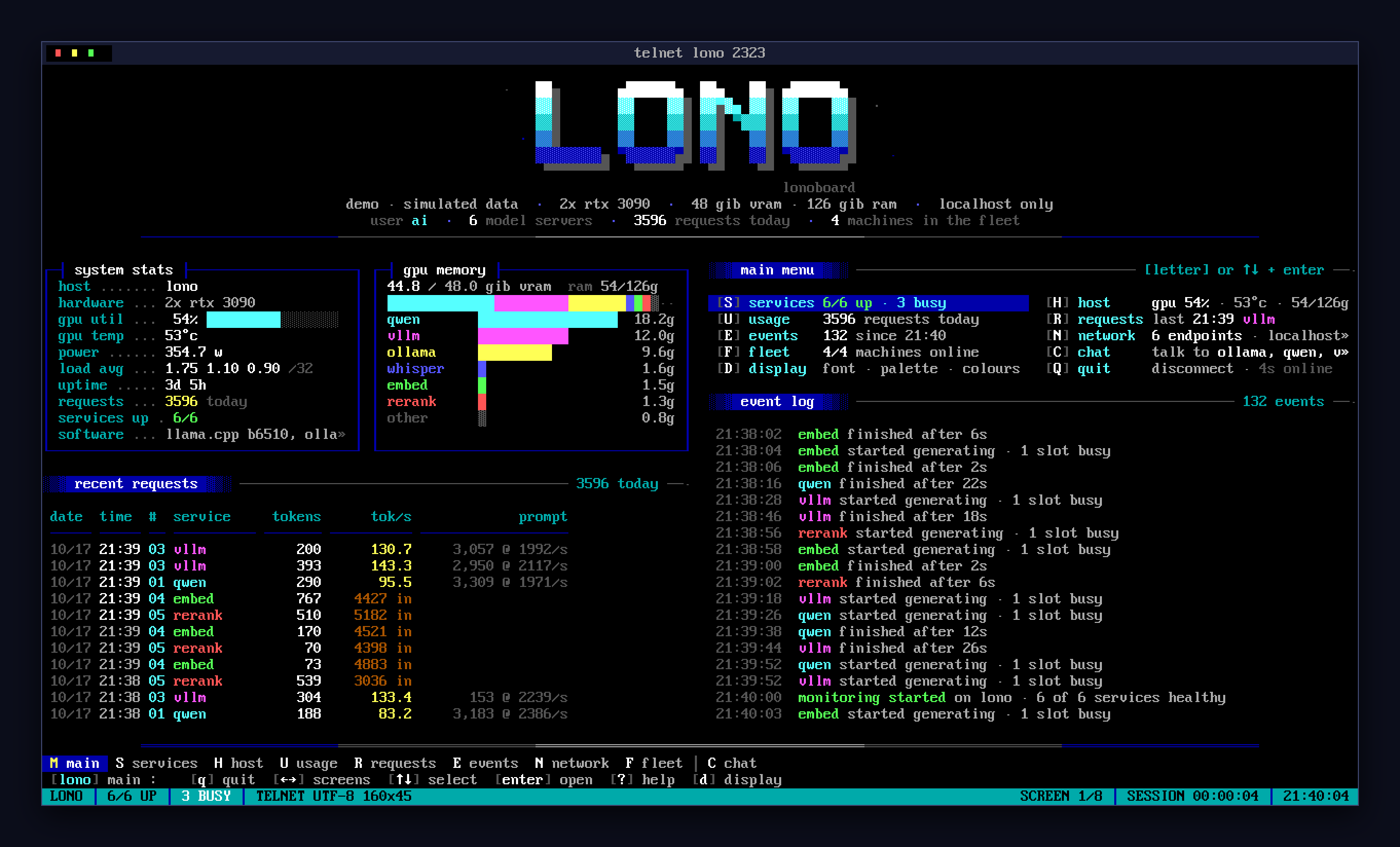
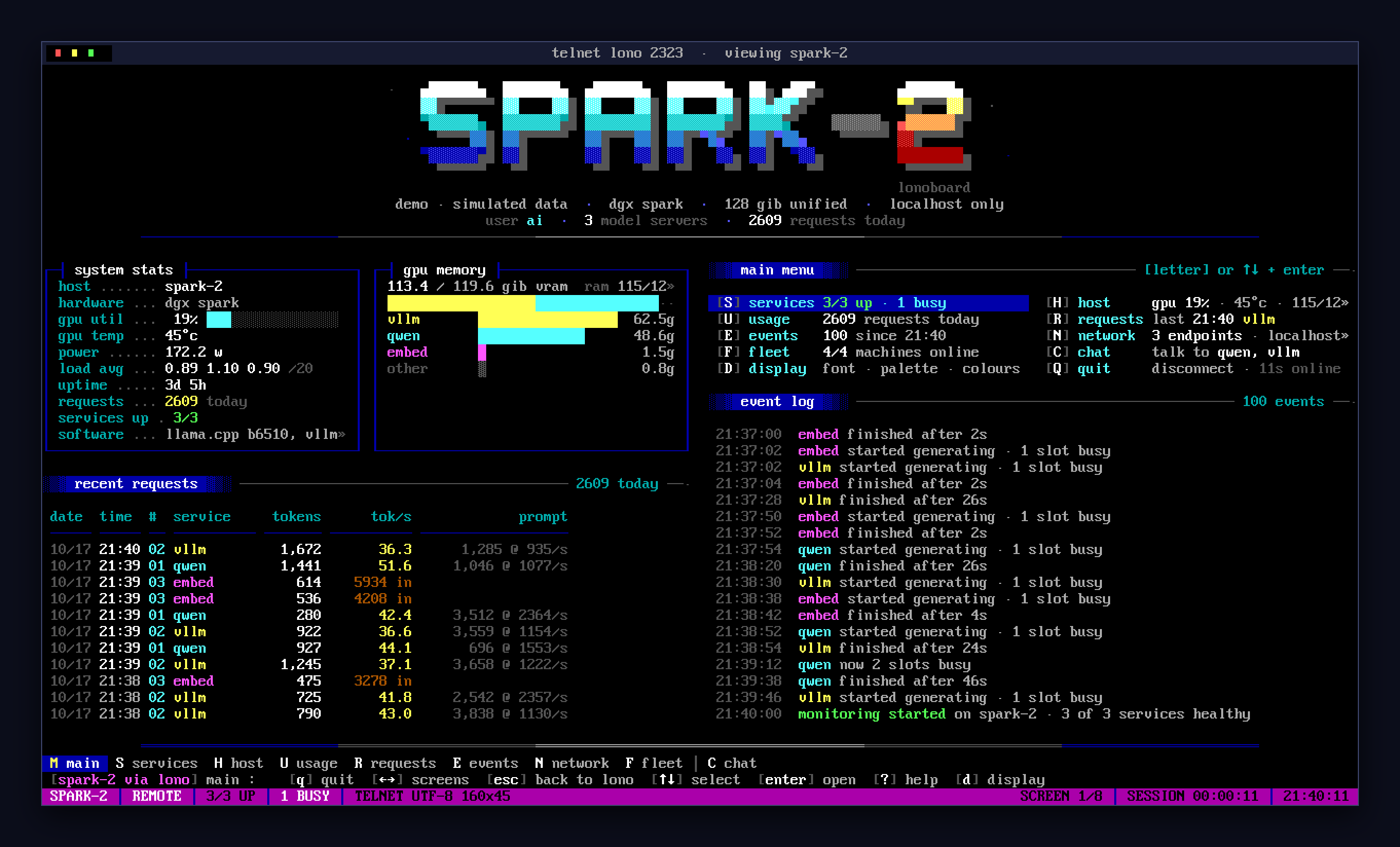
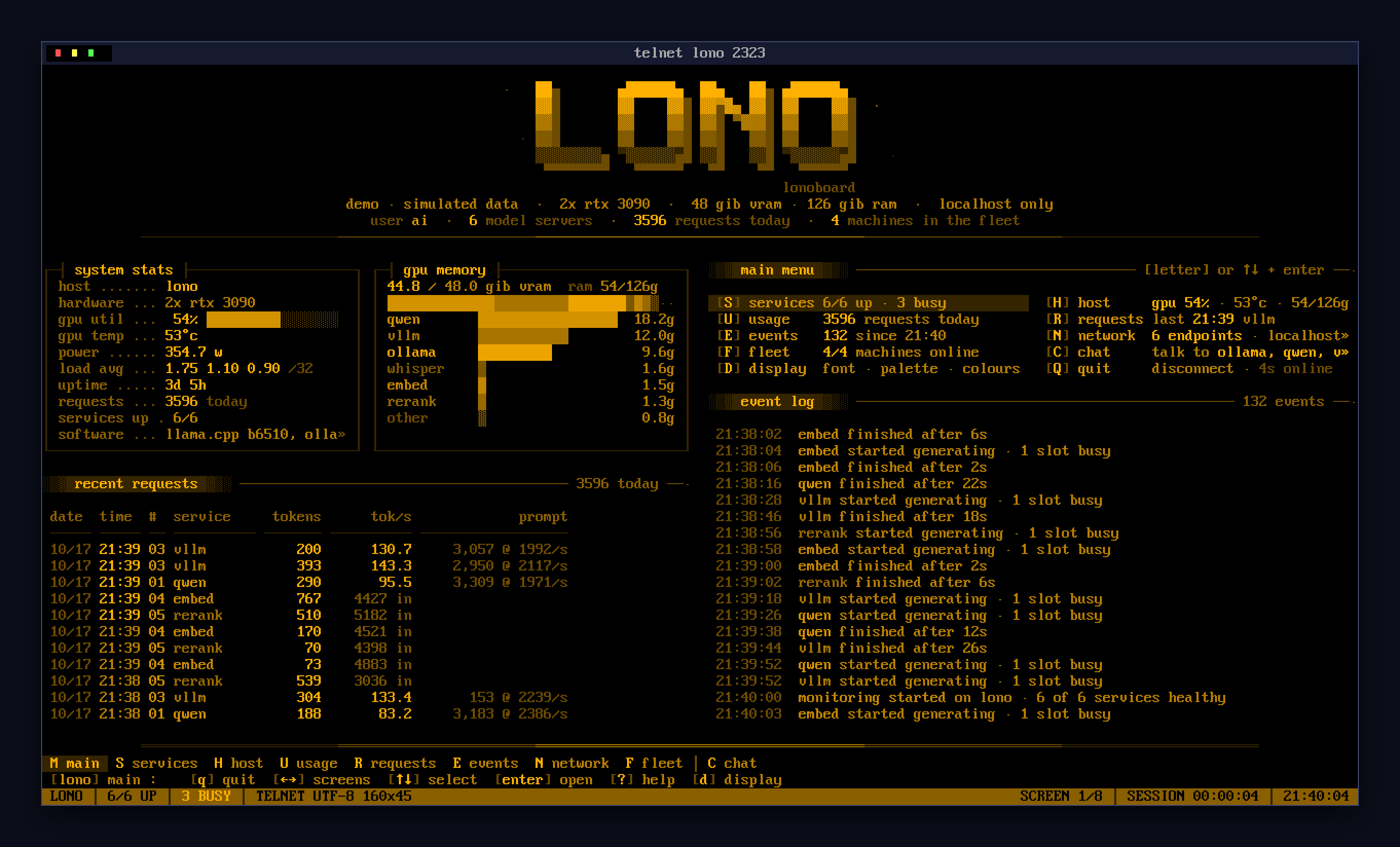
Telnet in, or open a browser, and you get a live board for that machine. It shows the models it serves, their memory and GPU use, requests and tokens per second, an event log, and a chat window for talking to the models. Everything is drawn in CP437 and the CGA palette, the way ACiD and iCE drew it.
telnet gpu-box 2323           # any terminal; SyncTERM or NetRunner for the full effect
http://gpu-box:7777/          # the same board in a browser
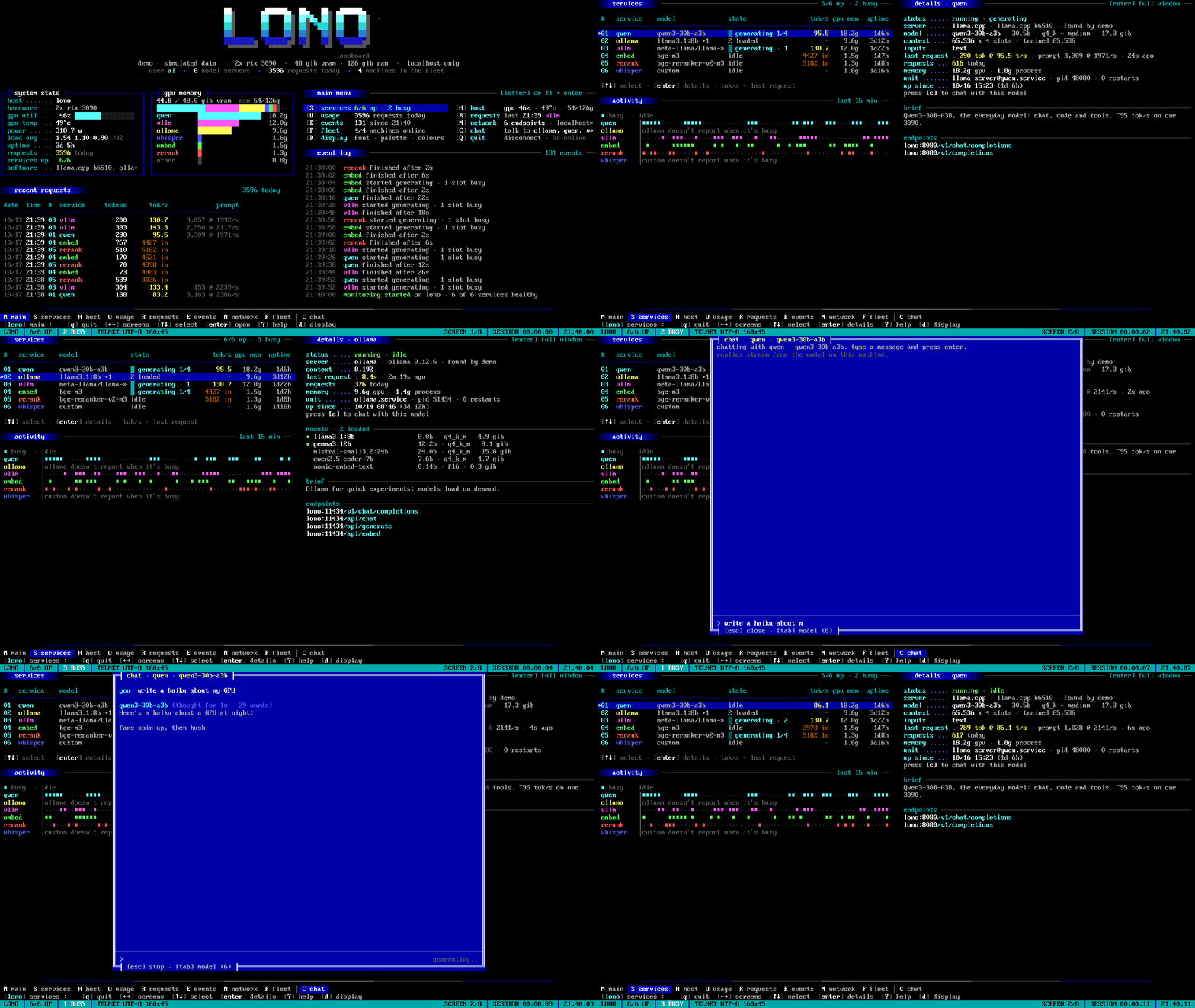
It works with llama.cpp, Ollama, vLLM and any OpenAI-compatible server. It finds them on its own, and you can also list them in a config file. It runs on NVIDIA, AMD, Apple Silicon or a plain CPU. It's a single Python program with no dependencies.
Try it
pipx install lonoboard
lonoboard demo            # a simulated machine, with a fake chat
lonoboard check           # what lonoboard finds on this machine
lonoboard                 # the real board, on localhost
Or try it without installing: uvx lonoboard demo.
Python 3.11 or newer. Then open http://localhost:7777/ or run telnet localhost 2323.
 |
 |
 |
 |
 |
 |
The board
The board is made of screens, each sized to your window:
| key | screen | what's on it |
|---|---|---|
M |
main | logo, system stats, GPU memory by service, recent requests, the menu, the event log |
S |
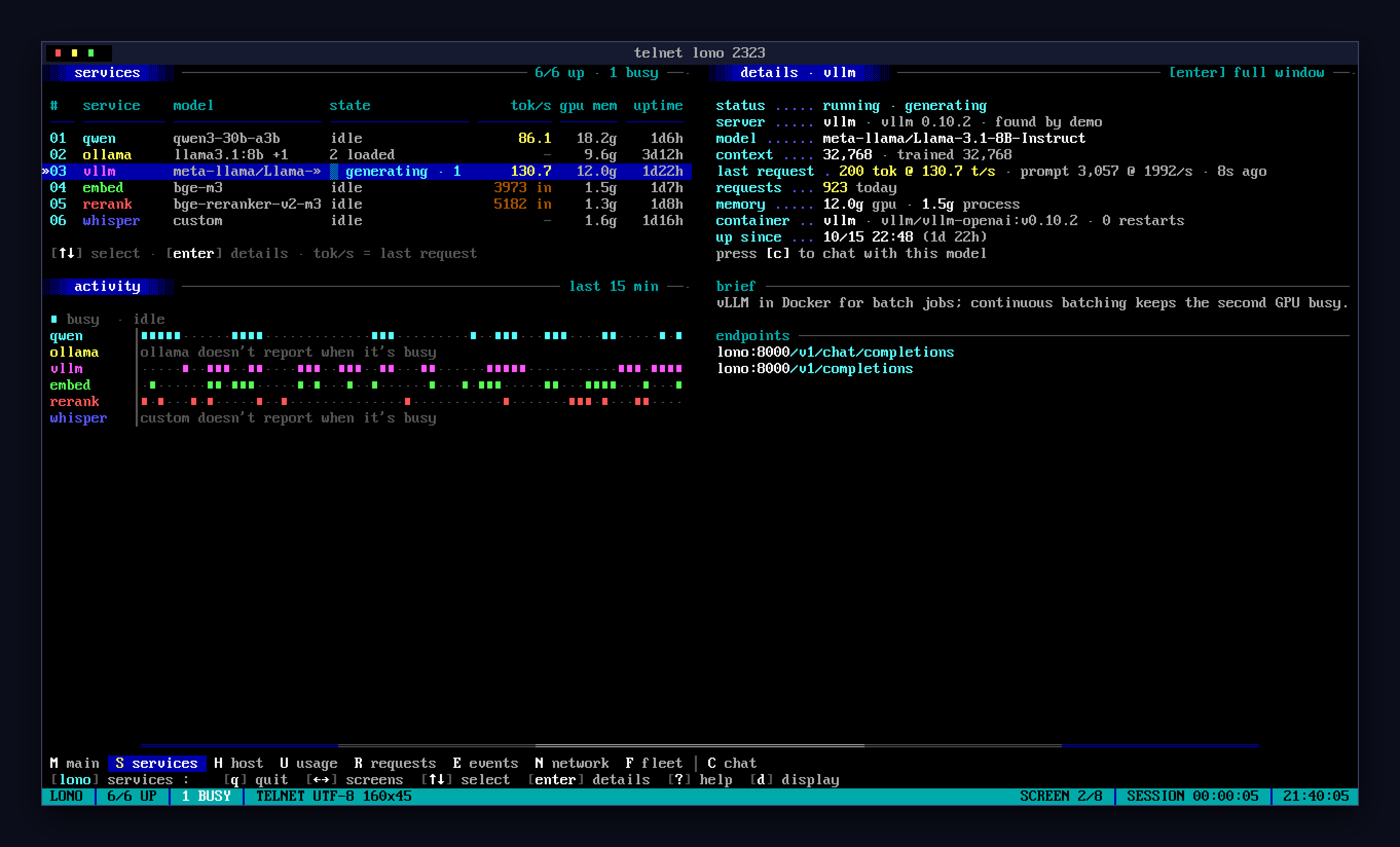
services | every model server on a lightbar; on wide windows, slot activity and live details |
H |
host | system stats, memory, GPU, slot activity |
U |
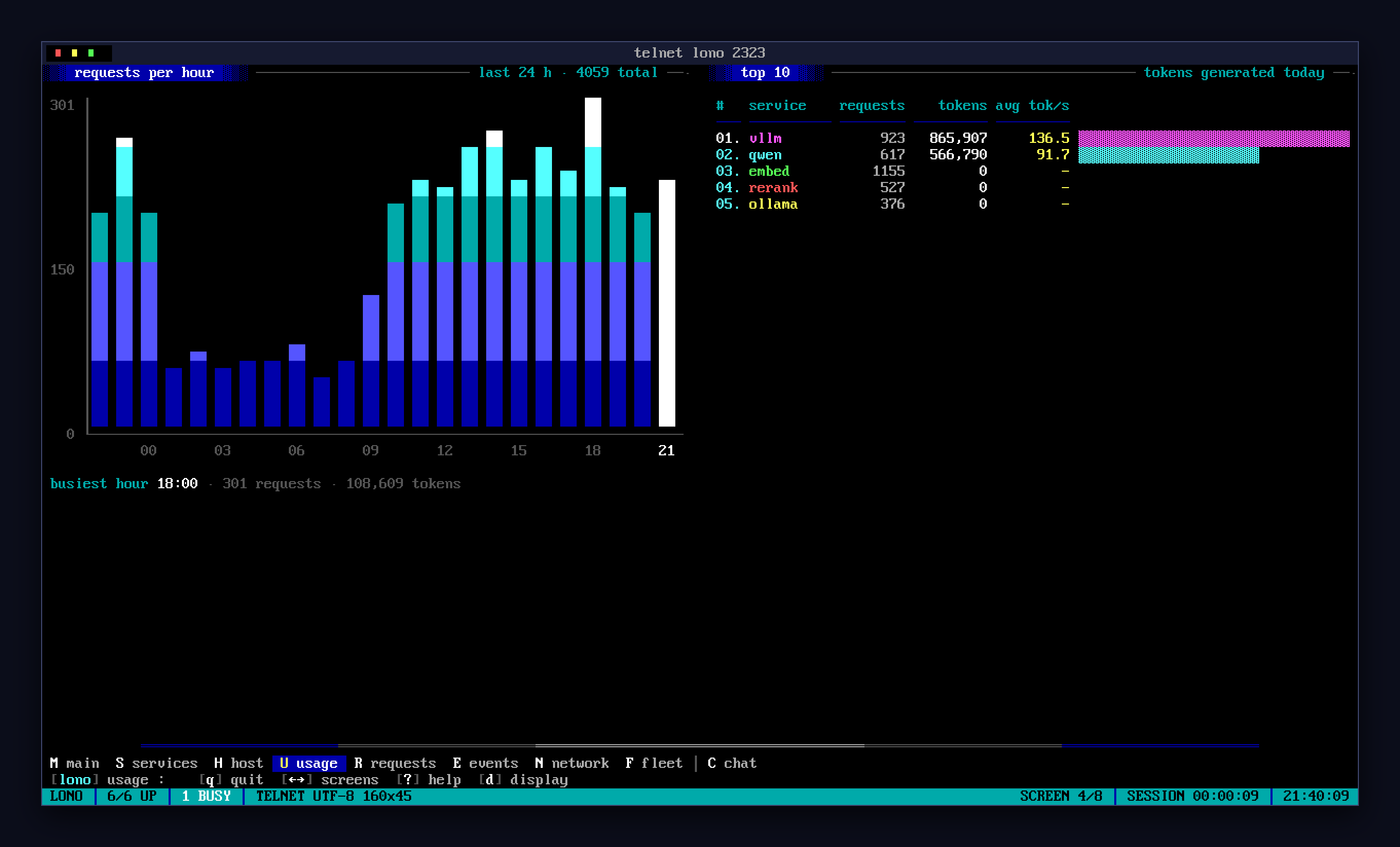
usage | requests per hour over 24 h, and the top 10 by tokens today |
R |
requests | recent requests: tokens, tok/s, prompt size and speed |
E |
events | services coming and going, generations starting and finishing |
N |
network | each service's URLs and API endpoints, other published ports |
F |
fleet | other machines running lonoboard; pick one to view its board |
- Moving around:
- A letter jumps to a screen.
←→flip between screens andescgoes back to main. ↑↓move the lightbar,enteropens the selected item, and1–9open a service.- A screen too tall for the window splits into pages.
spacereads on,bgoes back. - The mouse works: click entries, rows and links, and use the wheel to turn pages.
- A letter jumps to a screen.
- Details (
enteron a service): status, model, context, last request, memory, the systemd unit or container, endpoints, launch flags, and a live tail of its log. - Chat (
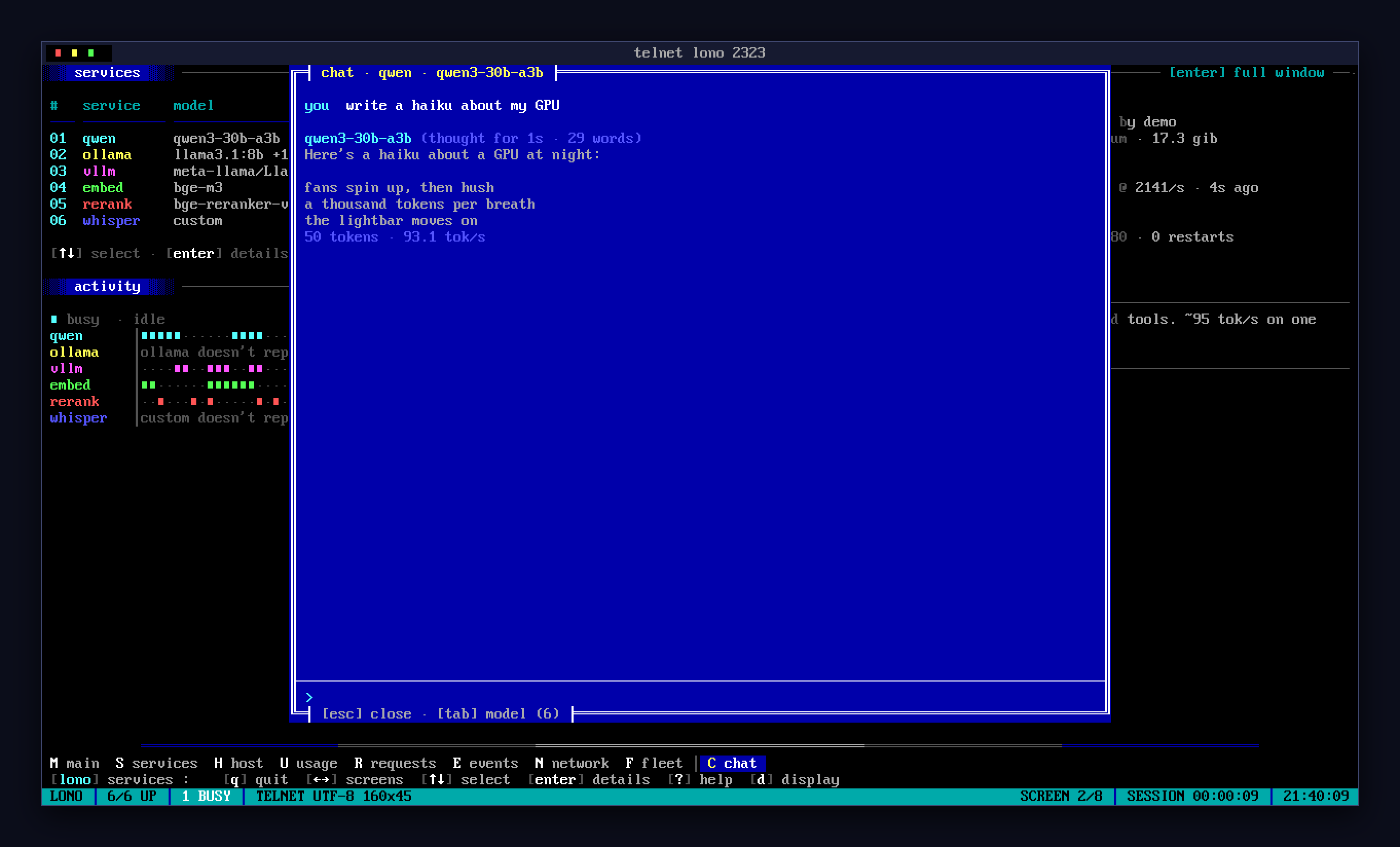
c): talk to any chat model on the machine, andtabswitches model. Replies stream, reasoning collapses into a summary, andescstops a reply. Conversations aren't stored. - Display (
d):- IBM VGA 8x16 or 9x16 font.
- VGA colour, amber or green monochrome.
- iCE colours or blink for bright backgrounds.
- CRT effect.
?opens help.qquits a telnet session after asking first.
Terminals
lonoboard negotiates echo, window size and terminal type, and adapts to what it finds:
| terminal | what lonoboard sends |
|---|---|
| modern (xterm, kitty, ghostty, WezTerm, PuTTY…) | UTF-8, hyperlinks, mouse reporting and the alternate screen |
| anything else | classic CP437 ANSI-BBS with iCE colours |
Colour depth is chosen separately:
| terminal | colours |
|---|---|
| known to support 24-bit | exact VGA colours |
*-256color |
the nearest xterm-256 colours |
| everything else | the terminal's own 16 colours |
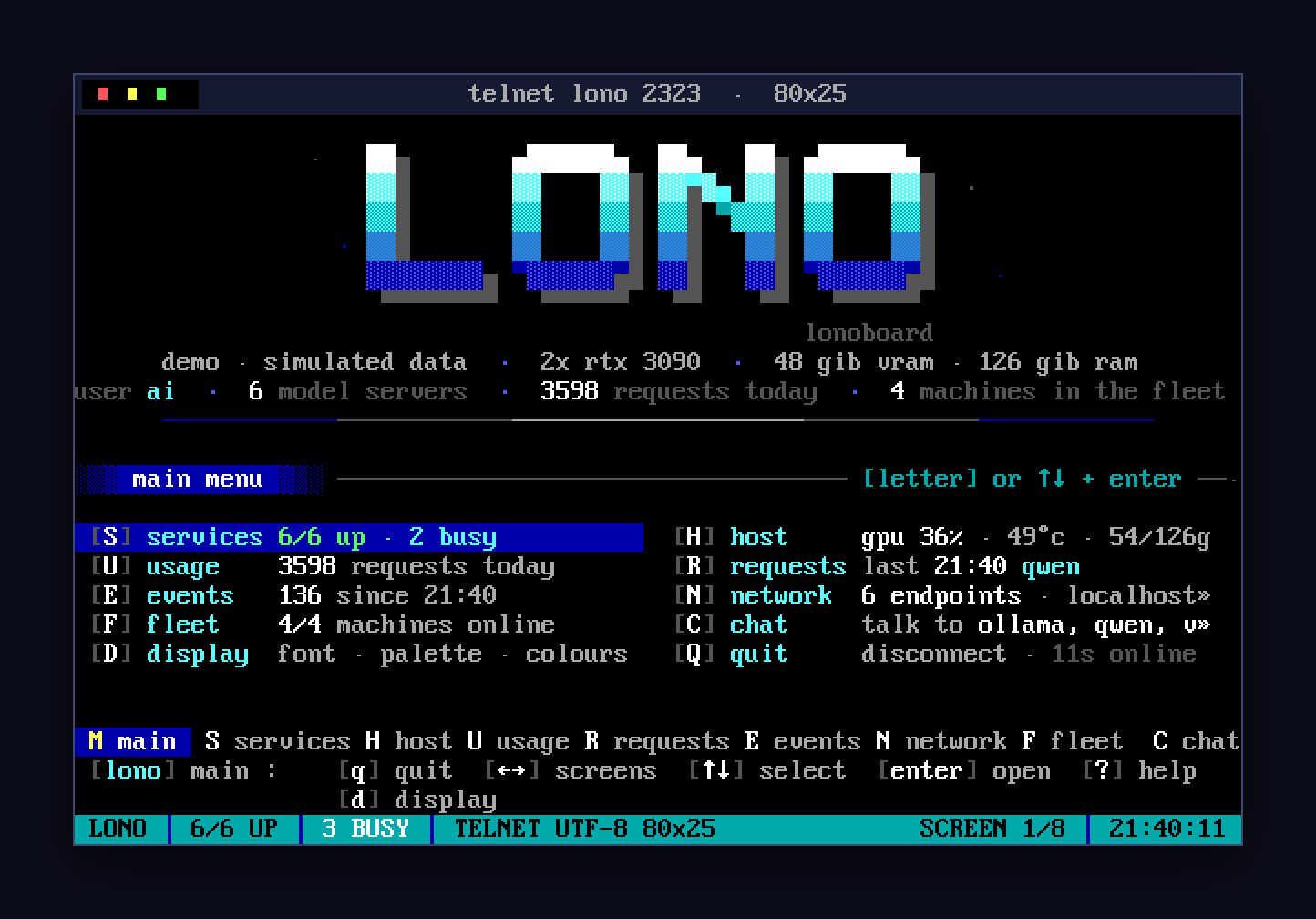
In a telnet session, press d and then m to cycle the colour mode, or u to switch between
UTF-8 and CP437.
Model servers
| server | found by | what lonoboard shows |
|---|---|---|
| llama.cpp | process or port | model, quant, params, context, slots and busy slots, per-request tok/s from its log |
| Ollama | process or port 11434 | installed and loaded models, VRAM, requests from its log |
| vLLM | /metrics |
model, context, running requests, token counters |
| OpenAI-compatible (LM Studio, …) | port or config | models, health, chat; optional API key |
lonoboard finds the systemd unit or Docker container behind each server. That gives it state, uptime, restarts and logs. See docs/sources.md for details.
Hardware:
- NVIDIA via
nvidia-smi, including unified-memory systems like the DGX Spark. - AMD via
rocm-smi. - Apple Silicon via
ioreg. - CPU-only.
Running it for real
lonoboard install --now # a systemd user service running `lonoboard serve`
The board listens on localhost only until you say otherwise. To reach it from elsewhere:
- Tailscale (recommended). Keep it on localhost and publish it with
tailscale serve. lonoboard then finds the other machines on your tailnet for the fleet screen. - Your LAN. Set
listenand apassword. lonoboard won't listen beyond localhost or your tailnet without one. The password is asked for at a login prompt in the terminal, and the API takes it as a bearer token.
SECURITY.md covers what the board shows and how it's protected.
See docs/deployment.md for systemd, Tailscale, Docker and deploying to several machines over SSH, and docs/public-demo.md for hosting a public demo board.
Configuration
Nothing needs configuring, but everything can be. Settings go in ~/.config/lonoboard/config.toml,
or in a file named by --config or $LONOBOARD_CONFIG:
[board]
tagline = "the attic box"

[[server]]
name = "lmstudio"
url = "http://127.0.0.1:1234"
kind = "openai"
examples/config.toml lists every setting, and docs/configuration.md explains them.
JSON API
Anything that doesn't ask for HTML gets JSON:
curl localhost:7777/              # host, services, other ports, fleet
curl localhost:7777/api/usage     # requests per hour, top 10
See docs/api.md for every endpoint.
Credits
- The fonts are
PxPlus_IBM_VGA_8x16andPxPlus_IBM_VGA_9x16, from The Ultimate Oldschool PC Font Pack by VileR. They are licensed CC BY-SA 4.0 and bundled, so the board works offline. - The look is inspired by the ANSI art groups of the 1990s: ACiD, iCE, Blocktronics and the rest of the 16colo.rs archive.
License
MIT, see LICENSE. The bundled fonts keep their CC BY-SA 4.0 license.
1 maintainer

Metadata
1 maintainer
Release files for lonoboard 0.1.0
For a detailed explanation of source distributions (sdists) and built distributions (wheels), please see the package formats documentation.
Source distribution (sdist)
| File | Size | Uploaded | Provenance | |
|---|---|---|---|---|
| lonoboard-0.1.0.tar.gz | 144.7 kB | With provenance | Details |
Built distribution (wheel)
| File | Interpreter | ABI | Platform | Reset |
|---|---|---|---|---|
| lonoboard-0.1.0-py3-none-any.whl | Python 3 | none | any | Details |
Total release size: 292.4 kB
Release files / lonoboard-0.1.0.tar.gz
| Download URL | lonoboard-0.1.0.tar.gz |
|---|---|
| Size | 144.7 kB |
| Tags | Source |
|
SHA-256 checksum How to use checksums |
e0a7cfbf2407b059982a119765223853448b898e61543c1671cbc7e115b0b9fe
|
|
BLAKE2b-256 checksum How to use checksums |
4707502f185cf81a6805b85073512b85af9fc28ee3b73bf2467be26c0e033eaa
|
| Upload date | |
|
Uploaded using Trusted Publishing? What is trusted publishing? |
Yes |
| Uploaded via |
twine/7.0.0 CPython/3.13.14
|
Provenance
Provenance describes where a file came from. On PyPI, provenance is shared via attestations, which provide a verifiable record of the build or publishing details. View details, limitations and caveats.


PyPI Publish Attestation
PyPI verified that this artifact, at this checksum, originated from the publisher listed below.
Signed by GitHub Actions, verified by PyPI on Oct 17, 2026.
Transparency logRelease files / lonoboard-0.1.0-py3-none-any.whl
| Download URL | lonoboard-0.1.0-py3-none-any.whl |
|---|---|
| Size | 147.7 kB |
| Tags | Python 3 |
|
SHA-256 checksum How to use checksums |
ab17b812f7736abd932e71ffe2bf5ebeb0c252b7d1564d0fff1736f8df8faf07
|
|
BLAKE2b-256 checksum How to use checksums |
6ae5c0698f7d0935cd08543bbeabcec3bb86c15c1ac3b78c4405d2fd8aec0ff9
|
| Upload date | |
|
Uploaded using Trusted Publishing? What is trusted publishing? |
Yes |
| Uploaded via |
twine/7.0.0 CPython/3.13.14
|
Provenance
Provenance describes where a file came from. On PyPI, provenance is shared via attestations, which provide a verifiable record of the build or publishing details. View details, limitations and caveats.
PyPI Publish Attestation
PyPI verified that this artifact, at this checksum, originated from the publisher listed below.
Signed by GitHub Actions, verified by PyPI on Oct 17, 2026.
Transparency logSecurity for lonoboard 0.1.0
Provenance
Provenance describes where a file came from. On PyPI, provenance is shared via attestations, which provide a verifiable record of the build or publishing details. View details, limitations and caveats.
Full provenance
All 2 files in this release have been uploaded with provenance metadata.
Attestation for lonoboard-0.1.0.tar.gz
PyPI Publish Attestation
PyPI verified that this artifact, at this checksum, originated from the publisher listed below.
Signed by GitHub Actions, verified by PyPI on Oct 17, 2026.
Transparency logA note on package security
PyPI is a repository for distributing packages, not a service for auditing them. While third-party security researchers and our staff do their best to detect and remove malicious packages, PyPI cannot guarantee the quality, security or suitability of any given package.













