
Monitors your command and notifies you via Slack when you need it the most

Project description
Lookout: Command watcher w/ Slack
About
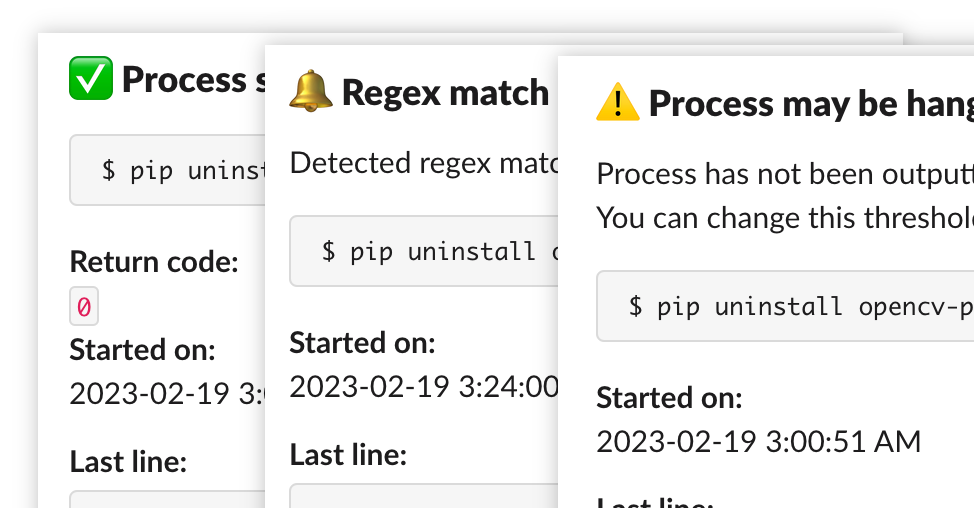
Lookout is a simple yet powerful CLI app that sends a slack notification when your program
- completes successfully,
- terminates with an error,
- exceeds predefined time without any output, or
- outputs predefined regex match.
Usage is very simple as well; say you wanted to run:
$ python really_heavy_program.py arg1 arg2
With lookout, just do:
$ lookout python really_heavy_program.py arg1 arg2
Example usages:
- Waiting for installation (or worse yet, conda's infamous
Solving environment: \)$ lookout --regex "\(\[y\]\/n\)\?" conda install opencv
This matches conda's prompt([y]/n)?and sends a notification when it's asking for user input. - Running very long machine learning programs on background servers
$ nohup lookout python train.py
This will runpython train.pyin the background even with the terminal closed, and you will get a notification when it's done.
Installation
$ pip install lookout-python
When you run lookout for the first time, you will be asked to log in to your Slack application via browser.
After authentication, you will be displayed a code that you need to copy and paste into your terminal window.
Options
-
Set timeout threshold
--hangthreshold 120This will set
hangthresholdto 120 seconds and will send aProcess may be hangingalert after 120 seconds. This value will be saved for next time. -
Using regex
--regex "expression"
This will send an alert when the command output matches given regex. Make sure to escape symbols with backslash. Double quotes are only required on some cases (to escape
sh). -
Change slack channel
$ lookout --change
Run this in order to update or change your Slack channel.
-
Reset
$ lookout --resetThis will reset to factory settings.
Limitations
- Color of output may be stripped. This is because some programs strip color from output when it detects that it is outputting to anything else than an actual terminal, and this program uses pipe to parse data.
Changelog
1.0.0 (2023/02/19)
Initial release.


Download files
Download the file for your platform. If you're not sure which to choose, learn more about installing packages.
Source Distribution
Built Distribution
Filter files by name, interpreter, ABI, and platform.
If you're not sure about the file name format, learn more about wheel file names.
Copy a direct link to the current filters
File details
Details for the file lookout-python-1.0.5.tar.gz.
File metadata
- Download URL: lookout-python-1.0.5.tar.gz
- Upload date:
- Size: 7.0 kB
- Tags: Source
- Uploaded using Trusted Publishing? No
- Uploaded via: twine/4.0.2 CPython/3.9.12
File hashes
| Algorithm | Hash digest | |
|---|---|---|
| SHA256 |
65c6c1de8bc65f179757c330e65c43f00bfb4cdd684fdaacc4d8d6f7c54f63f0
|
|
| MD5 |
ed9f3d66be006b59d116741a058d3020
|
|
| BLAKE2b-256 |
4a9ca13a7717114d27ab41ae9c6fa00bbf49b341dfa247020ef2862eaae9314b
|
File details
Details for the file lookout_python-1.0.5-py3-none-any.whl.
File metadata
- Download URL: lookout_python-1.0.5-py3-none-any.whl
- Upload date:
- Size: 7.7 kB
- Tags: Python 3
- Uploaded using Trusted Publishing? No
- Uploaded via: twine/4.0.2 CPython/3.9.12
File hashes
| Algorithm | Hash digest | |
|---|---|---|
| SHA256 |
1e3f2044c87a3e00ec1832af2c883370417998b5c2f7da09bc9d88d1146ce613
|
|
| MD5 |
49bd55fe852ff6e16d49e3feaba43f66
|
|
| BLAKE2b-256 |
c0d697f8bcaeda14f51d4fc6806151af0f19842364d0c95689c885af5f230537
|






