
Local-first real-time debugger for AI agent loops — Chrome DevTools for agent loops.
Verified details
These details have been verified by PyPIProject links
GitHub Statistics
Maintainers

Project description
LoopLens




📖 Documentation: https://ashutosh-rath02.github.io/looplens/
Chrome DevTools for AI agent loops. A local-first, real-time debugger that shows your agent's execution live and warns when it repeats itself, burns tokens, retries blindly, or stops making progress.
LoopLens gives you:
- live timeline of agent execution
- LLM-call and tool-call visibility
- retry and handoff tracking
- token and cost metrics
- loop warnings (repeated tool, no-progress, retry storm, cost spike, …)
- side-by-side run comparison (before/after a prompt or retry-rule change)
- JSONL import/export
- a local-first UI — no login, no cloud, no API key
See it in action
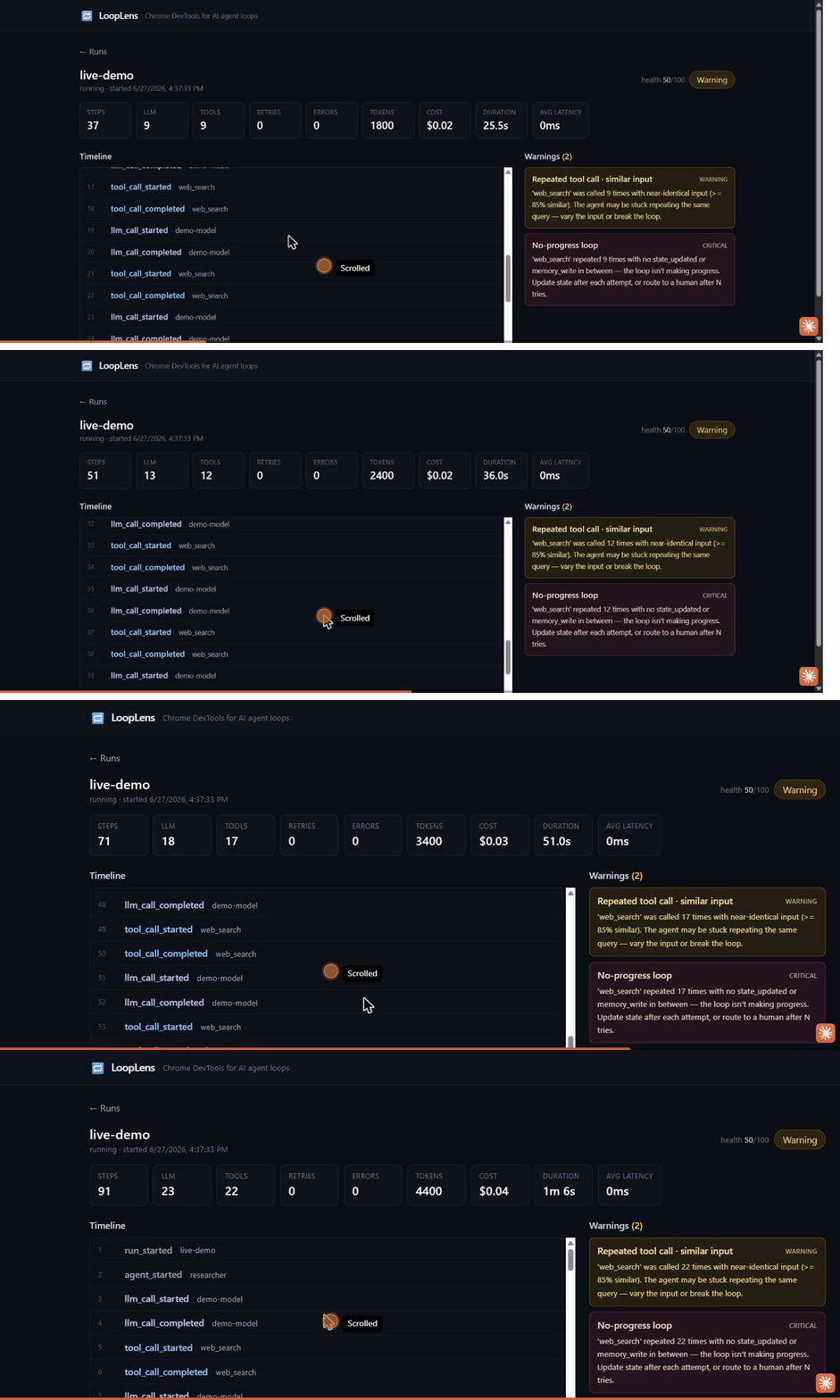
A looping agent calls web_search over and over. As events stream in live, the
metrics climb and LoopLens flags Repeated tool call and No-progress loop
— the warning counts track the repeat count in real time, and the health score
drops to Warning.
Drop it into any project
LoopLens is not a standalone app you rebuild your agent inside. It's a tiny SDK you add to the agent you already have, plus a dashboard you open when you want to look.
from looplens import trace, event

with trace("research-agent"):
    event("tool_call_started", tool="web_search", input={"query": "AI agents"})
    event("tool_call_completed", tool="web_search", output={"results": 5})
Or wrap a function with @observe to capture inputs, outputs, latency, and
errors automatically:
from looplens import observe

@observe(kind="tool")
def web_search(query):
    ...
The base install is pure-stdlib with zero third-party dependencies, so it won't conflict with anything in your agent's environment. Events are sent from a background thread (your loop never blocks). If the dashboard is running, events stream to it live; if not, the SDK buffers to a local JSONL file and never crashes your app.
Configure via environment variables:
LOOPLENS_ENDPOINT=http://127.0.0.1:8765   # where the dashboard listens
LOOPLENS_ENABLED=true                      # set false to make the SDK a no-op
LOOPLENS_PROJECT=default
LOOPLENS_CAPTURE_INPUTS=true
LOOPLENS_CAPTURE_OUTPUTS=true
LOOPLENS_TRACE_DIR=looplens-traces         # JSONL fallback location
Install
pip install looplens             # the SDK (drop into your agent — zero deps)
pip install "looplens[server]"   # adds the dashboard (FastAPI + prebuilt UI)
That's it — no Node, no npm, no build step. The [server] extra ships the
compiled React dashboard inside the wheel, so looplens dev serves a ready UI on
the first run. (pipx install "looplens[server]", uv pip install, and
uv tool install work the same way.)
Works with any agent or framework
The base looplens SDK is pure Python stdlib with zero third-party
dependencies, so it installs cleanly next to any agent stack and pins nothing:
- LangGraph / LangChain, CrewAI, AutoGen, OpenAI Agents SDK,
Pydantic AI, or a hand-rolled
whileloop — if it's Python, you can instrument it withtrace()/event()/@observe. - No API key, no login, no network egress — events go to
127.0.0.1only, and the SDK is a no-op whenLOOPLENS_ENABLED=false. - Fail-silent by design: if the dashboard isn't running it buffers to JSONL and never raises into your agent.
Quickstart
pip install "looplens[server]"
looplens dev      # start backend + prebuilt UI, opens http://localhost:8765
looplens demo     # run a sample looping agent that trips a warning
looplens doctor   # check the port, SDK->server round-trip, and JSONL fallback
looplens dev opens the dashboard in your browser automatically (pass
--no-open to skip). If it doesn't, open http://localhost:8765 yourself and
watch the run appear live.
Architecture
Your agent app ──(looplens SDK)──▶ Local FastAPI server ──▶ SQLite
                                          │
                                          └──(live stream)──▶ React UI
- SDK (
looplens):trace()+event(), background HTTP send, JSONL fallback, fail-silent. Zero third-party deps. - Server (
looplens[server]): FastAPI + SQLite + Pydantic, loop detectors, metrics, real-time stream. - UI: React + Vite + TypeScript + Tailwind.
Examples
Runnable agents under examples/ exercise the detectors. Start the dashboard
(looplens dev), then run any of them:
python examples/simple_agent.py         # a healthy run — no warnings
python examples/looping_agent.py        # repeated tool call + no-progress loop
python examples/retry_storm_agent.py    # retry storm
python examples/handoff_bounce_agent.py # two agents ping-ponging handoffs
looplens demo runs the looping agent without needing the file checked out.
examples/real_research_agent_openai.py is a real agent — it makes live
OpenAI calls (function calling) against a tiny corpus that lacks the answer, so
the model genuinely loops. Needs pip install openai and OPENAI_API_KEY
(optionally OPENAI_MODEL):
OPENAI_API_KEY=sk-... PYTHONPATH=. python examples/real_research_agent_openai.py
examples/langgraph_agent.py is the same idea with zero manual
instrumentation — a real LangGraph ReAct agent where LoopLens captures every
node's LLM and tool calls through one callback handler (see Works with any
framework below). Needs pip install "looplens[langgraph]" langchain-openai and
OPENAI_API_KEY.
examples/otel_openinference_openai.py captures a real OpenAI call through
OpenTelemetry — no LoopLens code in the agent, just an OTLP exporter pointed
at the server. Needs pip install "looplens[otel]" plus the OTel SDK and
instrumentor (see the file header) and OPENAI_API_KEY.
Works with any framework
You don't have to hand-place event() calls. There are two zero-instrumentation
paths, plus the manual SDK.
1. Any framework, via OpenTelemetry (universal)
Most agent frameworks — LangChain/LangGraph, LlamaIndex, CrewAI, AutoGen, the OpenAI Agents SDK, and more — can emit OpenTelemetry spans through the OpenInference or OpenLLMetry instrumentations. Point their OTLP/HTTP exporter at the LoopLens server and the spans become runs, events, and loop warnings — no LoopLens-specific code in your agent:
from opentelemetry.exporter.otlp.proto.http.trace_exporter import OTLPSpanExporter
exporter = OTLPSpanExporter(endpoint="http://127.0.0.1:8765/v1/traces")
# ...register it on your TracerProvider, then instrument your framework as usual.
LoopLens reads whichever convention a span uses (openinference.*,
traceloop.*, gen_ai.*, llm.*), mapping LLM and tool spans to
llm_call_* / tool_call_* events with model, token counts, and latencies.
OTLP/JSON works out of the box; OTLP/protobuf (the common default) needs
pip install "looplens[otel]". See examples/otel_openinference_openai.py.
2. LangGraph / LangChain adapter
For a tighter, in-process integration, drop in the callback handler:
from looplens.integrations.langgraph import LoopLensCallbackHandler

handler = LoopLensCallbackHandler(name="my-graph")
graph.invoke(inputs, config={"callbacks": [handler]})   # that's the whole change
It maps LangChain callbacks to LoopLens events (on_chat_model_start →
llm_call_started, on_tool_start → tool_call_started, errors → *_failed,
root chain start/end → run open/close). Needs pip install "looplens[langgraph]".
3. OpenAI Agents SDK adapter
A native TracingProcessor that captures the SDK's handoffs and guardrails (not
just LLM/tool calls). One line:
from looplens.integrations.openai_agents import instrument

instrument(name="my-agents-app")   # then use Runner.run(...) as usual
Needs pip install "looplens[openai-agents]". See the
docs.
4. CrewAI adapter
A BaseEventListener that captures crew events and emits a handoff when control
moves to a different agent (so a stuck crew trips handoff_bounce):
from looplens.integrations.crewai import instrument

instrument(name="my-crew")   # then crew.kickoff() as usual
Needs pip install "looplens[crewai]". See the
docs.
Build status
This repo is being built phase by phase (see PRD.md section 24).
- Phase 0 — repo scaffold, packaging, config
- Phase 1 — FastAPI backend + SQLite + API routes + metrics
- Phase 2 — Python SDK (
trace/event/@observe, background sender, JSONL fallback) - Phase 3 — CLI (
init / server / ui / dev / watch / import / export / demo) - Phase 6 — loop detection rules (repeated tool, similar input, no-progress, retry storm, long step, cost spike)
- Phase 4 — React UI (runs list, run detail, live timeline, metrics bar, warnings, event drawer)
- Phase 5 — real-time streaming (SSE: live events + metrics + warnings)
- Phase 7 — polish, examples, demo
Running from source
The published wheel ships the prebuilt dashboard, so end users never touch Node. Building from a git checkout is the only time you need npm — once, to compile the UI into the Python package:
pip install -e ".[server]"            # backend + CLI
npm --prefix ui install               # one-time UI deps
npm --prefix ui run build             # compiles the React bundle into looplens/server/_ui/
python -m looplens.server             # or: looplens server  (serves API + UI)
looplens demo                         # seed a looping run that trips warnings
Open http://localhost:8765 for the dashboard. The backend serves the bundled UI,
so it's a single URL. For UI development with hot reload, run npm --prefix ui run dev (Vite on :5173, proxies /api to the backend). Interactive API docs are at
http://localhost:8765/docs.
Packaging a release: run npm --prefix ui run build first, then python -m build
— the wheel force-includes looplens/server/_ui/ so it's installable with zero
Node.
How loop detection works
Detection is rule-based and transparent (PRD §17) — no black-box scoring. On every event the backend re-scans the run and raises (or updates) warnings:
| Warning | Fires when |
|---|---|
repeated_tool_call |
same tool ≥3× within the last 8 tool calls (window slides over tool calls, not raw events, so interleaved ReAct traces still trip it) |
repeated_tool_call_similar_input |
same tool ≥3× with ≥85% similar input |
repeated_tool_call_exact_input |
same tool ≥3× with byte-identical input — highest-confidence repeat signal |
no_progress |
a tool repeats with no state_updated / memory_write between calls |
empty_result_loop |
a tool returns empty / "no results" ≥3× — the agent is looping on a dead end |
retry_storm |
retry_triggered ≥3× in the run |
long_running_step |
a step over 30s |
cost_spike |
one event > 50% of run cost so far (above a $0.05 floor) |
cost_budget_exceeded |
run total cost crosses LOOPLENS_COST_BUDGET (opt-in) |
handoff_bounce |
control ping-pongs between the same two agents (A→B→A→B) |
Each warning carries a health penalty; the run's score (0–100) maps to Healthy / Warning / Likely stuck / Failed.
Limitations (MVP)
- Instrumentation options. Any framework that emits OpenTelemetry
(OpenInference / OpenLLMetry) streams in via
/v1/traceswith no LoopLens code; there's a dedicated LangGraph / LangChain adapter; otherwise you calltrace()/event()/@observe. Tighter per-framework adapters (OpenAI Agents SDK, CrewAI) are still on the roadmap. - Rule-based detection, not semantic — similar-input uses string similarity, not embeddings.
- Near-real-time, not push: the SSE stream polls SQLite every ~0.5s.
- Single local user, no auth — local-first by design, not a production service.
Tests
pip install -e ".[dev]"
pytest -q          # SDK resilience, all ten detectors, and the SSE stream
Roadmap
See ROADMAP.md for what's next — PyPI release, CI, and framework
adapters (LangGraph, OpenAI Agents SDK, CrewAI) to remove manual instrumentation.
Launch copy lives in LAUNCH.md.
License
MIT
Project details
Verified details
These details have been verified by PyPIProject links
GitHub Statistics
Maintainers
Release history Release notifications | RSS feed


Download files
Download the file for your platform. If you're not sure which to choose, learn more about installing packages.
Source Distribution
Built Distribution
Filter files by name, interpreter, ABI, and platform.
If you're not sure about the file name format, learn more about wheel file names.
Copy a direct link to the current filters
File details
Details for the file looplens-0.7.1.tar.gz.
File metadata
- Download URL: looplens-0.7.1.tar.gz
- Upload date:
- Size: 822.0 kB
- Tags: Source
- Uploaded using Trusted Publishing? Yes
- Uploaded via: twine/6.1.0 CPython/3.13.12
File hashes
| Algorithm | Hash digest | |
|---|---|---|
| SHA256 |
888055ce65de419679b927e5ad6c69662bbe43dc814189363cdc15a34326215b
|
|
| MD5 |
fcfe714820d818c5f1eae76b305475f4
|
|
| BLAKE2b-256 |
ab1e07bdf2545c3b5e36e42de046fde1acffe4b634b35e0b0bb6ceec62bf64fc
|
Provenance
The following attestation bundles were made for looplens-0.7.1.tar.gz:
Publisher:
release.yml on ashutosh-rath02/looplens
-
Statement:
-
Statement type:
https://in-toto.io/Statement/v1 -
Predicate type:
https://docs.pypi.org/attestations/publish/v1 -
Subject name:
looplens-0.7.1.tar.gz -
Subject digest:
888055ce65de419679b927e5ad6c69662bbe43dc814189363cdc15a34326215b - Sigstore transparency entry: 1993047783
- Sigstore integration time:
-
Permalink:
ashutosh-rath02/looplens@b0d488ed3610fc95cbffd533f4c31c79b022d55b -
Branch / Tag:
refs/tags/v0.7.1 - Owner: https://github.com/ashutosh-rath02
-
Access:
public
-
Token Issuer:
https://token.actions.githubusercontent.com -
Runner Environment:
github-hosted -
Publication workflow:
release.yml@b0d488ed3610fc95cbffd533f4c31c79b022d55b -
Trigger Event:
push
-
Statement type:
File details
Details for the file looplens-0.7.1-py3-none-any.whl.
File metadata
- Download URL: looplens-0.7.1-py3-none-any.whl
- Upload date:
- Size: 123.2 kB
- Tags: Python 3
- Uploaded using Trusted Publishing? Yes
- Uploaded via: twine/6.1.0 CPython/3.13.12
File hashes
| Algorithm | Hash digest | |
|---|---|---|
| SHA256 |
3ee35c995bf715dd34f6118c229ebe7d94eed146869888f8aeef6a2bffa798e5
|
|
| MD5 |
7b1123a6a822b07a23e3b7e42d927032
|
|
| BLAKE2b-256 |
7670c6a26323d5888c331a11551358b476ac26c27c8f829b4f892f679fb1fdd6
|
Provenance
The following attestation bundles were made for looplens-0.7.1-py3-none-any.whl:
Publisher:
release.yml on ashutosh-rath02/looplens
-
Statement:
-
Statement type:
https://in-toto.io/Statement/v1 -
Predicate type:
https://docs.pypi.org/attestations/publish/v1 -
Subject name:
looplens-0.7.1-py3-none-any.whl -
Subject digest:
3ee35c995bf715dd34f6118c229ebe7d94eed146869888f8aeef6a2bffa798e5 - Sigstore transparency entry: 1993048104
- Sigstore integration time:
-
Permalink:
ashutosh-rath02/looplens@b0d488ed3610fc95cbffd533f4c31c79b022d55b -
Branch / Tag:
refs/tags/v0.7.1 - Owner: https://github.com/ashutosh-rath02
-
Access:
public
-
Token Issuer:
https://token.actions.githubusercontent.com -
Runner Environment:
github-hosted -
Publication workflow:
release.yml@b0d488ed3610fc95cbffd533f4c31c79b022d55b -
Trigger Event:
push
-
Statement type:






