

简体中文 | English
looplive 是一个 7 x 24 小时全自动循环多平台同时推流直播工具。
理论上只要平台有 rtmp 服务器就能支持,增加新的平台欢迎 issue。
The Python toolkit package and cli designed for auto loop live.
欢迎使用,欢迎提供更多反馈,欢迎 PR 贡献此项目,请勿用于违反社区规定的用途。
特点
- 支持 7 x 24 小时全自动循环直播推流
- 支持多平台同时直播:
- Bilibili
- Youtube
- 更多平台欢迎 issue
- 支持记忆参数,仅需添加一次,后续一键自动运行
- 支持 Docker 部署
提前准备
使用此工具前,您需要先安装ffmpeg:
- Windows:
choco install ffmpeg(通过Chocolatey)或其他方法 - macOS:
brew install ffmpeg(通过Homebrew) - Linux:
sudo apt install ffmpeg(Debian/Ubuntu)
更多操作系统安装 ffmpeg 请参考官方网站。
然后安装 looplive
pip install looplive
快速开始
开始直播
Bilibili
- 前往 直播页面.
- 如果你还没有直播权限,请先申请,点击
立即开通直播间,然后按照 b 站提示操作。
- 如果你还没有直播权限,请先申请,点击
- 点击
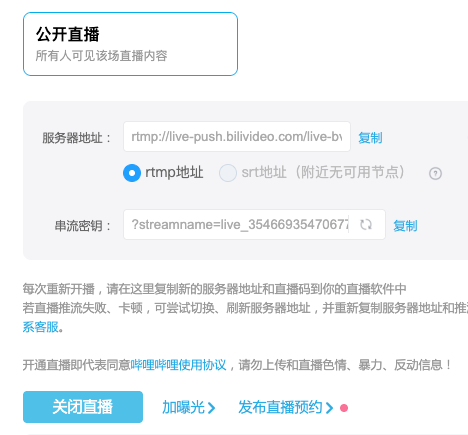
开始直播. - 获取推流服务器地址
-bs和串流密钥-bk,如下图所示,直接复制即可。
为了避免命令参数被错误分隔,请使用英文双引号
"包裹每一项参数。
Youtube
- 前往 直播页面.
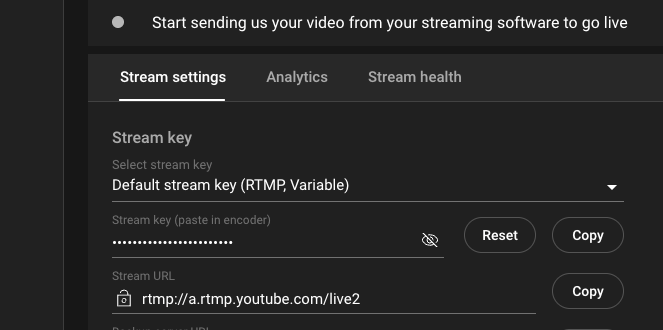
- 获取推流服务器地址(Stream URL)
-ys和串流密钥(Stream key)-yk。
为了避免命令参数被错误分隔,请使用英文双引号
"包裹每一项参数。
视频文件夹
参数 -f 是视频文件的存放文件夹
为了避免命令参数被错误分隔,请使用英文双引号
"包裹每一项参数。可以只填需要的平台对应的 server_url 和 key。
# eg.
# 只需要推流到 Bilibili 的配置,只需添加一次,例如
looplive add -bs "rtmp://live-push.bilivideo.com/live-bvc/" -bk "?streamname=live_3541234541234567_8901234&key=looplivexxxxxxxxxxxxdgd&schedule=rtmp&pflag=1" -f "your/folder/path"
# 只需要推流到 Youtube 的配置,只需添加一次
looplive add -ys "rtmp://a.rtmp.youtube.com/live2" -yk "ghkh-sfgg-loop-live-live" -f "your/folder/path"
# 同时推流到 Bilibili 和 Youtube 的配置,只需添加一次
looplive add -bs "rtmp://live-push.bilivideo.com/live-bvc/" -bk "?streamname=live_3541234541234567_8901234&key=looplivexxxxxxxxxxxxdgd&schedule=rtmp&pflag=1" -ys "rtmp://a.rtmp.youtube.com/live2" -yk "ghkh-sfgg-loop-live-live" -f "your/folder/path"
推流
只需添加一次参数,以后直接执行以下命令启动即可。
# 只推流到 Bilibili
looplive bili
# 只推流到 Youtube
looplive youtube
# 同时推流到 Bilibili 和 Youtube
looplive both
Docker 部署
配置文件
{
    "folder": "/app/looplive/videos", // 由于 docker 的挂载映射,最好不要修改这里
    "bili_server_url": "rtmp://live-push.bilivideo.com/live-bvc/",
    "bili_key": "?streamname=live_3541234541234567_8901234&key=looplivexxxxxxxxxxxxdgd&schedule=rtmp&pflag=1",
    "ytb_server_url": "rtmp://a.rtmp.youtube.com/live2", // 不需要可置为空 ""
    "ytb_key": "ghkh-sfgg-loop-live-live" // 不需要可置为空 ""
}
运行
sudo docker run -it \
    -v /your/path/to/config.json:/app/looplive/model/config.json \
    -v /your/path/to/videos:/app/looplive/videos \
    --name looplive_docker \
    ghcr.io/timerring/looplive:0.0.2
更多用法
$ looplive -h

looplive [-h] [-V] {check,add,reset,bili} ...


The Python toolkit package and cli designed for auto loop live.

positional arguments:
  {check,add,reset,bili,ytb,both}
                        Subcommands
    check               Check the configuration
    add                 Add the configuration
    reset               Reset the configuration
    bili                Stream on the bilibili platform
    ytb                 Stream on the youtube platform
    both                Stream on the bilibili and youtube platform

options:
  -h, --help            show this help message and exit
  -V, --version         Print version information
1 maintainer

Metadata
1 maintainer
Release files for looplive 0.0.2
For a detailed explanation of source distributions (sdists) and built distributions (wheels), please see the package formats documentation.
Source distribution (sdist)
| File | Size | Uploaded | |
|---|---|---|---|
| looplive-0.0.2.tar.gz | 364.1 kB | Details |
Built distribution (wheel)
| File | Interpreter | ABI | Platform | Reset |
|---|---|---|---|---|
| looplive-0.0.2-py3-none-any.whl | Python 3 | none | any | Details |
Total release size: 374.5 kB
Release files / looplive-0.0.2.tar.gz
| Download URL | looplive-0.0.2.tar.gz |
|---|---|
| Size | 364.1 kB |
| Tags | Source |
|
SHA-256 checksum How to use checksums |
08d052e3e918fae04df28b9ba4805ce0052f462369fdaf6747d29fcd661d898b
|
|
BLAKE2b-256 checksum How to use checksums |
f6afea8e1e5d3d75fe75529b4e28d8342584be639fabb030ea0e19b4098e918a
|
| Upload date | |
|
Uploaded using Trusted Publishing? What is trusted publishing? |
No |
| Uploaded via |
twine/6.1.0 CPython/3.10.16
|
Release files / looplive-0.0.2-py3-none-any.whl
| Download URL | looplive-0.0.2-py3-none-any.whl |
|---|---|
| Size | 10.4 kB |
| Tags | Python 3 |
|
SHA-256 checksum How to use checksums |
1bc6d8059cec63a034d981bb169f9c2627dd2db07ee361e28db7cb2b23f3d80a
|
|
BLAKE2b-256 checksum How to use checksums |
fdf74daac490d5d31af71f7e6f872992e78b8755689d510fd76badba4435ec42
|
| Upload date | |
|
Uploaded using Trusted Publishing? What is trusted publishing? |
No |
| Uploaded via |
twine/6.1.0 CPython/3.10.16
|














