
Looree




Offline push-to-talk dictation for Windows, powered by NVIDIA Parakeet.
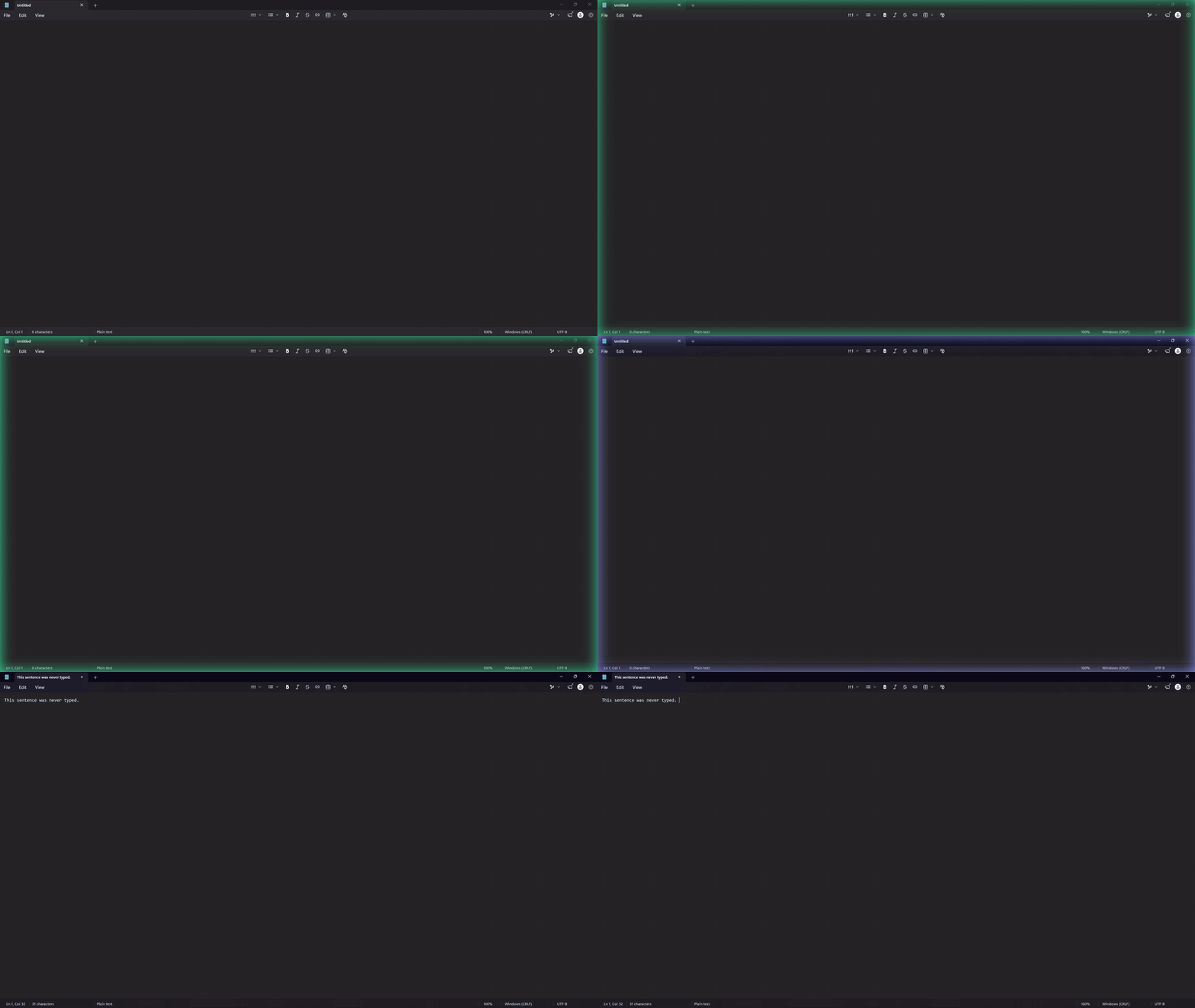
Hold Ctrl+Win, speak, and release. Looree transcribes on your own machine and pastes the text into whatever app has focus. Nothing leaves the computer.
Requirements
- Windows 11
- Python 3.11 or newer
- Optional: an NVIDIA GPU with a current driver
Install
py -m pip install looree
The install takes about 2 GB of disk, most of it the NVIDIA CUDA libraries that GPU support needs.
To work on the code instead, install it from a clone:
git clone https://github.com/digitalblack210/LOOREE.git
cd LOOREE
py -m venv .venv
.venv\Scripts\pip install -e .
Run
pyw -m looree
From a clone, run .venv\Scripts\pythonw -m looree instead.
Looree starts without a console window and adds an icon to the system tray. To have it start when you sign in, right-click the tray icon and tick Start with Windows.
The install also creates a looree.exe command, which does the same thing,
but Windows Smart App Control may block it because it is not signed.
The first run downloads the Parakeet TDT 0.6B v3 model (int8 ONNX, about 670 MB) from Hugging Face into the Hugging Face cache. After that Looree runs fully offline.
To watch the log in a console instead, run py -m looree.
Use
- Hold Ctrl+Win and speak. A glow around the edges of the screen shows that Looree is listening and follows the level of your voice.
- Release to transcribe. The glow changes colour while the text is produced, then the text is pasted at the cursor and the glow fades.
- Holds shorter than 250 ms are ignored. Pressing any other key during the hold cancels it, so shortcuts such as Ctrl+Win+D keep working.
Your clipboard is put back after the paste, and transcripts are kept out of the Windows clipboard history.
The tray menu has Open config, Open log folder, Reload config and model, Start with Windows and Quit.
Configuration
Settings live in %APPDATA%\Looree\config.toml, created on first run. Open it
from the tray menu, edit, then choose Reload config and model.
| Section | Setting | Default | Meaning |
|---|---|---|---|
hotkey |
keys |
"ctrl+win" |
Keys to hold, from ctrl, shift, alt, win, f1–f24 |
hotkey |
min_hold_ms |
250 |
Shorter holds are ignored |
hotkey |
max_hold_seconds |
600 |
A recording is ended and transcribed at this length |
microphone |
device |
"" |
"" for the system default, or part of a device name, or an index |
microphone |
keep_open |
true |
Keep the microphone stream open so the first word is never cut off |
model |
name |
"nemo-parakeet-tdt-0.6b-v3" |
Any model name onnx-asr accepts |
model |
quantization |
"int8" |
"" for the full precision model |
model |
device |
"cpu" |
"cpu", "cuda", or "auto" (GPU if it works, otherwise CPU) |
overlay |
enabled |
true |
Show the screen-edge glow |
overlay |
recording_color |
"#34C98E" |
Glow colour while recording |
overlay |
transcribing_color |
"#8C9BFF" |
Glow colour while transcribing |
overlay |
thickness |
90 |
Glow reach in pixels |
overlay |
animate |
true |
false gives a steady glow with no pulsing |
paste |
trailing_space |
true |
Add a space after each transcript |
paste |
restore_delay_ms |
300 |
Wait before restoring the clipboard |
cleanup |
remove_fillers |
true |
Drop "um", "uh" and stuttered repeats |
The int8 model is built for CPUs and runs fastest there. The log states which provider is active each time the model loads.
Cleanup
Looree tidies each transcript before pasting it. It drops "um", "uh" and "er", and
collapses stuttered repeats such as "I I". This needs no extra model and is on by
default; set remove_fillers = false under [cleanup] to turn it off.
Words the model does not know
The speech model cannot be given a word list, so Looree fixes names after the fact. Under [vocabulary.hears] in
config.toml, put the word you want on the left and the ways the model tends to write it on the right:
[vocabulary.hears]
Acme = ["ack me", "ak me", "akmee"]
Matching is on whole words, in any capitalisation and spacing, so "Ack me's wings" becomes "Acme's wings" and "back me up" is left alone. Copy the wrong spellings from what Looree actually pasted. The bundled config has only a commented example. After editing, choose "Reload config and model" from the tray menu.
Privacy
- To see the hotkey from any app, Looree installs a global keyboard hook. It tracks only the hotkey's own keys; any other key just cancels a hold in progress. No keystrokes are recorded, logged or sent anywhere.
- Audio is processed in memory and never written to disk.
- Transcripts are never logged. The log (
%LOCALAPPDATA%\Looree\looree.log) records only timings and character counts. - With
keep_open = truethe microphone stream stays open while Looree runs, and Windows shows its microphone indicator. Audio outside a hotkey hold is discarded.
Accessibility
The glow is designed not to flash. Its pulse is slow, its reaction to your voice is smoothed so it follows phrases and not syllables, and it stays lit for at least half a second so tapping the hotkey cannot make it flicker. The test suite simulates the glow and checks it against the WCAG 2.3.1 limit of three flashes per second. This is an automated check of the app's own animation maths, not a medical certification.
Set animate = false under [overlay] for a steady glow with no movement,
or enabled = false to turn it off.
Limitations
- Looree cannot see the hotkey while a window running as administrator has focus, unless Looree is started as administrator too.
- Text is inserted with Ctrl+V, so it only works where pasting does.
Transcribe a file
From a clone:
.venv\Scripts\python scripts\transcribe_wav.py path\to\audio.wav
Add --device cpu or --device cuda to choose a provider. Without it the
script uses the GPU when one works and the CPU otherwise.
Uninstall
- Untick Start with Windows in the tray menu, then choose Quit.
- Run
py -m pip uninstall looree, or delete the cloned folder if you installed from a clone. - Delete
%APPDATA%\Looree(settings) and%LOCALAPPDATA%\Looree(logs). - To reclaim the model's disk space, delete its folder from the Hugging Face
cache,
%USERPROFILE%\.cache\huggingface\hubby default.
Development
.venv\Scripts\pip install -e .[dev]
.venv\Scripts\python -m pytest
.venv\Scripts\python -m ruff check
.venv\Scripts\python -m ruff format --check
The tests run without a microphone, a GPU or the model. Bug reports and pull requests are welcome on the issue tracker.
To release, set version in pyproject.toml, commit, then push a tag of the
same version, such as v0.1.0. The release workflow runs the tests, builds the
package and publishes it to PyPI.
Credits
Speech recognition uses NVIDIA's Parakeet TDT 0.6B v3 model, released under CC BY 4.0, through the onnx-asr library. The model is downloaded on first run and is not part of this repository.
Looree is an independent project. It is not affiliated with or endorsed by NVIDIA.
License
MIT. See LICENSE.
1 maintainer

Metadata
1 maintainer
Release files for looree 0.1.0
For a detailed explanation of source distributions (sdists) and built distributions (wheels), please see the package formats documentation.
Source distribution (sdist)
| File | Size | Uploaded | Provenance | |
|---|---|---|---|---|
| looree-0.1.0.tar.gz | 84.8 kB | With provenance | Details |
Built distribution (wheel)
| File | Interpreter | ABI | Platform | Reset |
|---|---|---|---|---|
| looree-0.1.0-py3-none-any.whl | Python 3 | none | any | Details |
Total release size: 161.7 kB
Release files / looree-0.1.0.tar.gz
| Download URL | looree-0.1.0.tar.gz |
|---|---|
| Size | 84.8 kB |
| Tags | Source |
|
SHA-256 checksum How to use checksums |
9b9085a9ea2615c5780de4f1a5825ff984cc4d9d5eb7f3edebfa1c5ef69b38c7
|
|
BLAKE2b-256 checksum How to use checksums |
d3bbeb56643651b5176aa41fe8ec45ac8d60d89b8eb76c4be0487b0be9e57112
|
| Upload date | |
|
Uploaded using Trusted Publishing? What is trusted publishing? |
Yes |
| Uploaded via |
twine/7.0.0 CPython/3.13.14
|
Provenance
Provenance describes where a file came from. On PyPI, provenance is shared via attestations, which provide a verifiable record of the build or publishing details. View details, limitations and caveats.


PyPI Publish Attestation
PyPI verified that this artifact, at this checksum, originated from the publisher listed below.
Signed by GitHub Actions, verified by PyPI on Oct 18, 2026.
Transparency logRelease files / looree-0.1.0-py3-none-any.whl
| Download URL | looree-0.1.0-py3-none-any.whl |
|---|---|
| Size | 76.9 kB |
| Tags | Python 3 |
|
SHA-256 checksum How to use checksums |
c1916147251af86bef040fad1c5ad8b090c24cb2ce8741db800f7da5794407da
|
|
BLAKE2b-256 checksum How to use checksums |
2bcafe5d6071f0e5fc07065c096736f673e567fee8c90fd16e25de2579e74b83
|
| Upload date | |
|
Uploaded using Trusted Publishing? What is trusted publishing? |
Yes |
| Uploaded via |
twine/7.0.0 CPython/3.13.14
|
Provenance
Provenance describes where a file came from. On PyPI, provenance is shared via attestations, which provide a verifiable record of the build or publishing details. View details, limitations and caveats.
PyPI Publish Attestation
PyPI verified that this artifact, at this checksum, originated from the publisher listed below.
Signed by GitHub Actions, verified by PyPI on Oct 18, 2026.
Transparency logSecurity for looree 0.1.0
Provenance
Provenance describes where a file came from. On PyPI, provenance is shared via attestations, which provide a verifiable record of the build or publishing details. View details, limitations and caveats.
Full provenance
All 2 files in this release have been uploaded with provenance metadata.
Attestation for looree-0.1.0.tar.gz
PyPI Publish Attestation
PyPI verified that this artifact, at this checksum, originated from the publisher listed below.
Signed by GitHub Actions, verified by PyPI on Oct 18, 2026.
Transparency logA note on package security
PyPI is a repository for distributing packages, not a service for auditing them. While third-party security researchers and our staff do their best to detect and remove malicious packages, PyPI cannot guarantee the quality, security or suitability of any given package.
To learn more about protecting yourself from malicious actors, visit our package security documentation.













