
A plotting library that create Line Rider maps

Project description
Loss Rider
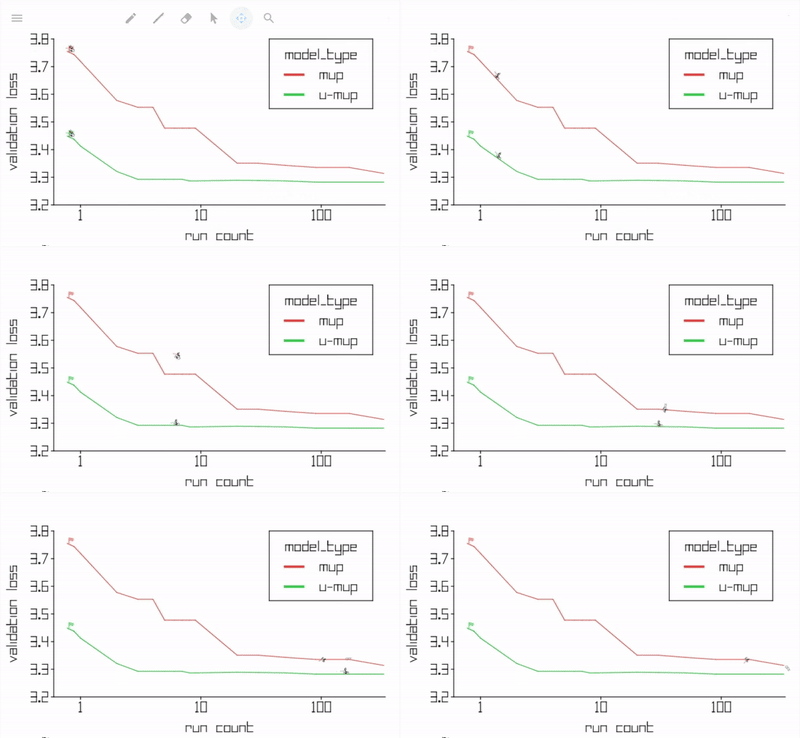
Finally, a Python plotting library that can (only) output Line Rider maps!

ML practitioners can experience gradient descent like never before!

With support for all important features of a line graph.

And don't forget interactive plotting in Jupyter Notebooks!

The above plots all use data from the Unit-Scaled Maximal Update Parameterization paper which proposes a more usable version of μP.
Installation
pip install lossrider
Usage
import pandas as pd
from lossrider import lossrider

# Load a csv that contains columns named "Validation Loss", "Run Count" and "model_type"
data = pd.read_csv("./_data/sweep_df.csv")

# Plot it!
lossrider(
    data,
    x="Run Count",
    y="Validation Loss",
    hue="model_type",
    xlim=(0.6, 340),
    ylim=(3.2, 3.8),
    xticks=(1, 10, 100),
    yticks=[x/10 for x in range(32, 39)],
    width=1000, height=500, fontsize=30,
    logx=True, grid=False,
    legend=True, legend_loc=(.65, 1),
    outfile='maps/sweep_strategies',
)
The above produces the below plot
Release history Release notifications | RSS feed


Download files
Download the file for your platform. If you're not sure which to choose, learn more about installing packages.
Source Distribution
Built Distribution
Filter files by name, interpreter, ABI, and platform.
If you're not sure about the file name format, learn more about wheel file names.
Copy a direct link to the current filters
File details
Details for the file lossrider-0.0.3.tar.gz.
File metadata
- Download URL: lossrider-0.0.3.tar.gz
- Upload date:
- Size: 8.5 kB
- Tags: Source
- Uploaded using Trusted Publishing? No
- Uploaded via: twine/5.1.1 CPython/3.8.10
File hashes
| Algorithm | Hash digest | |
|---|---|---|
| SHA256 |
71f5d0d8b1e5eae3e9d6c243a73c46dbbf4a914971d1f93b1f72efd21ddce552
|
|
| MD5 |
b9d1a619b4c94515ad2d3bc2b9c9b612
|
|
| BLAKE2b-256 |
b43e75591e8c06180176307c8ba704909c1616e104c9ea85bacdca2ebbe21a3c
|
File details
Details for the file lossrider-0.0.3-py3-none-any.whl.
File metadata
- Download URL: lossrider-0.0.3-py3-none-any.whl
- Upload date:
- Size: 7.9 kB
- Tags: Python 3
- Uploaded using Trusted Publishing? No
- Uploaded via: twine/5.1.1 CPython/3.8.10
File hashes
| Algorithm | Hash digest | |
|---|---|---|
| SHA256 |
eb5e7a828caaee060ab36b44fe0fd6d87cc5e11c04e81f304ab50a4cdeac04e9
|
|
| MD5 |
f8a9528934d403cf445b24e9bfd928bc
|
|
| BLAKE2b-256 |
a2b5c73a7b7164c10592277cfc153ce60055ef8f14968df6a3cfc0c08ba157df
|






