
lovia





English | 简体中文
One agent loop, three ways to use it. lovia is a Python agent framework you
can import as a library, run as a ready-made assistant in your browser, or take
apart to build your own. Each layer is built on the one below, so going from a
script to a product never means switching frameworks. The core depends only on
httpx, pydantic and pyyaml; everything else is opt-in.
| Use lovia as… | What you get | Start with |
|---|---|---|
| A library | An agent loop in ordinary Python: tools, streaming, sessions, approvals, context management | pip install lovia |
| A ready-made harness | A local assistant that works in your project folders, with files, shell, memory, skills and MCP | pip install "lovia[web]", then lovia web |
| The base for your own | That assistant as a toolkit: add tools, brand the page, add views, or keep only the API | lovia[web], then default_app() or create_app() |
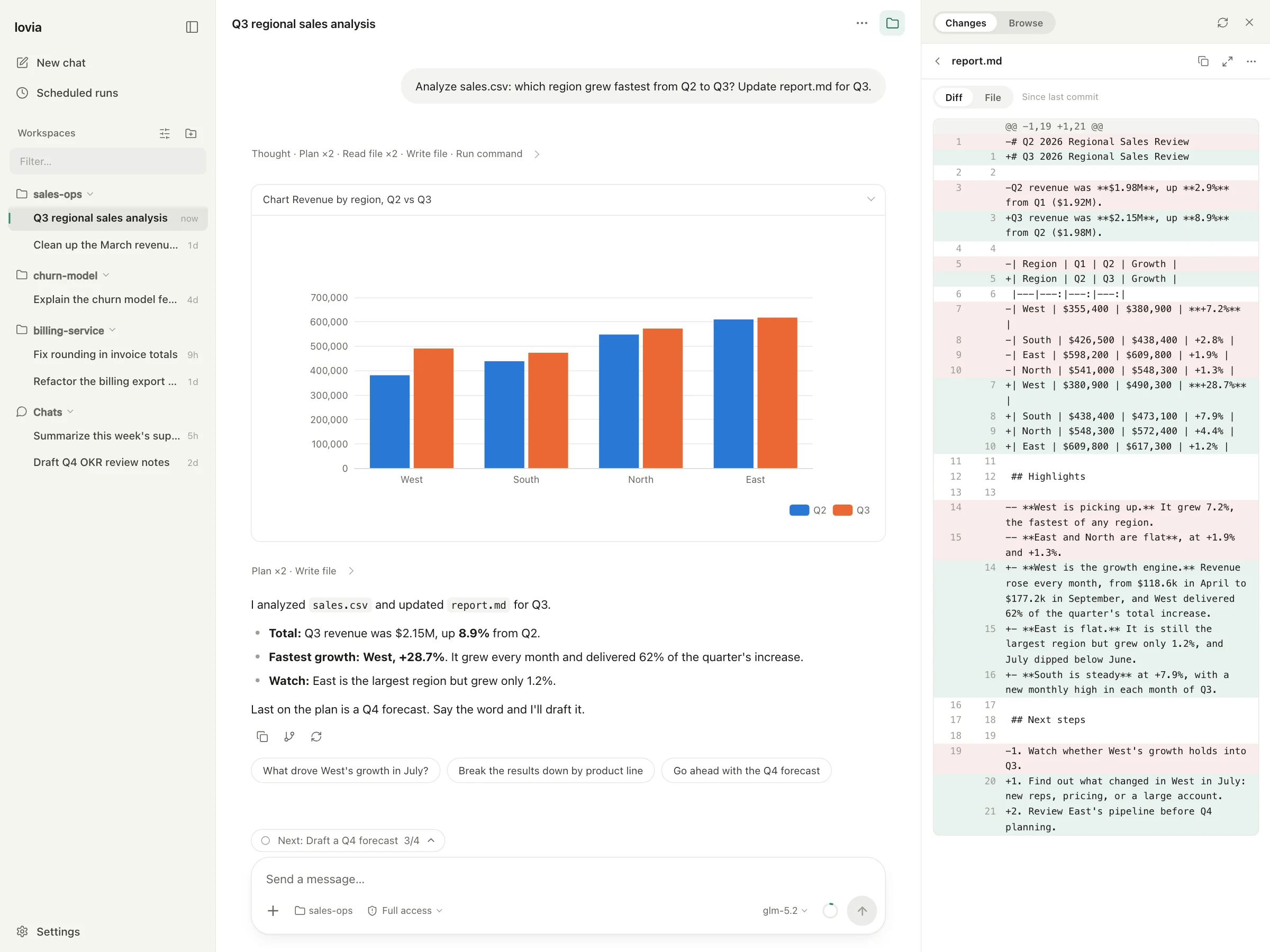
lovia web: chats grouped by workspace, a chart a tool drew, the agent's plan
above the composer, and the diff of the report it just updated.
A library
pip install lovia
export OPENAI_BASE_URL=https://your-endpoint/v1  # any OpenAI-compatible endpoint
export OPENAI_API_KEY=...
from lovia import Agent, tool


@tool
def get_order(order_id: str) -> str:
    """Look up an order's status by id."""
    return f"Order {order_id}: shipped 2 days ago, arriving Thursday."


agent = Agent(
    name="support",
    instructions="Look the order up before answering, in one or two sentences.",
    model="glm-5.2",  # a model your endpoint serves
    tools=[get_order],
)

print(agent.run_sync("Where is my order A-1042?").output)
From async code, use await Runner.run(agent, ...), or Runner.stream(...) for
typed events. For Anthropic, set ANTHROPIC_API_KEY and write
model="anthropic:<model>"
(configure a model).
What the loop gives you, each a few lines away:
- Tools from typed functions, run concurrently, and structured output validated into Pydantic models.
- Multi-agent by handoff, agent-as-tool, or background subagents that report back.
- Approvals for sensitive tools: answer from any UI, or suspend the run until someone does.
- Sessions and checkpoints: conversations persist, and a crashed run resumes where it stopped.
- Context compaction that never rewrites the transcript and keeps provider prompt caches warm.
- A workspace: file and shell tools under one policy for paths and commands, locally, over SSH, or in a container.
- Plugins: Skills, MCP, Todo and long-term Memory, built on the same extension point you get.
- Guardrails, retries and budgets, cancellation and steering, and offline testing with evals.
→ Cheatsheet, every feature in one snippet · Quickstart · Examples, a numbered path of runnable scripts
A ready-made harness: lovia web
pip install "lovia[web]"
lovia web
Open http://127.0.0.1:8000 and add a model on first launch. New chats work in
the directory you started from; lovia web ~/code/app picks another.
- It works in your folders. It reads and edits files, runs commands, plans with a todo list, searches the web, draws charts and tables, and hands independent work to background subagents.
- Many projects at once. The sidebar groups chats by workspace. Each chat has its own folder, model and permission mode, and the folder can be on an SSH host or in a container. Ask the assistant about your workspaces or an earlier chat and it looks them up.
- You stay in control. Permission modes range from read-only to full access. In the default mode, irreversible commands ask first and say why, and an approval can be remembered for the chat; in every mode, dangerous commands are refused.
- It follows your project. A chat loads its folder's
AGENTS.md,.agents/skillsand.mcp.json. In the composer,/lists commands and skills and@mentions a file. - A complete chat. Streaming, branching from any reply, steering a run while it works, attachments, scheduled runs, and long-term memory you can edit. A run keeps going when you close the tab.
- Settings without restarts. Models, MCP servers, skills and the
assistant's instructions live in Settings. Everything is kept in one home
directory,
~/.lovia, never in your repository.
On 127.0.0.1 no credentials are needed; binding any other address requires a
token. lovia web --help lists the flags.
The base for your own harness
lovia web is assembled from public pieces. Pick the depth you need:
| You want | Use | What you keep |
|---|---|---|
| The same assistant, plus your tools | default_app(customize=...) |
All of lovia web: Settings, memory, workspaces, schedules |
| Your own agent in a branded, extended chat page | create_app(agent, ui=ChatUI(...)) |
The chat page: streaming, approvals, history, files |
| Your own front end | create_app(agent, ui=False) or build_api_router() |
The JSON + SSE API behind the page (/api/docs) |
The same assistant, plus your tools. default_app() builds exactly what
lovia web serves, and customize hands you each agent it builds:
from lovia import tool
from lovia.web import default_app, serve


@tool
def order_status(order_id: str) -> str:
    """Look up an order."""
    return "shipped"


serve(default_app(customize=lambda agent: agent.clone(tools=[*agent.tools, order_status])))
Your agent, your page. create_app(agent) serves the agent you built,
exactly as you built it. It returns a FastAPI app, so your own routes sit
beside it:
from lovia.web import ChatUI, create_app, serve

app = create_app(
    agent,
    title="Acme",
    auth=my_auth,          # any FastAPI dependency
    run_deps=my_run_deps,  # who is asking, and what the page picked -> ctx.deps
    ui=ChatUI(assets="ui", styles=["theme.css"], logo="logo.svg", scripts=["acme.js"]),
)
serve(app)
- Tool results that draw UI. A tool returns
ui_result(kind, props). Tables, ECharts charts and sandboxed HTML pages are built in. - A scriptable page. Through
window.lovia, your scripts add renderers, tool views, slash commands, and whole views beside the chat. Template blocks, design tokens anddata-i18nkeys change the page's markup, look and wording.lovia web init-ui uiscaffolds the directory. - Worked examples. Examples
26–27and31–35cover serving, components, branding and extensions. lovia-react extends the bundled chat with React views.
Your own front end. create_app(agent, ui=False) serves only the API.
build_api_router() mounts it in your own FastAPI app, behind your own auth.
→ Web server guide · HTTP API · Deployment
Design principles
- Concise. An immutable
Agent, a statelessRunner,@tool, and plugins as the one extension axis. Every piece fits one screen of mental model. - Lightweight. Three hard dependencies. MCP, the web app and search backends are extras, imported only when used.
- Readable. Model calls, tool execution, retries and persistence run in one explicit loop. When something surprises you, there is one chain to follow.
- Extensible, with restraint. Extension points are dataclasses, Protocols and decorators, never subclassing. What fits in a short recipe on your side stays out of the framework.
Install
lovia needs Python 3.10 or newer.
| Need | Install |
|---|---|
| Core library | pip install lovia |
| MCP | pip install "lovia[mcp]" |
| Web app (includes MCP) | pip install "lovia[web]" |
| DuckDuckGo search | pip install "lovia[ddg]" (Tavily needs no extra: set TAVILY_API_KEY) |
| Runnable examples | pip install "lovia[examples,web]" |
Status
lovia is in beta, on its way to 1.0. Until then, breaking changes can ship in patch releases; pin a version if that matters to you. Stability lists what 1.0 will promise to keep.
Contributing
python -m venv .venv && .venv/bin/pip install -e ".[dev]"
.venv/bin/python -m pytest
.venv/bin/python -m ruff check . && .venv/bin/python -m ruff format .
.venv/bin/python -m mypy lovia
Live provider tests are skipped unless enabled:
LOVIA_LIVE_TESTS=1 .venv/bin/python -m pytest -m live_provider. Read
Architecture before changing
the internals.
License
1 maintainer

Metadata
1 maintainer
Release files for lovia 0.9.268
For a detailed explanation of source distributions (sdists) and built distributions (wheels), please see the package formats documentation.
Source distribution (sdist)
| File | Size | Uploaded | Provenance | Actions |
|---|---|---|---|---|
| lovia-0.9.268.tar.gz | 4.0 MB | With provenance | Details for lovia-0.9.268.tar.gz |
Built distribution (wheel)
| File | Interpreter | ABI | Platform | Actions Reset |
|---|---|---|---|---|
| lovia-0.9.268-py3-none-any.whl | Python 3 | none | any | Details for lovia-0.9.268-py3-none-any.whl |
Total release size: 6.3 MB
Release files / lovia-0.9.268.tar.gz
| Download URL | lovia-0.9.268.tar.gz |
|---|---|
| Size | 4.0 MB |
| Tags | Source |
|
SHA-256 checksum How to use checksums |
0c7c8c978b700e08c0b30659cee13093cb7f09a6dff0dc4e7a17c4548fa69f00
|
|
BLAKE2b-256 checksum How to use checksums |
1e380c0a05cd491f9d1a896c8cbf4a9f79c14858f3d14f6de881519638d453ee
|
| Upload date | |
|
Uploaded using Trusted Publishing? What is trusted publishing? |
Yes |
| Uploaded via |
twine/7.0.0 CPython/3.13.16
|
Provenance
Provenance describes where a file came from. On PyPI, provenance is shared via attestations, which provide a verifiable record of the build or publishing details. View details, limitations and caveats.


PyPI Publish Attestation
PyPI verified that this artifact, at this checksum, originated from the publisher listed below.
Signed by GitHub Actions, verified by PyPI on Nov 23, 2026.
Transparency logRelease files / lovia-0.9.268-py3-none-any.whl
| Download URL | lovia-0.9.268-py3-none-any.whl |
|---|---|
| Size | 2.3 MB |
| Tags | Python 3 |
|
SHA-256 checksum How to use checksums |
63e19e21ae5412128bb1cb697ea36b7ba0aeed1dea90e8dc7935d89b15d2fcde
|
|
BLAKE2b-256 checksum How to use checksums |
b2ed6af4cbaa321c0f95a9b40df3f598b4a6f94538526076635034f67395d48f
|
| Upload date | |
|
Uploaded using Trusted Publishing? What is trusted publishing? |
Yes |
| Uploaded via |
twine/7.0.0 CPython/3.13.16
|
Provenance
Provenance describes where a file came from. On PyPI, provenance is shared via attestations, which provide a verifiable record of the build or publishing details. View details, limitations and caveats.
PyPI Publish Attestation
PyPI verified that this artifact, at this checksum, originated from the publisher listed below.
Signed by GitHub Actions, verified by PyPI on Nov 23, 2026.
Transparency logSecurity for lovia 0.9.268
Provenance
Provenance describes where a file came from. On PyPI, provenance is shared via attestations, which provide a verifiable record of the build or publishing details. View details, limitations and caveats.
Full provenance
Both files in this release have been uploaded with provenance metadata.
Attestation for lovia-0.9.268.tar.gz
PyPI Publish Attestation
PyPI verified that this artifact, at this checksum, originated from the publisher listed below.
Signed by GitHub Actions, verified by PyPI on Nov 23, 2026.
Transparency logA note on package security
PyPI is a repository for distributing packages, not a service for auditing them. While third-party security researchers and our staff do their best to detect and remove malicious packages, PyPI cannot guarantee the quality, security or suitability of any given package.
To learn more about protecting yourself from malicious actors, visit our package security documentation.














