
lr_cd
A better implementation of linear regression in Python!








Project Summary
We implement linear regression using the coordinate descent (CD) algorithm in this Python package. Here are additional details about the coordinate descent (CD) algorithm.
Functions
There are three functions in this package:
1. Simulated data generation:
generate_data_lr(n, n_features, theta, noise=0.2, random_seed=123): generates random data points based on the theta coefficients, which can be used for model fitting.
2. Coordinate descent algorithm:
coordinate_descent(X, y, ϵ=1e-6, max_iterations=1000): performs coordinate descent to minimize the mean squared error (MSE) of linear regression and outputs the optimized intercept and coefficients vector.
3. Visualization of data and the fitted linear regression:
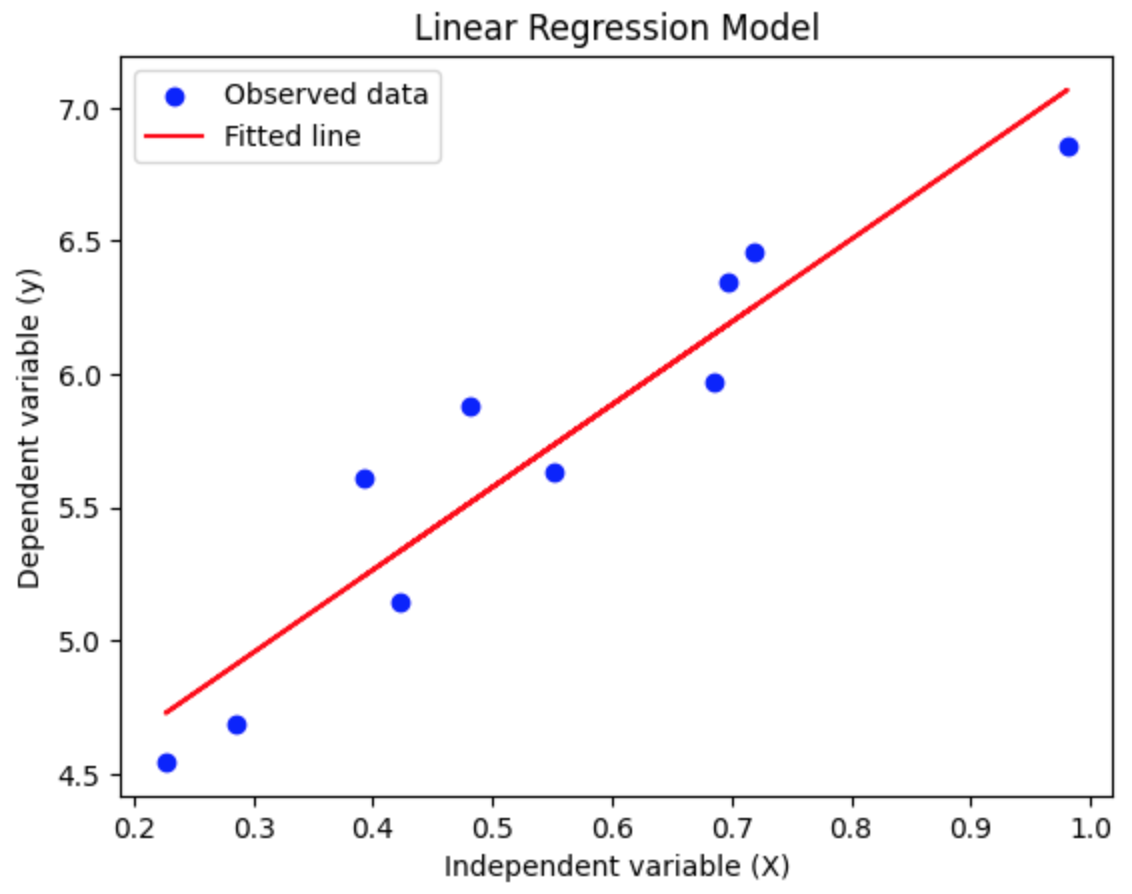
plot_lr(X, y, intercept, coef): returns a scatter plot of the observed data points overlayed with a regression with optimized intercept and coefficients vector.
Common Parameters
n(integer): Number of data points users want to generate.n_features(integer): Number of features to generate, excluding the intercept.theta(ndarray): True scalar intercept and coefficient weights vector. The first element should always be the intercept.noise(float): Standard deviation of a normal distribution added to the generated target y array as noise.random_seed(integer): Random seed to ensure reproducibility.X(ndarray): Feature data matrix, the independent variable.y(ndarray): Response data vector, the dependent variable. BothXandyshould have the same number of observations.ϵ(float, optional): Stop the algorithm if the change in weights is smaller than the value (default is 1e-6).max_iterations(integer, optional): Maximum number of iterations (default is 1000).intercept(float): Optimized intercept.coef(ndarray): Optimized coefficient weights vector.
Python Ecosystem Context
lr_cd establishes a valuable enhancement to the Python ecosystem. The LinearRegression in the Python package scikit-learn has similar functionality, but our implementation uses a different algorithm, which we believe is better. sklearn.linear_model.LinearRegression contains a few optimization functions: scipy.linalg.lstsq, scipy.sparse.linalg.lsqr, and scipy.optimize.nnls, which rely on the singular value decomposition of feature matrix X.
-
Beginner-Friendly :
lr_cdis easy to use for beginners in Python and statistics. The well-written functions allow users to play with various simulated data and generate beautiful plots with little effort. -
Reliable-Alternative : The coordinate descent algorithm is known for fast convergence in various convex optimization problems, making this Python package a reliable alternative to existed packages. Current package can be easily extended to a list of statistical models such as Ridge Regression and Lasso Regression.
Installation
Prerequisites
Make sure Miniconda or Anaconda is installed on your system
Step 1: Clone the Repository
git clone git@github.com:UBC-MDS/lr_cd.git
cd lr_cd  # Navigate to the cloned repository directory
Step 2: Create and Activate the Conda Environment
# Method 1: create Conda Environment from the environment.yml file
conda env create -f environment.yml
conda activate lr_cd

# Method 2: create Conda Environment from scratch
conda create --name lr_cd python=3.9 -y
conda activate lr_cd
Step 3: Install the Package Using Poetry
Ensure the Conda environment is activated (you should see (lr_cd) in the terminal prompt)
poetry install # Install the package using Poetry
Step 4: Get the coverage
# Check line coverage
pytest --cov=lr_cd

# Check branch coverage
pytest --cov-branch --cov=lr_cd
poetry run pytest --cov-branch --cov=src
poetry run pytest --cov-branch --cov=lr_cd --cov-report html
Troubleshooting
-
Environment Creation Issues: Ensure environment.yml is in the correct directory and you have the correct Conda version
-
Poetry Installation Issues: Verify Poetry is correctly installed in the Conda environment and your pyproject.toml file is properly configured
Usage
Use this package to find the optimized intercept and coefficients vector of linear regression. In the following example, we generate a simulated data set with a feature matrix and response first. By the coordinate descent algorithm, we obtain the optimized intercept and coefficients. Finally, we visualize both the simulated data and fitted line in one figure.
Example usage:
>>> from lr_cd.lr_data_generation import generate_data_lr
>>> import numpy as np
>>> theta = np.array([4, 3])
>>> X, y = generate_data_lr(n=10, n_features=1, theta=theta)
>>> print(f"Generated X: {X}")
>>> print(f'Generated y: {y}')
Generated X:
[[0.69646919]
 [0.28613933]
 [0.22685145]
 [0.55131477]
 [0.71946897]
 [0.42310646]
 [0.9807642 ]
 [0.68482974]
 [0.4809319 ]
 [0.39211752]]
Generated y:
[[6.34259481]
 [4.68506992]
 [4.54477713]
 [5.63500251]
 [6.45668483]
 [5.14153898]
 [6.8534962 ]
 [5.96761896]
 [5.88398172]
 [5.61370977]]
>>> from lr_cd.lr_cd import coordinate_descent
>>> intercept, coef, _ = coordinate_descent(X, y)
>>> print(f"lr_cd Intercept for example: {intercept}")
>>> print(f"lr_cd Coefficients for example: {coef}")
lr_cd Intercept for example: 4.0240072117306145
lr_cd Coefficients for example: [[3.10261496]]
>>> from lr_cd.lr_plotting import plot_lr
>>> plot_lr(X, y, intercept, coef)
Documentations
Online documentation is available readthedocs.
Published on TestPyPi and PyPi.
Contributors
Sam Fo for data generation, Andy Zhang for algorithm,and Jing Wen for visualization.
Contributing
Interested in contributing? Check out the contributing guidelines. Please note that this project is released with a Code of Conduct. By contributing to this project, you agree to abide by its terms.
License
lr_cd was created by Sam Fo, Jing Wen, Andy Zhang. It is licensed under the terms of the MIT license.
Credits
lr_cd was created with cookiecutter and the py-pkgs-cookiecutter template.
1 maintainer

Metadata
1 maintainer
Release files for lr-cd 0.3.10
For a detailed explanation of source distributions (sdists) and built distributions (wheels), please see the package formats documentation.
Source distribution (sdist)
| File | Size | Uploaded | |
|---|---|---|---|
| lr_cd-0.3.10.tar.gz | 7.1 kB | Details |
Built distribution (wheel)
| File | Interpreter | ABI | Platform | Reset |
|---|---|---|---|---|
| lr_cd-0.3.10-py3-none-any.whl | Python 3 | none | any | Details |
Total release size: 15.8 kB
Release files / lr_cd-0.3.10.tar.gz
| Download URL | lr_cd-0.3.10.tar.gz |
|---|---|
| Size | 7.1 kB |
| Tags | Source |
|
SHA-256 checksum How to use checksums |
ac95af909e5fd8e97fef5731fc35e4299b071b6aabf3bcc6f2d55c428bcf0b1c
|
|
BLAKE2b-256 checksum How to use checksums |
aec8bd412e8d9c78288a7fac2bf555f15ab9e1eab3301e00796fada18f2b7770
|
| Upload date | |
|
Uploaded using Trusted Publishing? What is trusted publishing? |
No |
| Uploaded via |
twine/4.0.2 CPython/3.11.7
|
Release files / lr_cd-0.3.10-py3-none-any.whl
| Download URL | lr_cd-0.3.10-py3-none-any.whl |
|---|---|
| Size | 8.7 kB |
| Tags | Python 3 |
|
SHA-256 checksum How to use checksums |
0c04b465607700e140ee78a670f5a233da982116678a3abc74f48456c9d04548
|
|
BLAKE2b-256 checksum How to use checksums |
1aa88542a81a4c09899085307a55116b8bae7aa9e4668490c3b8ce30ee75f490
|
| Upload date | |
|
Uploaded using Trusted Publishing? What is trusted publishing? |
No |
| Uploaded via |
twine/4.0.2 CPython/3.11.7
|














