
lsdsk
English | Deutsch










lsdsk is a storage diagnostic for Linux and Windows: it groups every drive under the controller and the PCIe path it hangs off, reads what the ports and the drives can do and what they actually negotiated, reads SMART data and error counters, and recommends what to act on.
c't Magazin covered it on 17 September 2026, in German: Kommandozeilentool lsdsk: Performance-Engpässe bei SSDs und Controllern finden.
Ten drives, three controllers, a chipset and a riser between them and the CPU. The machine boots fine, and nothing on it tells you that one card negotiated x1 in an x8 slot, that two SSDs share a link, or that the free port you were about to fill hangs off an uplink that is already full. A storage server rarely fails outright. It runs quietly for years with a shortfall that is easy to fix, and the values that would explain it are spread across sysfs, a set of ioctls and the mainboard manual.
lsdsk starts no subprocesses and makes no network requests: every value it prints was read directly, from sysfs and direct ioctls on Linux and from SetupAPI and DeviceIoControl on Windows.
QUICKSTART
The command below needs uv and nothing else; if uv is not installed yet,
INSTALL.md documents the one-line installer for
Linux, macOS and Windows.
For full information run lsdsk as root or Administrator. Without those rights you lose SMART
wear, the error counters, PCIe connector detection and the SATA controllers' port count. The
details are in INSTALL.md.
The usual invocation is uvx lsdsk@latest - uv then installs the newest version in a virtual
environment. The rest of this document writes the short form lsdsk for readability.
# run as Administrator or root for full information
uvx lsdsk@latest          # lsdsk TUI
uvx lsdsk@latest report   # get a printed report
uvx lsdsk@latest --help   # get further help
uvx lsdsk@latest opens an interactive view at a terminal, with a page per
topic; piped or redirected it prints the same data as one page: the mainboard,
what is wrong, the controller tree, every disk's identity, wear and error
counters, every SMART attribute, the PCIe slots, and each finding with its
reasoning.
The TUI
Number keys switch between the pages, Tab cycles, and every page is also a subcommand, so lsdsk health prints exactly what page 4 shows.
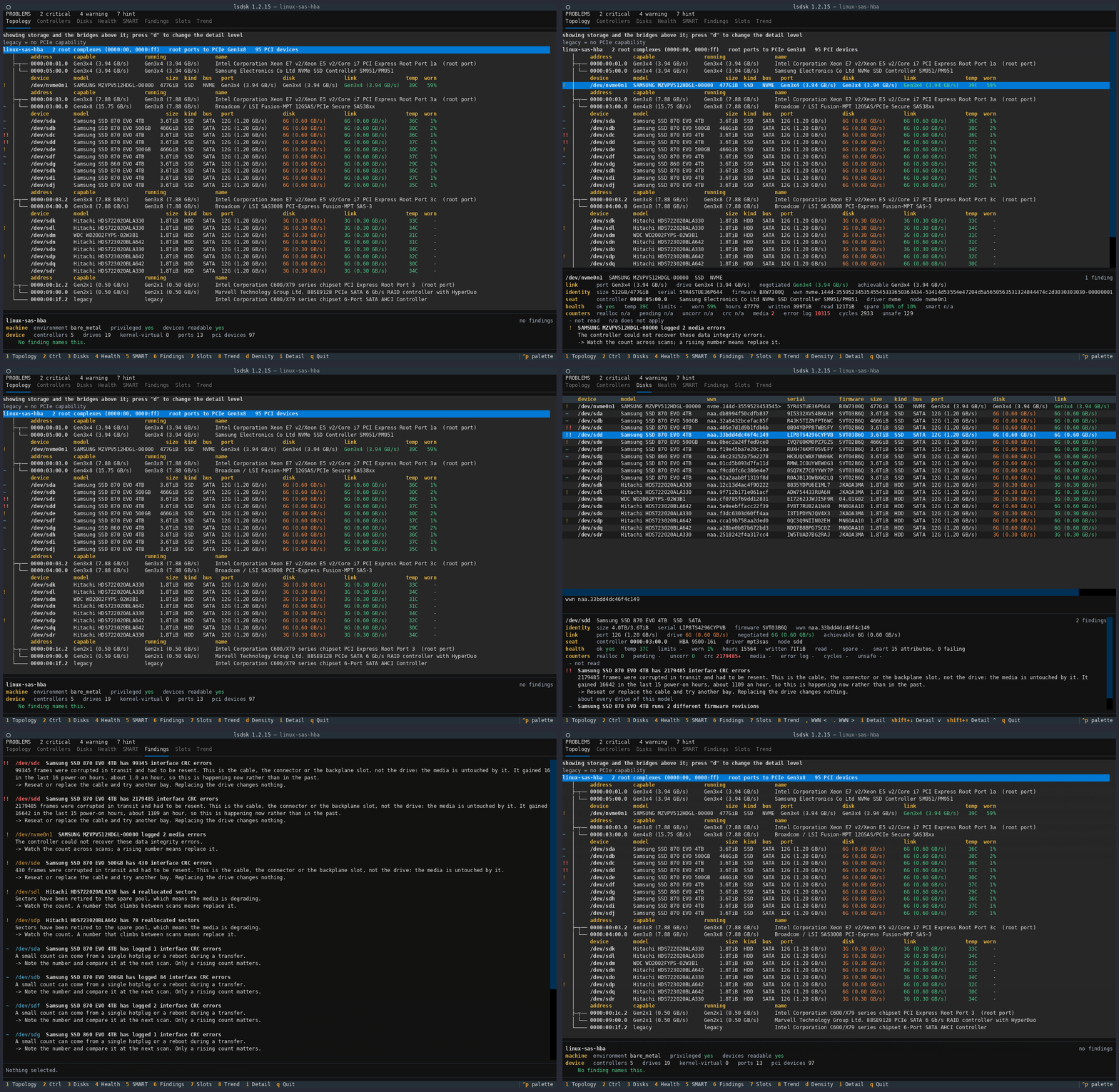
Six of the eight pages carry a cursor, and a panel under the table gives the detail: every value the row had no column for, and the findings that go with it. PAGES.md describes all eight pages in detail.
Through a pipe, into a file, or with the command lsdsk report, the program
prints text instead, most important findings first.
REPORT.md documents that report.
Privileges
lsdsk runs unprivileged too. Topology, PCIe link state, SATA capability and
negotiated speed, SAS phy rates, capacity, controller firmware and NVMe
temperature all read without elevated rights.
Four things do need root or Administrator:
- SMART attributes and wear.
- The error counters, so
trendandrecord. - PCIe slot numbers and whether a port is a real connector.
- The AHCI capability register.
Inside an LXC or Proxmox container these values cannot be read even with elevated rights.
lsdsk ships a skill for Claude Code
The hard part of a storage report is not reading it, it is knowing which findings deserve action. lsdsk ships that judgement as a Claude Code skill, so an agent reading the output reaches the same conclusions a practised admin would.
# in claude code
/plugin marketplace add bitranox/lsdsk
/plugin install lsdsk
The skill shows and explains what the tool cannot: that a CRC count is the cable
and never the drive, that a wear percentage means nothing without the drive's
own threshold, that a controller capped by the board has two opposite remedies
depending on whether a faster port exists and is merely occupied, and that a
slot number is matched against the mainboard manual because no readable source
gives the form factor. lsdsk can also export every value as JSON, and the
skill can then interpret that data on another machine. Nobody wants an agent
running on the server itself.
Install
uvx lsdsk@latest       # run without installing
uv tool install lsdsk  # install for repeated use, in its own venv
pip install lsdsk      # if you prefer the old way
Python 3.11 or newer, Linux or Windows. It shells out to nothing: no
smartmontools, no nvme-cli, no lspci, no subprocess of any kind, and no
network access at any point. Its own Python dependencies are declared in
pyproject.toml.
From the hardware lsdsk reads only a controller's numeric identifiers, not its
name. The PCI name database therefore ships with it. That is why a controller
reads the same on Linux and on Windows; lsdsk does not quote the localised
device names Windows carries. See NOTICE for that database's licence.
How lsdsk works
Linux reads sysfs and issues SG_IO ATA passthrough and NVMe admin ioctls
directly. A SATA port's own speed comes from the AHCI controller's capability
register. Windows uses SetupAPI and DeviceIoControl through ctypes, with
no WMI and no PowerShell. Both platforms receive the same ATA IDENTIFY, ATA
SMART and NVMe structures, so a single set of decoders serves both and is tested
against captures from real hardware on every supported operating system.
Every command lsdsk issues is a read. It never writes to a device or a controller.
Documentation
| Document | What it covers |
|---|---|
| PAGES.md | The eight pages and the key bindings |
| REPORT.md | The one-page report |
| COMMANDS.md | Every command and global option, the JSON envelope, and the exit codes |
| FINDINGS.md | What it reports, and what evidence each rule needs |
| WHY.md | The problem it was written for, and the two cases easiest to get wrong without it |
| INSTALL.md | Installing it, and what works unprivileged versus what needs root |
| CONFIG.md | Every configuration key, the layered sources, and the env-var forms |
| DEVELOPMENT.md | Working on lsdsk: the gate, the test lanes, capturing a fixture |
| CONTRIBUTING.md | How to propose a change |
| SECURITY.md | Reporting a vulnerability |
| CHANGELOG.md | What changed, and when |
| docs/systemdesign/module_reference.md | Every module, the layer rule, the CLI commands and the exit codes |
| ai-transparency.md | Where an AI assistant was used, what was verified on real hardware, and what was not |
| ai-stance.md | Why the project takes that position |
Licence
MIT.
1 maintainer

Metadata
1 maintainer
Release files for lsdsk 1.5.0
For a detailed explanation of source distributions (sdists) and built distributions (wheels), please see the package formats documentation.
Source distribution (sdist)
| File | Size | Uploaded | |
|---|---|---|---|
| lsdsk-1.5.0.tar.gz | 4.0 MB | Details |
Built distribution (wheel)
| File | Interpreter | ABI | Platform | Reset |
|---|---|---|---|---|
| lsdsk-1.5.0-py3-none-any.whl | Python 3 | none | any | Details |
Total release size: 4.6 MB
Release files / lsdsk-1.5.0.tar.gz
| Download URL | lsdsk-1.5.0.tar.gz |
|---|---|
| Size | 4.0 MB |
| Tags | Source |
|
SHA-256 checksum How to use checksums |
0d2368cb0dfe518e653bae96cc78d11c20e0918a83b1d7c71c5de9ce3aac28e4
|
|
BLAKE2b-256 checksum How to use checksums |
dc7f505b6d0c9ec0ff2eb02e03289f28f5911c36d980bc9dba3a9c4b3f5de7bc
|
| Upload date | |
|
Uploaded using Trusted Publishing? What is trusted publishing? |
No |
| Uploaded via |
twine/7.0.0 CPython/3.13.14
|
Release files / lsdsk-1.5.0-py3-none-any.whl
| Download URL | lsdsk-1.5.0-py3-none-any.whl |
|---|---|
| Size | 639.7 kB |
| Tags | Python 3 |
|
SHA-256 checksum How to use checksums |
c677152f28197e1daf649071753e65188b31682ceb7c2bedadbac1845e9e0cca
|
|
BLAKE2b-256 checksum How to use checksums |
7e79eb06214d963d28524c21da256fcd179aedf72d9b89caea7c9a365ece96dd
|
| Upload date | |
|
Uploaded using Trusted Publishing? What is trusted publishing? |
No |
| Uploaded via |
twine/7.0.0 CPython/3.13.14
|














