
LS-DYNA Mesh Reader
This library can be used to read in LS-DYNA meshes stored within keyword
(*.k, *.key, *.dyn) files, also known as keyword format "input
decks". Full documentation for this repository can be found at lsdyna-mesh-reader Documentation.
Many of these example files were obtained from the excellent documentation at LS-DYNA Examples.
Motivation
Despite its popularity, there doesn't appear to be a reader for LS-DYNA keyword files. I need a reader for a closed source project and hope that this helps someone else who also wishes to read in these files. It borrows from mapdl-archive as MAPDL also follows many of the same FORTRAN conventions when writing out FEMs.
Installation
Install the fully featured reader with visualization with:
pip install lsdyna-mesh-reader[pyvista]
If you only need the node and element arrays and not any VTK features (e.g. plotting or UnstructuredGrid representation), install the basic library with:
pip install lsdyna-mesh-reader
Examples
Before going through a basic example, let's talk about how these "decks" are organized. Each keyword file contains "keywords" that describe the start of sections of "cards". This terminology dates back to when DYNA3D was developed in 1976 where programs were written on punch cards.
To read in nodes and elements, we have to read in one or more node and element sections, each starting with *NODE or *ELEMENT_SOLID. This library loads in those raw sections as well as parsed sections as a higher level abstraction.
Let's start by loading the Contact Eroding I example deck.
Load the birdball deck.

>>> import lsdyna_mesh_reader
>>> from lsdyna_mesh_reader import examples
>>> deck = lsdyna_mesh_reader.Deck(examples.birdball)
LSDYNA Deck with:
  Node sections:              1
  Element Solid sections:     1
  Element Shell sections:     1
We can now inspect one of the node sections:
>>> node_section = deck.node_sections[0]
>>> node_section
NodeSection containing 1281 nodes

|  NID  |       X       |       Y       |       Z       |   tc   |   rc   |
|-------|---------------|---------------|---------------|--------|--------|
       1 -2.30940104e+00 -2.30940104e+00 -2.30940104e+00        0        0
       2 -2.03960061e+00 -2.03960061e+00 -2.03960061e+00        0        0
       3 -1.76980031e+00 -1.76980031e+00 -1.76980031e+00        0        0
       4 -1.50000000e+00 -1.50000000e+00 -1.50000000e+00        0        0
       5 -2.59364843e+00 -1.59561157e+00 -2.59364843e+00        0        0
       6 -2.22909880e+00 -1.39707434e+00 -2.22909880e+00        0        0
       7 -1.86454940e+00 -1.19853711e+00 -1.86454940e+00        0        0
       8 -1.50000000e+00 -1.00000000e+00 -1.50000000e+00        0        0
       9 -2.76911068e+00 -8.14893484e-01 -2.76911068e+00        0        0
      10 -2.34607387e+00 -7.09928930e-01 -2.34607387e+00        0        0
...
We can directly access the node IDs and arrays of the node section:
Node IDs

>>> node_section.nid
array([   1,    2,    3, ..., 1342, 1343, 1344], dtype=int32)

Node coordinates

>>> node_section.coordinates
array([[ -2.30940104,  -2.30940104,  -2.30940104],
       [ -2.03960061,  -2.03960061,  -2.03960061],
       [ -1.76980031,  -1.76980031,  -1.76980031],
       ...,
       [ -4.        , -10.        ,   0.        ],
       [ -2.        , -10.        ,   0.        ],
       [  0.        , -10.        ,   0.        ]])
The same can be done for both the solid and shell element sections.
>>> deck.element_solid_sections  # or deck.element_shell_sections
[ElementSolidSection containing 816 elements

 |  EID  |  PID  |  N1   |  N2   |  N3   |  N4   |  N5   |  N6   |  N7   |  N8   |
 |-------|-------|-------|-------|-------|-------|-------|-------|-------|-------|
        1       1       1       2       6       5      17      18      22      21
        2       1       2       3       7       6      18      19      23      22
        3       1       3       4       8       7      19      20      24      23
        4       1       5       6      10       9      21      22      26      25
        5       1       6       7      11      10      22      23      27      26
        6       1       7       8      12      11      23      24      28      27
        7       1       9      10      14      13      25      26      30      29
        8       1      10      11      15      14      26      27      31      30
        9       1      11      12      16      15      27      28      32      31
       10       1      17      18      22      21      33      34      38      37
 ...]

Element IDs

>>> section = deck.element_solid_sections[0]
>>> section.eid
array([  1,   2,   3, ..., 814, 815, 816], dtype=int32)

Node IDs of the elements

>>>
array([   1,    2,    6, ..., 1256, 1267, 1266], dtype=int32)
The elements are stored as a single contiguous array for efficiency and can be split up via:
>>> import numpy as np
>>> elements = np.split(section.node_ids, section.node_id_offsets[1:-1])
[array([ 1,  2,  6,  5, 17, 18, 22, 21], dtype=int32),
 array([ 2,  3,  7,  6, 18, 19, 23, 22], dtype=int32),
...
]
If you have pyvista installed or installed the library with pip install lsdyna-mesh-reader[pyvista], you can convert the mesh to a single unstructured
grid:
>>> grid = deck.to_grid()
>>> grid
UnstructuredGrid (0x70d5d723bc40)
  N Cells:    916
  N Points:   1281
  X Bounds:   -2.000e+01, 2.220e-15
  Y Bounds:   -1.000e+01, 4.000e+00
  Z Bounds:   -2.000e+01, 4.441e-15
  N Arrays:   2
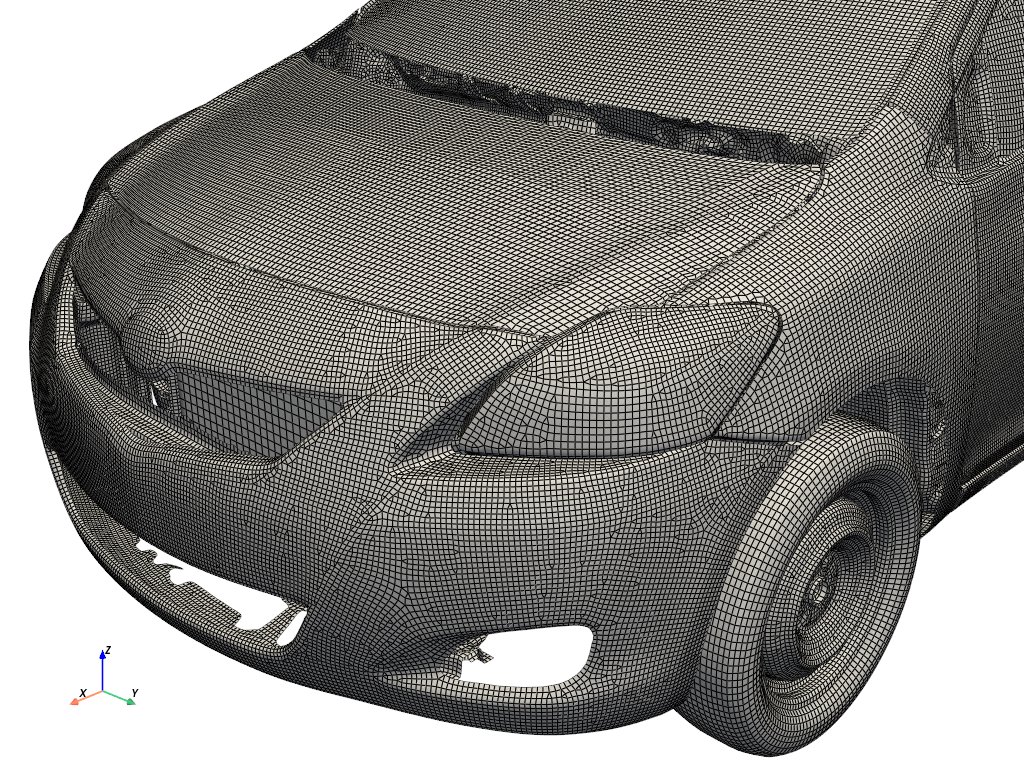
This lets you plot, save, or perform other operations on the mesh via PyVista. For example, you could plot the resulting mesh. Here's a full example using the Yaris Static Suspension System Loading Examplew.
>>> filename = "YarisD_V2g_shock_abs_load_01.k"
>>> deck = Deck(filename)
>>> grid = deck.to_grid()
>>> grid.plot(color="w", smooth_shading=True, show_edges=True)
Caveats and Limitations
As of now, limited testing has been performed on this library and you may find that it fails to load complex or simple keyword decks.
Additionally, this reader only supports the following keywords:
*NODE*ELEMENT_SHELL*ELEMENT_SOLID*ELEMENT_TSHELL(note: sections encoded as solid sections)
The VTK UnstructuredGrid contains only the linear element conversion of the
underlying LS-DYNA elements, and only supports VTK_QUAD, VTK_TRIANGLE,
VTK_TETRA, VTK_WEDGE, and VTK_HEXAHEDRAL.
Issues and Contributing
Feel free to open an Issue in this repository with any features you'd like me to add or bugs you need fixed.
If you'd like to contribute, please see CONTRIBUTING.md.
License
Source and content is under the MIT License, except for the LS-DYNA artifacts, which retain their original license from LS-DYNA and Ansys.
Note that the example files used here were downloaded from LS-DYNA Examples and have the following usage license as noted on the website:
The input files and several class notes are available for download. The
download is free of charge, a login is not required. All examples are
presented with a brief description. You may find an example by checking a
specific class or by using the search functionality of the site.

The content is prepared for educational purposes. Hence, material
properties and other parameters might be non-physic for simplification.
1 maintainer

Metadata
1 maintainer
Release files for lsdyna-mesh-reader 0.2.0
For a detailed explanation of source distributions (sdists) and built distributions (wheels), please see the package formats documentation.
Source distribution (sdist)
| File | Size | Uploaded | |
|---|---|---|---|
| lsdyna_mesh_reader-0.2.0.tar.gz | 649.3 kB | Details |
Built distributions (wheels)
Total release size: 11.6 MB
Release files / lsdyna_mesh_reader-0.2.0.tar.gz
| Download URL | lsdyna_mesh_reader-0.2.0.tar.gz |
|---|---|
| Size | 649.3 kB |
| Tags | Source |
|
SHA-256 checksum How to use checksums |
0362eaefefa0aa415b51c52cc7c3236c95f7f2412107cdd5113101687062c889
|
|
BLAKE2b-256 checksum How to use checksums |
acbbe71d1796edb6316d9c9e97a3a5a0bdf79965bc59a8b48ceff05cf060456f
|
| Upload date | |
|
Uploaded using Trusted Publishing? What is trusted publishing? |
Yes |
| Uploaded via |
twine/7.0.0 CPython/3.13.14
|
Provenance
Provenance describes where a file came from. On PyPI, provenance is shared via attestations, which provide a verifiable record of the build or publishing details. View details, limitations and caveats.


PyPI Publish Attestation
PyPI verified that this artifact, at this checksum, originated from the publisher listed below.
Signed by GitHub Actions, verified by PyPI on Aug 16, 2026.
Transparency logRelease files / lsdyna_mesh_reader-0.2.0-cp312-abi3-win_amd64.whl
| Download URL | lsdyna_mesh_reader-0.2.0-cp312-abi3-win_amd64.whl |
|---|---|
| Size | 720.7 kB |
| Tags | CPython 3.12 Windows x86-64 abi3 |
|
SHA-256 checksum How to use checksums |
2d32210ac410dcf1ceab0f05ff874a5fe9317788beac5754d4350cb322f36f51
|
|
BLAKE2b-256 checksum How to use checksums |
703b5a0f033f60c515bb43b271b7829746d5bcca8337961c95969f5ece580588
|
| Upload date | |
|
Uploaded using Trusted Publishing? What is trusted publishing? |
Yes |
| Uploaded via |
twine/7.0.0 CPython/3.13.14
|
Provenance
Provenance describes where a file came from. On PyPI, provenance is shared via attestations, which provide a verifiable record of the build or publishing details. View details, limitations and caveats.
PyPI Publish Attestation
PyPI verified that this artifact, at this checksum, originated from the publisher listed below.
Signed by GitHub Actions, verified by PyPI on Aug 16, 2026.
Transparency logRelease files / lsdyna_mesh_reader-0.2.0-cp312-abi3-manylinux_2_27_x86_64.manylinux_2_28_x86_64.whl
| Download URL | lsdyna_mesh_reader-0.2.0-cp312-abi3-manylinux_2_27_x86_64.manylinux_2_28_x86_64.whl |
|---|---|
| Size | 740.2 kB |
| Tags | CPython 3.12 Linux glibc 2.27+ x86-64 Linux glibc 2.28+ x86-64 abi3 |
|
SHA-256 checksum How to use checksums |
bcb9c96cb96772ed456060bf4f947aa86cb15ebc679a61902a526dd44811e227
|
|
BLAKE2b-256 checksum How to use checksums |
0d6e0481fa40d6594433e461b368ed0c1ab7bf2d44a93550cf73913cd84016ab
|
| Upload date | |
|
Uploaded using Trusted Publishing? What is trusted publishing? |
Yes |
| Uploaded via |
twine/7.0.0 CPython/3.13.14
|
Provenance
Provenance describes where a file came from. On PyPI, provenance is shared via attestations, which provide a verifiable record of the build or publishing details. View details, limitations and caveats.
PyPI Publish Attestation
PyPI verified that this artifact, at this checksum, originated from the publisher listed below.
Signed by GitHub Actions, verified by PyPI on Aug 16, 2026.
Transparency logRelease files / lsdyna_mesh_reader-0.2.0-cp312-abi3-manylinux_2_26_aarch64.manylinux_2_28_aarch64.whl
| Download URL | lsdyna_mesh_reader-0.2.0-cp312-abi3-manylinux_2_26_aarch64.manylinux_2_28_aarch64.whl |
|---|---|
| Size | 733.6 kB |
| Tags | CPython 3.12 Linux glibc 2.26+ ARM64 Linux glibc 2.28+ ARM64 abi3 |
|
SHA-256 checksum How to use checksums |
54c74802a74b7c2d329c72c3f75f6e0ca29a0c22a1375914aa7eb63be14d9d1c
|
|
BLAKE2b-256 checksum How to use checksums |
a5c34f74a326cd9f052f67477e8478c4e9ee842bf9392e2bd786408622143503
|
| Upload date | |
|
Uploaded using Trusted Publishing? What is trusted publishing? |
Yes |
| Uploaded via |
twine/7.0.0 CPython/3.13.14
|
Provenance
Provenance describes where a file came from. On PyPI, provenance is shared via attestations, which provide a verifiable record of the build or publishing details. View details, limitations and caveats.
PyPI Publish Attestation
PyPI verified that this artifact, at this checksum, originated from the publisher listed below.
Signed by GitHub Actions, verified by PyPI on Aug 16, 2026.
Transparency logRelease files / lsdyna_mesh_reader-0.2.0-cp312-abi3-macosx_11_0_arm64.whl
| Download URL | lsdyna_mesh_reader-0.2.0-cp312-abi3-macosx_11_0_arm64.whl |
|---|---|
| Size | 718.6 kB |
| Tags | CPython 3.12 abi3 macOS 11.0+ ARM64 |
|
SHA-256 checksum How to use checksums |
1e6f28f27f0527908b14e9665dc530451c1e73ee970789b687d28ab4a725ccb6
|
|
BLAKE2b-256 checksum How to use checksums |
04f024111e2af1b24e37220fcca614eed3ce249145b2fb18cf2bf6a5f22164b3
|
| Upload date | |
|
Uploaded using Trusted Publishing? What is trusted publishing? |
Yes |
| Uploaded via |
twine/7.0.0 CPython/3.13.14
|
Provenance
Provenance describes where a file came from. On PyPI, provenance is shared via attestations, which provide a verifiable record of the build or publishing details. View details, limitations and caveats.
PyPI Publish Attestation
PyPI verified that this artifact, at this checksum, originated from the publisher listed below.
Signed by GitHub Actions, verified by PyPI on Aug 16, 2026.
Transparency logRelease files / lsdyna_mesh_reader-0.2.0-cp312-abi3-macosx_10_14_x86_64.whl
| Download URL | lsdyna_mesh_reader-0.2.0-cp312-abi3-macosx_10_14_x86_64.whl |
|---|---|
| Size | 722.4 kB |
| Tags | CPython 3.12 abi3 macOS 10.14+ x86-64 |
|
SHA-256 checksum How to use checksums |
ad13ce001ee77d2553f0321e05a4b3644cded933a837608c09fd866ab50c7d3d
|
|
BLAKE2b-256 checksum How to use checksums |
fa8e34642bc696b0c412c4b9f71866dfc846db418a3596c0def5be9b25d95ec3
|
| Upload date | |
|
Uploaded using Trusted Publishing? What is trusted publishing? |
Yes |
| Uploaded via |
twine/7.0.0 CPython/3.13.14
|
Provenance
Provenance describes where a file came from. On PyPI, provenance is shared via attestations, which provide a verifiable record of the build or publishing details. View details, limitations and caveats.
PyPI Publish Attestation
PyPI verified that this artifact, at this checksum, originated from the publisher listed below.
Signed by GitHub Actions, verified by PyPI on Aug 16, 2026.
Transparency logRelease files / lsdyna_mesh_reader-0.2.0-cp311-cp311-win_amd64.whl
| Download URL | lsdyna_mesh_reader-0.2.0-cp311-cp311-win_amd64.whl |
|---|---|
| Size | 722.8 kB |
| Tags | CPython 3.11 Windows x86-64 |
|
SHA-256 checksum How to use checksums |
e13435094368da65b1647d964c3b5442f15b606a78dec1dbf1fa91560d6842ba
|
|
BLAKE2b-256 checksum How to use checksums |
95f1a126f6acebe787bda8b3a2686f35bb4f647b227e89041fa33322ca4dbb5c
|
| Upload date | |
|
Uploaded using Trusted Publishing? What is trusted publishing? |
Yes |
| Uploaded via |
twine/7.0.0 CPython/3.13.14
|
Provenance
Provenance describes where a file came from. On PyPI, provenance is shared via attestations, which provide a verifiable record of the build or publishing details. View details, limitations and caveats.
PyPI Publish Attestation
PyPI verified that this artifact, at this checksum, originated from the publisher listed below.
Signed by GitHub Actions, verified by PyPI on Aug 16, 2026.
Transparency logRelease files / lsdyna_mesh_reader-0.2.0-cp311-cp311-manylinux_2_27_x86_64.manylinux_2_28_x86_64.whl
| Download URL | lsdyna_mesh_reader-0.2.0-cp311-cp311-manylinux_2_27_x86_64.manylinux_2_28_x86_64.whl |
|---|---|
| Size | 744.7 kB |
| Tags | CPython 3.11 Linux glibc 2.27+ x86-64 Linux glibc 2.28+ x86-64 |
|
SHA-256 checksum How to use checksums |
16620f186e57d8546f2aa944b9a1fa7e06c02a91910777a059c7a1fe26215c7c
|
|
BLAKE2b-256 checksum How to use checksums |
5a0d591c03d06858d8370dd67e5c97b21002773dc9a954919b7649b43e0a7f1d
|
| Upload date | |
|
Uploaded using Trusted Publishing? What is trusted publishing? |
Yes |
| Uploaded via |
twine/7.0.0 CPython/3.13.14
|
Provenance
Provenance describes where a file came from. On PyPI, provenance is shared via attestations, which provide a verifiable record of the build or publishing details. View details, limitations and caveats.
PyPI Publish Attestation
PyPI verified that this artifact, at this checksum, originated from the publisher listed below.
Signed by GitHub Actions, verified by PyPI on Aug 16, 2026.
Transparency logRelease files / lsdyna_mesh_reader-0.2.0-cp311-cp311-manylinux_2_26_aarch64.manylinux_2_28_aarch64.whl
| Download URL | lsdyna_mesh_reader-0.2.0-cp311-cp311-manylinux_2_26_aarch64.manylinux_2_28_aarch64.whl |
|---|---|
| Size | 737.7 kB |
| Tags | CPython 3.11 Linux glibc 2.26+ ARM64 Linux glibc 2.28+ ARM64 |
|
SHA-256 checksum How to use checksums |
26f81924e8153c297ebd48b3292629e1401fa8512c82812094b3a25d6f9a17b9
|
|
BLAKE2b-256 checksum How to use checksums |
f3eff66721d2818950c6d47a06e5d11d6f61ae60f97d466157c32c63b314ba7a
|
| Upload date | |
|
Uploaded using Trusted Publishing? What is trusted publishing? |
Yes |
| Uploaded via |
twine/7.0.0 CPython/3.13.14
|
Provenance
Provenance describes where a file came from. On PyPI, provenance is shared via attestations, which provide a verifiable record of the build or publishing details. View details, limitations and caveats.
PyPI Publish Attestation
PyPI verified that this artifact, at this checksum, originated from the publisher listed below.
Signed by GitHub Actions, verified by PyPI on Aug 16, 2026.
Transparency logRelease files / lsdyna_mesh_reader-0.2.0-cp311-cp311-macosx_11_0_arm64.whl
| Download URL | lsdyna_mesh_reader-0.2.0-cp311-cp311-macosx_11_0_arm64.whl |
|---|---|
| Size | 720.5 kB |
| Tags | CPython 3.11 macOS 11.0+ ARM64 |
|
SHA-256 checksum How to use checksums |
cb26585788607f8baac0597b4d1b59ff978db4891818116842e05bc9f8e8790f
|
|
BLAKE2b-256 checksum How to use checksums |
84079298ef29854bd6bf112cde80b95b3296bd0f7c8544ed1d5664b926fbe128
|
| Upload date | |
|
Uploaded using Trusted Publishing? What is trusted publishing? |
Yes |
| Uploaded via |
twine/7.0.0 CPython/3.13.14
|
Provenance
Provenance describes where a file came from. On PyPI, provenance is shared via attestations, which provide a verifiable record of the build or publishing details. View details, limitations and caveats.
PyPI Publish Attestation
PyPI verified that this artifact, at this checksum, originated from the publisher listed below.
Signed by GitHub Actions, verified by PyPI on Aug 16, 2026.
Transparency logRelease files / lsdyna_mesh_reader-0.2.0-cp311-cp311-macosx_10_14_x86_64.whl
| Download URL | lsdyna_mesh_reader-0.2.0-cp311-cp311-macosx_10_14_x86_64.whl |
|---|---|
| Size | 724.0 kB |
| Tags | CPython 3.11 macOS 10.14+ x86-64 |
|
SHA-256 checksum How to use checksums |
33552a4634c4656c6dcfe969b7254d9924205627a4413d43cec9076501c6d6ec
|
|
BLAKE2b-256 checksum How to use checksums |
ead182db0cbe07af65468e5de1a9b2c9b2f9612371d0f241d993b8220d89819b
|
| Upload date | |
|
Uploaded using Trusted Publishing? What is trusted publishing? |
Yes |
| Uploaded via |
twine/7.0.0 CPython/3.13.14
|
Provenance
Provenance describes where a file came from. On PyPI, provenance is shared via attestations, which provide a verifiable record of the build or publishing details. View details, limitations and caveats.
PyPI Publish Attestation
PyPI verified that this artifact, at this checksum, originated from the publisher listed below.
Signed by GitHub Actions, verified by PyPI on Aug 16, 2026.
Transparency logRelease files / lsdyna_mesh_reader-0.2.0-cp310-cp310-win_amd64.whl
| Download URL | lsdyna_mesh_reader-0.2.0-cp310-cp310-win_amd64.whl |
|---|---|
| Size | 723.0 kB |
| Tags | CPython 3.10 Windows x86-64 |
|
SHA-256 checksum How to use checksums |
2585135f4546bae4ed116a0fad256b25252eb2773781dc718da453ad5b9632b6
|
|
BLAKE2b-256 checksum How to use checksums |
bd356c5c273cf53ad098dce1f65dba045f59d77de89ea4795761376fe9940247
|
| Upload date | |
|
Uploaded using Trusted Publishing? What is trusted publishing? |
Yes |
| Uploaded via |
twine/7.0.0 CPython/3.13.14
|
Provenance
Provenance describes where a file came from. On PyPI, provenance is shared via attestations, which provide a verifiable record of the build or publishing details. View details, limitations and caveats.
PyPI Publish Attestation
PyPI verified that this artifact, at this checksum, originated from the publisher listed below.
Signed by GitHub Actions, verified by PyPI on Aug 16, 2026.
Transparency logRelease files / lsdyna_mesh_reader-0.2.0-cp310-cp310-manylinux_2_27_x86_64.manylinux_2_28_x86_64.whl
| Download URL | lsdyna_mesh_reader-0.2.0-cp310-cp310-manylinux_2_27_x86_64.manylinux_2_28_x86_64.whl |
|---|---|
| Size | 745.3 kB |
| Tags | CPython 3.10 Linux glibc 2.27+ x86-64 Linux glibc 2.28+ x86-64 |
|
SHA-256 checksum How to use checksums |
fea9fe893eea0d10b00ee3dcde811f83bf2a0706c6f0a9be78889694d4097376
|
|
BLAKE2b-256 checksum How to use checksums |
84d0a9730eaf4dde2351ce74b032fd0d643e048be262379400478242e9d5ffd6
|
| Upload date | |
|
Uploaded using Trusted Publishing? What is trusted publishing? |
Yes |
| Uploaded via |
twine/7.0.0 CPython/3.13.14
|
Provenance
Provenance describes where a file came from. On PyPI, provenance is shared via attestations, which provide a verifiable record of the build or publishing details. View details, limitations and caveats.
PyPI Publish Attestation
PyPI verified that this artifact, at this checksum, originated from the publisher listed below.
Signed by GitHub Actions, verified by PyPI on Aug 16, 2026.
Transparency logRelease files / lsdyna_mesh_reader-0.2.0-cp310-cp310-manylinux_2_26_aarch64.manylinux_2_28_aarch64.whl
| Download URL | lsdyna_mesh_reader-0.2.0-cp310-cp310-manylinux_2_26_aarch64.manylinux_2_28_aarch64.whl |
|---|---|
| Size | 738.2 kB |
| Tags | CPython 3.10 Linux glibc 2.26+ ARM64 Linux glibc 2.28+ ARM64 |
|
SHA-256 checksum How to use checksums |
2235f39529c7e0343093a3c8aecd1cef6aaa4987b846286ca88db66d6356f093
|
|
BLAKE2b-256 checksum How to use checksums |
5799f805126348e0ee2591203f1b9a29bfc147e6ef757af0a02576559d5671cd
|
| Upload date | |
|
Uploaded using Trusted Publishing? What is trusted publishing? |
Yes |
| Uploaded via |
twine/7.0.0 CPython/3.13.14
|
Provenance
Provenance describes where a file came from. On PyPI, provenance is shared via attestations, which provide a verifiable record of the build or publishing details. View details, limitations and caveats.
PyPI Publish Attestation
PyPI verified that this artifact, at this checksum, originated from the publisher listed below.
Signed by GitHub Actions, verified by PyPI on Aug 16, 2026.
Transparency logRelease files / lsdyna_mesh_reader-0.2.0-cp310-cp310-macosx_11_0_arm64.whl
| Download URL | lsdyna_mesh_reader-0.2.0-cp310-cp310-macosx_11_0_arm64.whl |
|---|---|
| Size | 720.9 kB |
| Tags | CPython 3.10 macOS 11.0+ ARM64 |
|
SHA-256 checksum How to use checksums |
c1f7063dad4870d81a408a46793d1eada9d50cad76e0d6e15388e909a7191f23
|
|
BLAKE2b-256 checksum How to use checksums |
6b8435f3daaf301f5bfc7d8eec4e351a2d4cf18bb109dcc2a9849d8e52571765
|
| Upload date | |
|
Uploaded using Trusted Publishing? What is trusted publishing? |
Yes |
| Uploaded via |
twine/7.0.0 CPython/3.13.14
|
Provenance
Provenance describes where a file came from. On PyPI, provenance is shared via attestations, which provide a verifiable record of the build or publishing details. View details, limitations and caveats.
PyPI Publish Attestation
PyPI verified that this artifact, at this checksum, originated from the publisher listed below.
Signed by GitHub Actions, verified by PyPI on Aug 16, 2026.
Transparency logRelease files / lsdyna_mesh_reader-0.2.0-cp310-cp310-macosx_10_14_x86_64.whl
| Download URL | lsdyna_mesh_reader-0.2.0-cp310-cp310-macosx_10_14_x86_64.whl |
|---|---|
| Size | 724.3 kB |
| Tags | CPython 3.10 macOS 10.14+ x86-64 |
|
SHA-256 checksum How to use checksums |
eb9eeefa5bbcd75f3822e2e02971e60028bc3d69309267015d01a0e72ea83278
|
|
BLAKE2b-256 checksum How to use checksums |
c1a783ec6b3382d37872cf833dec311ab9785e1c1b55f34c54cd64c187be207f
|
| Upload date | |
|
Uploaded using Trusted Publishing? What is trusted publishing? |
Yes |
| Uploaded via |
twine/7.0.0 CPython/3.13.14
|
Provenance
Provenance describes where a file came from. On PyPI, provenance is shared via attestations, which provide a verifiable record of the build or publishing details. View details, limitations and caveats.
PyPI Publish Attestation
PyPI verified that this artifact, at this checksum, originated from the publisher listed below.
Signed by GitHub Actions, verified by PyPI on Aug 16, 2026.
Transparency log













