
a library to create language servers

Project description
lsp-tree-sitter





























A core library to support language servers.
I write many language servers and they share some same code so I extract the shared code to this library.
I've had enough of writing many DSLs in my editor without any LSP support (completion, hover, ...). So I decide to sacrifice my time to do this work.
Language servers
- termux-language-server: for some specific bash scripts:
- mutt-language-server: for (neo)mutt's (neo)muttrc
- More
Usage
Schema
A Trie to convert a file to a json, then you can use json schema to validate
it to get diagnostics.
Take termux-language-server as an example.
PKGBUILD:
pkgname=hello
pkgver=0.0.1
pkgrel=1
pkgdesc="hello"
arch=(wrong_arch)
license=(GPL3)

build() {
    cat <<EOF > hello
#!/usr/bin/env sh
echo hello
EOF
}

package() {
    install -D hello -t $pkgdir/usr/bin
}
termux-language-server --convert PKGBUILD
{
  "pkgname": "hello",
  "pkgver": "0.0.1",
  "pkgrel": "1",
  "pkgdesc": "hello",
  "arch": [
    "wrong_arch"
  ],
  "license": [
    "GPL3"
  ],
  "build": 0,
  "package": 0
}
So, we can validate the json by a json schema:
$ termux-language-server --check PKGBUILD
PKGBUILD:5:7-5:17:error: 'wrong_arch' is not one of ['any', 'pentium4', 'i486', 'i686', 'x86_64', 'x86_64_v3', 'arm', 'armv6h', 'armv7h', 'armv8', 'aarch64']
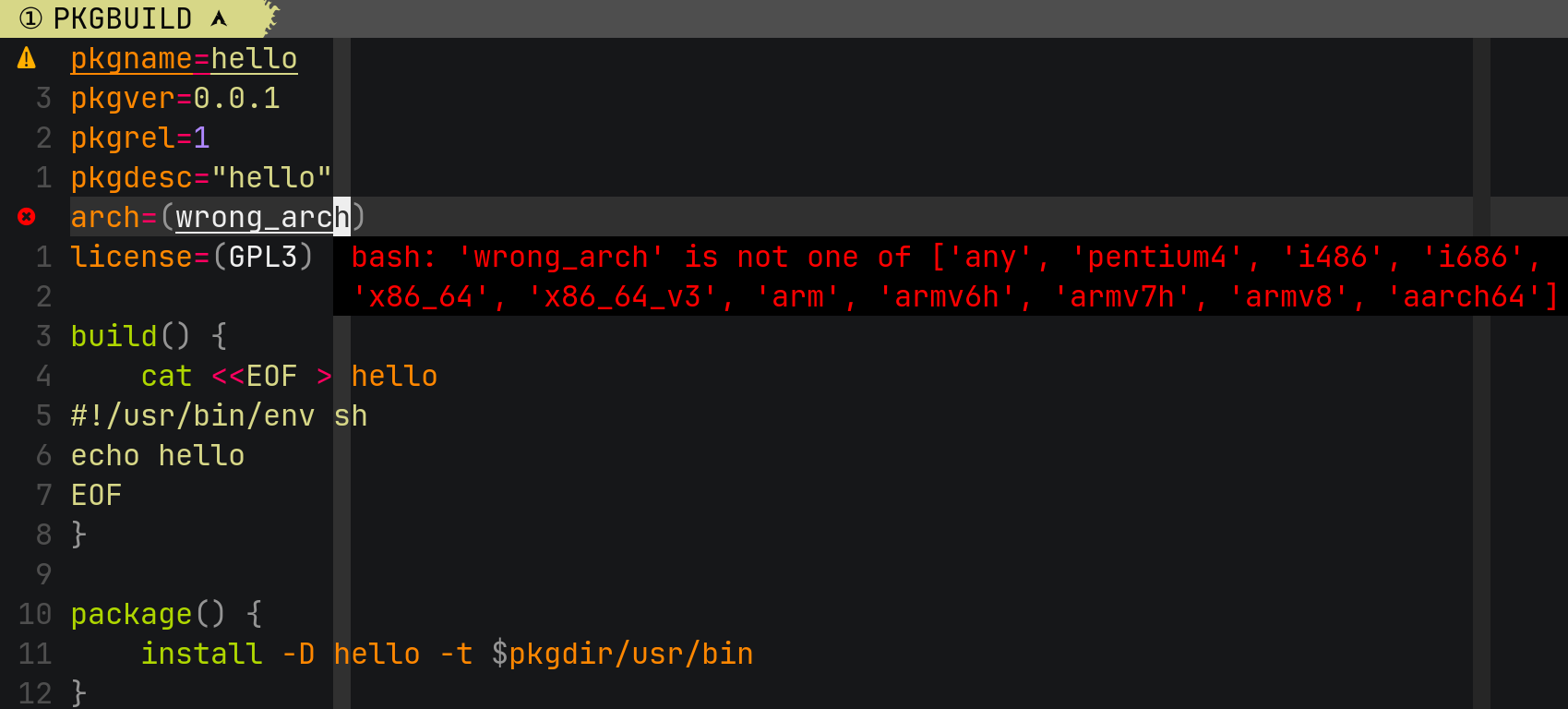
Sometimes it will be more complicated:
neomuttrc:
set allow_ansi=yes sleep_time = no ispell = aspell
set query_command = 'mutt_ldap_query.pl %s'
mutt-language-server --convert neomuttrc
{
  "set": {
    "allow_ansi": "yes",
    "sleep_time": "no",
    "ispell": "aspell",
    "query_command": "mutt_ldap_query.pl %s"
  }
}
$ mutt-language-server --check neomuttrc
neomuttrc:1:33-1:35:error: 'no' is not of type 'number'

We put the result to the json's .set not . just in order to reserve the
other keys for other usages.
Finders
Some finders to find the required node in tree-sitter's AST. Such as, if you want to get the node under the cursor:
@self.feature(TEXT_DOCUMENT_COMPLETION)
def completions(params: CompletionParams) -> CompletionList:
    document = self.workspace.get_document(params.text_document.uri)
    uni = PositionFinder(params.position, right_equal=True).find(
        document.uri, self.trees[document.uri]
    )
    # ...
UNI (Universal Node Identifier) is URI + node.
Utilities
This library also provides many utility functions. Such as converting man page to markdown and tokenizing it in order to generate the json schema.
mutt-language-server --generate-schema neomuttrc
{
  "$id": "https://github.com/neomutt/mutt-language-server/blob/main/src/termux_language_server/assets/json/neomuttrc.json",
  "$schema": "http://json-schema.org/draft-07/schema#",
  "$comment": "Don't edit this file directly! It is generated by `mutt-language-server --generate-schema=neomuttrc`.",
  "type": "object",
  "properties": {
    "account-hook": {
      "description": "```neomuttrc\naccount-hook regex command\n```\nThis hook is executed whenever you access a remote mailbox. Useful to adjust configuration settings to different IMAP or POP servers."
    },
    "$comment": "..."
  }
}

Template
This project provides a template for copier.
For example, you want to create a language server for a filetype named
zathurarc. Please follow
the following steps:
Create a tree-sitter parser
- Create a tree-sitter-parser from template.
- Publish it to PYPI
You can see if py-tree-sitter-languages supports the language where you want to create a language server.
Copy a template
$ copier copy -rHEAD gh:neomutt/lsp-tree-sitter /path/to/your/XXX-language-server
🎤 What is your language name?
zathurarc
🎤 What is your file patterns? split by " "
*.zathurarc zathurarc
🎤 What is your project name?
zathura-language-server
🎤 What is your Python module name?
zathura_language_server
🎤 What is your Python class name?
ZathuraLanguageServer
🎤 What is your tree-sitter parser name?
tree-sitter-zathurarc
🎤 What is your user name?
wzy
🎤 What is your email?
32936898+Freed-Wu@users.noreply.github.com
Copying from template version None
create .
...
$ cd /path/to/your/XXX-language-server
$ tree .
.
├── docs # documents
│ ├── api
│ │ └── zathura-language-server.md
│ ├── conf.py
│ ├── index.md
│ ├── requirements.txt
│ └── resources
│ ├── configure.md
│ ├── install.md
│ └── requirements.md
├── LICENSE
├── pyproject.toml
├── README.md
├── requirements # optional dependencies
│ ├── colorize.txt
│ ├── dev.txt
│ └── misc.txt
├── requirements.txt
├── src
│ └── zathura_language_server
│ ├── __init__.py
│ ├── __main__.py
│ ├── _shtab.py
│ ├── assets
│ │ ├── json # json schemas generated by misc/XXX.py
│ │ │ └── zathurarc.json
│ │ └── queries # tree-sitter queries
│ │ └── import.scm
│ ├── finders.py # project specific finders
│ ├── misc
│ │ ├── __init__.py
│ │ └── zathurarc.py
│ ├── py.typed
│ ├── schema.py # project specific schemas
│ ├── server.py # main file for server
│ └── utils.py
├── templates
│ ├── class.txt
│ ├── def.txt
│ ├── metainfo.py.j2
│ └── noarg.txt
└── tests
└── test_utils.py
- Edit
schema.pyto convert a tree-sitter's tree to a json, which is the core function ofXXX-langauge-server --convert - Edit a
misc/XXX.pyto generate json schemas, which is the core function ofXXX-languageserver --generate-schema - Edit
server.pyto make sure the LSP features can work for specific tree-sitter parsers. - Edit
queries/XXX.scmto make sure the LSP features can work for specific tree-sitter parsers if you use them. - Edit
finders.pyto add the language specific finders forXXX-languageserver --checkandXXX-languageserver --format
Test if it can work
$ git init
$ pip install -e .
$ which zathura-language-server
~/.local/bin/zathura-language-server
- Refer
docs/resources/configure.mdto configure your language server for your editor. - Refer
README.mdto see the LSP features provided by your language server.
vi /path/to/zathurarc
You can test the LSP features.
Refer https://docs.readthedocs.io to see how to publish the documents.
References
These following language servers can be a good example for beginners:
zathura-language-server
zathurarc's syntax only has 4 directives:
set option valueinclude /the/pathmap key functionunmap key
Very few directives make creating
tree-sitter-zathurarc and
editing schema.py very easy. So I am highly recommended starting from it.
tmux-language-server
tmux.conf is more complex than zathurarc. It has not only
set option = value and source /the/path, but also 170+ other directives.
mutt-language-server
muttrc or neomuttrc has the following directives:
set option = valuesource /the/path- 80+ other directives
However, its set syntax is very flexible. The following syntaxes are legal:
set option2 = value1 option2 = value2 ...set option: a shortcut forset option = yesset nooption: a shortcut forset option = noset invoptionset nooption1 invoption2 option3 ...- ...
So, in fact it is harder than tmux.conf, IMO.
termux-language-server
build.sh, PKGBUILD, *.ebuild use same syntax of bash. However, they use
different json schemas. If the language where you want to create a language
server, you can refer it to know how to handle this situation.
Other references
Some useful URLs for beginners who want to develop language servers:
- some Chinese blogs about how I write these language servers
- tree-sitter
- language server protocol
- json schema


Download files
Download the file for your platform. If you're not sure which to choose, learn more about installing packages.
Source Distribution
Built Distribution
Filter files by name, interpreter, ABI, and platform.
If you're not sure about the file name format, learn more about wheel file names.
Copy a direct link to the current filters
File details
Details for the file lsp_tree_sitter-0.1.0.tar.gz.
File metadata
- Download URL: lsp_tree_sitter-0.1.0.tar.gz
- Upload date:
- Size: 66.9 kB
- Tags: Source
- Uploaded using Trusted Publishing? No
- Uploaded via: twine/6.1.0 CPython/3.13.7
File hashes
| Algorithm | Hash digest | |
|---|---|---|
| SHA256 |
ade7873b77774e7ffcd93b9c84c7ff827645abd59ff7a149b7620d6de5c3fabd
|
|
| MD5 |
eeaf41f2435a96ec65d572841a67760e
|
|
| BLAKE2b-256 |
eb4be98b04e9d5b688b4d77f6676f8687bf2f9efacfe7dc8962fd850b62d2b22
|
File details
Details for the file lsp_tree_sitter-0.1.0-py3-none-any.whl.
File metadata
- Download URL: lsp_tree_sitter-0.1.0-py3-none-any.whl
- Upload date:
- Size: 32.4 kB
- Tags: Python 3
- Uploaded using Trusted Publishing? No
- Uploaded via: twine/6.1.0 CPython/3.13.7
File hashes
| Algorithm | Hash digest | |
|---|---|---|
| SHA256 |
0ee1d77b14ea74157dacffef14da89999cabc1532d16ba2dd78eebb2b04752f1
|
|
| MD5 |
1a9c6c2f65854c50524703fb52c41138
|
|
| BLAKE2b-256 |
e322419ab63f9b53d0b1c96f7e5d21ec42f32f434a183ec724f67b771e8ea11f
|






