
🗄️ lsql
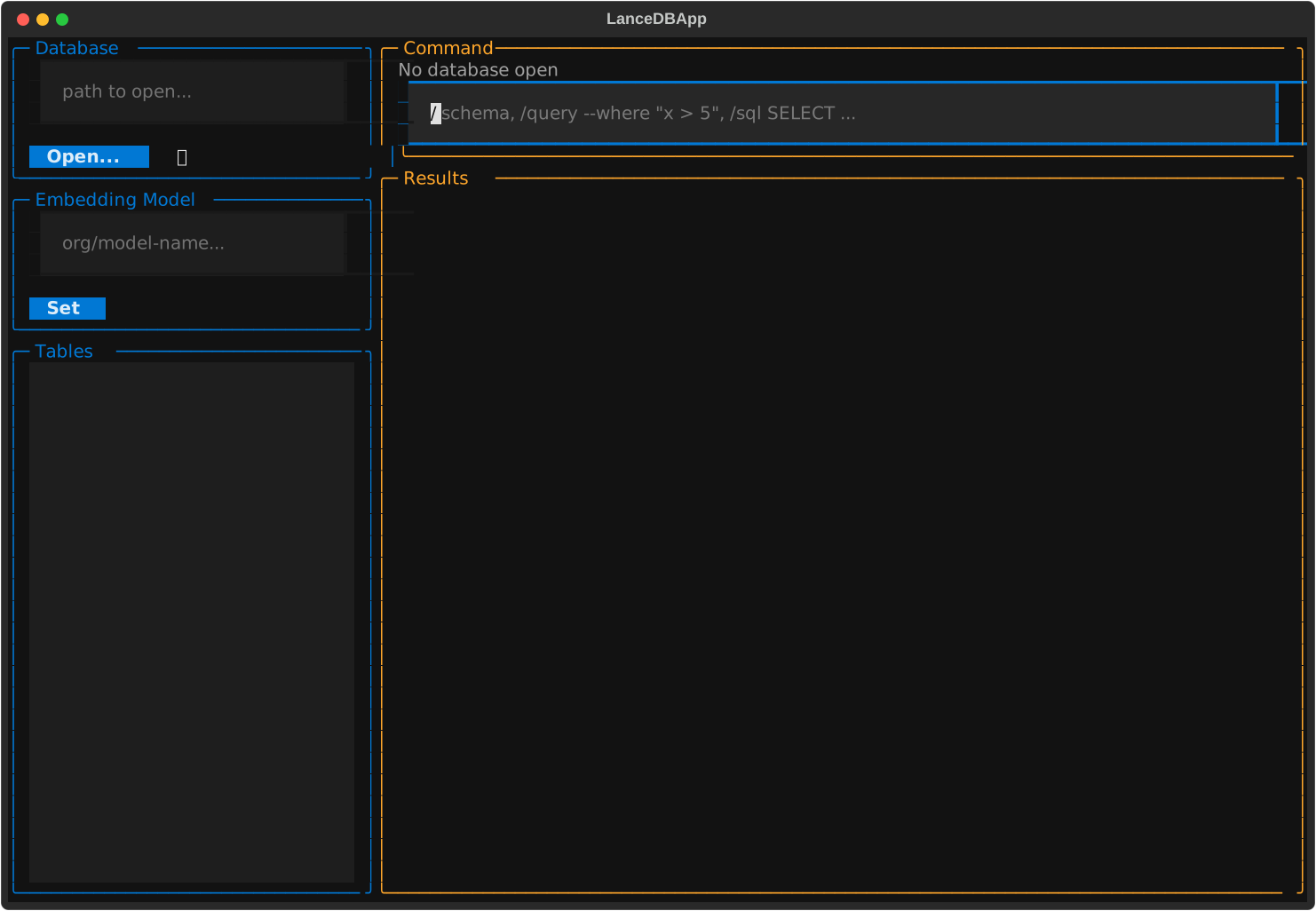
lsql is a TUI for managing LanceDB databases easily. Pick a database and a table visually, then run slash commands against whatever's selected — no more retyping paths and table names for every single query.
✨ Features
- 🖥️ Four-panel layout — database picker, table list, command input, and results, all on one screen
- 📁 Folder-browser dialog — open an existing database by browsing to it, no need to memorize or hand-type paths
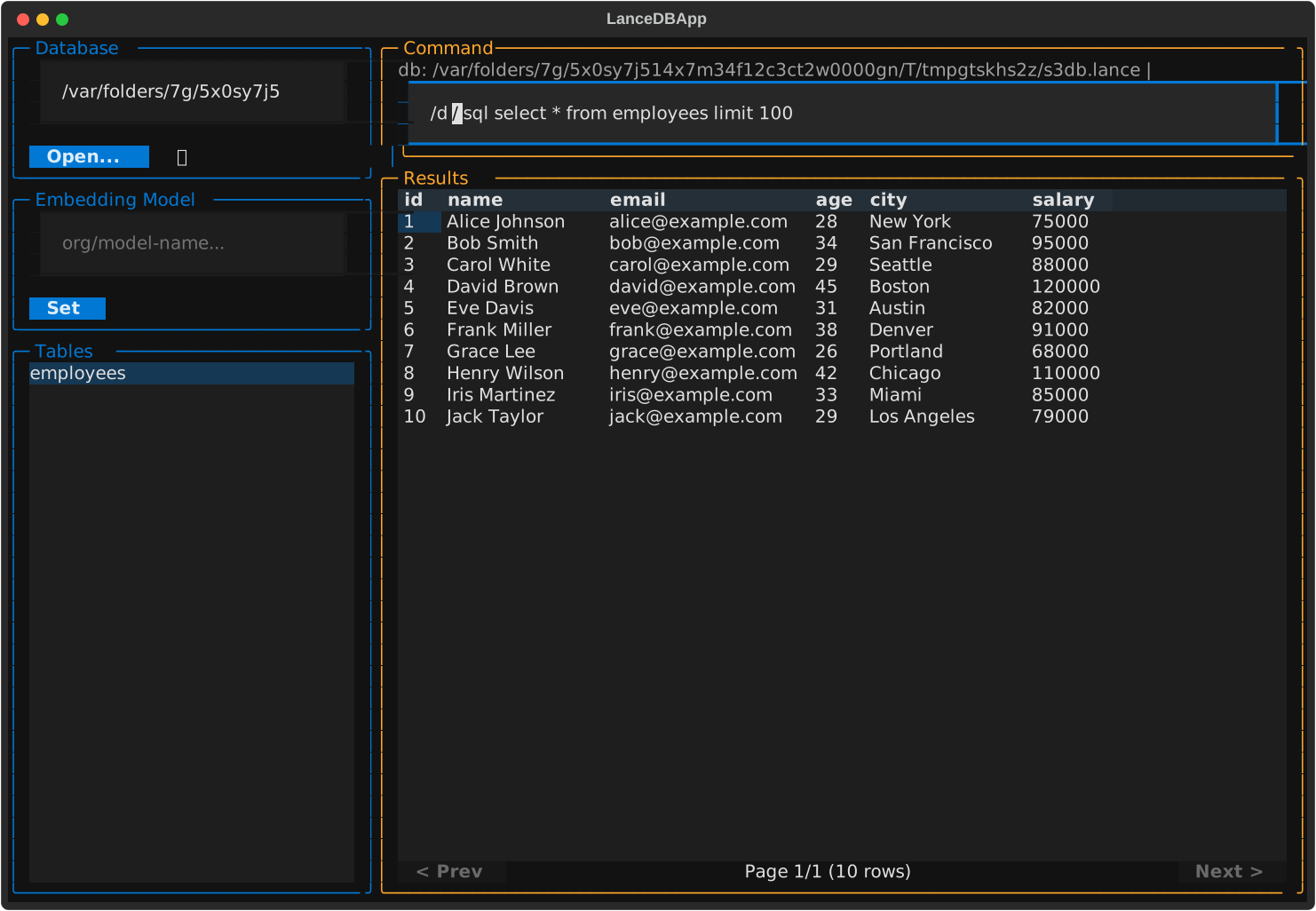
- ⚡ Slash commands with auto-suggestion — type
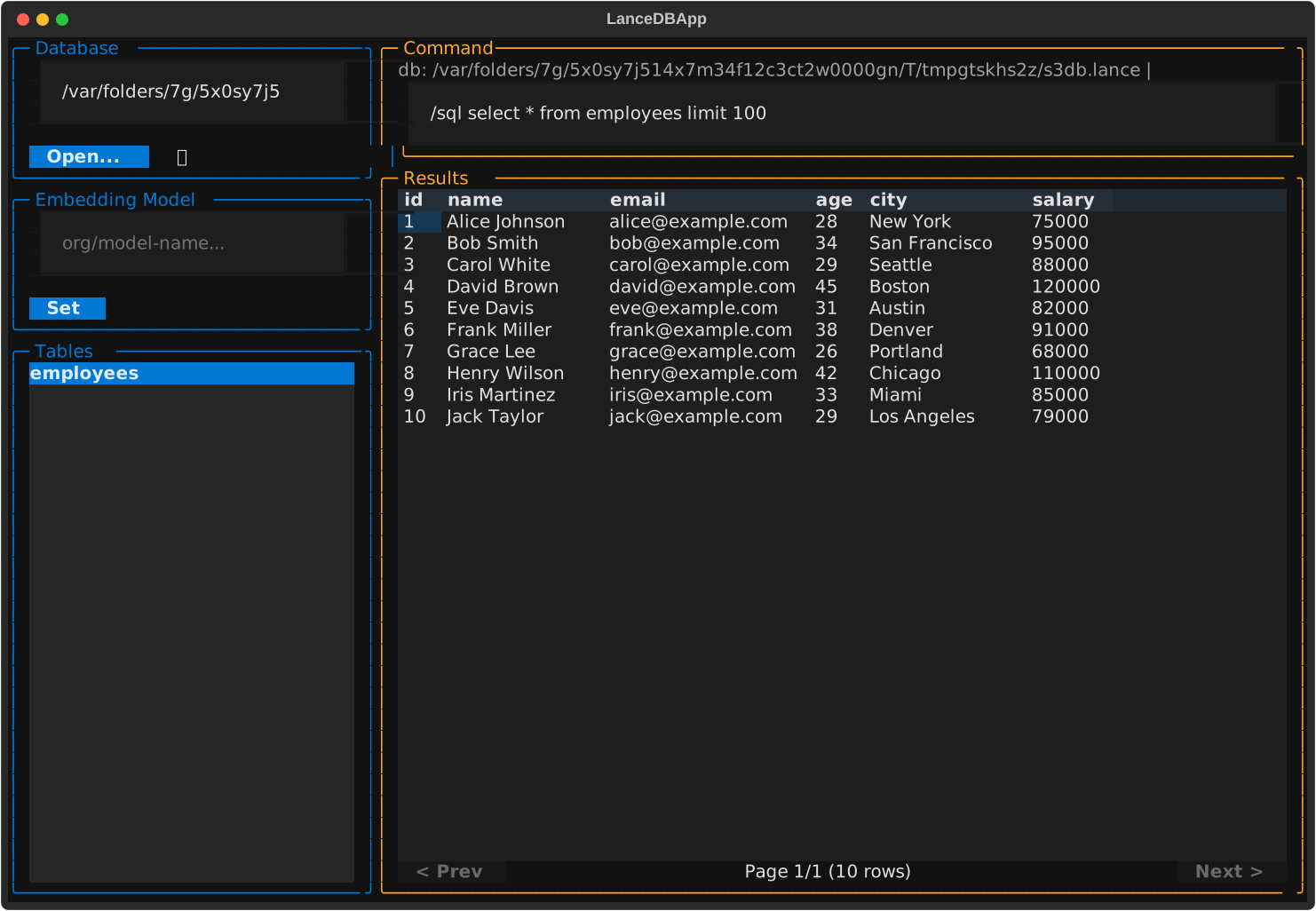
/and see every available command, filtered live as you type - 🖱️ Click a table to preview it — instantly runs
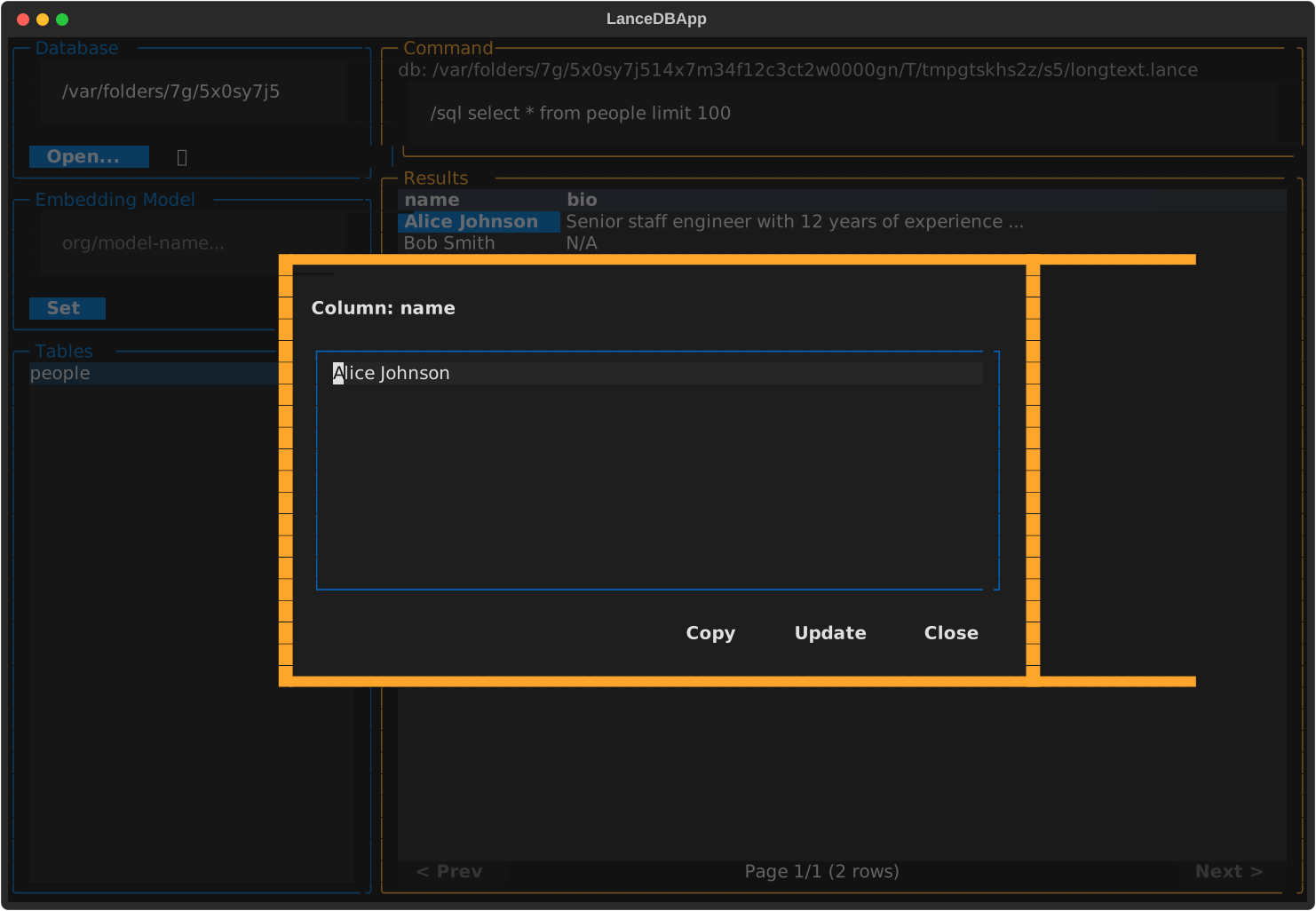
select * from <table> limit 100for you - 🔍 Double-click any cell — pop open the full, untruncated value when a row is too wide to read comfortably, with buttons to copy it or edit and write it back
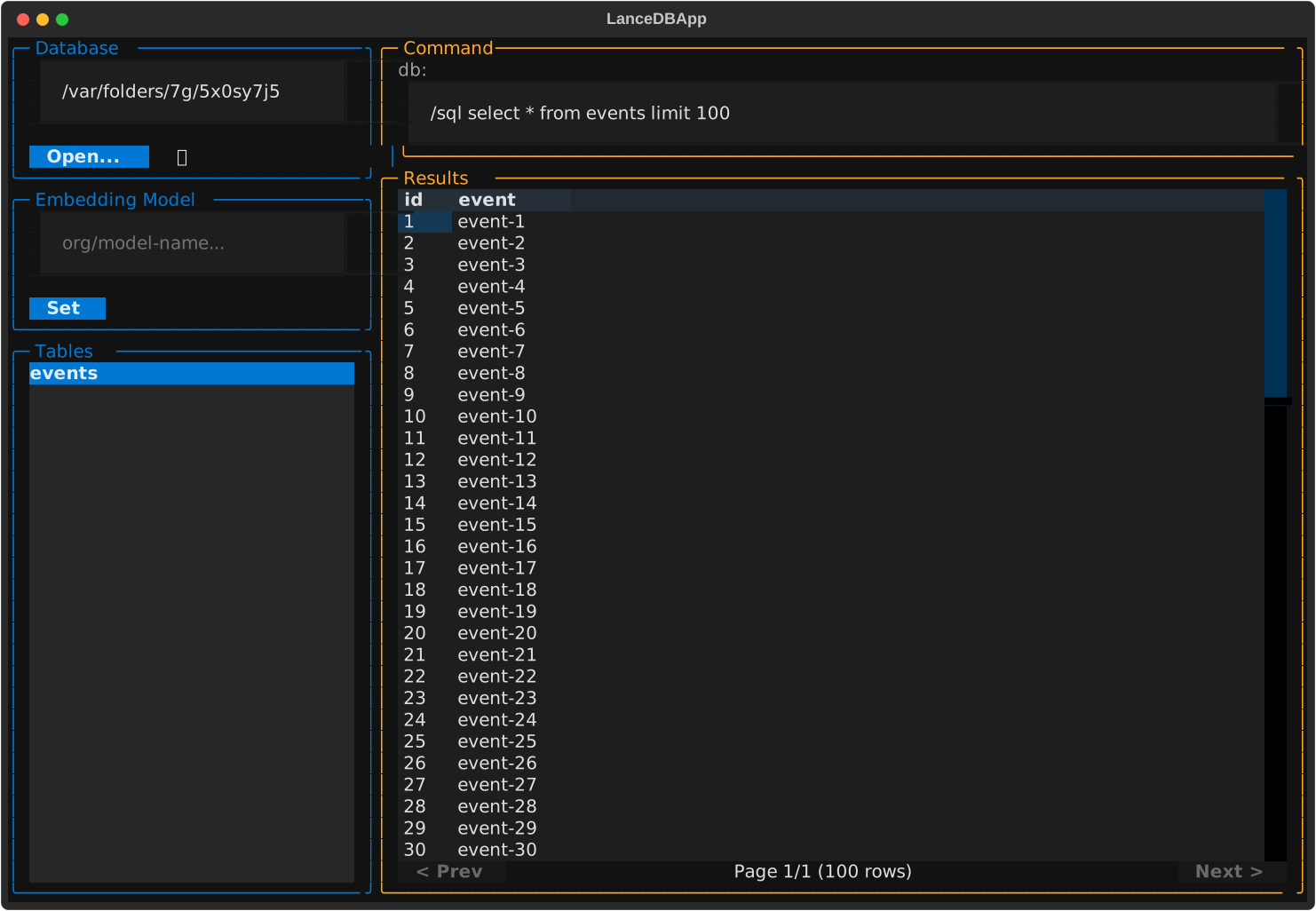
- 📄 Pagination — large result sets are paged 100 rows at a time instead of flooding the screen
- 🧮 Raw SQL via DuckDB —
/sqlruns across every table in the database - 🧬 Embeddings — set a sentence-transformers model in the Embedding Model panel
(downloading it on first use), then
/embeddingcomputes vector column(s) for a table - 🔎 Vector, full-text, and hybrid search —
/searchruns a kNN vector search, a keyword full-text search, or both combined (LanceDB's default RRF reranker) against the current table;/indexbuilds the full-text index/searchneeds, or it's built for you automatically on first use - 🛟 Confirmation dialogs —
/drop,/empty,/delete, and/embeddingalways ask first - ⏪ Command history — up/down arrow recall, just like a shell
- 📚 Built-in help —
/helplists every command;/help <command>shows its flags - 🌓 Light/dark theme — a one-click toggle, defaulting to your OS's current setting
📦 Installation
pip install lsql
🚀 Quick Start
lsql                      # launch the TUI
lsql /path/to/database    # launch pre-connected to a database
🧭 A tour of the four panels
1️⃣ Database — type a path or browse to one
Type a path directly and hit Enter, or click Open... to pick a folder visually (with an Up button to walk back up the directory tree). The 🌙/☀️ icon next to it toggles light/dark theme — it defaults to whatever your OS is currently using.
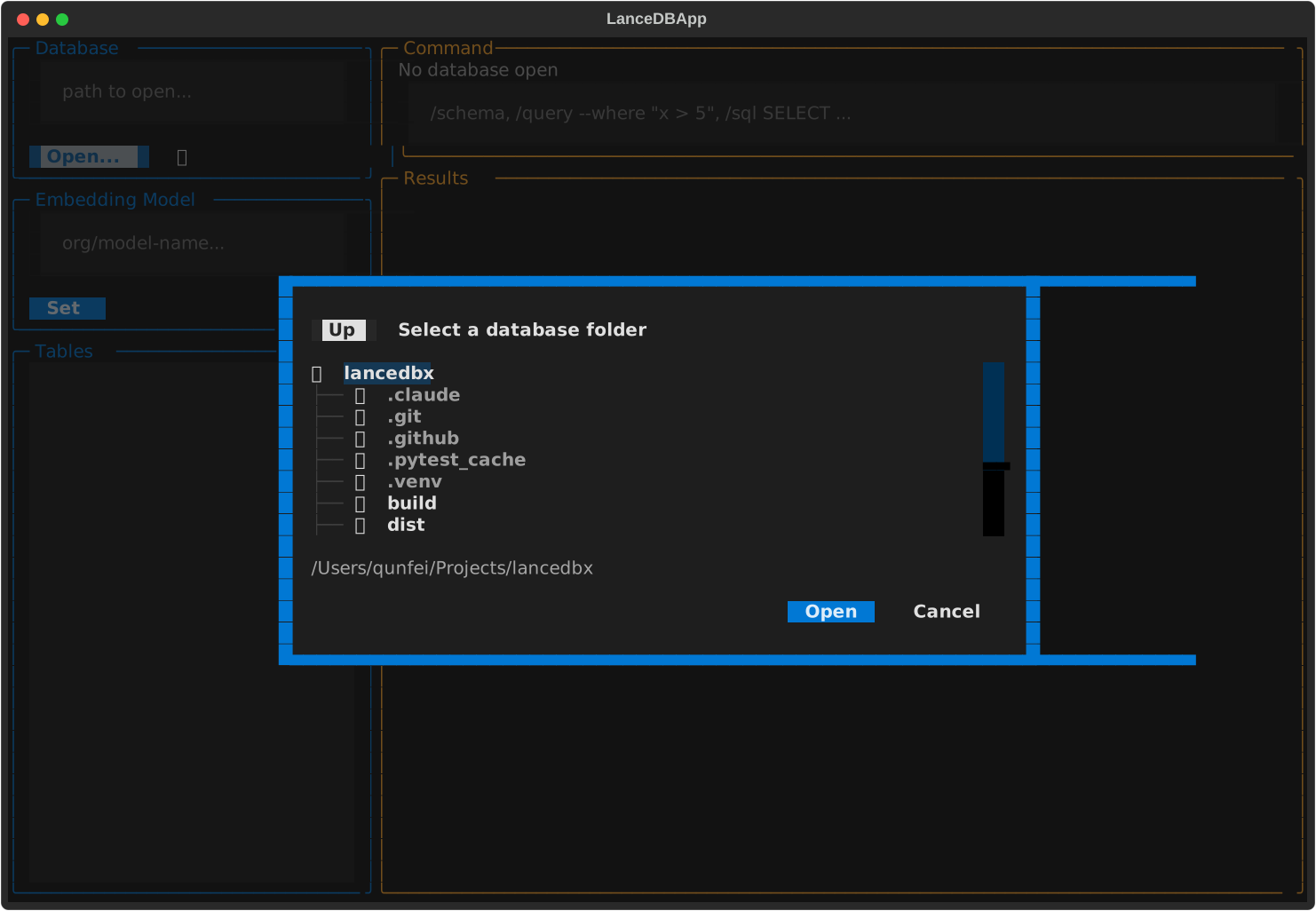
Opening a path that doesn't exist yet creates a database there — same as running
/create --path <path>.
2️⃣ Tables — click to preview
Click any table in the list to select it and immediately see its first 100 rows.
3️⃣ Command input — slash commands with live suggestions
Start typing / and a filtered dropdown of matching commands appears. Use ↑/↓ to
pick one, Tab or Enter to accept it, Esc to dismiss. ↑/↓ also recall previous
commands when the dropdown isn't open.
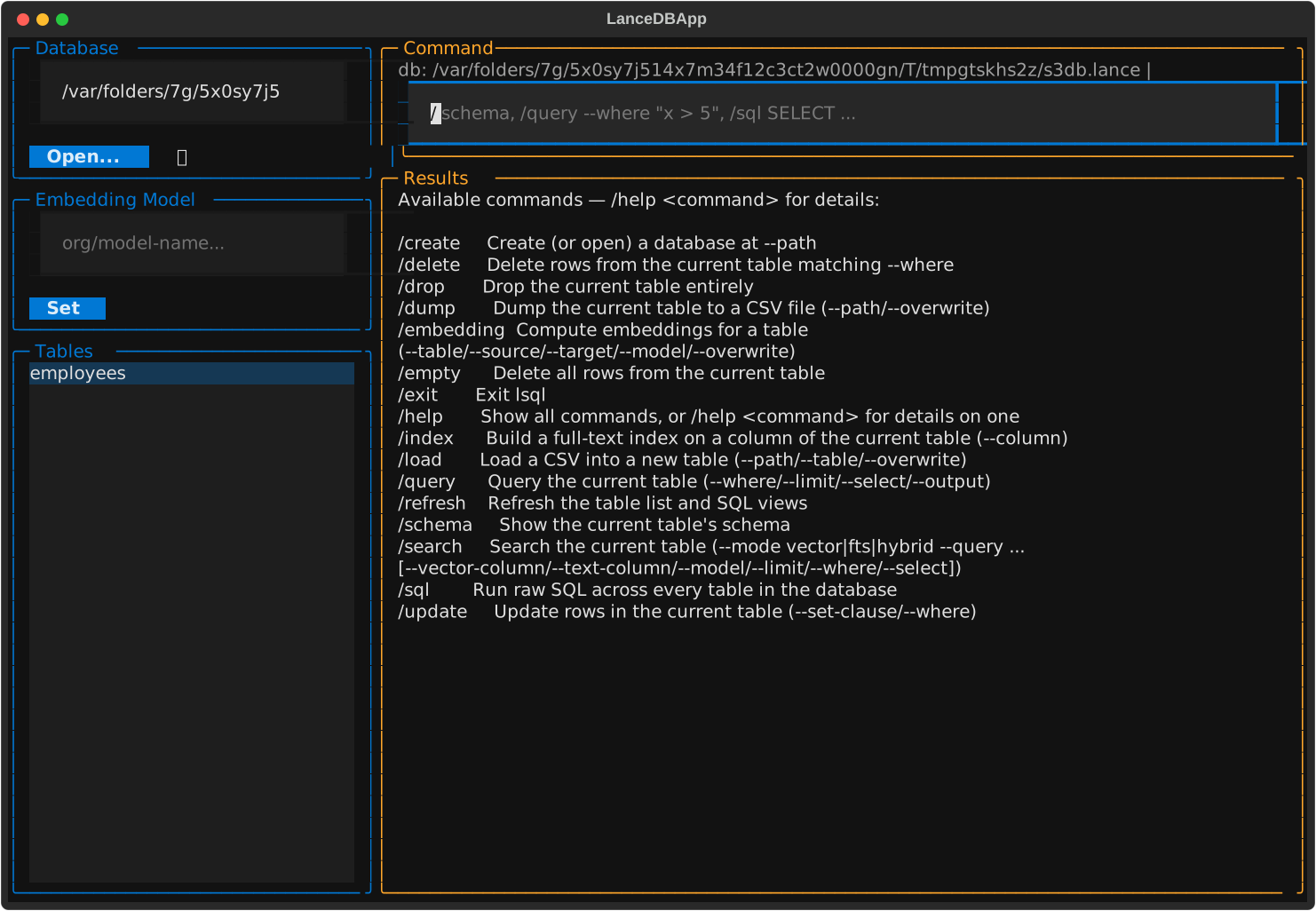
Forgot a flag? /help lists every command, and /help <command> shows its full usage:
4️⃣ Results — tables, schemas, and safety checks
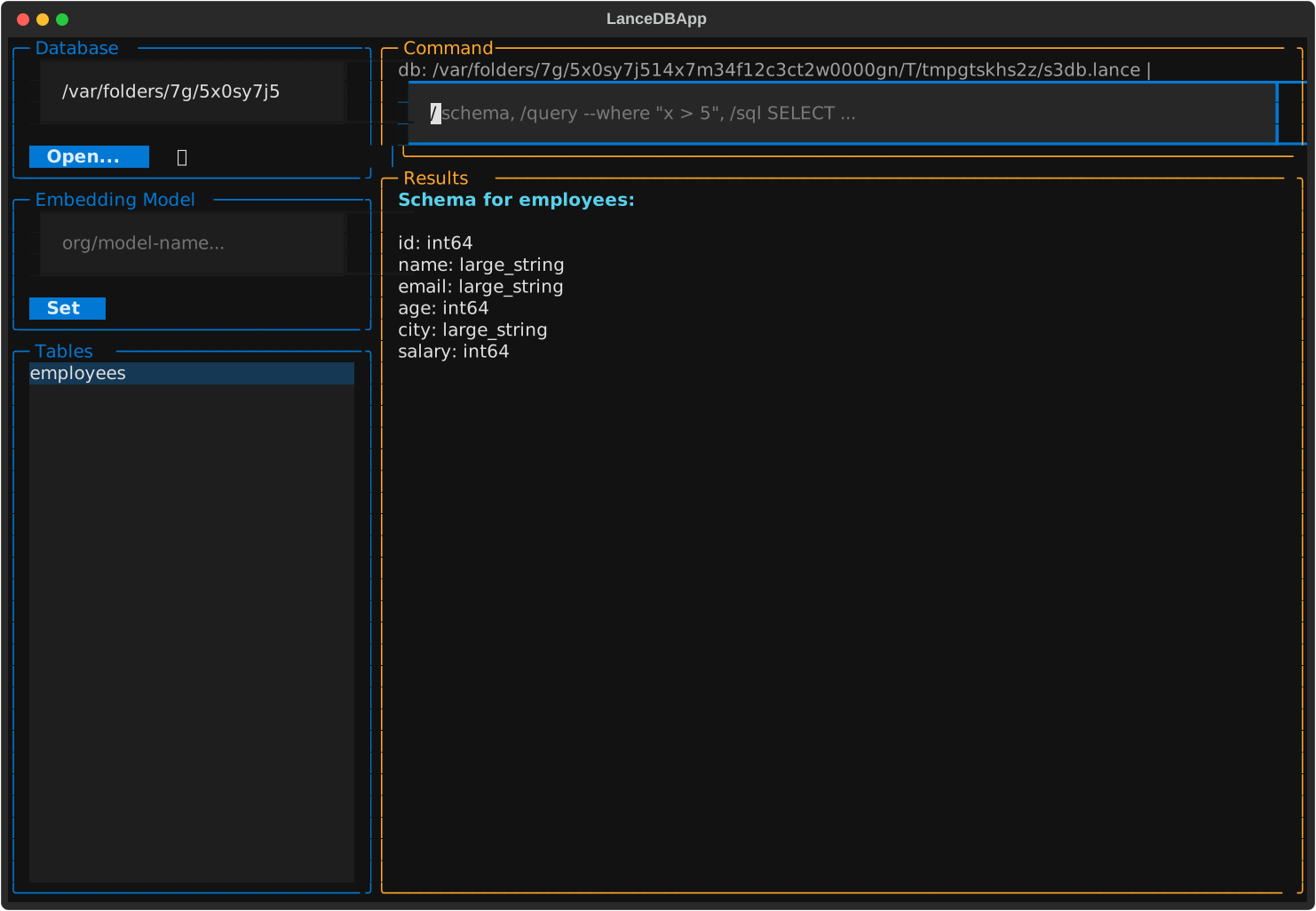
/schema renders a table's columns and types right in the results panel:
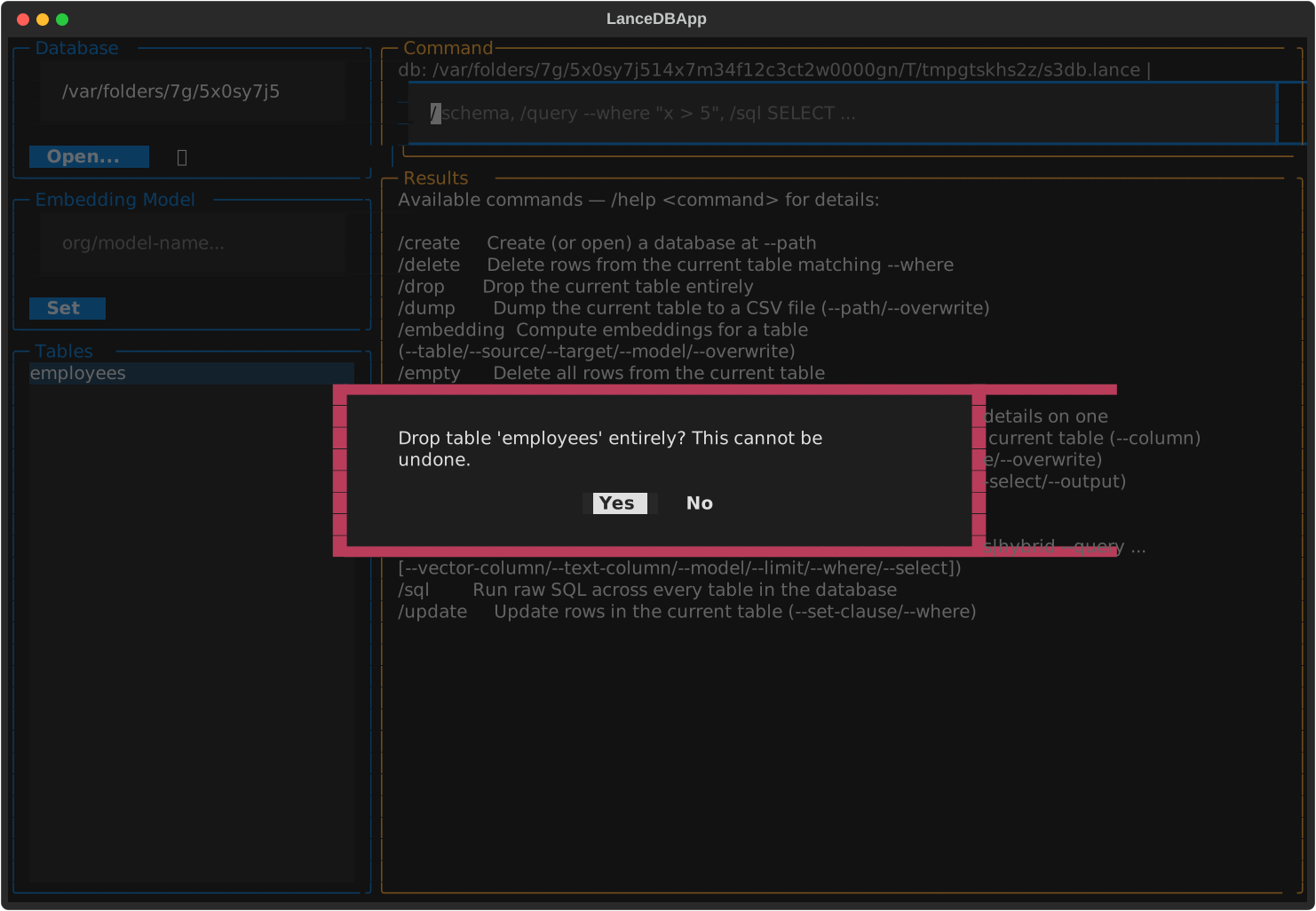
Destructive commands always confirm first:
Large results are paginated — 100 rows per page, with < Prev / Next > controls:
And if a cell's value is too long to read in the table, double-click it to see the full text, copy it, or edit it and write the change back to the table:
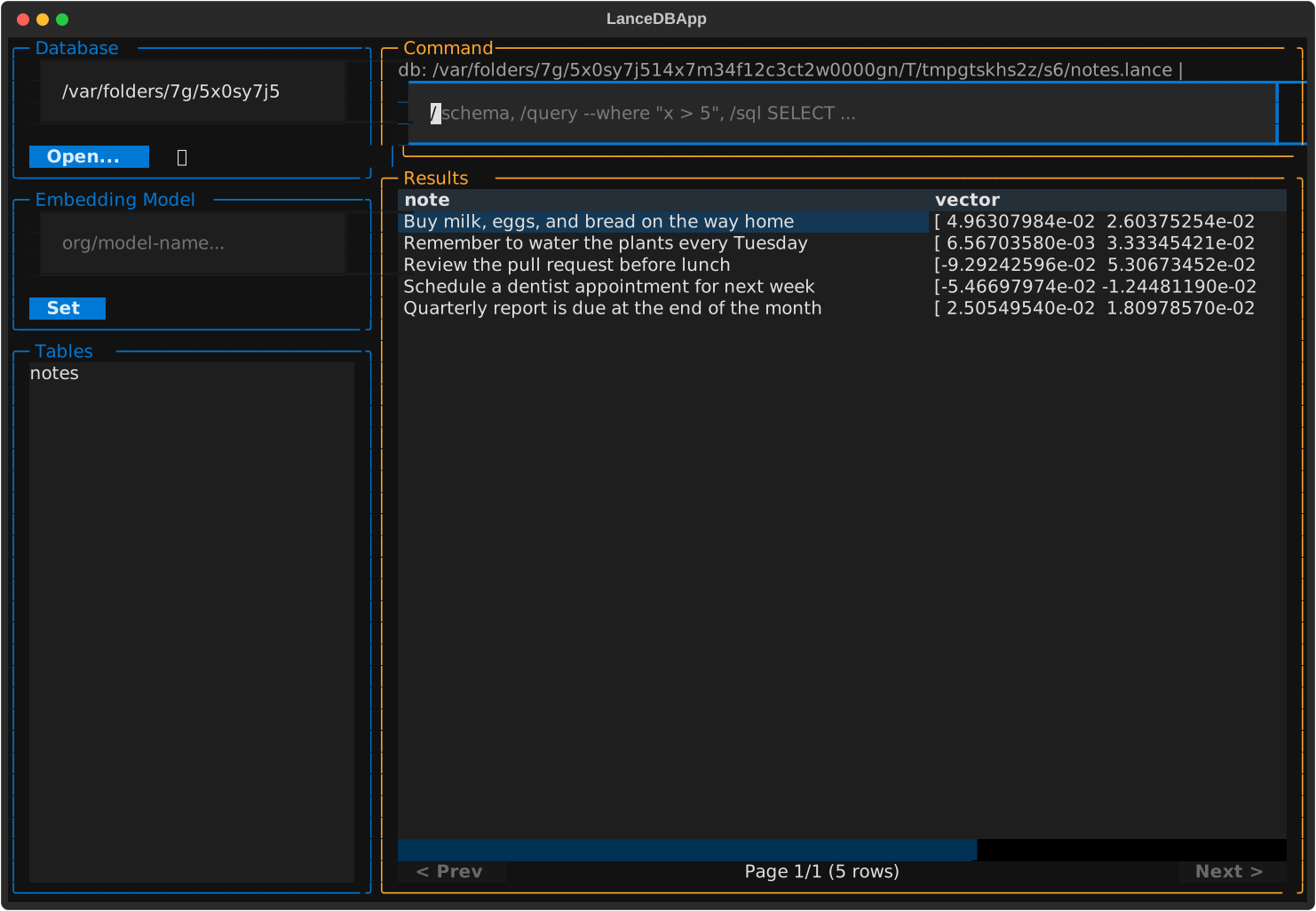
/search runs vector, full-text, or hybrid search against the current table — here's
/search --mode hybrid --query "remember to buy groceries" --text-column note against a
table of unrelated notes, finding the shopping-list one even though "groceries" never
appears verbatim:
⌨️ Command reference
Commands that operate on a table (query, schema, delete, empty, drop, update,
dump, index, search) always act on whichever table is currently selected in the
table list — select it there rather than naming it in the command.
| Command | What it does |
|---|---|
/create --path <path> |
Create (or open) a database at path |
/query [--where ...] [--limit 10] [--select "a,b"] [--output table|json] |
Query the current table |
/schema |
Show the current table's schema |
/sql <SQL query> |
Raw SQL across every table — the one command that ignores the table selection |
/update --set-clause "col='val'" --where "..." |
Update rows in the current table |
/delete --where "..." |
Delete rows from the current table |
/empty |
Delete all rows from the current table |
/drop |
Drop the current table entirely |
/load --path file.csv --table name [--overwrite] |
Load a CSV into a new table |
/embedding --table name --source col[,col2] [--target vec[,vec2]] [--model org/name] [--overwrite] |
Compute embeddings for one or more columns into vector column(s) |
/index --column name |
Build a full-text index on a column of the current table |
/search --mode vector|fts|hybrid --query "..." [--vector-column c] [--text-column c] [--model org/name] [--limit 10] [--where ...] [--select "a,b"] |
Vector, full-text, or hybrid search against the current table |
/dump --path out.csv [--overwrite] |
Dump the current table to CSV |
/refresh |
Refresh the table list and SQL views |
/help [command] |
Show all commands, or details for one |
/exit |
Quit |
/drop, /empty, /delete, and /embedding pop a confirmation dialog before running
(/embedding always rewrites the whole table under the hood, even without
--overwrite). /load and /embedding take an explicit --table name instead of
using the current selection — /load because it creates a brand-new table,
/embedding because it's often more convenient to target a table other than the one
currently selected.
/embedding uses the model set in the Embedding Model panel by default, or
all-MiniLM-L6-v2 if none has been set; --model overrides both for a single run.
With multiple --source columns and no --target, each gets its own <source>_vector
column.
/search --mode vector embeds --query with the same model precedence as /embedding
and runs an exact kNN scan — no index required. --vector-column is only needed if the
table has more than one vector column (from repeated /embedding runs); with exactly
one, it's picked automatically. --mode fts keyword-searches --text-column (required
— there's no single obvious text column to default to), building its full-text index
automatically on first use if one doesn't exist yet (same as running /index --column
on it beforehand). --mode hybrid runs both and combines them with LanceDB's default
RRF reranker, so it needs both a vector column (inferred or explicit) and --text-column.
🛠️ Development
git clone https://github.com/wuqunfei/lsql.git
cd lsql
pip install -e ".[dev]"
Run the tests:
pytest
Regenerate the screenshots above after a visible UI change:
python scripts/generate_screenshots.py
Requirements
- Python 3.10+
- lancedb, duckdb, pandas, pyarrow, typer, rich, textual, sentence-transformers
🤝 Contributing
Contributions are welcome! Please feel free to open a PR.
🐛 Issues
Found a bug or have an idea? Open an issue.
📄 License
Apache License 2.0 — see LICENSE for details.
1 maintainer

Metadata
1 maintainer
Release files for lsql 2.1.0
For a detailed explanation of source distributions (sdists) and built distributions (wheels), please see the package formats documentation.
Source distribution (sdist)
| File | Size | Uploaded | Provenance | |
|---|---|---|---|---|
| lsql-2.1.0.tar.gz | 122.1 kB | With provenance | Details |
Built distribution (wheel)
| File | Interpreter | ABI | Platform | Reset |
|---|---|---|---|---|
| lsql-2.1.0-py3-none-any.whl | Python 3 | none | any | Details |
Total release size: 164.7 kB
Release files / lsql-2.1.0.tar.gz
| Download URL | lsql-2.1.0.tar.gz |
|---|---|
| Size | 122.1 kB |
| Tags | Source |
|
SHA-256 checksum How to use checksums |
c0d2896e5e694d0dbc60b6657e06457eb6ebc6aed23a902231bc1f5306ed4378
|
|
BLAKE2b-256 checksum How to use checksums |
dbafeb712b147010a861b4fd28255f6f6d6b14aac6b3171c8b03c09f2a89659c
|
| Upload date | |
|
Uploaded using Trusted Publishing? What is trusted publishing? |
Yes |
| Uploaded via |
twine/7.0.0 CPython/3.13.14
|
Provenance
Provenance describes where a file came from. On PyPI, provenance is shared via attestations, which provide a verifiable record of the build or publishing details. View details, limitations and caveats.


PyPI Publish Attestation
PyPI verified that this artifact, at this checksum, originated from the publisher listed below.
Signed by GitHub Actions, verified by PyPI on Oct 20, 2026.
Transparency logRelease files / lsql-2.1.0-py3-none-any.whl
| Download URL | lsql-2.1.0-py3-none-any.whl |
|---|---|
| Size | 42.6 kB |
| Tags | Python 3 |
|
SHA-256 checksum How to use checksums |
cea6ad0dff954bb48bc5b094b0cb4f164467520db39361e9c99e056baa4968eb
|
|
BLAKE2b-256 checksum How to use checksums |
9ac6a9304d6111927b8242e176617c1f0d4fc263e7de14805911209e07ebd876
|
| Upload date | |
|
Uploaded using Trusted Publishing? What is trusted publishing? |
Yes |
| Uploaded via |
twine/7.0.0 CPython/3.13.14
|
Provenance
Provenance describes where a file came from. On PyPI, provenance is shared via attestations, which provide a verifiable record of the build or publishing details. View details, limitations and caveats.
PyPI Publish Attestation
PyPI verified that this artifact, at this checksum, originated from the publisher listed below.
Signed by GitHub Actions, verified by PyPI on Oct 20, 2026.
Transparency logSecurity for lsql 2.1.0
Provenance
Provenance describes where a file came from. On PyPI, provenance is shared via attestations, which provide a verifiable record of the build or publishing details. View details, limitations and caveats.
Full provenance
All 2 files in this release have been uploaded with provenance metadata.
Attestation for lsql-2.1.0.tar.gz
PyPI Publish Attestation
PyPI verified that this artifact, at this checksum, originated from the publisher listed below.
Signed by GitHub Actions, verified by PyPI on Oct 20, 2026.
Transparency logA note on package security
PyPI is a repository for distributing packages, not a service for auditing them. While third-party security researchers and our staff do their best to detect and remove malicious packages, PyPI cannot guarantee the quality, security or suitability of any given package.














