
a CLI-centric Wi-Fi scanning tool for Windows

Project description







lswifi is a CLI-centric Wi-Fi scanning tool for Windows that provides more information about nearby Wi-Fi networks than built-in tools (e.g. netsh show wlan networks). Examples include Received Signal Strength Indicator (RSSI), showing security AKMs and ciphers, parsing 802.11 feature set, looking at 6 GHz Reduced Neighbor Reports, and more. With capable Wi-Fi adapters, lswifi can detect and show networks in 2.4 GHz, 5 GHz, and 6 GHz bands.
Installation
Note: The Python Scripts directory must be added to the PATH environment variable.
> python -m pip install lswifi

Usage
Output nearby Wi-Fi networks:
> lswifi
Output nearby Wi-Fi networks that have a detected signal of -60 dBm or stronger:
> lswifi -t -60
Output only networks that match my_ssid (partial match support):
> lswifi -include my_ssid
Output verbose information (including Information Elements) for BSSID 00:00:00:00:00:00 (exact match):
> lswifi -ies 00:00:00:00:00:00
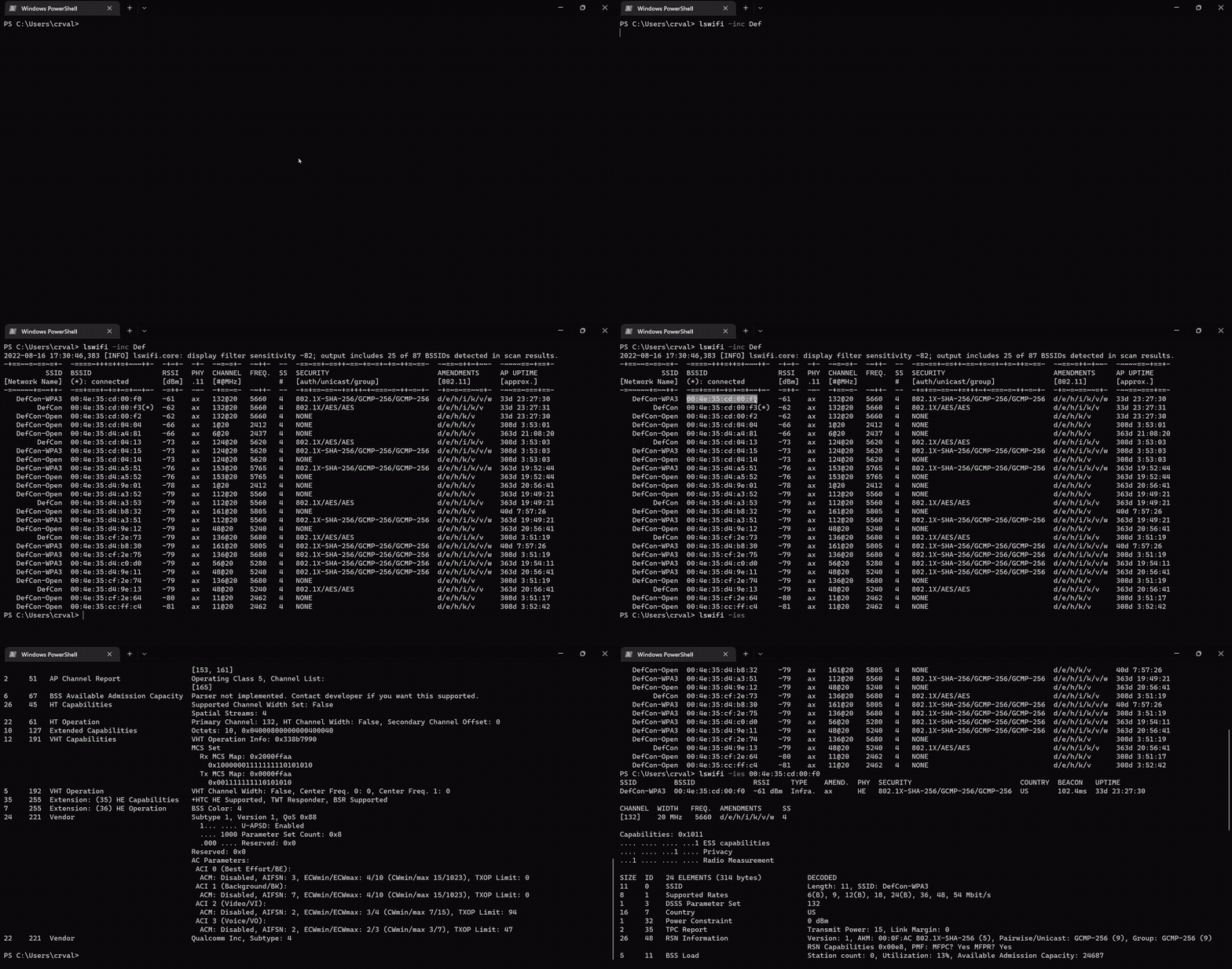
Print help information:
> lswifi -h
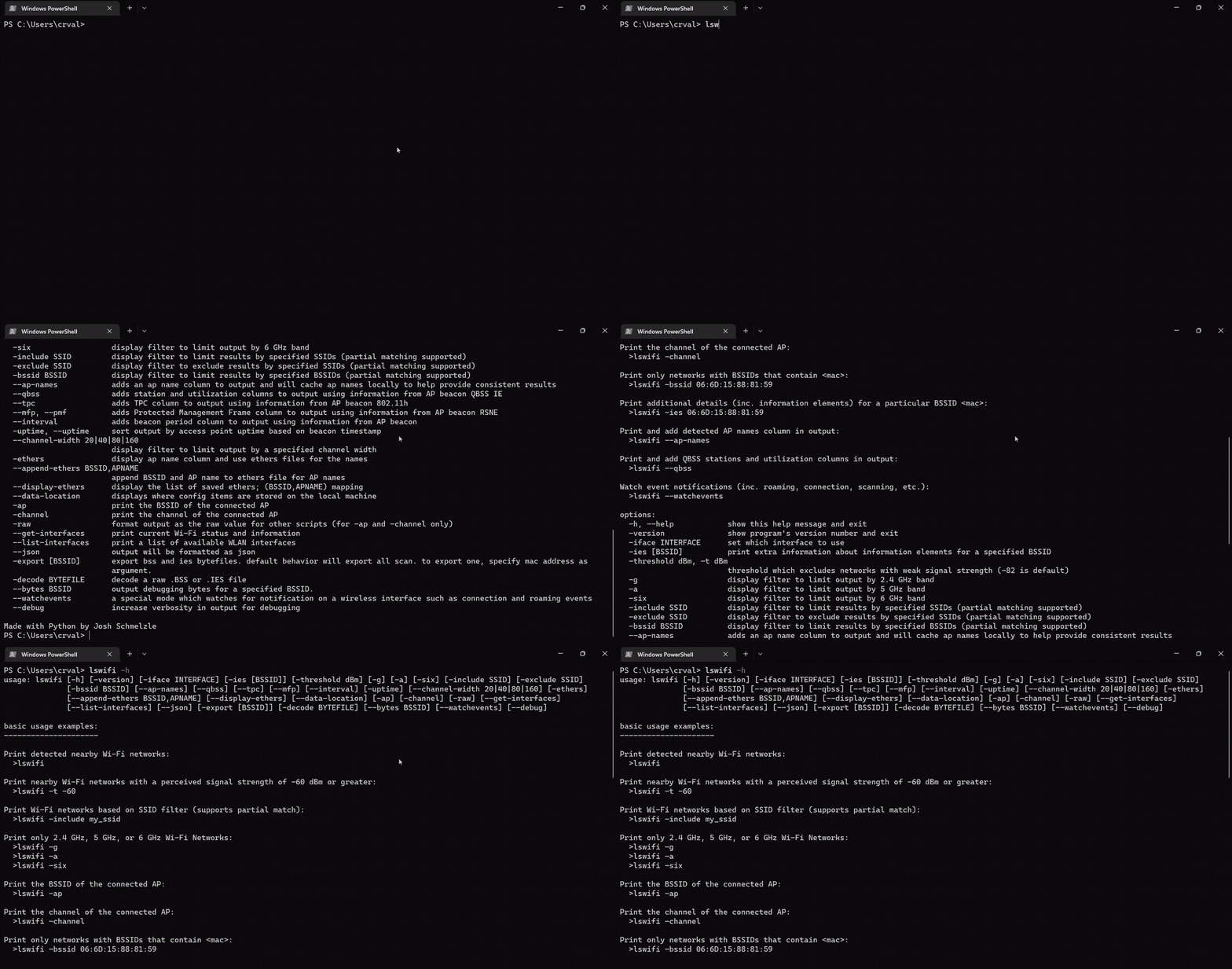
Print and add detected AP names column in output:
> lswifi --ap-names
Print and add detected AP names and QBSS column in output (try adding --mfp or --tpc too!):
> lswifi --ap-names --qbss
Print an alternative table for BSSes which may contain 6 GHz Reduced Neighbor Reports:
> lswifi -rnr
Watch event notifications (inc. roaming, connection, scanning, etc.):
> lswifi --watchevents
CLI options
options:
  -h, --help            show this help message and exit
  -version, --version, -V
                        show program's version number and exit
  -n #, --scans #       set how many scans to do before exiting
  --time #              set test in seconds to perform scans for
  -i #, --interval #    seconds between scans
  -ies [BSSID]          print extra information about information elements for a specified BSSID
  -threshold -82, -t -82
                        threshold which excludes networks with weak signal strength from results (-82 is default)
  -all                  remove threshold filtering which excludes results with weaker signal
  -g                    display filter to limit output by 2.4 GHz band
  -a                    display filter to limit output by 5 GHz band
  -six                  display filter to limit output by 6 GHz band
  -include SSID, -inc SSID
                        display filter to limit results by specified SSIDs (partial matching supported)
  -exclude SSID, -exc SSID
                        display filter to exclude results by specified SSIDs (partial matching supported)
  -bssid BSSID          display filter to limit results by specified BSSIDs (partial matching supported)
  --ap-names            adds an ap name column to output and will cache ap names locally to help provide consistent results
  --qbss                adds station and utilization columns to output using information from AP beacon QBSS IE
  --tpc                 adds TPC column to output using information from AP beacon 802.11h
  --mfp, --pmf          adds Protected Management Frame column to output using information from AP beacon RSNE
  --period              adds beacon period column to output using information from AP beacon
  --uptime, -uptime     sort output by access point uptime based on beacon timestamp
  -rnr, --rnr           special mode to create an alternate table based on RNR results
  --channel-width 20|40|80|160
                        display filter to limit output by a specified channel width
  -ethers               adds an ap name column to output and use an ethers file for the ap names
  --append-ethers BSSID,APNAME
                        append BSSID and AP name to ethers file for AP names
  --display-ethers      display the list of saved ethers; (BSSID,APNAME) mapping
  --data-location       displays where config items are stored on the local machine
  -ap                   print the BSSID of the connected AP
  -channel              print the channel of the connected AP
  -raw                  format output as the raw value for other scripts (for -ap and -channel only)
  --get-interfaces      print current Wi-Fi status and information
  --list-interfaces     print a list of available WLAN interfaces
  --json [JSON]         output will be formatted as json
  --indent 4            JSON output will be formatted with pretty print with provided indent level
  --csv [CSV]           output will be formatted as csv
  -export [BSSID], -exp [BSSID]
                        export bss and ies bytefiles. default behavior will export all from a scan. to export only one, provide full mac
                        address of the BSSID as argument.
  -decode BYTEFILE      decode a raw .BSS or .IES file
  --bytes BSSID         output debugging bytes for a specified BSSID found in scan results.
  --watchevents         a special mode which watches for notification on a wireless interface such as connection and roaming events
  --syslog <server IP>  syslogs events from --watchevents to a remote syslog server
  --debug               increase verbosity for debugging
Release history Release notifications | RSS feed


Download files
Download the file for your platform. If you're not sure which to choose, learn more about installing packages.
Source Distribution
Built Distribution
Filter files by name, interpreter, ABI, and platform.
If you're not sure about the file name format, learn more about wheel file names.
Copy a direct link to the current filters
File details
Details for the file lswifi-0.1.43.tar.gz.
File metadata
- Download URL: lswifi-0.1.43.tar.gz
- Upload date:
- Size: 81.6 kB
- Tags: Source
- Uploaded using Trusted Publishing? No
- Uploaded via: twine/5.0.0 CPython/3.11.4
File hashes
| Algorithm | Hash digest | |
|---|---|---|
| SHA256 |
3dc50be0fc65b2a6b4ba9421dead63a3438e777d0c70f3768e1a80a881a1fad2
|
|
| MD5 |
deb220f40aab7b72ce7ed3b8d4651601
|
|
| BLAKE2b-256 |
ff1548b4b96ddaf89d71adf80a1e55890ea8636a00af32f983c85d46f8778e5f
|
File details
Details for the file lswifi-0.1.43-py3-none-any.whl.
File metadata
- Download URL: lswifi-0.1.43-py3-none-any.whl
- Upload date:
- Size: 80.2 kB
- Tags: Python 3
- Uploaded using Trusted Publishing? No
- Uploaded via: twine/5.0.0 CPython/3.11.4
File hashes
| Algorithm | Hash digest | |
|---|---|---|
| SHA256 |
4262fe30c572a4eec9b0bf26aeea3cb4df0f20f8caddae0f01b095ec0f844b40
|
|
| MD5 |
95d7a99ba6abae9b66912526ea04e5ed
|
|
| BLAKE2b-256 |
f6a7e33b2d1a2e073c136583b0b1c7bc1a4c9e0bf50884be9c86503b9c527da5
|






