
Windows LTSC Microsoft Store 最新版下载安装脚本
- Windows LTSC 2021
- Windows LTSC 2019
测试通过
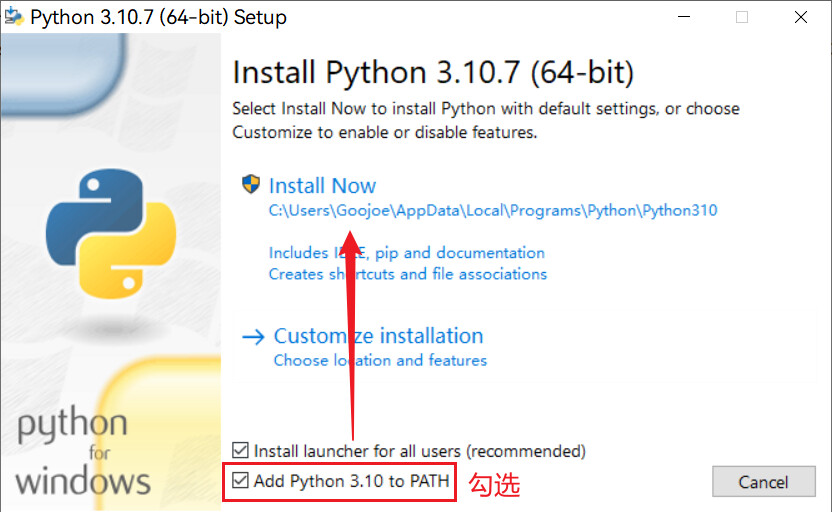
1.安装Python
安装时需勾选Add Python 3.10 to PATH
🔽下载软件包
pip install ltscaddstore -i https://mirror.sjtu.edu.cn/pypi/web/simple/
2.运行脚本
# 写入文件
echo "import ltscaddstore" > ltscaddstore.py
echo "ltscaddstore.download()" >> ltscaddstore.py
# 运行
python ltscaddstore.py
软件来源
所有软件来自https://store.rg-adguard.net/
Url(Link)
https://www.microsoft.com/store/productId/9WZDNCRFJBMPRP
关于转载
版权属于Microsoft,禁止商用
⚠️不允许转载后的内容需要”回复“、”登录“、”关注公众号“、”积分购买“以及其他任何不能直接下载的形式展现
1 maintainer

Metadata
1 maintainer
Release files for ltscaddstore 1.0.4
For a detailed explanation of source distributions (sdists) and built distributions (wheels), please see the package formats documentation.
Source distribution (sdist)
| File | Size | Uploaded | |
|---|---|---|---|
| ltscaddstore-1.0.4.tar.gz | 6.2 kB | Details |
Built distribution (wheel)
| File | Interpreter | ABI | Platform | Reset |
|---|---|---|---|---|
| ltscaddstore-1.0.4-py3-none-any.whl | Python 3 | none | any | Details |
Total release size: 11.5 kB
Release files / ltscaddstore-1.0.4.tar.gz
| Download URL | ltscaddstore-1.0.4.tar.gz |
|---|---|
| Size | 6.2 kB |
| Tags | Source |
|
SHA-256 checksum How to use checksums |
162793490773f1082295d531091dd4b4906e26753800f59875bb3111f11e40c6
|
|
BLAKE2b-256 checksum How to use checksums |
181e70b9c725b03813a74287c03ea82939c91153ffc79eae8d4b4015f65f31e6
|
| Upload date | |
|
Uploaded using Trusted Publishing? What is trusted publishing? |
No |
| Uploaded via |
twine/4.0.2 CPython/3.10.7
|
Release files / ltscaddstore-1.0.4-py3-none-any.whl
| Download URL | ltscaddstore-1.0.4-py3-none-any.whl |
|---|---|
| Size | 5.4 kB |
| Tags | Python 3 |
|
SHA-256 checksum How to use checksums |
1505f4407082eb96be622cd2eccbb3dab380a4599efc35aebcd1b2ee65440f24
|
|
BLAKE2b-256 checksum How to use checksums |
6a40dac798c642357ba471b032ea04d5d094f70188c11a6cce5ba68ed1097fc7
|
| Upload date | |
|
Uploaded using Trusted Publishing? What is trusted publishing? |
No |
| Uploaded via |
twine/4.0.2 CPython/3.10.7
|














