
🌙 LUAR: Local Utility for Automated Reviews
Label a spreadsheet of text with your own questions, on your own computer.
You drop a spreadsheet, write what you want to know about each row ("What is this review about?", "Does the customer ask for a refund?"), and LUAR gives you back a copy of the spreadsheet with the answers filled in, plus a short report. No cloud, no account, no API costs: your data never leaves your machine.
Contents
- What LUAR does
- Before you start
- Installing
- Your first run, step by step
- Writing good questions
- Understanding the results
- Checking whether you can trust the answers
- How accurate is Laya
- Using the command line
- Troubleshooting and FAQ
- Related projects, contributing and license
1. What LUAR does
Imagine a spreadsheet of customer reviews:
| id | review |
|---|---|
| 1 | The package arrived two weeks late and the box was crushed. |
| 2 | The blender stopped working after three days. I want my money back. |
You ask two questions: "What is this review mainly about?" (delivery, product, support or price) and "Does the customer ask for their money back?" (yes or no). LUAR returns a copy of the file with new columns:
| id | review | topic | topic_confidence | wants_refund | wants_refund_confidence | needs_review |
|---|---|---|---|---|---|---|
| 1 | The package arrived two weeks late… | delivery | 0.62 | no | 0.71 | yes |
| 2 | The blender stopped working… | product | 0.48 | yes | 0.88 | yes |
Real output of the Laya engine on the bundled example. All four answers are right, but the model was unsure about the topic (below the 0.7 threshold), so both rows are marked for a quick human check.
- Each answer comes with a confidence from 0 to 1.
- Rows where the model was unsure are marked
needs_review, so you know where a person should look. - A summary report counts the answers and lists the rows to review.
- Your original file is never changed.
It is useful for survey answers, product reviews, support messages, feedback forms, notes: any column of text you would otherwise read and tag by hand.
2. Before you start
You need:
- Python 3.10 or newer. Check by opening a terminal (on Windows: PowerShell or Command
Prompt) and typing
python --version. If it is missing, install it from python.org and tick "Add python.exe to PATH" during setup. - A spreadsheet in
.xlsxor.csvformat, with the text in one or more columns. - Disk space and a one-time download of about 2.5 GB (libraries and Laya's two models). After that, everything works offline.
The "brain" that reads your text is Laya, an open decision model built for this kind of question: instead of writing text, it gives a probability to each option. It runs on your computer, without a GPU, at about 1 second per row.
Laya comes ready to use: it does not need training, and it does not learn from your spreadsheets. What improves the answers is writing good questions (section 5) and measuring accuracy on a sample (section 7).
3. Installing
Open a terminal and run:
pip install "luar[all]"
Installs LUAR with Laya and the web interface. (pip install luar, without [all], installs only
the command line, still with Laya.)
To have LUAR ready to use without internet, download the Laya models right after installing:
luar download
It fetches the multilingual and English models (about 1.5 GB, only once). After that, LUAR makes no outside connection: neither the interface nor the model.
On Linux, install the CPU version of PyTorch first, or pip will download a multi-GB GPU build:
pip install torch --index-url https://download.pytorch.org/whl/cpu
4. Your first run, step by step
Step 1: open LUAR
luar ui
Your browser opens on http://127.0.0.1:7860. This page is served by your own computer and is
not reachable from the internet. Keep the terminal open while you use LUAR; close it (or press
Ctrl+C) to stop.
If
luaris not recognized, or Windows blocks it, usepython -m luar uiinstead.
Step 2: load your spreadsheet
Drag your file onto the CSV or XLSX box (or click it to choose the file).
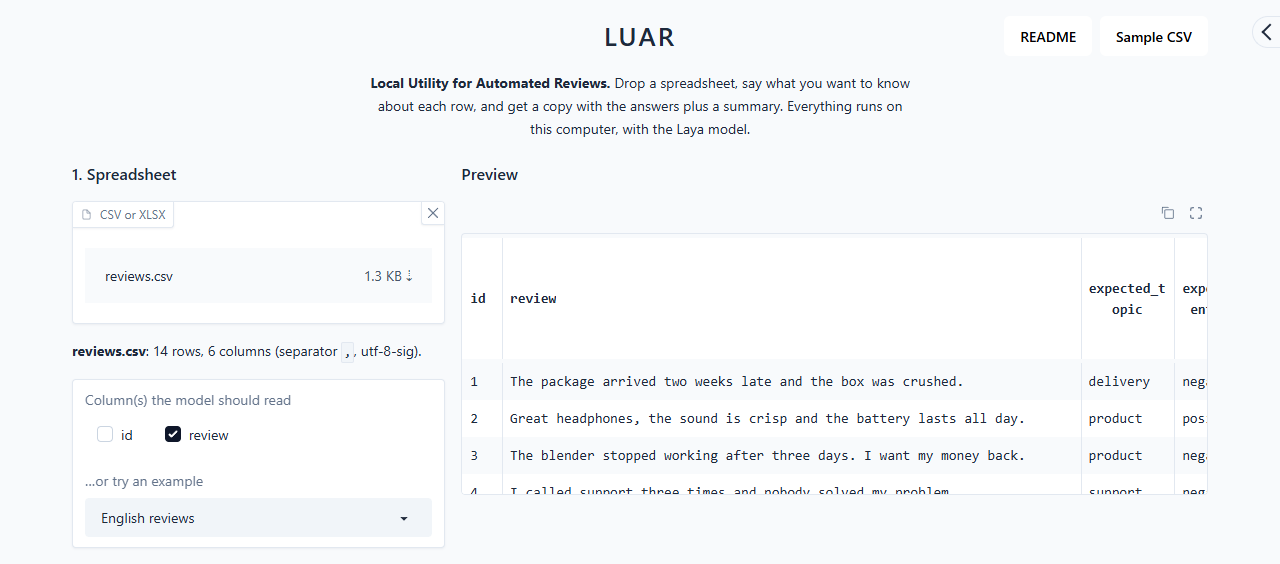
- LUAR shows how many rows and columns it found and a preview of the first rows.
- CSV files exported by Excel in other languages (with
;as separator, or accented characters) are detected automatically. - For Excel files, the first sheet is used.
- Under Column(s) the model should read, tick the column with the text. LUAR pre-selects the column with the longest text. If you tick several (for example title and body), they are read together.
Just want to try it? If you installed from the repository (see section 11), pick a bundled example in …or try an example, or click Sample CSV at the top of the page to download a test spreadsheet with 20 made-up customer messages (the README button next to it opens this manual). To run it with ready-made questions, pick Amostra de teste (Sample CSV) in the same examples menu. Otherwise, download reviews.csv and reviews_questions.json and load them as described in steps 2 and 3.
Step 3: write your questions
Each row of the questions table is one question:
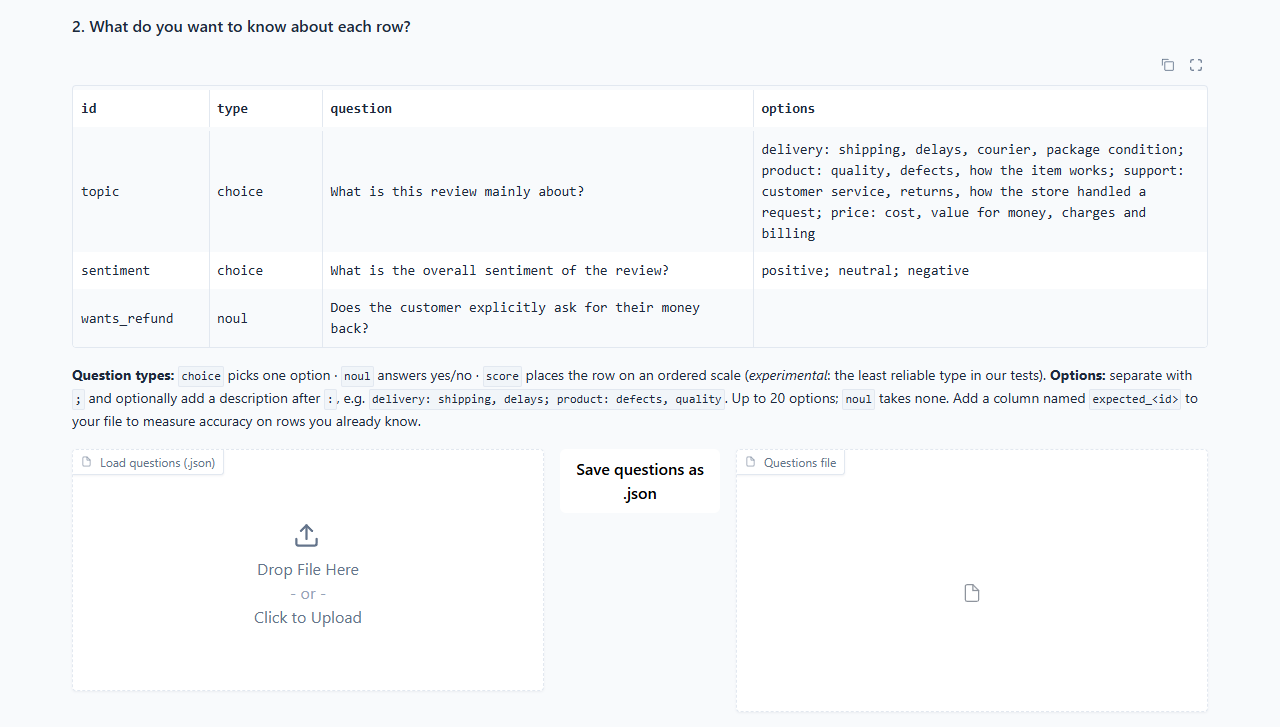
| Column | What to write | Example |
|---|---|---|
| id | A short name for the question. It becomes the name of the new column. Letters, numbers and _ only, no spaces. |
topic |
| type | choice, noul or score (see section 5). |
choice |
| question | The question, in plain language. | What is this review mainly about? |
| options | The possible answers, separated by ;. Optionally add a short description after :. Leave empty for noul. |
delivery: shipping, delays; product: defects, quality; price |
Click a cell to edit it, and use the table's row controls to add or remove rows.
Tip: questions can be saved and reused. Save questions as .json downloads the table;
Load questions (.json) brings it back. Writing the questions once in a .json file is often
the easiest way to manage many of them (format in section 5).
Step 4: choose the settings and run

- Confidence threshold (default
0.7): any answer below this is markedneeds_review. Raise it to review more rows, lower it to review fewer. - Laya model variant: leave it on
auto. It picks the English model for English files and the multilingual model for everything else.
Click Run. If you did not run luar download when installing, the first run downloads Laya's
model, which takes a few minutes; later runs start in seconds.
Step 5: download the results
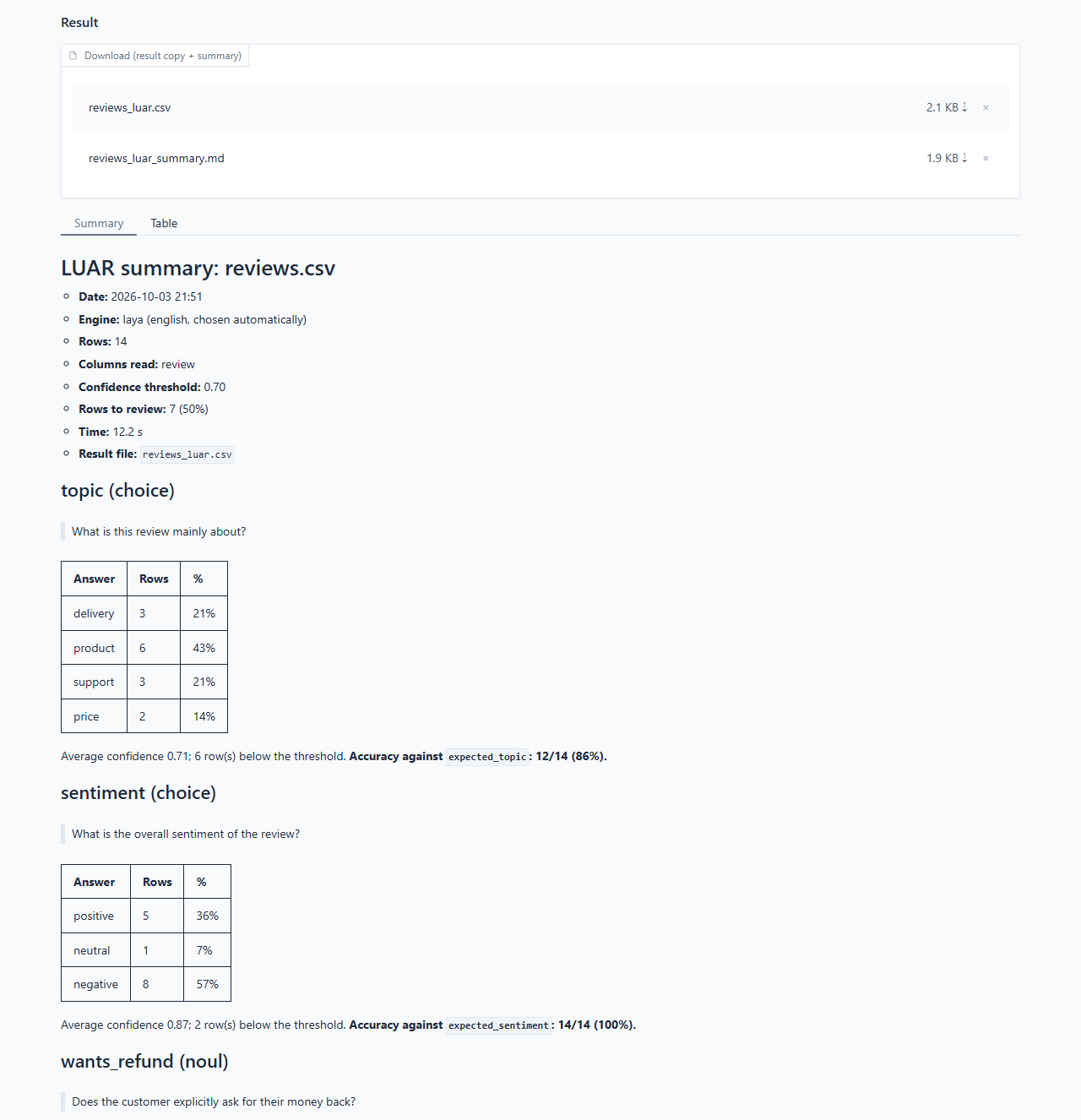
Under Result you get two files to download:
<your file>_luar.csvor.xlsx: your spreadsheet with the new columns.<your file>_luar_summary.md: the report (it is also shown on the page, in Summary)..mdis plain text, so it opens in any text editor.
The Table tab shows the result spreadsheet right on the page.
5. Writing good questions
The quality of the answers depends mostly on how the questions are written.
The three question types
| Type | Use it when… | Answer | Example |
|---|---|---|---|
choice |
the answer is one of a list (2 to 20 options) | one of your options | What is the review about? delivery / product / support / price |
noul |
the answer is yes or no | yes or no |
Does the customer ask for their money back? |
score ⚠️ |
the answer is a level on a scale | one of your levels, in order from lowest to highest | How serious is the problem? none / minor / major |
⚠️
scoreis experimental. It was the least reliable type in our tests: on 300 real product reviews, Laya matched the customer's own star rating (1 to 5) only 26% of the time, although 60% of its answers were within one star. On an urgency scale (low / medium / high) for support messages it got 3 of 12 right, and neither describing each level, nor reversing the order, nor switching tochoicefixed it: some scales are simply beyond the model. Preferchoiceornoulwhen you can (for example "Does the message report lost money or a health risk?" instead of an urgency level), describe each level if you usescore, and always measure withexpected_columns (section 7). Because its confidence is almost always low, ascorequestion does not mark rows for review.
Tips
- Describe the options.
price: cost, value for money, chargesworks much better than justprice. The description tells the model what belongs in each option. - Make the options cover everything and not overlap. If some rows may fit none of them, add an
otheroption. If two options mean almost the same thing, merge them. - Ask one thing per question. Instead of "Is the customer angry and asking for a refund?",
make two
noulquestions. - Be specific. "Does the customer explicitly ask for their money back?" gets better answers than "Refund?".
- Keep to about 20 options. For longer lists, split into a broad question and a detailed one.
- Option order can change some answers. If results look biased towards one option, try reordering and compare (section 7 shows how to measure).
- Write in the language of your data. Questions and options can be in any language the engine supports.
- Be careful with "middle" options such as
neutral. On real reviews, Laya got positive and negative right 82–87% of the time but almost never choseneutral(3 of 60). If you need a middle option, describe it well and measure it withexpected_columns (section 7); two yes/no questions ("Is it positive?", "Is it negative?") can be an alternative worth testing.
Questions file format
A questions file is a list in JSON format. This is the file behind the example above:
[
  {
    "id": "topic",
    "type": "choice",
    "question": "What is this review mainly about?",
    "options": {
      "delivery": "shipping, delays, courier, package condition",
      "product": "quality, defects, how the item works",
      "support": "customer service, returns, how the store handled a request",
      "price": "cost, value for money, charges and billing"
    }
  },
  {
    "id": "sentiment",
    "type": "choice",
    "question": "What is the overall sentiment of the review?",
    "options": ["positive", "neutral", "negative"]
  },
  {
    "id": "wants_refund",
    "type": "noul",
    "question": "Does the customer explicitly ask for their money back?"
  }
]
options can be a simple list (["positive", "neutral", "negative"]) or a list with
descriptions ({"delivery": "shipping, delays", …}). For score, list the levels from lowest to
highest.
6. Understanding the results
New columns in your spreadsheet
For each question (here, a question with id topic):
| Column | Meaning |
|---|---|
topic |
The answer: one of your options, or yes/no for noul questions. |
topic_confidence |
How sure the engine is, from 0 to 1. 0.95 = very sure; 0.40 = guessing between options. |
And two columns for the whole row:
| Column | Meaning |
|---|---|
needs_review |
yes if any answer in the row is below the confidence threshold (score questions excepted, see section 5). Filter by it to find the rows a person should check. |
review_reasons |
Which questions were uncertain (for example topic, sentiment), or empty text if the row had no text. |
Rows with no text are not sent to the engine; they are marked needs_review with the reason empty text.
The summary report
The _summary.md file contains:
- The run: date, engine, number of rows, columns read, threshold, time taken.
- One section per question: how many rows got each answer (count and %), the average confidence, and how many answers fell below the threshold.
- Accuracy, if your file has answer-key columns (next section).
- Rows to review: row number (as in Excel, counting the header as row 1), which questions were
uncertain, and the start of the text. Up to 50 rows are listed; filter
needs_reviewin the result file for the rest.
How much to trust the confidence
The confidence is a real probability computed by the engine, not a number the model makes up. It is a good guide to where mistakes are likely, but how good depends on your data. In our tests, Laya was right 98% of the time when its confidence was 0.7 or more on news topics, but only 72–75% on customer reviews. A model can be confidently wrong, which is why the next section matters.
7. Checking whether you can trust the answers
Before relying on LUAR for a large file, measure it on a sample whose answers you already know:
- Pick 20 to 50 rows and answer the questions yourself.
- Add one column per question named
expected_+ the question id. For the questiontopic, the column isexpected_topic. Fill in your answers.- For
noulquestions,yes/no,sim/não,true/falseand1/0all work. - Rows left blank in the
expected_column are simply not counted.
- For
- Run LUAR on that file. The summary now shows, for each question, a line like
Accuracy against
expected_topic: 12/14 (86%). - If the accuracy is too low, improve the questions (section 5): describe the options better,
split questions that mix two things, swap
scoreforchoiceornoul, or try the other Laya model variant. Run again until you are satisfied. Then run your full file.
The expected_ columns are never shown to the model, so they cannot leak the answers.
8. How accurate is Laya
We measured Laya on 300 texts from two public datasets labeled by people, on a laptop without a dedicated GPU (details and script):
| Question | Type | Accuracy |
|---|---|---|
| News topic (English, AG News, 4 topics) | choice |
93% |
| Would recommend? (Portuguese reviews, B2W) | noul |
70% |
| Sentiment positive / neutral / negative (B2W) | choice |
68% (neutral: 5%) |
| Star rating 1–5 (B2W) | score |
26% (60% within one star) |
- Right when confidence is 0.7 or more: 98% on news, 72–75% on reviews.
- Time per row: about 1 s with one question, 1.3 s with three.
Review labels come from the customers' own ratings, which do not always match the text, so they are a hard, noisy test.
Accuracy depends a lot on the question type and your data: clear choice or yes/no questions do well;
scales (score) and "middle" options do poorly. So measure on your sample with expected_
columns (section 7) before trusting a large run.
9. Using the command line
Everything in the web interface can also be done in a terminal, which is handy for repeating the same job or automating it.
luar columns my_file.xlsx
Lists the columns of a file with a sample value from each.
luar download
Downloads Laya's models (multilingual and English) so LUAR works offline afterwards.
luar run my_file.xlsx -q questions.json -c review
Labels the file. The result and the summary are saved next to the original file, as
my_file_luar.xlsx and my_file_luar_summary.md. If those names already exist, LUAR adds _2,
_3… instead of overwriting.
| Option | What it does |
|---|---|
-q, --questions |
The questions file (.json). Required. |
-c, --columns |
The column(s) to read. Several are allowed: -c title body. Required. |
-t, --threshold |
Confidence threshold, from 0 to 1 (default 0.7). |
-o, --out-dir |
Save the results in another folder. |
--sheet |
Excel sheet to read (default: the first). |
--checkpoint |
Laya model variant: auto (default), multilingual or english. |
--device |
cpu or cuda (default: automatic). |
Use LUAR from Python:
from luar import load_questions, run_file
from luar.backends import make_backend

backend = make_backend("laya")
result = run_file("data.csv", load_questions("questions.json"), ["text"], backend)
print(result.table_path, result.summary_path)
10. Troubleshooting and FAQ
Does my data leave my computer?
No. Laya runs on your computer and LUAR makes no outside connection: the interface and the model
work offline. The only downloads are the software and the models, when installing (see
luar download in section 3).
Do I need to train Laya? Does it learn from my data or my corrections?
No and no. Laya comes trained and answers new questions from the text of the question and options
alone; it keeps nothing from your spreadsheets or from the corrections you make to the result. To
get better answers, rewrite the questions (section 5) and measure accuracy with expected_ columns
(section 7).
luar is not recognized, or Windows says access is denied.
Use python -m luar ui (or python -m luar run …). Some Windows security settings block small
program files that pip creates; going through python avoids that.
"Old .xls files are not supported".
Open the file in Excel and save it as .xlsx (or .csv).
Accents look wrong in the result. The result CSV is saved in UTF-8, which Excel reads correctly when you double-click the file. If you import it manually (Data → From Text/CSV), choose UTF-8.
"The file already has column(s) …". You are probably running LUAR on a file that is already a LUAR result. Use the original file, or change the question ids.
"The Laya engine could not be loaded".
Laya comes with LUAR, so this means a broken install. Run pip install "laya>=0.3.21" and open LUAR
again.
It is slow. Laya takes 30 to 60 seconds to load at the start of each session; after that it handles about one row per second, so a 1,000-row file takes about 20 minutes. To tune your questions, try a small sample first.
Many rows are marked needs_review.
Improve the option descriptions (section 5), check accuracy with expected_ columns (section 7),
or lower the threshold if accuracy is already good.
Which languages work? Laya's multilingual model handles many languages (it was tested here in Portuguese and English).
11. Related projects, contributing and license
Related projects. Other open tools around Laya, in case one fits you better:
- laya-studio: a full web platform (Docker + PostgreSQL) with batch evaluation, calibration monitoring, a review queue and automations. Pick it if you are building a decision system for a team; pick LUAR if you just want a labeled spreadsheet.
- vgi-laya: Laya as SQL functions inside DuckDB. Pick it if your data already lives in a database and you are comfortable with SQL.
- More in the laya.tools directory.
Installing from the repository (includes the examples and the example picker):
git clone https://github.com/HayateV30/luar.git
cd luar
pip install -e ".[all]"
Contributing. How LUAR works inside, how to run the tests and how to add an engine: CONTRIBUTING.md. Bugs and ideas: issues.
License. MIT for LUAR's code. Laya (the package and the model weights) is a separate project with its own license; check its model card before redistributing it.
1 maintainer

Metadata
1 maintainer
Release files for luar 0.4.1
For a detailed explanation of source distributions (sdists) and built distributions (wheels), please see the package formats documentation.
Source distribution (sdist)
| File | Size | Uploaded | |
|---|---|---|---|
| luar-0.4.1.tar.gz | 41.2 kB | Details |
Built distribution (wheel)
| File | Interpreter | ABI | Platform | Reset |
|---|---|---|---|---|
| luar-0.4.1-py3-none-any.whl | Python 3 | none | any | Details |
Total release size: 71.7 kB
Release files / luar-0.4.1.tar.gz
| Download URL | luar-0.4.1.tar.gz |
|---|---|
| Size | 41.2 kB |
| Tags | Source |
|
SHA-256 checksum How to use checksums |
18e84705fea97bb0dab51057638b5a5aacdda73d3d48442731fe9ae4a9ef83b9
|
|
BLAKE2b-256 checksum How to use checksums |
12656b267d2709fe12b3e3f8eb9badf32435f0fbb0dad056c48d0e7dea13b606
|
| Upload date | |
|
Uploaded using Trusted Publishing? What is trusted publishing? |
Yes |
| Uploaded via |
twine/7.0.0 CPython/3.13.14
|
Provenance
Provenance describes where a file came from. On PyPI, provenance is shared via attestations, which provide a verifiable record of the build or publishing details. View details, limitations and caveats.


PyPI Publish Attestation
PyPI verified that this artifact, at this checksum, originated from the publisher listed below.
Signed by GitHub Actions, verified by PyPI on Oct 4, 2026.
Transparency logRelease files / luar-0.4.1-py3-none-any.whl
| Download URL | luar-0.4.1-py3-none-any.whl |
|---|---|
| Size | 30.6 kB |
| Tags | Python 3 |
|
SHA-256 checksum How to use checksums |
c548c82c7e320e3448cf6985cf7e26458d02d01ba23f51acbd7ddb351d6d4a7e
|
|
BLAKE2b-256 checksum How to use checksums |
9dcc4016153b647cf41ce0e5ac2407f0dc1eea7c7e43615787467906224a102b
|
| Upload date | |
|
Uploaded using Trusted Publishing? What is trusted publishing? |
Yes |
| Uploaded via |
twine/7.0.0 CPython/3.13.14
|
Provenance
Provenance describes where a file came from. On PyPI, provenance is shared via attestations, which provide a verifiable record of the build or publishing details. View details, limitations and caveats.
PyPI Publish Attestation
PyPI verified that this artifact, at this checksum, originated from the publisher listed below.
Signed by GitHub Actions, verified by PyPI on Oct 4, 2026.
Transparency log













