
lucidadl — Lucida downloader for tracks, albums and playlists




A small Python CLI and terminal interface for downloading music through lucida.to.
Paste a track, album, text list, or public playlist. lucidadl extracts the titles, finds matching results through Lucida, downloads them in parallel, and keeps your library organized.
Official project: github.com/Jude-A/lucidadl
Install lucidadl only from PyPI or this repository's GitHub releases. No standalone Windows
.exeis currently distributed.
What makes lucidadl useful?
| Input | Result |
|---|---|
| Track or album search | Qobuz, Amazon Music, or GrilledCheese through Lucida |
Large .txt list |
Parallel downloads with deduplication and retry |
| Public streaming playlist | Ordered import from eight supported services |
| FLAC source | Optional local MP3, AAC, Opus, Ogg, WAV, or FLAC conversion |
| Interrupted playlist | Resume with the original order and folder |
Supported public playlist sources: Apple Music, Spotify, Deezer, YouTube/YouTube Music, Amazon Music, TIDAL, SoundCloud, and Qobuz. Playlist sources and download providers are separate: playlists can originate from any supported service, while lucidadl resolves downloads through Lucida's Qobuz, Amazon Music, and GrilledCheese providers when they are available.
Upstream status — last checked 15 October 2026: lucida.to remains unstable. Amazon Music resolves in automatic, US, UK, and Japan modes. Qobuz still advertises a Netherlands account, but both search and direct track resolution currently fail with an upstream HTTP 403. GrilledCheese exposes no account, while SoundCloud resolves metadata but still fails at the final download step. This is upstream service status, not a limitation of playlist importing. Run
lucida setupbefore retrying, and expect availability to change without a lucidadl release.
Use lucidadl only for content you are entitled to download. You are responsible for complying with applicable law and with the terms of the services involved. This project is not affiliated with lucida.to, Apple, Spotify, Deezer, YouTube, Amazon, TIDAL, SoundCloud, Qobuz, or any streaming service.
Install
Python 3.10 or newer and a normal desktop session are required. Using pipx keeps the application isolated and available everywhere:
pipx install lucidadl
lucida setup
lucida
lucida setup installs the matching Playwright Chromium build when needed, opens
lucida.to once for the Cloudflare check, then saves the resulting access locally.
Plain pip also works:
pip install lucidadl
lucida setup
Installing the package creates both lucida and lucidadl. If another application
already owns the lucida command, use the lucidadl alias for every example below.
Nix installation
The flake supports x86_64-linux and aarch64-linux.
Add lucidadl to the inputs of your NixOS or Home Manager flake:
inputs.lucidadl.url = "github:Jude-A/lucidadl";
To use the same nixpkgs revision as your system, add
inputs.lucidadl.inputs.nixpkgs.follows = "nixpkgs"; to your flake.
Update it with nix flake update lucidadl.
Run or build directly
For one-off use, without adding lucidadl to a system or home configuration:
nix run github:Jude-A/lucidadl
nix build github:Jude-A/lucidadl
Install the package directly
Add the package to environment.systemPackages on NixOS:
{ inputs, pkgs, ... }:
{
  environment.systemPackages = [
    inputs.lucidadl.packages.${pkgs.stdenv.hostPlatform.system}.default
  ];
}
For Home Manager, add the same package to home.packages instead.
Use the NixOS module
Import inputs.lucidadl.nixosModules.default in your nixosSystem modules.
It installs lucidadl system-wide and configures the overlay.
Use the Home Manager module
Import inputs.lucidadl.homeManagerModules.default and enable the program:
{ inputs, ... }:
{
  imports = [ inputs.lucidadl.homeManagerModules.default ];
  programs.lucidadl.enable = true;
}
Use the overlay
Add inputs.lucidadl.overlays.default to nixpkgs.overlays, then install
pkgs.lucidadl through environment.systemPackages or home.packages.
Three ways to download
1. A track or album
lucida track "Daft Punk - Around the World"
lucida album "Daft Punk - Discovery"
A direct Qobuz or Amazon URL can be used in place of the search text. Albums are expanded and downloaded track by track so the available parallelism is preserved.
Use interactive search when you want to choose the result yourself:
lucida search "Discovery Daft Punk"
2. Many tracks or albums from a text file
lucida tracks --file "D:/music-lists/tracks.txt"
lucida albums --file "D:/music-lists/albums.txt"
The format is deliberately simple: one search or direct URL per line. Blank lines and
comments beginning with # are ignored.
# Road-trip additions
Daft Punk - Around the World
The Chemical Brothers - Galvanize
https://play.qobuz.com/track/24107150
The source file is never edited. Already downloaded items are skipped unless --force
is used. When --file is omitted, the plural commands use ./inputs/tracks.txt or
./inputs/albums.txt; ready-to-copy examples are included in the repository.
3. A public streaming playlist
lucida playlist "https://music.apple.com/.../pl.xxxxxxxx"
lucida playlist "https://open.spotify.com/playlist/xxxxxxxx"
lucida playlist "https://www.deezer.com/playlist/xxxxxxxx"
lucida playlist "https://music.youtube.com/playlist?list=xxxxxxxx"
lucida playlist "https://music.amazon.com/playlists/xxxxxxxx"
lucida playlist "https://tidal.com/playlist/xxxxxxxx"
lucida playlist "https://soundcloud.com/user/sets/xxxxxxxx"
lucida playlist "https://open.qobuz.com/playlist/xxxxxxxx"
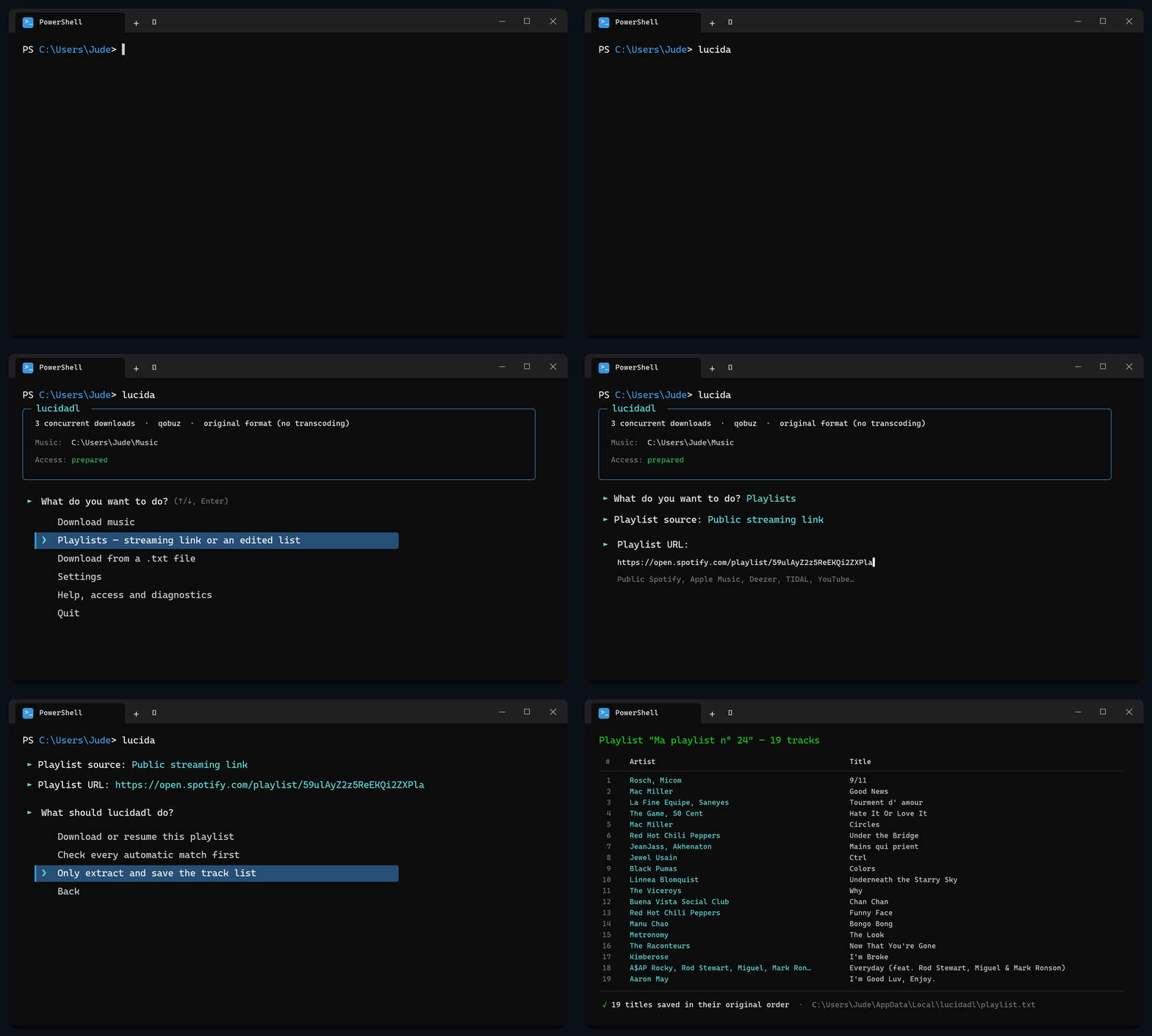
lucidadl detects the service from the URL, reads its public track list, resolves each
title through lucida.to, and stores the result under Playlists/<playlist name>/. An
.m3u8 file is written beside the tracks so players and devices recognize the folder as
an actual playlist.
Preview the extraction without downloading anything:
lucida playlist "https://music.apple.com/.../pl.xxxxxxxx" --dry-run
To verify what lucidadl will select on Qobuz or Amazon before starting a large download:
lucida playlist "https://music.apple.com/.../pl.xxxxxxxx" --check
The extracted list is saved in lucidadl's application-data folder. If a title is ambiguous or unavailable, edit that file (or remove the line), then download the reviewed version while preserving playlist order:
lucida playlist-file "C:/path/to/playlist.txt" --name "My playlist"
If a playlist is interrupted, lucida retry resumes it with its original folder,
settings, and track numbers. Existing files are skipped, and the .m3u8 is rebuilt when
the run finishes. Repeating the same song at two different positions is supported.
Only public playlists are read: lucidadl does not connect to or modify a streaming account. Deezer, Amazon Music, and Qobuz are read directly; short Spotify and TIDAL lists use their fast public players. Apple Music, YouTube, SoundCloud, and longer Spotify/TIDAL lists automatically use a headless browser to load every public position. The import stops with a clear error instead of accepting a known partial list.
Interactive menu
Run lucida without arguments (or lucida ui):
╭────────────────── lucidadl ──────────────────╮
│ 3 concurrent downloads · qobuz · original    │
│ Music: ~/Downloads/music                     │
│ Access: prepared                             │
╰──────────────────────────────────────────────╯

► What do you want to do?
  ⬇   Download music
  🎶  Playlists — streaming link or an edited list
  📄  Download from a .txt file
  ⚙   Settings
  🧰  Help, access and diagnostics
  🚪  Quit
The menu remembers its download count, source service, conversion settings, and music folder. Each run ends with a readable summary and offers failed items for retry from the main menu.
Output and formats
Music is saved to ~/Downloads/music by default, independently of the directory from
which lucidadl is launched:
music/
├── Artists/
│   └── Artist/
│       └── Album/
└── Playlists/
    └── Playlist name/
        ├── 01 - Track.flac
        └── Playlist name.m3u8
Change the main folder permanently or for one run:
lucida config --music "D:/Music"
lucida track "Artist - Title" --out "E:/Temporary music"
For local conversion, lucidadl downloads the best source first and invokes the bundled ffmpeg executable:
lucida album "Artist - Album" --to mp3 --bitrate 320k --jobs 8
If conversion fails, the source audio is kept and the item is reported as failed rather than silently counted as a success.
Useful download options:
| Option | Purpose |
|---|---|
-j, --jobs N |
Parallel downloads, from 1 to 100 (default: 3) |
-s, --service |
Search service: qobuz, amazon, or grilledcheese |
--to FORMAT |
Local conversion to MP3, AAC/M4A, Opus, Ogg, FLAC, or WAV |
--bitrate RATE |
Conversion bitrate such as 320k or 192k |
--keep-original |
Keep the source FLAC after conversion |
--flat |
Place files under Music/ instead of organizing from tags |
--force |
Ignore download history and fetch the item again |
--hidden |
Move a necessary Cloudflare browser window off-screen |
Run lucida <command> --help for the complete options of a command.
Access, failures, and diagnostics
Cloudflare access is prepared once in a real Chromium window. Downloads then use a lightweight HTTP client. If the saved access expires, lucidadl briefly opens the browser again and refreshes it.
lucida doctor          # quick local check; never opens a browser
lucida doctor --live   # browser and lucida.to connectivity check
lucida setup           # install/repair Chromium and refresh access
lucida retry           # retry failures or resume an interrupted playlist
lucida cleanup         # prune stale state and old partial downloads
Failed tracks and albums retain their original type; playlist failures also retain their
folder and original position. Automated and scheduled commands return a non-zero status
while work remains unresolved. The latest details are stored in run.log; lucida config prints its exact location along with the extracted playlist and recovery data.
Common fixes:
- No confident automatic match: use
lucida searchand choose the result manually. - Cloudflare or browser failure: run
lucida setup, thenlucida doctor --live. - Unexpected output folder: run
lucida configand checkLUCIDADL_MUSIC. - Another program uses the
lucidacommand: call this application withlucidadl.
Scheduling a batch
Once access has been prepared, a .txt batch can run unattended while its cached access
remains valid. A Windows Scheduled Task helper is included:
.\schedule.ps1 -Mode tracks -Time 21:30 -WorkingDir "D:\music-lists"
The scheduled task uses inputs/tracks.txt or inputs/albums.txt under its working
directory. A logged-in desktop session is still required if Cloudflare access must be
renewed.
Application data
The browser profile, access data, configuration, deduplication state, last log, failed-item list, and playlist recovery data are stored outside the repository:
- Windows:
%LOCALAPPDATA%\lucidadl - Linux:
~/.local/share/lucidadl - macOS:
~/Library/Application Support/lucidadl
Advanced overrides are available through LUCIDADL_HOME and LUCIDADL_MUSIC.
Development
git clone https://github.com/Jude-A/lucidadl
cd lucidadl
python -m venv .venv
pip install -e ".[dev]"
python selftest.py
See CONTRIBUTING.md for platform-specific setup and validation. Release changes are recorded in CHANGELOG.md.
Credits
lucidadl takes inspiration from lucida-flow and lucida-downloader.
License
1 maintainer

Metadata
1 maintainer
Release files for lucidadl 1.4.3
For a detailed explanation of source distributions (sdists) and built distributions (wheels), please see the package formats documentation.
Source distribution (sdist)
| File | Size | Uploaded | Provenance | |
|---|---|---|---|---|
| lucidadl-1.4.3.tar.gz | 69.8 kB | With provenance | Details |
Built distribution (wheel)
| File | Interpreter | ABI | Platform | Reset |
|---|---|---|---|---|
| lucidadl-1.4.3-py3-none-any.whl | Python 3 | none | any | Details |
Total release size: 138.2 kB
Release files / lucidadl-1.4.3.tar.gz
| Download URL | lucidadl-1.4.3.tar.gz |
|---|---|
| Size | 69.8 kB |
| Tags | Source |
|
SHA-256 checksum How to use checksums |
041452e95e4a4d07a7708096b625faf53fa11fb14bfab9f558f0d2e92005e9fa
|
|
BLAKE2b-256 checksum How to use checksums |
2d53f0ceab575d99d95ad45a5508f97b384a843e56449df6e9733be5b485bd65
|
| Upload date | |
|
Uploaded using Trusted Publishing? What is trusted publishing? |
Yes |
| Uploaded via |
twine/7.0.0 CPython/3.13.14
|
Provenance
Provenance describes where a file came from. On PyPI, provenance is shared via attestations, which provide a verifiable record of the build or publishing details. View details, limitations and caveats.


PyPI Publish Attestation
PyPI verified that this artifact, at this checksum, originated from the publisher listed below.
Signed by GitHub Actions, verified by PyPI on Oct 24, 2026.
Transparency logRelease files / lucidadl-1.4.3-py3-none-any.whl
| Download URL | lucidadl-1.4.3-py3-none-any.whl |
|---|---|
| Size | 68.3 kB |
| Tags | Python 3 |
|
SHA-256 checksum How to use checksums |
3d9fa34cc670a62f0f2af2ac93556ba376308a63cf8de336285c223f5f3b1e50
|
|
BLAKE2b-256 checksum How to use checksums |
7fc4413e87d5472a6c73014b8e688fe0e6428a43c24d11ba1bbc93be76e5da7e
|
| Upload date | |
|
Uploaded using Trusted Publishing? What is trusted publishing? |
Yes |
| Uploaded via |
twine/7.0.0 CPython/3.13.14
|
Provenance
Provenance describes where a file came from. On PyPI, provenance is shared via attestations, which provide a verifiable record of the build or publishing details. View details, limitations and caveats.
PyPI Publish Attestation
PyPI verified that this artifact, at this checksum, originated from the publisher listed below.
Signed by GitHub Actions, verified by PyPI on Oct 24, 2026.
Transparency logSecurity for lucidadl 1.4.3
Provenance
Provenance describes where a file came from. On PyPI, provenance is shared via attestations, which provide a verifiable record of the build or publishing details. View details, limitations and caveats.
Full provenance
All 2 files in this release have been uploaded with provenance metadata.
Attestation for lucidadl-1.4.3.tar.gz
PyPI Publish Attestation
PyPI verified that this artifact, at this checksum, originated from the publisher listed below.
Signed by GitHub Actions, verified by PyPI on Oct 24, 2026.
Transparency logA note on package security
PyPI is a repository for distributing packages, not a service for auditing them. While third-party security researchers and our staff do their best to detect and remove malicious packages, PyPI cannot guarantee the quality, security or suitability of any given package.
To learn more about protecting yourself from malicious actors, visit our package security documentation.














