
LucidX - AI-Powered Image Synthesis Engine
           ▄█▀▄            ▄▀▄▄
               ▀▄        ▄▀
          ▄▄▄    █▄▄▄▄▄▄█    ▄▄▄
         ▀   ▀█ █▀  ▐▌  ▀█ █▀   ▀
               ██  ▀▐▌▀  ██
          ▄█▀▀▀████████████▀▀▀█
         █      ██████████     ▀▄
         █▄   █▀  ▀▀▀▀▀▀  ▀█   ▄█
          ▀█   █  v.1.0.4 █   █▀
An AI-powered image synthesis engine crafted for creators, developers, and visionaries.












🆕 What's New in v1.0.4
🖥️ Command Line Arguments Support
--help/-h: Get instant help and usage examples without entering the interactive menu--version/-v: Quickly check your LucidX version and system information- Smart Error Handling: Prevents multiple arguments and shows helpful error messages
- Professional CLI: Standard Unix-style command line interface
🌐 Global Configuration System
- New Config Location:
~/.config-vritrasecz/lucidx-config.json - JSON Format: Clean, structured configuration instead of Python files
- Global Access: Use your API key from any directory on your system
- Auto-Creation: Configuration directory is created automatically
- Enhanced Security: Config stored safely in your home directory
🔧 Enhanced User Experience
- Argument Validation: Detects and handles invalid arguments gracefully
- Better Error Messages: More informative error handling throughout the tool
- Backward Compatibility: All existing functionality preserved
- Improved Documentation: Updated help system with new features
📖 Usage Examples
# Quick help (new!)
python lucidx.py --help

# Check version (new!)
python lucidx.py --version

# Normal interactive mode (unchanged)
python lucidx.py
📋 Table of Contents
- Overview
- Features
- Requirements
- Installation
- Configuration
- Usage
- Style Presets
- Screenshots
- File Structure
- Output Management
- Logging System
- Platform Compatibility
- Troubleshooting
- Contributing
- Contact & Support
- License
🔮 Overview
LucidX is a sophisticated AI-powered image synthesis engine that leverages the Stability AI API to transform text prompts into stunning, high-resolution images. Designed with an intuitive command-line interface, LucidX offers creators, developers, and visionaries a powerful tool to bring their imagination to life through advanced AI image generation.
Key Highlights
- 🎨 Multi-Style Generation: Choose from 8 distinctive artistic styles
- 🔧 Interactive CLI: User-friendly command-line interface with visual feedback
- 📱 Cross-Platform: Native support for Linux and Android (Termux)
- 📊 Session Management: Comprehensive logging and progress tracking
- 🛡️ Secure API Handling: Safe storage and management of API credentials
- ⚡ Batch Processing: Generate multiple variations per prompt automatically
✨ Features
Core Functionality
- AI Image Generation: Powered by Stability AI's advanced image synthesis models
- Multiple Style Presets: 8 built-in artistic styles including photographic, anime, digital art, and more
- Batch Generation: Automatically creates 4 image variations per prompt
- Smart File Management: Automatic timestamped file naming and organized storage
- Session Logging: Comprehensive activity logs with detailed metadata
User Experience
- Interactive Menu System: Intuitive navigation through all application features
- Real-time Progress Feedback: Visual indicators during image generation
- Graceful Error Handling: Robust error management with user-friendly messages
- Interrupt Handling: Safe Ctrl+C handling with session cleanup
- Session Summary: Detailed statistics upon completion
Security & Configuration
- Secure API Key Storage: Encrypted local storage of Stability AI credentials
- API Key Management: Easy configuration and updating of API keys
- Validation: Input validation and API response verification
📋 Requirements
System Requirements
- Python: Version 3.7 or higher
- Operating System: Linux (any distribution) or Android with Termux
- Internet Connection: Required for Stability AI API access
- Storage: Minimum 100MB free space for generated images
Python Dependencies
colorama>=0.4.4    # Terminal color formatting
requests>=2.25.1   # HTTP requests for API communication
pathlib            # File path management (built-in)
datetime           # Timestamp generation (built-in)
API Requirements
- Stability AI API Key: Required for image generation
- API Credits: Sufficient credits in your Stability AI account
🚀 Installation
Method 1: Git Clone (Recommended)
# Clone the repository
git clone https://github.com/VritraSecz/LucidX.git

# Navigate to project directory
cd LucidX

# Install dependencies
pip3 install -r requirements.txt

# Run the application
python lucidx.py
Method 2: Direct Download
- Download the project as ZIP from GitHub
- Extract to your desired location
- Install dependencies:
pip install colorama requests - Run:
python lucidx.py
Method 3: Termux (Android)
# Update package list
apt update && apt upgrade

# Install Python and Git
apt install python python-pip git

# Clone and setup
git clone https://github.com/VritraSecz/LucidX.git
cd LucidX
pip install -r requirements.txt

# Run
python lucidx.py
⚙️ Configuration
API Key Setup
-
Obtain Stability AI API Key:
- Visit Stability AI Platform
- Create an account and generate an API key
- Ensure you have sufficient credits
-
Configure in LucidX:
- Launch LucidX:
python lucidx.py - Select option
[2] Configure API Key - Enter your API key when prompted
- Key is securely stored in
core/config.py
- Launch LucidX:
-
Update Existing Key:
- Use the same configuration menu
- Choose to replace existing key when prompted
Directory Structure Setup
The application automatically creates necessary directories:
Linux/PC:
./generated_images/     # Generated images storage
./generation_log.txt    # Session activity log
./last_style.txt        # Temporary style preference
Termux (Android):
/sdcard/LucidX_Images/  # Generated images storage
./generation_log.txt    # Session activity log
./last_style.txt        # Temporary style preference
🎯 Usage
Basic Workflow
-
Launch Application
python lucidx.py -
Configure API Key (First-time setup)
- Select option
[2]from main menu - Enter your Stability AI API key
- Select option
-
Generate Images
- Select option
[1] Image Generation - Choose your preferred style preset (1-8)
- Enter your text prompt
- Wait for generation completion
- Select option
-
View Results
- Images saved automatically with timestamps
- Session summary displayed after each batch
Advanced Usage
Custom Prompting Tips
- Be Descriptive: Use detailed, specific language
- Add Modifiers: Include quality terms like "high resolution", "cinematic", "detailed"
- Style Keywords: Incorporate style-specific terms that complement your chosen preset
- Composition: Describe the scene composition, lighting, and mood
Batch Operations
- Each prompt automatically generates 4 variations
- Seeds are incremented for unique results (1234, 1235, 1236, 1237)
- All images use consistent steps (30) for quality
Session Management
- View real-time generation progress
- Session statistics available at completion
- Graceful exit with Ctrl+C preserves session data
🎨 Style Presets
LucidX offers 8 distinctive artistic styles:
| ID | Style | Description | Best For |
|---|---|---|---|
| 1 | photographic |
Realistic, camera-like imagery | Portraits, landscapes, realistic scenes |
| 2 | anime |
Japanese animation style | Characters, fantasy scenes, stylized art |
| 3 | digital-art |
Modern digital illustration | Concept art, creative designs, modern aesthetics |
| 4 | neon-punk |
Cyberpunk aesthetic with neon colors | Futuristic scenes, urban landscapes, sci-fi |
| 5 | fantasy-art |
Fantasy and magical themes | Mythical creatures, magical scenes, epic art |
| 6 | pixel-art |
Retro pixelated style | Game assets, retro designs, minimalist art |
| 7 | isometric |
3D isometric perspective | Technical illustrations, game environments |
| 8 | low-poly |
Geometric, minimalist 3D style | Abstract designs, modern minimalism |
Style Selection Process
- Styles are remembered during the session
- Stored in temporary
last_style.txtfile - Automatically cleaned up on exit
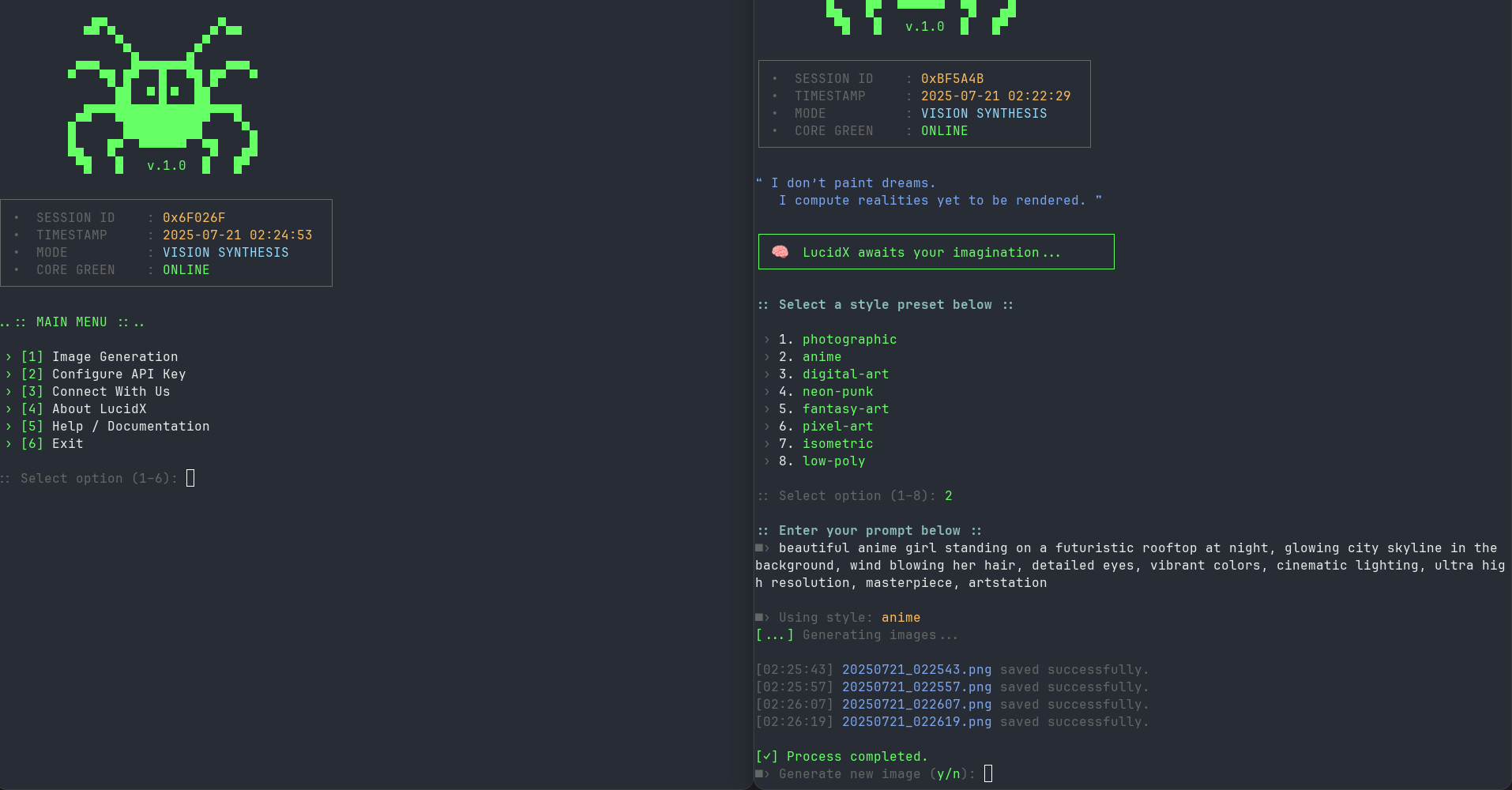
🖼️ Screenshots
Main Menu + Output Interface
📁 File Structure
LucidX/
├── lucidx.py                # Application entry point
├── core/                  # Core modules directory
│   ├── genx.py            # Image generation engine
│   ├── banr.py            # ASCII art banners
│   ├── colors.py          # Terminal color definitions
│   └── modulex.py         # Utility functions and menus
├── generated_images/      # Output directory (auto-created)
├── generation_log.txt     # Activity log (auto-created)
├── last_style.txt         # Temporary style storage (auto-created)
├── requirements.txt       # Install required python library
└── README.md              # This documentation
Core Module Details
lucidx.py
- Application entry point
- Main menu navigation
- Signal handling for graceful interruption
core/genx.py
- Image generation engine
- API communication with Stability AI
- File management and batch processing
- Progress tracking and logging
core/modulex.py
- Menu systems and user interactions
- API key configuration interface
- Help and documentation displays
core/banr.py
- ASCII art banners and logos
- Session information display
- Dynamic timestamp generation
core/colors.py
- Terminal color scheme definitions
- Consistent visual styling across application
📂 Output Management
File Naming Convention
Generated images follow a standardized naming pattern:
YYYYMMDD_HHMMSS.png
Example: 20241220_143052.png (December 20, 2024 at 14:30:52)
Storage Locations
Linux/PC Systems
- Path:
./generated_images/ - Creation: Automatically created relative to script location
- Permissions: Standard user permissions
Android (Termux)
- Path:
/sdcard/LucidX_Images/ - Creation: Automatically created on SD card storage
- Access: Accessible through file manager apps
Image Specifications
- Format: PNG
- Quality: High resolution (API dependent)
- Size: Variable based on Stability AI model output
- Metadata: Generation parameters logged separately
📊 Logging System
Generation Log (generation_log.txt)
Each generation session creates detailed log entries:
[2024-12-20 14:30:52] Prompt: "sunset over mountain lake" -› 20241220_143052.png
[2024-12-20 14:30:54] Prompt: "sunset over mountain lake" -› 20241220_143054.png
[2024-12-20 14:30:56] Prompt: "sunset over mountain lake" -› 20241220_143056.png
[2024-12-20 14:30:58] Prompt: "sunset over mountain lake" -› 20241220_143058.png
Session Summary
Displayed at the end of each session:
:: LucidX Session Summary ::
 › Prompts entered    : 3
 › Images generated   : 12
 › Output directory   : /home/user/LucidX/generated_images
 › Session completed.
Error Logging
- API errors logged with full response details
- Network issues captured with diagnostic information
- File system errors documented with context
🖥️ Platform Compatibility
Linux Distributions
- Ubuntu/Debian: Fully supported
- Fedora/CentOS: Fully supported
- Arch Linux: Fully supported
- Kali Linux: Fully supported (as tested)
- Alpine Linux: Compatible with Python 3.7+
Android (Termux)
- Installation: Available through Termux package manager
- Storage: Automatic internal storage integration
- Performance: Optimized for mobile hardware
- Permissions: Handles Android storage permissions
Requirements by Platform
Linux
sudo apt update
sudo apt install python3 python3-pip
pip3 install colorama requests
Termux
pkg update
pkg install python python-pip git
pip install colorama requests
🔧 Troubleshooting
Common Issues
API Key Problems
Issue: "API key not configured" or authentication errors Solutions:
- Verify API key is correctly entered (check for extra spaces)
- Ensure API key is active on Stability AI platform
- Check account credit balance
- Reconfigure using menu option [2]
Network Issues
Issue: Connection timeout or network errors Solutions:
- Verify internet connectivity
- Check firewall settings
- Try using VPN if blocked in your region
- Ensure stable internet connection during generation
File Permission Errors
Issue: Cannot save files or create directories Solutions:
- Check write permissions in current directory
- For Termux: Ensure storage permissions are granted
- Run with appropriate user permissions
- Verify sufficient disk space
Import Errors
Issue: ModuleNotFoundError for colorama or requests
Solutions:
pip install --upgrade colorama requests
# or for system-wide installation
pip3 install --upgrade colorama requests
Performance Optimization
For Slower Systems
- Close unnecessary applications during generation
- Ensure stable internet connection
- Monitor available RAM and storage
For Mobile/Termux
- Use Wi-Fi instead of mobile data for better stability
- Keep device plugged in during long sessions
- Clear app cache if experiencing issues
🤝 Contributing
We welcome contributions from the community! Here's how you can help:
Ways to Contribute
- 🐛 Bug Reports: Submit detailed issue reports
- 💡 Feature Requests: Suggest new functionality
- 🔧 Code Contributions: Submit pull requests
- 📚 Documentation: Improve documentation and examples
- 🎨 Style Presets: Suggest new artistic styles
Development Setup
# Fork the repository on GitHub
# Clone your fork
git clone https://github.com/yourusername/LucidX.git

# Create a feature branch
git checkout -b feature/your-feature-name

# Make changes and test thoroughly
# Commit with descriptive messages
git commit -m "Add: new feature description"

# Push to your fork and create pull request
git push origin feature/your-feature-name
Code Standards
- Follow PEP 8 Python style guidelines
- Include docstrings for new functions
- Test on both Linux and Termux when possible
- Maintain backward compatibility
Issue Reporting
When reporting issues, please include:
- Python version
- Operating system and version
- Error messages (full traceback)
- Steps to reproduce
- Expected vs actual behavior
📞 Contact & Support
Developer Information



Community & Support




Getting Help
- Check Documentation: Review this README and built-in help
- Search Issues: Look for existing solutions on GitHub
- Community Support: Ask questions on Telegram channel
- Bug Reports: Submit detailed issues on GitHub
- Direct Contact: Use support bot for urgent issues
📄 License



- This project is licensed under the MIT License - see the LICENSE file for details.







LucidX v1.0.4 - "I don't paint dreams. I compute realities yet to be rendered."
Made with ❤️ by VritraSec
1 maintainer

Download files
Download the file for your platform. If you're not sure which to choose, learn more about installing packages.
Source Distribution
Built Distribution
Filter files by name, interpreter, ABI, and platform.
If you're not sure about the file name format, learn more about wheel file names.
Copy a direct link to the current filters
File details
Details for the file lucidx-1.0.4.tar.gz.
File metadata
- Download URL: lucidx-1.0.4.tar.gz
- Upload date:
- Size: 24.9 kB
- Tags: Source
- Uploaded using Trusted Publishing? No
- Uploaded via:
twine/6.1.0 CPython/3.13.5
File hashes
| Algorithm | Hash digest | |
|---|---|---|
| SHA256 |
9749d5f8be22480efc74b5b9fe112d26a773040c05675134a0050bf30bf52bc4
|
|
| MD5 |
5aa8501e9c2541e3df215673a9eb7b07
|
|
| BLAKE2b-256 |
be566e8336b3472674fb79eb729ba85a72f5d89b57760eb1690536c9def3144e
|
File details
Details for the file lucidx-1.0.4-py3-none-any.whl.
File metadata
- Download URL: lucidx-1.0.4-py3-none-any.whl
- Upload date:
- Size: 18.7 kB
- Tags: Python 3
- Uploaded using Trusted Publishing? No
- Uploaded via:
twine/6.1.0 CPython/3.13.5
File hashes
| Algorithm | Hash digest | |
|---|---|---|
| SHA256 |
339e640cbb75afb50553dd61bc8fa06f676c7b8027f140ffcbbc9b0d8f40674c
|
|
| MD5 |
c71119d66c5e931d4e63e4b60a68b661
|
|
| BLAKE2b-256 |
dde55120ef60845409ea92e2b242a627e246c09bcb9f9ac44276924c92853952
|













