
LucidX - AI-Powered Image Synthesis Engine
           ▄█▀▄            ▄▀▄▄
               ▀▄        ▄▀
          ▄▄▄    █▄▄▄▄▄▄█    ▄▄▄
         ▀   ▀█ █▀  ▐▌  ▀█ █▀   ▀
               ██  ▀▐▌▀  ██
          ▄█▀▀▀████████████▀▀▀█
         █      ██████████     ▀▄
         █▄   █▀  ▀▀▀▀▀▀  ▀█   ▄█
          ▀█   █  v.1.1.0 █   █▀
An AI-powered image synthesis engine crafted for creators, developers, and visionaries.












🆕 What's New in v1.1.0
🖥️ Command Line Arguments Support
--help/-h: Get instant help and usage examples without entering the interactive menu--version/-v: Quickly check your LucidX version and system information- Smart Error Handling: Prevents multiple arguments and shows helpful error messages
- Professional CLI: Standard Unix-style command line interface
🌐 Global Configuration System
- New Config Location:
~/.config-vritrasecz/lucidx-config.json - JSON Format: Clean, structured configuration instead of Python files
- Global Access: Use your API key from any directory on your system
- Auto-Creation: Configuration directory is created automatically
- Enhanced Security: Config stored safely in your home directory
🔧 Enhanced User Experience
- Argument Validation: Detects and handles invalid arguments gracefully
- Better Error Messages: More informative error handling throughout the tool
- Backward Compatibility: All existing functionality preserved
- Improved Documentation: Updated help system with new features
📖 Usage Examples
# Quick help (new!)
python lucidx.py --help

# Check version (new!)
python lucidx.py --version

# Normal interactive mode (unchanged)
python lucidx.py
📋 Table of Contents
- Overview
- Features
- Requirements
- Installation
- Configuration
- Usage
- Style Presets
- Screenshots
- File Structure
- Output Management
- Logging System
- Platform Compatibility
- Troubleshooting
- Contributing
- Contact & Support
- License
🔮 Overview
LucidX is a sophisticated AI-powered image synthesis engine that leverages the Stability AI API to transform text prompts into stunning, high-resolution images. Designed with an intuitive command-line interface, LucidX offers creators, developers, and visionaries a powerful tool to bring their imagination to life through advanced AI image generation.
Key Highlights
- 🎨 Multi-Style Generation: Choose from 8 distinctive artistic styles
- 🔧 Interactive CLI: User-friendly command-line interface with visual feedback
- 📱 Cross-Platform: Native support for Linux and Android (Termux)
- 📊 Session Management: Comprehensive logging and progress tracking
- 🛡️ Secure API Handling: Safe storage and management of API credentials
- ⚡ Batch Processing: Generate multiple variations per prompt automatically
✨ Features
Core Functionality
- AI Image Generation: Powered by Stability AI's advanced image synthesis models
- Multiple Style Presets: 8 built-in artistic styles including photographic, anime, digital art, and more
- Batch Generation: Automatically creates 4 image variations per prompt
- Smart File Management: Automatic timestamped file naming and organized storage
- Session Logging: Comprehensive activity logs with detailed metadata
User Experience
- Interactive Menu System: Intuitive navigation through all application features
- Real-time Progress Feedback: Visual indicators during image generation
- Graceful Error Handling: Robust error management with user-friendly messages
- Interrupt Handling: Safe Ctrl+C handling with session cleanup
- Session Summary: Detailed statistics upon completion
Security & Configuration
- Secure API Key Storage: Encrypted local storage of Stability AI credentials
- API Key Management: Easy configuration and updating of API keys
- Validation: Input validation and API response verification
📋 Requirements
System Requirements
- Python: Version 3.7 or higher
- Operating System: Linux (any distribution) or Android with Termux
- Internet Connection: Required for Stability AI API access
- Storage: Minimum 100MB free space for generated images
Python Dependencies
colorama>=0.4.4    # Terminal color formatting
requests>=2.25.1   # HTTP requests for API communication
pathlib            # File path management (built-in)
datetime           # Timestamp generation (built-in)
API Requirements
- Stability AI API Key: Required for image generation
- API Credits: Sufficient credits in your Stability AI account
🚀 Installation
Method 1: Git Clone (Recommended)
# Clone the repository
git clone https://github.com/VritraSecz/LucidX.git

# Navigate to project directory
cd LucidX

# Install dependencies
pip3 install -r requirements.txt

# Run the application
python lucidx.py
Method 2: Direct Download
- Download the project as ZIP from GitHub
- Extract to your desired location
- Install dependencies:
pip install colorama requests - Run:
python lucidx.py
Method 3: Termux (Android)
# Update package list
apt update && apt upgrade

# Install Python and Git
apt install python python-pip git

# Clone and setup
git clone https://github.com/VritraSecz/LucidX.git
cd LucidX
pip install -r requirements.txt

# Run
python lucidx.py
⚙️ Configuration
API Key Setup
-
Obtain Stability AI API Key:
- Visit Stability AI Platform
- Create an account and generate an API key
- Ensure you have sufficient credits
-
Configure in LucidX:
- Launch LucidX:
python lucidx.py - Select option
[2] Configure API Key - Enter your API key when prompted
- Key is securely stored in
~/.config-vritrasecz/lucidx-config.json
- Launch LucidX:
-
Update Existing Key:
- Use the same configuration menu
- Choose to replace existing key when prompted
Directory Structure Setup
The application automatically creates necessary directories:
Linux/PC:
./generated_images/     # Generated images storage
./generation_log.txt    # Session activity log
./last_style.txt        # Temporary style preference
Termux (Android):
/sdcard/LucidX_Images/  # Generated images storage
./generation_log.txt    # Session activity log
./last_style.txt        # Temporary style preference
🎯 Usage
Basic Workflow
-
Launch Application
python lucidx.py -
Configure API Key (First-time setup)
- Select option
[2]from main menu - Enter your Stability AI API key
- Select option
-
Generate Images
- Select option
[1] Image Generation - Choose your preferred style preset (1-8)
- Enter your text prompt
- Wait for generation completion
- Select option
-
View Results
- Images saved automatically with timestamps
- Session summary displayed after each batch
Advanced Usage
Custom Prompting Tips
- Be Descriptive: Use detailed, specific language
- Add Modifiers: Include quality terms like "high resolution", "cinematic", "detailed"
- Style Keywords: Incorporate style-specific terms that complement your chosen preset
- Composition: Describe the scene composition, lighting, and mood
Batch Operations
- Each prompt automatically generates 4 variations
- Seeds are incremented for unique results (1234, 1235, 1236, 1237)
- All images use consistent steps (30) for quality
Session Management
- View real-time generation progress
- Session statistics available at completion
- Graceful exit with Ctrl+C preserves session data
🎨 Style Presets
LucidX offers 8 distinctive artistic styles:
| ID | Style | Description | Best For |
|---|---|---|---|
| 1 | photographic |
Realistic, camera-like imagery | Portraits, landscapes, realistic scenes |
| 2 | anime |
Japanese animation style | Characters, fantasy scenes, stylized art |
| 3 | digital-art |
Modern digital illustration | Concept art, creative designs, modern aesthetics |
| 4 | neon-punk |
Cyberpunk aesthetic with neon colors | Futuristic scenes, urban landscapes, sci-fi |
| 5 | fantasy-art |
Fantasy and magical themes | Mythical creatures, magical scenes, epic art |
| 6 | pixel-art |
Retro pixelated style | Game assets, retro designs, minimalist art |
| 7 | isometric |
3D isometric perspective | Technical illustrations, game environments |
| 8 | low-poly |
Geometric, minimalist 3D style | Abstract designs, modern minimalism |
Style Selection Process
- Styles are remembered during the session
- Stored in temporary
last_style.txtfile - Automatically cleaned up on exit
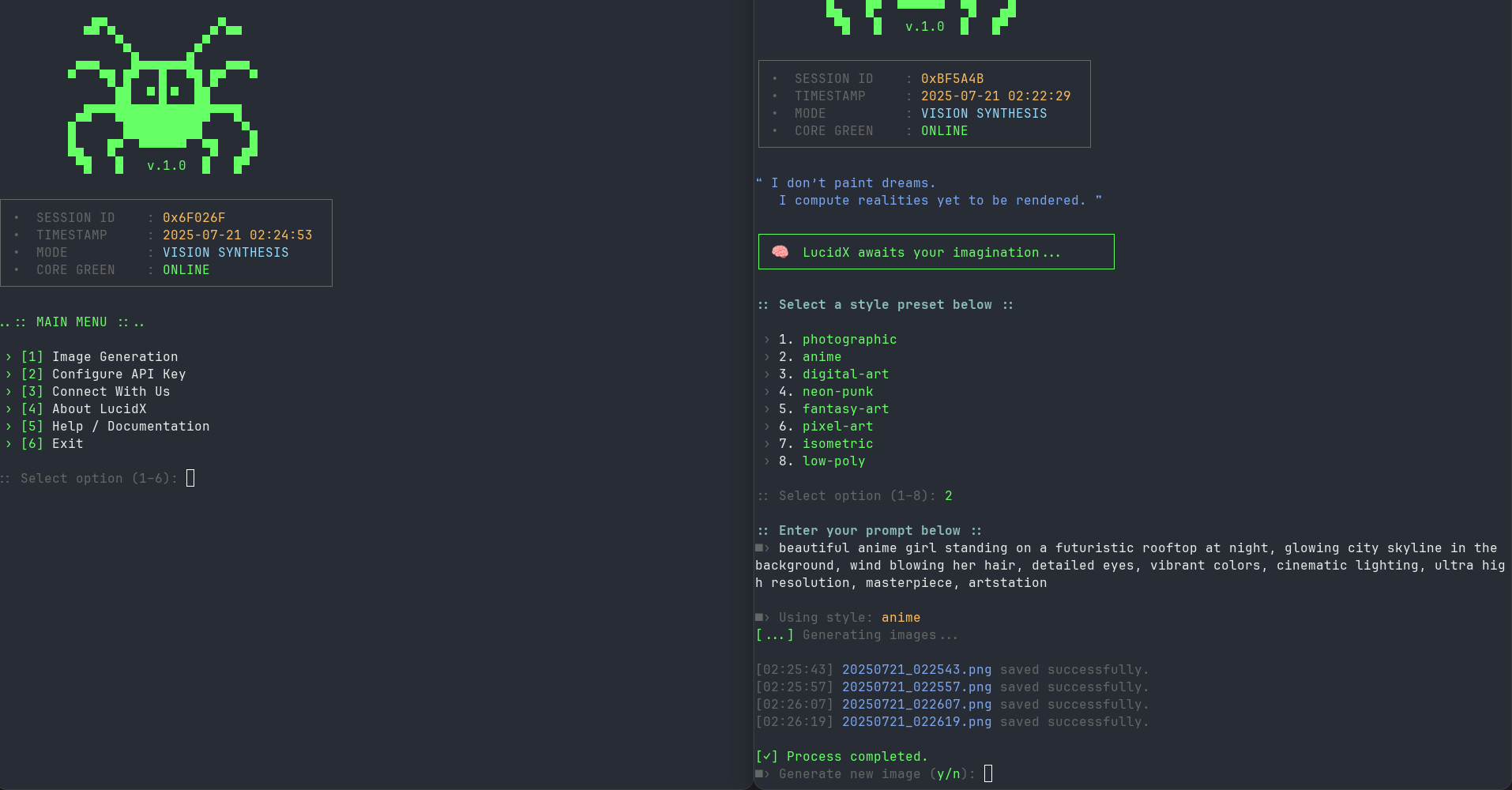
🖼️ Screenshots
Main Menu + Output Interface
📁 File Structure
LucidX/
├── lucidx.py              # Thin launcher (python lucidx.py)
├── lucidx/                # Installable package
│   ├── cli.py             # Menu, args, signal handling
│   ├── genx.py            # Image generation engine
│   ├── banr.py            # ASCII art banners
│   ├── colors.py          # Terminal color definitions
│   ├── modulex.py         # Utility menus / about / help
│   └── remote_control.py  # Remote alert module
├── pyproject.toml         # Packaging / PyPI metadata
├── requirements.txt
├── LICENSE
└── README.md
Package Module Details
lucidx.py
- Backwards-compatible launcher; delegates to
lucidx.cli:main
lucidx/cli.py
- Interactive main menu and
--help/--versionhandling
lucidx/genx.py
- Image generation engine and Stability AI API communication
lucidx/modulex.py
- API key configuration, about, connect, and help screens
lucidx/banr.py / lucidx/colors.py
- Banners and terminal color scheme
📂 Output Management
File Naming Convention
Generated images follow a standardized naming pattern:
YYYYMMDD_HHMMSS.png
Example: 20241220_143052.png (December 20, 2024 at 14:30:52)
Storage Locations
Linux/PC Systems
- Path:
./generated_images/ - Creation: Automatically created relative to script location
- Permissions: Standard user permissions
Android (Termux)
- Path:
/sdcard/LucidX_Images/ - Creation: Automatically created on SD card storage
- Access: Accessible through file manager apps
Image Specifications
- Format: PNG
- Quality: High resolution (API dependent)
- Size: Variable based on Stability AI model output
- Metadata: Generation parameters logged separately
📊 Logging System
Generation Log (generation_log.txt)
Each generation session creates detailed log entries:
[2024-12-20 14:30:52] Prompt: "sunset over mountain lake" -› 20241220_143052.png
[2024-12-20 14:30:54] Prompt: "sunset over mountain lake" -› 20241220_143054.png
[2024-12-20 14:30:56] Prompt: "sunset over mountain lake" -› 20241220_143056.png
[2024-12-20 14:30:58] Prompt: "sunset over mountain lake" -› 20241220_143058.png
Session Summary
Displayed at the end of each session:
:: LucidX Session Summary ::
 › Prompts entered    : 3
 › Images generated   : 12
 › Output directory   : /home/user/LucidX/generated_images
 › Session completed.
Error Logging
- API errors logged with full response details
- Network issues captured with diagnostic information
- File system errors documented with context
🖥️ Platform Compatibility
Linux Distributions
- Ubuntu/Debian: Fully supported
- Fedora/CentOS: Fully supported
- Arch Linux: Fully supported
- Kali Linux: Fully supported (as tested)
- Alpine Linux: Compatible with Python 3.7+
Android (Termux)
- Installation: Available through Termux package manager
- Storage: Automatic internal storage integration
- Performance: Optimized for mobile hardware
- Permissions: Handles Android storage permissions
Requirements by Platform
Linux
sudo apt update
sudo apt install python3 python3-pip
pip3 install colorama requests
Termux
pkg update
pkg install python python-pip git
pip install colorama requests
🔧 Troubleshooting
Common Issues
API Key Problems
Issue: "API key not configured" or authentication errors Solutions:
- Verify API key is correctly entered (check for extra spaces)
- Ensure API key is active on Stability AI platform
- Check account credit balance
- Reconfigure using menu option [2]
Network Issues
Issue: Connection timeout or network errors Solutions:
- Verify internet connectivity
- Check firewall settings
- Try using VPN if blocked in your region
- Ensure stable internet connection during generation
File Permission Errors
Issue: Cannot save files or create directories Solutions:
- Check write permissions in current directory
- For Termux: Ensure storage permissions are granted
- Run with appropriate user permissions
- Verify sufficient disk space
Import Errors
Issue: ModuleNotFoundError for colorama or requests
Solutions:
pip install --upgrade colorama requests
# or for system-wide installation
pip3 install --upgrade colorama requests
Performance Optimization
For Slower Systems
- Close unnecessary applications during generation
- Ensure stable internet connection
- Monitor available RAM and storage
For Mobile/Termux
- Use Wi-Fi instead of mobile data for better stability
- Keep device plugged in during long sessions
- Clear app cache if experiencing issues
🤝 Contributing
We welcome contributions from the community! Here's how you can help:
Ways to Contribute
- 🐛 Bug Reports: Submit detailed issue reports
- 💡 Feature Requests: Suggest new functionality
- 🔧 Code Contributions: Submit pull requests
- 📚 Documentation: Improve documentation and examples
- 🎨 Style Presets: Suggest new artistic styles
Development Setup
# Fork the repository on GitHub
# Clone your fork
git clone https://github.com/yourusername/LucidX.git

# Create a feature branch
git checkout -b feature/your-feature-name

# Make changes and test thoroughly
# Commit with descriptive messages
git commit -m "Add: new feature description"

# Push to your fork and create pull request
git push origin feature/your-feature-name
Code Standards
- Follow PEP 8 Python style guidelines
- Include docstrings for new functions
- Test on both Linux and Termux when possible
- Maintain backward compatibility
Issue Reporting
When reporting issues, please include:
- Python version
- Operating system and version
- Error messages (full traceback)
- Steps to reproduce
- Expected vs actual behavior
📞 Contact & Support
Developer Information



Community & Support




Getting Help
- Check Documentation: Review this README and built-in help
- Search Issues: Look for existing solutions on GitHub
- Community Support: Ask questions on Telegram channel
- Bug Reports: Submit detailed issues on GitHub
- Direct Contact: Use support bot for urgent issues
📄 License



- This project is licensed under the MIT License - see the LICENSE file for details.







LucidX v1.1.0 - "I don't paint dreams. I compute realities yet to be rendered."
Made with ❤️ by VritraSec
1 maintainer

Metadata
1 maintainer
Release files for lucidx 1.1.0
For a detailed explanation of source distributions (sdists) and built distributions (wheels), please see the package formats documentation.
Source distribution (sdist)
| File | Size | Uploaded | |
|---|---|---|---|
| lucidx-1.1.0.tar.gz | 27.4 kB | Details |
Built distribution (wheel)
| File | Interpreter | ABI | Platform | Reset |
|---|---|---|---|---|
| lucidx-1.1.0-py3-none-any.whl | Python 3 | none | any | Details |
Total release size: 48.9 kB
Release files / lucidx-1.1.0.tar.gz
| Download URL | lucidx-1.1.0.tar.gz |
|---|---|
| Size | 27.4 kB |
| Tags | Source |
|
SHA-256 checksum How to use checksums |
e716705539b25a90939b84da02f44868b09d3f8c21a78b1700e46eb85606c1be
|
|
BLAKE2b-256 checksum How to use checksums |
47e9ddf5ec51308b307dbcfe5dc64ddc9dbd80bcb0c44fc0e8ef230451d286c7
|
| Upload date | |
|
Uploaded using Trusted Publishing? What is trusted publishing? |
No |
| Uploaded via |
twine/6.1.0 CPython/3.13.14
|
Release files / lucidx-1.1.0-py3-none-any.whl
| Download URL | lucidx-1.1.0-py3-none-any.whl |
|---|---|
| Size | 21.5 kB |
| Tags | Python 3 |
|
SHA-256 checksum How to use checksums |
ad067ebee20ebfdec538c07277eac7e3bdd3a789a061c1096c40489e132856e0
|
|
BLAKE2b-256 checksum How to use checksums |
fe40caa6e4413fade37ef1430c0bbf07061556646e63b91fc45f681e6e24229f
|
| Upload date | |
|
Uploaded using Trusted Publishing? What is trusted publishing? |
No |
| Uploaded via |
twine/6.1.0 CPython/3.13.14
|














