
Luma CLI




A command-line tool for AI video generation using Luma through the AceDataCloud API.
Generate AI videos directly from your terminal — no MCP client required.
Features
- Video Generation — Generate videos from text prompts with multiple models
- Image-to-Video — Create videos from reference images- Video Extension — Extend existing videos
- Multiple Models — luma
- Task Management — Query tasks, batch query, wait with polling
- Rich Output — Beautiful terminal tables and panels via Rich
- JSON Mode — Machine-readable output with
--jsonfor piping
Quick Start
1. Get API Token
- Open Ace Data Cloud → Applications. Sign in, or register an account first.
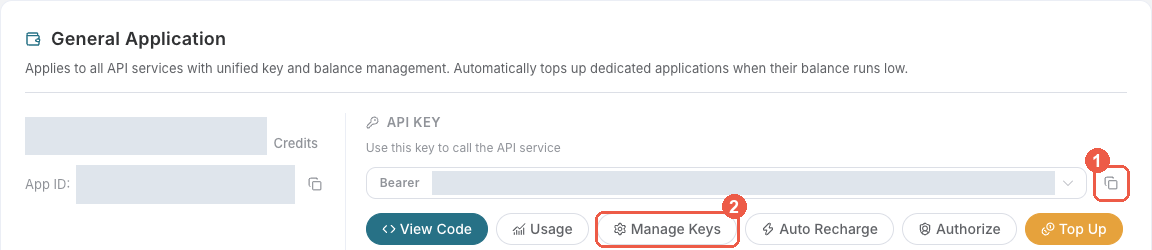
- Find General application. If it has not been created, choose Initialize General Application. A general key can use the services available to your account; a dedicated application's key is limited to its service. Check the required service/model access and current pricing.
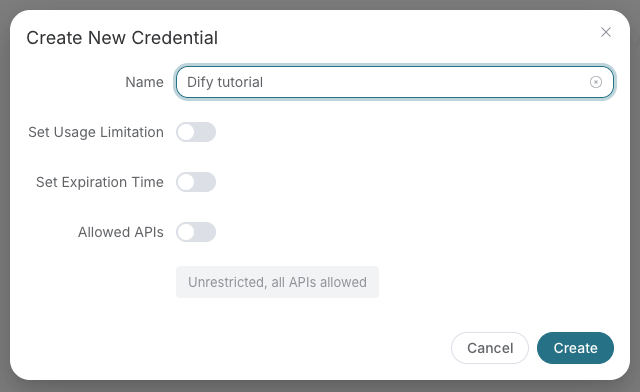
- Copy the API Key from the application card, or open Keys / Manage Keys → Create to create a separate key for this integration. Give it a recognizable name so you can revoke or rotate it independently.
- When creating a key, review Expiration Time, Set Usage Limitation, and Allowed APIs. Enable only the restrictions you need, allow the operations you will call, then click Create and copy the token from the key list. Task lookup does not grant permission to submit a generation. Confirm the application's balance can cover your first request; any trial allowance is whatever your account currently displays.
- Copy only the token value, without quotation marks, spaces, or
Bearer. An API Key / API Token field expects this raw value; only a manually configured HTTPAuthorizationheader needs theBearerprefix. Aplatform-...account-management token cannot replace a generation API key.
Save the key in the client's credential store or the environment variable shown below. Never put it in a prompt, shared workflow, screenshot, or Git commit. If authentication fails, check the full copied value, application/service access, expiration, usage limit, and balance before creating another key.
2. Install
# Install with pip
pip install luma-pro-cli

# Or with uv (recommended)
uv pip install luma-pro-cli

# Or from source
git clone https://github.com/AceDataCloud/LumaCli.git
cd LumaCli
pip install -e .
3. Configure
# Set your API token
export ACEDATACLOUD_API_TOKEN=your_token_here

# Or use .env file
cp .env.example .env
# Edit .env with your token
4. Use
# Generate a video
luma generate "A test video"

# Generate from reference image
luma image-to-video "Animate this scene" -i https://example.com/photo.jpg

# Extend a video
luma extend <video-id>

# Check task status
luma task <task-id>

# Wait for completion
luma wait <task-id> --interval 5

# List available models
luma models
Commands
| Command | Description |
|---|---|
luma generate <prompt> |
Generate a video from a text prompt |
luma image-to-video <prompt> -i <url> |
Generate a video from reference image(s) |
luma extend <video_id> |
Extend an existing video |
luma task <task_id> |
Query a single task status |
luma tasks <id1> <id2>... |
Query multiple tasks at once |
luma wait <task_id> |
Wait for task completion with polling |
luma models |
List available Luma models |
luma config |
Show current configuration |
luma aspect-ratios |
List available aspect ratios |
Global Options
--token TEXT    API token (or set ACEDATACLOUD_API_TOKEN env var)
--version       Show version
--help          Show help message
Most commands support:
--json          Output raw JSON (for piping/scripting)
--model TEXT    Luma model version (default: luma)
--timeout INT   Timeout in seconds for the API to return data
Available Models
| Model | Version | Notes |
|---|---|---|
luma |
Standard | Standard quality video generation (default) |
Configuration
Environment Variables
| Variable | Description | Default |
|---|---|---|
ACEDATACLOUD_API_TOKEN |
API token from AceDataCloud | Required |
ACEDATACLOUD_API_BASE_URL |
API base URL | https://api.acedata.cloud |
LUMA_DEFAULT_MODEL |
Default model | luma |
LUMA_REQUEST_TIMEOUT |
Timeout in seconds | 1800 |
Development
Setup Development Environment
git clone https://github.com/AceDataCloud/LumaCli.git
cd LumaCli
python -m venv .venv
source .venv/bin/activate
pip install -e ".[dev,test]"
Run Tests
pytest
pytest --cov=luma_cli
pytest tests/test_integration.py -m integration
Code Quality
ruff format .
ruff check .
mypy luma_cli
Docker
docker pull ghcr.io/acedatacloud/luma-pro-cli:latest
docker run --rm -e ACEDATACLOUD_API_TOKEN=your_token \
  ghcr.io/acedatacloud/luma-pro-cli generate "A test video"
Project Structure
LumaCli/
├── luma_cli/                # Main package
│   ├── __init__.py
│   ├── __main__.py            # python -m luma_cli entry point
│   ├── main.py                # CLI entry point
│   ├── core/                  # Core modules
│   │   ├── client.py          # HTTP client for Luma API
│   │   ├── config.py          # Configuration management
│   │   ├── exceptions.py      # Custom exceptions
│   │   └── output.py          # Rich terminal formatting
│   └── commands/              # CLI command groups
│       ├── video.py           # Video generation commands
│       ├── task.py            # Task management commands
│       └── info.py            # Info & utility commands
├── tests/                     # Test suite
├── .github/workflows/         # CI/CD (lint, test, publish to PyPI)
├── Dockerfile                 # Container image
├── deploy/                    # Kubernetes deployment configs
├── .env.example               # Environment template
├── pyproject.toml             # Project configuration
└── README.md
Luma CLI vs Luma MCP
| Feature | Luma CLI | Luma MCP |
|---|---|---|
| Interface | Terminal commands | MCP protocol |
| Usage | Direct shell, scripts, CI/CD | Claude, VS Code, MCP clients |
| Output | Rich tables / JSON | Structured MCP responses |
| Automation | Shell scripts, piping | AI agent workflows |
| Install | pip install luma-pro-cli |
pip install mcp-luma |
Both tools use the same AceDataCloud API and share the same API token.
Contributing
Contributions are welcome! Please:
- Fork the repository
- Create a feature branch (
git checkout -b feature/amazing) - Commit your changes (
git commit -m 'Add amazing feature') - Push to the branch (
git push origin feature/amazing) - Open a Pull Request
Development Requirements
- Python 3.10+
- Dependencies:
pip install -e ".[all]" - Lint:
ruff check . && ruff format --check . - Test:
pytest
License
This project is licensed under the MIT License — see the LICENSE file for details.
1 maintainer

Metadata
1 maintainer
Release files for luma-pro-cli 2026.10.12.0
For a detailed explanation of source distributions (sdists) and built distributions (wheels), please see the package formats documentation.
Source distribution (sdist)
| File | Size | Uploaded | |
|---|---|---|---|
| luma_pro_cli-2026.10.12.0.tar.gz | 15.2 kB | Details |
Built distribution (wheel)
| File | Interpreter | ABI | Platform | Reset |
|---|---|---|---|---|
| luma_pro_cli-2026.10.12.0-py3-none-any.whl | Python 3 | none | any | Details |
Total release size: 30.5 kB
Release files / luma_pro_cli-2026.10.12.0.tar.gz
| Download URL | luma_pro_cli-2026.10.12.0.tar.gz |
|---|---|
| Size | 15.2 kB |
| Tags | Source |
|
SHA-256 checksum How to use checksums |
c90e9b35c5a229811fd562e88fa2676813b04a77dcbbb8237a7b0931b5a61c4a
|
|
BLAKE2b-256 checksum How to use checksums |
525185a7b18634f79625c13ed1aaeb5b8373ad3ea51dfea3596770d602769e11
|
| Upload date | |
|
Uploaded using Trusted Publishing? What is trusted publishing? |
No |
| Uploaded via |
twine/7.0.0 CPython/3.12.3
|
Release files / luma_pro_cli-2026.10.12.0-py3-none-any.whl
| Download URL | luma_pro_cli-2026.10.12.0-py3-none-any.whl |
|---|---|
| Size | 15.3 kB |
| Tags | Python 3 |
|
SHA-256 checksum How to use checksums |
e75ad07b87d401c14396a06fb105984130e8e3a40608cf2c589bd3bcc9cfb392
|
|
BLAKE2b-256 checksum How to use checksums |
660b7528844adb6188098eacc528d43149b8f80350d1bb1bfcbab2fa985bb99b
|
| Upload date | |
|
Uploaded using Trusted Publishing? What is trusted publishing? |
No |
| Uploaded via |
twine/7.0.0 CPython/3.12.3
|














