






LumiBot AI Trading
AI agents that actually place the trade. Twelve broker integrations, real backtests, and stocks, options, futures, forex, crypto and prediction markets.
Full docs: lumibot.lumiwealth.com · Managed cloud: BotSpot.trade · MCP: BotSpot for AI coding agents
Read this in 中文 · Español · Français · Deutsch · 日本語 · 한국어 · Português · Русский
Sixty seconds
pip install lumibot
lumibot demo
That runs a real backtest on free daily data and writes a tearsheet. No API key, no broker account, no configuration.
Then make it yours:
lumibot init my-bot --template ai     # writes an ordinary, editable Strategy subclass
lumibot backtest my-bot --days 90
lumibot run my-bot --paper
Running the AI template requires OPENAI_API_KEY and billed model calls. The --paper command requires Alpaca paper-account credentials (ALPACA_API_KEY and ALPACA_API_SECRET). See the CLI setup guide.
lumibot init writes the same Python you would have written by hand. Nothing is hidden behind the CLI, and you keep an editable file.
The strategy class can stay the same. The code that starts it must select a
backtest or a broker run. Strategy.backtest(...) always backtests;
Trader.run_all() or strategy.run_live() starts a configured broker. Setting
IS_BACKTESTING=false alone cannot turn a backtest-only example into a broker
runner. Check every AI example's run mode

Prefer traditional trading strategies? Use --template python instead. Write your own rules, indicators, and order logic in a normal Strategy subclass. No AI model or model API key is required.
Python quickstart · AI quickstart · Python examples · AI examples
Why LumiBot?
- Use Python rules, AI agents, or both. Keep one familiar
Strategylifecycle. - The decision reaches a broker. A deterministic Python gate the model cannot talk past, real broker orders, and a trace you can open. How it works
- Backtest before connecting a broker. Run historical simulations and view trades and results.
- Reuse your strategy across supported brokers. Keep strategy logic separate from broker configuration.
- Start from working examples. Choose stocks, macro, options, or a traditional buy-and-hold strategy.
How LumiBot compares
AI trading projects have proved that people want agentic trading workflows. Lumibot's edge is that those workflows run inside a real Python trading framework: you can backtest the agent decisions, inspect artifacts, add Python guardrails, paper trade, and connect to brokers without rewriting the strategy.
That matters because an AI trading demo is not the same thing as a trading system. Without backtests and broker-aware strategy code, you are mostly trusting prompts. Lumibot lets you iterate faster: test the agent flow on historical data, see what it would have bought or sold, tighten the Python risk checks, then run the same lifecycle in paper or live trading.
Compared with AI trading agent projects
| Project | Main angle | AI agents / teams | Backtest agent decisions | Paper/live broker path | Deterministic Python strategies | Hosted data/deploy/monitoring |
|---|---|---|---|---|---|---|
| Lumibot + BotSpot | Python strategies, flexible AI trading teams, hybrid guardrails, backtests, brokers, hosted deployment | Flexible teams, debates, specialist desks, and deterministic gates | Replayable decisions, orders, traces, artifacts, charts, logs | Yes: Alpaca, IBKR, Tradier, Schwab, Tradovate, ProjectX, Bitunix, Polymarket, selected CCXT | Yes | Hosted data, parallel backtests, deployment, monitoring, MCP, alerts, kill switches |
| TradingAgents | Multi-agent LLM trading research framework | Yes, with a specific research/debate structure | Research/demo oriented | Not the main focus | Limited | No |
| ai-hedge-fund | Educational AI hedge fund with named investor-style agents | Yes, with investor-style personas | Demo/backtest oriented | Not the main focus | Limited | No |
| OpenAlice | One-person Wall Street agent concept | Yes, end-to-end agent concept | Emerging/experimental | Local/self-run focus | Limited | No |
| QuantDinger | Self-hosted AI quant operating system | Yes | Yes | Crypto, IBKR, MT5, Alpaca | Yes | Self-hosted |
| Vibe-Trading | Personal trading agent | Yes | Yes | Agent trading platform focus | Limited | Platform-specific |
| AI-Trader | Agent-native trading platform | Yes | Platform focus | Platform focus | Limited | Platform-specific |
| OpenBB | Financial data platform for analysts, quants, and AI agents | Tooling for agents | Not a strategy backtester | No broker execution framework | No | OpenBB workspace/platform |
| Qlib | AI-oriented quant research platform | Research/ML agents | Quant research backtests | Limited live focus | Research pipelines | No |
See the docs comparison pages for more detail: Lumibot vs TradingAgents, Lumibot vs ai-hedge-fund, Lumibot vs OpenAlice, and Lumibot vs QuantDinger.
Compared with backtesting libraries
| Feature | Lumibot | Backtrader | Freqtrade | Zipline | Backtesting.py | Jesse | vectorbt | NautilusTrader | Hummingbot |
|---|---|---|---|---|---|---|---|---|---|
| Same code: backtest + live | Yes | Yes | Yes (crypto) | No | No | Yes (paid) | No | Yes | Yes (crypto) |
| Stocks | Yes | Yes | No | Yes | Yes | No | Yes | Yes | No |
| Options | Yes | No | No | No | No | No | No | Limited | No |
| Crypto | Yes | Limited | Yes | No | Yes | Yes | Yes | Yes | Yes |
| Prediction markets | Polymarket trading and backtesting | No | No | No | No | No | No | No | Limited/no |
| Futures | Yes | Limited | Crypto only | Partial | Yes | Crypto only | Yes | Yes | Perpetuals/crypto venues |
| Forex | Yes | Outdated | No | No | Yes | No | Yes | Yes | No |
| AI agent runtime | Built-in | No | FreqAI (ML) | No | No | ML pipeline | No | No | Condor agent framework |
| Broker execution | Alpaca, IBKR, Tradier, Schwab, Tradovate, TopstepX (via ProjectX), Bitunix, Polymarket, selected CCXT | IB and other integrations; verify adapter maintenance | Crypto exchanges | None | None | Crypto exchanges | No | Exchange adapters | Crypto exchanges |
| Hosted deployment path | BotSpot | No | No | No | No | Paid cloud | No | No | Hummingbot Foundation/enterprise ecosystem |
| License | GPL-3.0 | GPL-3.0 | GPL-3.0 | Apache-2.0 | AGPL-3.0 | MIT | Apache-2.0 with Commons Clause | LGPL-3.0 | Apache-2.0 |
Switching from Backtrader? See our migration guide for a side-by-side comparison with code examples.
Run your first AI backtest
Start with SPY. A research agent analyzes its trend; a trading agent checks the evidence and account, then decides whether to buy, hold, or sell. This example limits a new position to 10% of the simulated portfolio.
You need Python 3.10+ and an OpenAI API key (OPENAI_API_KEY). The default model is openai/gpt-6-luna on medium reasoning. Historical prices come from Yahoo; this backtest does not connect to a broker account. Model usage may incur charges.
python -m pip install "git+https://github.com/Lumiwealth/lumibot.git@version/4.6.3"
export OPENAI_API_KEY="your-openai-api-key"
export BACKTESTING_DATA_SOURCE=yahoo
python -m lumibot.example_strategies.ai_researcher_trader
The command runs a historical backtest of the complete SPY example. Watch the research and trading decisions, then inspect the generated simulated order records. Open its source.
Customize the backtest
Save as my_ai_strategy.py:
from datetime import datetime
from lumibot.backtesting import YahooDataBacktesting
from lumibot.example_strategies.ai_researcher_trader import ResearcherTraderStrategy

if __name__ == "__main__":
    ResearcherTraderStrategy.backtest(
        YahooDataBacktesting,
        datetime(2026, 4, 6),
        datetime(2026, 4, 11),
        budget=100_000,
        benchmark_asset="SPY",
        parameters={"symbol": "SPY", "max_position_pct": 10},
    )
python my_ai_strategy.py
Watch the research and trading decisions in the log, then inspect the orders and backtest report. The $100,000 is simulated portfolio capital. The example uses openai/gpt-6-luna on medium reasoning.
Open the complete strategy code to change the prompts, tools, or trading rules. Follow the walkthrough for the agent setup and how to read the results. Prefer rules without AI? Run a conventional Python strategy.
Recorded run (made with Gemini, before GPT-6 Luna became the default): ten fresh agent runs across April 6 to 10, with one verified fill for 15 SPY shares. Inspect the source, decisions, and trade records. Fresh AI decisions can vary.
If this helps you build, star LumiBot so you can find it again and share your strategy with the community.
Explore an AI trading team
The large-cap stock example has four agents: a researcher ranks stocks, a bull makes the case, a bear challenges it, and a trader decides what to do.
See the code, run commands, and recorded results. A fresh model run can choose different trades and returns. Replaying saved decisions is different from asking the model to reason again.
Want help building your first AI trading bot?
Join the free challenge with Rob Grzesik, creator of LumiBot. Follow the training and learn how to turn an idea into an AI trading strategy.

Looking for deeper training? Explore the AI Trading Bootcamp. Prefer a hosted workspace? Explore BotSpot.
🌐 Community


What You Can Build
- Deterministic strategies: normal Python logic, indicators, if statements, scheduled rules, position sizing, and risk controls.
- AI-agent strategies: one or more agents that reason through evidence, call tools, write memory, and optionally place orders.
- Backtests: replay historical data and simulated orders with artifacts you can inspect.
- Paper or live trading: reuse the same strategy code with real broker state and real order routing.
Start with the open-source docs, then deploy when you are ready: Lumibot documentation · Try a sample Lumibot strategy on BotSpot
Quick Start
Choose a starting point:
- Run a Python backtest: the complete example below, using daily Yahoo data without a broker account.
- Build an AI agent: AI Agents Quick Start, with installation, model credentials, and a complete backtest runner.
- Explore an options strategy: AI iron condor, including data requirements and the limits of the recorded evidence.
Building a product on LumiBot? Partner with LumiBot through funded integrations, open-source maintenance, joint tutorials, or strategic collaboration.
Backtest a strategy
This is a traditional rules-based strategy: buy 10 AAPL shares on the first iteration and hold. It uses Yahoo historical prices, requires internet access, and makes no AI calls. Use Python 3.10 or later.
pip install lumibot
Save this as my_strategy.py:
from datetime import datetime
from lumibot.strategies import Strategy
from lumibot.backtesting import YahooDataBacktesting

class MyStrategy(Strategy):
    def on_trading_iteration(self):
        if self.first_iteration:
            aapl = self.create_order("AAPL", 10, "buy")
            self.submit_order(aapl)

MyStrategy.backtest(
    YahooDataBacktesting,
    datetime(2023, 1, 1),
    datetime(2024, 1, 1),
)
python my_strategy.py
Run the same strategy with a paper broker
After the backtest works, keep the MyStrategy class and replace the final MyStrategy.backtest(...) call with a broker runner. This example uses Alpaca paper trading:
export ALPACA_API_KEY='your-alpaca-key'
export ALPACA_API_SECRET='your-alpaca-secret'
export ALPACA_IS_PAPER=true
python my_strategy.py
import os
from lumibot.brokers import Alpaca
from lumibot.traders import Trader

ALPACA_CONFIG = {
    "API_KEY": os.environ["ALPACA_API_KEY"],
    "API_SECRET": os.environ["ALPACA_API_SECRET"],
    "PAPER": os.environ.get("ALPACA_IS_PAPER", "true").lower() != "false",
}

broker = Alpaca(ALPACA_CONFIG)
strategy = MyStrategy(broker=broker)

trader = Trader()
trader.add_strategy(strategy)
trader.run_all()
Start with paper trading. When you are ready for live trading, use the same strategy class and switch your broker account/configuration intentionally.
For full setup guides, broker tutorials, AI-agent docs, examples, and deployment notes, use the Lumibot documentation.
AI Trading Team
Lumibot now includes a built-in AI agent runtime for financial research, reasoning, debate, risk review, and trade execution. Agents can inspect market data, read filings, query indicators, search memory, compare macro context, and submit orders through the same Lumibot strategy loop used by normal backtests and live trading.
Classic Python strategies are still first-class. Lumibot lets you choose the right level of intelligence: fixed rules, AI agents, or a hybrid where Python handles the hard gates and agents reason through evidence.
Built-in AI agent tools include market/account state, order inspection, DuckDB queries, documentation search, Alpaca news when credentials exist, technical indicators, SEC fundamentals and filings, FRED macro data, local memory, and Telegram notifications.
Explore existing AI strategies
Start with stock opening range breakout, large-cap stock teams, or macro research.
Explore the public Macro Insight AI: Bridgewater-Style Strategy listing on BotSpot. Inspect their published code and available observations before using them.
These educational implementations have no affiliation or endorsement from the named firms or people. BotSpot plans, model usage, broker access, and data requirements may apply.
Design Your AI Trading Team
An AI trading team is just a group of agents with different jobs inside the same Lumibot strategy. You can build a single-agent strategy, a specialist research flow, bull/bear/neutral teams, model-vs-model debates, deterministic execution gates, or agent reviewers layered on top of normal Python logic.

Example: Research, Bull, Bear, and Trader Agents
Here is one example pattern: a researcher gathers evidence, bull and bear agents debate the trade, and a trader agent decides what to buy or sell.

In this pattern, each agent has a job:
- Research Agent: builds the evidence pack from market data, filings, fundamentals, news, macro data, and indicators.
- Bull Agent: turns that evidence into the strongest long thesis.
- Bear Agent: challenges the thesis, looks for risk, and argues for avoiding, delaying, or reducing the trade.
- Trader / Portfolio Manager Agent: checks cash, positions, open orders, and risk limits, then decides whether to trade.
The copy-paste example below implements that exact team. It uses GPT-6 Luna on medium reasoning, LumiBot's default model.
To run it with a broker in paper mode, set your AI and Alpaca credentials and run the file:
export OPENAI_API_KEY='your-key-here'
export ALPACA_API_KEY='your-alpaca-key'
export ALPACA_API_SECRET='your-alpaca-secret'
export ALPACA_IS_PAPER=true
python ai_trading_team_bull_bear_leveraged_etf.py
To backtest the same strategy instead, change IS_BACKTESTING = False to IS_BACKTESTING = True in the runner:
export OPENAI_API_KEY='your-key-here'
python ai_trading_team_bull_bear_leveraged_etf.py
Save this as ai_trading_team_bull_bear_leveraged_etf.py. If an AI key is missing or invalid, Lumibot stops and prints a clear provider key error with a link to create a key.
import os
from datetime import datetime

from lumibot.strategies.strategy import Strategy


class AITradingTeamBullBearLeveragedETFStrategy(Strategy):
    parameters = {
        "universe": ["TQQQ", "SQQQ", "UPRO", "SPXU", "UDOW", "SDOW", "TNA", "TZA", "TECL", "TECS", "SOXL", "SOXS", "WEBL", "WEBS", "FAS", "FAZ", "LABU", "LABD", "ERX", "ERY", "GUSH", "DRIP", "DRN", "DRV", "TMF", "TMV", "NUGT", "DUST"],
    }

    def initialize(self):
        self.sleeptime = "1D"
        model = os.environ.get("AI_TRADING_TEAM_MODEL", "openai/gpt-6-luna")
        # The first three agents are read-only. They can reason, but cannot trade.
        self.agents.create(
            name="researcher",
            model=model,
            allow_trading=False,
            system_prompt="Rank the ETFs by upside. Be direct.",
        )
        self.agents.create(
            name="bull",
            model=model,
            allow_trading=False,
            system_prompt="Argue for the strongest money-making trade.",
        )
        self.agents.create(
            name="bear",
            model=model,
            allow_trading=False,
            system_prompt="Point out the biggest risk, briefly.",
        )
        # Only this final agent can submit orders through Lumibot.
        self.agents.create(
            name="trader",
            model=model,
            allow_trading=True,
            system_prompt="Buy one ETF from the universe aggressively. Use nearly all cash.",
        )

    def on_trading_iteration(self):
        # Each trading day, pass the same market context through the team.
        context = {
            "date": self.get_datetime().date().isoformat(),
            "universe": self.parameters["universe"],
        }
        research = self.agents["researcher"].run(
            task_prompt="Pick the strongest ETF.",
            context=context,
        )
        bull = self.agents["bull"].run(
            task_prompt="Make the bull case.",
            context={**context, "research": research.summary},
        )
        bear = self.agents["bear"].run(
            task_prompt="Make the bear case.",
            context={**context, "research": research.summary, "bull": bull.summary},
        )
        self.agents["trader"].run(
            task_prompt="Sell anything that is not the pick, then buy the best ETF with nearly all available cash.",
            context={**context, "research": research.summary, "bull": bull.summary, "bear": bear.summary},
        )


if __name__ == "__main__":
    IS_BACKTESTING = False

    if IS_BACKTESTING:
        from lumibot.backtesting import YahooDataBacktesting

        AITradingTeamBullBearLeveragedETFStrategy.backtest(
            YahooDataBacktesting,
            datetime(2026, 4, 7),
            datetime(2026, 5, 22),
        )
    else:
        from lumibot.brokers import Alpaca
        from lumibot.traders import Trader

        ALPACA_CONFIG = {
            "API_KEY": os.environ["ALPACA_API_KEY"],
            "API_SECRET": os.environ["ALPACA_API_SECRET"],
            "PAPER": os.environ.get("ALPACA_IS_PAPER", "true").lower() != "false",
        }

        broker = Alpaca(ALPACA_CONFIG)
        strategy = AITradingTeamBullBearLeveragedETFStrategy(broker=broker)

        trader = Trader()
        trader.add_strategy(strategy)
        trader.run_all()
Backtests are not expected future performance. The point is that the full AI trading team runs inside Lumibot's normal broker and backtest loops, so the decisions, orders, and artifacts are inspectable before you connect real money.
More AI Trading Team Examples
These examples show different ways to organize an AI trading team. Each page explains the inspiration, the agent flow, how to run it with a broker in paper mode, and how to backtest it.
- Citadel sector pods AI trading team: inspired by the pod-style structure associated with Ken Griffin's Citadel: sector specialists pitch their best ideas, a risk manager challenges crowding and drawdown risk, and a portfolio manager rotates into the strongest sector ETF. Source:
ai_trading_team_citadel_sector_pods.py. - Warren Buffett value AI trading team: uses AI agents like a patient value-investing desk: one agent digs into business quality and annual reports, one demands valuation discipline, and the portfolio manager only buys the best long-term compounder. Source:
ai_trading_team_warren_buffett_value.py. - Ray Dalio idea meritocracy AI trading team: turns Bridgewater-style thoughtful disagreement into a macro ETF workflow, with growth, inflation, liquidity, and disagreement agents arguing before the trader acts. Watch it live on BotSpot. Source:
ai_trading_team_ray_dalio_idea_meritocracy.py. - Bill Ackman concentrated AI trading team: inspired by Pershing Square-style concentrated investing: find one great business, make the activist bull case, attack it like a short seller, then let the portfolio manager take a focused position if the thesis survives. Source:
ai_trading_team_bill_ackman_concentrated.py. - Bull/bear leveraged ETF AI trading team: a fast, aggressive demo where bull and bear agents debate leveraged long and inverse ETFs before the trader rebalances to one direction per index. Source:
ai_trading_team_bull_bear_leveraged_etf.py. - Bull/bear large-cap stocks AI trading team: the same debate structure applied to familiar large-cap stocks, which makes it easier to inspect each agent's reasoning before using more volatile instruments. Source:
ai_trading_team_bull_bear_large_cap_stocks.py.
Run Lumibot Without Managing Servers
BotSpot is the managed cloud built around Lumibot. It makes Lumibot easier and cheaper to run because the data, backtesting workers, broker connections, scheduling, monitoring, logs, alerts, and kill switches are already wired together.
BotSpot is not a generic chatbot bolted onto a broker account. Its AI workflows, prompts, MCP tools, backtest setup, broker paths, and deployment flow are built for Lumibot.
- Backtesting data included. Use hosted stock, futures, options, FRED macro, SEC filing, and other supported data without wrangling every feed and API key yourself. Some data is included; premium data can be much cheaper than buying direct subscriptions for occasional experiments.
- Cheaper deployment at scale. Scheduled and periodic bots should not need a full always-on server per strategy. BotSpot runs Lumibot bots on managed infrastructure built for this workflow, with monitoring and controls included.
- Lumibot-tuned AI. Generic coding tools can write Python, but BotSpot is tuned for Lumibot strategy structure, broker setup, backtests, artifacts, and deployment.
- MCP for coding agents. Connect BotSpot to Codex, Claude Code, Cursor, and other MCP clients so your coding agent can run backtests, inspect artifacts, compare results, and prepare deployment instead of only generating code.
- Work from anywhere. Use the same strategy workspace from the web, your phone, Telegram, Discord, Claude, ChatGPT, and coding tools. Start in one place and continue in another.
- Marketplace and strategy library. Browse existing strategy code, clone and adapt strategies, run strategies where available, and publish your own strategies when you are ready.
- Observability and control. Inspect why a bot bought or sold, review charts, logs, decisions, orders, notifications, audit history, and kill-switch controls in one place.

Deploy Live
Option A: BotSpot (managed cloud)
BotSpot is the managed path for taking a Lumibot strategy from idea to backtest to paper or live trading. It handles the expensive and fragile parts around the strategy: hosted data setup for supported backtests, parallel backtest runs, broker connections, scheduling, logs, alerts, monitoring, audit history, and kill-switch controls.
This is especially useful when your strategy only needs to run daily or periodically. You get the same Lumibot code path without paying for always-on infrastructure, maintaining a scheduler, hand-wiring broker secrets, or building your own log and alerting stack.


Option B: Self-hosted (full control)
Run Lumibot on your own machine with any supported broker:
from lumibot.brokers import Alpaca
from lumibot.traders import Trader

ALPACA_CONFIG = {
    "API_KEY": "your-key",
    "API_SECRET": "your-secret",
    "PAPER": True,
}

broker = Alpaca(ALPACA_CONFIG)
strategy = MyStrategy(broker=broker)

trader = Trader()
trader.add_strategy(strategy)
trader.run_all()
Supported Brokers
Lumibot supports stocks, options, crypto, futures, forex, indexes, and prediction contracts across several broker integrations:

- Alpaca
- Interactive Brokers and Interactive Brokers REST
- Tradier
- Schwab
- Tradovate
- TopstepX futures (via ProjectX)
- Bitunix
- Polymarket prediction-contract trading and backtesting
- Selected CCXT crypto paths. Coinbase, Kraken, and WEEX have auto-detected credential paths; KuCoin, Binance, and BitMEX have documented manual CCXT setup paths; Kraken, Binance, KuCoin, BitMEX, Bybit, and OKX have documented backtesting examples. Lumibot does not claim blanket support for every CCXT exchange.
Select Backtesting Data Sources
Lumibot can backtest from free daily data, broker data, premium market data, and your own files:
- Yahoo Finance
- Alpaca
- Interactive Brokers REST
- ThetaData
- Polygon/Massive
- DataBento
- Tradier
- Schwab
- Polymarket prediction-contract price history
- CCXT backtesting examples: Kraken, Binance, KuCoin, BitMEX, Bybit, and OKX
- Pandas/CSV dataframes
Recommended Data Provider
For historical stocks, options, and indexes, consider ThetaData. Its coverage FAQ currently excludes CME futures; choose a supported futures data provider for those backtests. Use promo code BotSpot10 for 10% off your first order.
AI Trading Agents
Lumibot includes a built-in AI trading agent runtime. Build agents that run identically in backtests and live trading.
- Create agents with
self.agents.create(...) - The default model is
openai/gpt-6-lunaon medium reasoning; setmodel=per agent to use any other LiteLLM/ADK-supported provider string - Make research agents read-only with
allow_trading=False - Give agents built-in SEC fundamentals, filings, FRED macro data, indicators, memory, and notifications
- Use DuckDB for time-series analysis instead of dumping raw bars into prompts
- Mount external MCP servers for news, macro data, filings, or any domain-specific tools
- Replay identical agent decisions in backtests without paying for another model call
Use BotSpot MCP when you want an AI coding agent to create and edit Lumibot strategies, run historical backtests, inspect artifacts, and iterate without leaving your editor. The maintained setup guide includes client instructions and starter prompts. A paid BotSpot plan is required; public store availability is tracked separately.


These controls constrain tool inputs to the simulated time. They cannot remove later information from a model's training or guarantee a bias-free backtest. See the AI quickstart's backtest limitations.
Start here:
- Agent Documentation
- AI Trading Team Flow Design
- AI Trading Team Examples
- Leveraged ETF, large-cap stocks, Ray Dalio idea meritocracy, Warren Buffett value, Bill Ackman concentrated, and Citadel sector pods
- Standalone AI Committee Demo
- Discretionary Agent Example
- News Sentiment Agent Example
- Full Guide
Memory and Traceability
AI strategies can record proposals, risk notes, actual trading decisions, submitted orders, lessons, open theses, tool calls, and run artifacts as local SQLite and Parquet files. This makes an AI backtest reviewable instead of a black box: you can inspect why the agent traded, which tools it used, what memory it retrieved, and what it remembered for later iterations. Memory events include agent/model-call provenance when they come from agent tools.

Community Strategies
Browse and contribute open-source strategies: lumibot-strategies. For hosted strategy discovery with performance, descriptions, visuals, and deploy flows, use the BotSpot marketplace.

Example Strategies
Lumibot includes 25+ example strategies covering stocks, options, crypto, futures, forex, and Polymarket prediction contracts:
# Run a simple buy-and-hold backtest
python -m lumibot.example_strategies.stock_buy_and_hold

# Or explore all examples
ls lumibot/example_strategies/
Browse all examples: example_strategies/
Polymarket example: polymarket_prediction_contract.py
External example repo: stock_example_algo shows a minimal strategy repository you can run yourself or adapt inside BotSpot.
Backtesting Data Sources
Select a data source via environment variable (overrides code):
export BACKTESTING_DATA_SOURCE=thetadata # or yahoo, ibkr, polygon, polymarket
Multi-provider routing by asset type:
export BACKTESTING_DATA_SOURCE='{"default":"thetadata","option":"thetadata","crypto":"ibkr","crypto_future":"ibkr","future":"ibkr","cont_future":"ibkr"}'
Crypto futures/perpetual backtests can route Asset.AssetType.CRYPTO_FUTURE through spot crypto history. Quote symbols are preserved: BTCUSDT uses BTC/USDT spot history when that pair is available from the selected crypto data source. LumiBot must not silently replace a requested USDT, USDC, EUR, or other quote with USD; missing pairs should fail honestly or be changed explicitly in strategy code.
Data source comparison
| Data Source | OHLCV | Split Adjusted | Dividends | Dividend Adjusted Returns |
|---|---|---|---|---|
| Yahoo | Yes | Yes | Yes | Yes |
| Alpaca | Yes | Yes | No | No |
| Polygon | Yes | Yes | No | No |
| Tradier | Yes | Yes | No | No |
| Polymarket | Yes | N/A | N/A | N/A |
| Pandas* | Yes | Yes | Yes | Yes |
*Pandas loads CSV files in Yahoo dataframe format, which can contain dividends.
Learn More
- Documentation: lumibot.lumiwealth.com
- Blog: lumiwealth.com/blog
- AI strategy builder and hosted deployment: BotSpot.trade
- BotSpot MCP for AI coding agents: Setup and starter prompts
- Strategy marketplace: botspot.trade/marketplace
- YouTube strategy builds: Lumiwealth on YouTube

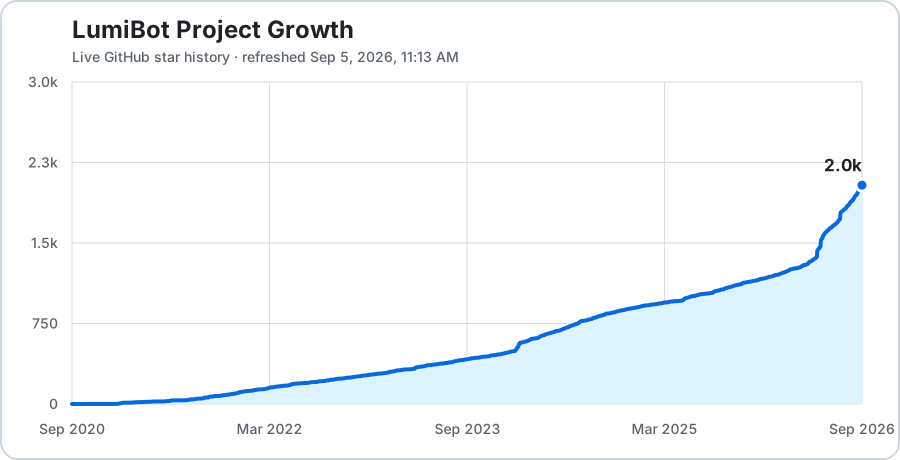
Project Growth
AI Bootcamp
Learn to build, backtest, and deploy trading strategies using AI. Join 2,400+ traders.

Contributing
We welcome contributions! Here's a video to help you get started: Watch The Video
Steps:
- Clone the repository
- Create a new branch:
git switch -c my-feature - Install dev dependencies:
pip install -r requirements_dev.txt && pip install -e . - Make your changes
- Run tests:
pytest - Create a pull request
Running Tests
pytest                          # Run all tests
pytest tests/test_asset.py      # Run a specific test file
coverage run; coverage report   # Show code coverage
Remote Cache Configuration
Lumibot can mirror its local parquet caches to AWS S3. See docs/remote_cache.md for configuration.
Architecture Documentation
- Backtesting Architecture - Data flow diagrams for Yahoo, ThetaData, Polygon
- Acceptance Backtests - End-to-end acceptance suite
- Environment Variables - All configurable env vars
- Changelog - Release notes
- AI Assistant Guide - Instructions for AI coding assistants
- Production Safety - ThetaData and production rules
Disclaimer
This software is provided for educational and informational purposes only. It is not financial advice and does not constitute a recommendation to buy or sell any security. Lumibot and BotSpot are not registered broker-dealers or financial advisors. Algorithmic trading involves substantial risk of loss, including the possibility of losses greater than your initial investment. Software bugs and errors can lead to rapid financial losses. Past backtest performance does not guarantee future results. Use this software at your own risk. You are solely responsible for compliance with all applicable laws and regulations regarding the assets you choose to trade.
Affiliate disclosure: some provider links or promo codes, including ThetaData, may support continued Lumibot development.
License
GNU General Public License v3.0 - View License
Contribute
See CONTRIBUTING.md for reproducible bugs, examples, tests, and focused pull requests. If LumiBot is useful to your work, star the repository and share an example with another developer.
1 maintainer

Metadata
1 maintainer
Release files for lumibot 4.6.23
For a detailed explanation of source distributions (sdists) and built distributions (wheels), please see the package formats documentation.
Built distribution (wheel)
| File | Interpreter | ABI | Platform | Reset |
|---|---|---|---|---|
| lumibot-4.6.23-py3-none-any.whl | Python 3 | none | any | Details |
Release files / lumibot-4.6.23-py3-none-any.whl
| Download URL | lumibot-4.6.23-py3-none-any.whl |
|---|---|
| Size | 38.0 MB |
| Tags | Python 3 |
|
SHA-256 checksum How to use checksums |
9f25b3a1b0c6d322bdc6202da56042cb15f7649593b66e0e89e63792161f1204
|
|
BLAKE2b-256 checksum How to use checksums |
6e6addce85d4920cb66fecd02f0bdb8ad94af674a5d19b5fbad72164ae23adea
|
| Upload date | |
|
Uploaded using Trusted Publishing? What is trusted publishing? |
No |
| Uploaded via |
twine/7.0.0 CPython/3.13.16
|
Security for lumibot 4.6.23
Provenance
Provenance describes where a file came from. On PyPI, provenance is shared via attestations, which provide a verifiable record of the build or publishing details. View details, limitations and caveats.
No provenance found
None of the files in this release were uploaded with provenance metadata.
A note on package security
PyPI is a repository for distributing packages, not a service for auditing them. While third-party security researchers and our staff do their best to detect and remove malicious packages, PyPI cannot guarantee the quality, security or suitability of any given package.














