
Luminaut
Casting light on shadow cloud deployments. Detect exposure of resources deployed in AWS.









Introduction
Luminaut is a utility to scope cloud environment exposure for triage. The goal is to quickly identify exposed resources and collect information to start an investigation.
Starting from the public IP addresses of AWS Elastic Network Interfaces (ENIs) and GCP Compute Engine instances, plus public URIs of GCP Cloud Run services, Luminaut gathers information about the associated resources, security configurations, and related events. The framework includes active scanning tools like nmap and whatweb, to identify services running on exposed ports, and passive sources like Shodan.
By combining cloud configuration data with external sources, Luminaut provides context to guide the next steps of an investigation.
Luminaut supports both AWS and GCP environments, with modular architecture allowing for the addition of new cloud providers, tools, and services as needed.

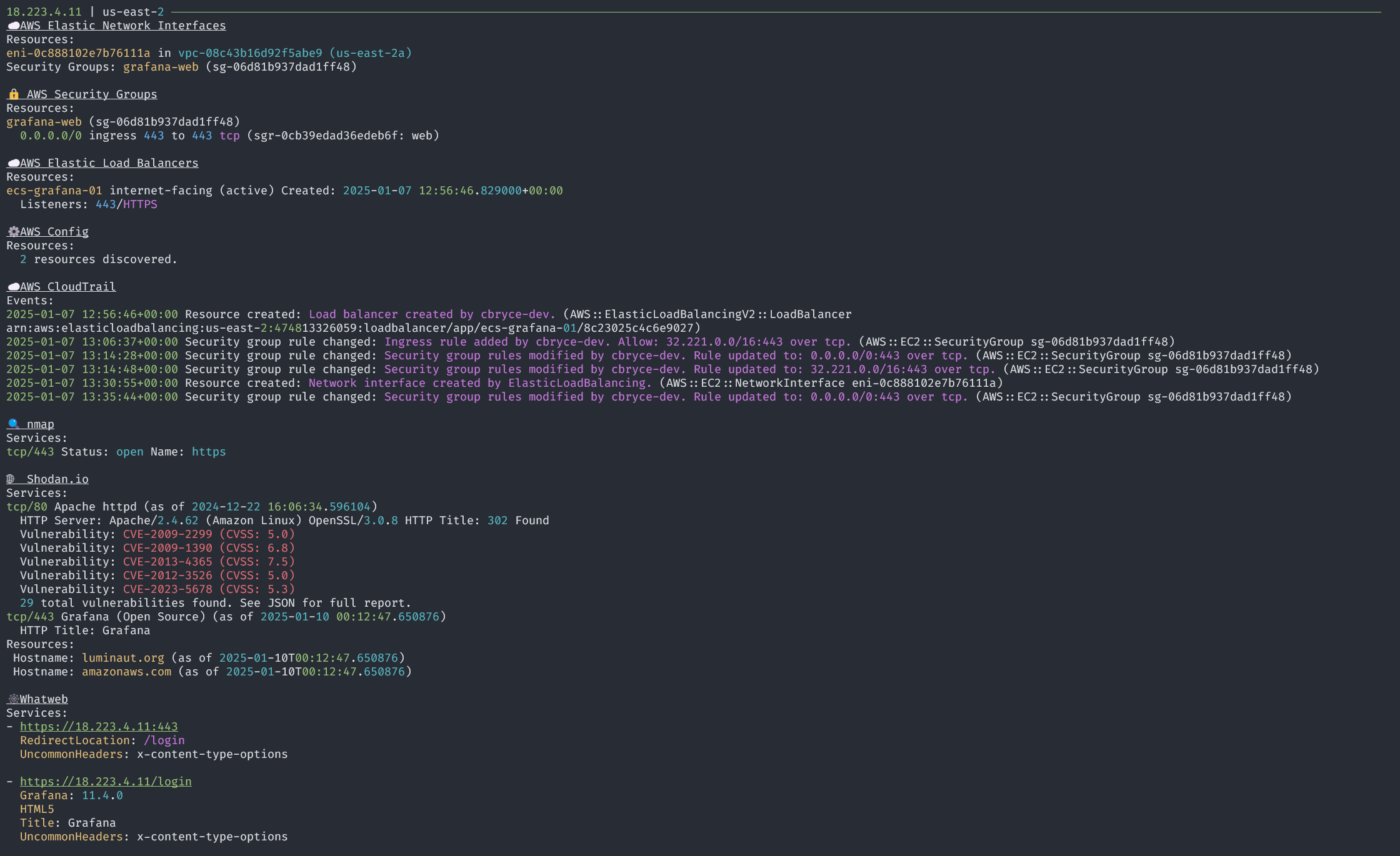

Features
AWS
- Enumerate ENIs with public IPs.
- Gather information about associated EC2 instances and Elastic load balancers.
- Identify permissive rules for attached security groups.
- Scan CloudTrail history for related events to answer who, what, and when.
- Supports querying for activity related to discovered ENI, EC2, ELB, and Security Group resources.
- Optionally specify a time frame to limit the scan to a specific time period.
- Query AWS Config for resource configuration changes over time.
- Supports scanning AWS Config history for the discovered ENI and EC2 Instance associated with the ENI.
- Optionally specify a time frame to limit the scan to a specific time period.
- Skip scanning and reporting on resources based on the resource id or tag values
- Supports skipping based on the resource id of the ENI.
GCP
- Enumerate Compute Engine instances with public IPs.
- Enumerate Cloud Run services with public URIs.
- Identify permissive firewall rules that allow external access to instances.
- Query GCP audit logs for instance and service lifecycle events to answer who, what, and when.
- Supports querying for activity related to discovered Compute Engine instances and Cloud Run services.
- Optionally specify a time frame to limit the scan to a specific time period.
Active scanning
- nmap to scan common ports and services against identified IP addresses.
- nmap will only scan ports associated with permissive security group rules or a load balancer listener.
- whatweb to identify services running on ports associated with exposed security group ports.
- whatweb will only scan ports associated with permissive security group rules or a load balancer listener.
Passive sources
- shodan to gather information about exposed services and vulnerabilities.
Reporting
- Console output with rich formatting, displaying key information.
- HTML capture of console output to preserve prior executions.
- CSV Timeline of events from CloudTrail, GCP audit logs, and other sources.
- JSON lines output with full event information for parsing and integration with other tools.
Installation
Luminaut is available on PyPI and can be installed with pip:
pip install luminaut
There is also a docker image available on GitHub, you can pull it locally by running:
docker pull ghcr.io/luminaut-org/luminaut
Additional installation information is available within the Luminaut documentation
Usage
Luminaut requires access to cloud providers with appropriate credentials and permissions. Configure your system with the necessary credentials for the cloud providers you want to scan:
- AWS: Configure AWS credentials using the AWS CLI.
- GCP: Configure GCP credentials using the gcloud CLI.
See the Configuration documentation for required cloud provider permissions.
No arguments are required to run luminaut. The default is to look for a luminaut.toml file in the same directory
and run available tools to start detecting resources.
The default configuration options are shown in the Configuration section.
Luminaut help is available with the argument --help.
$ luminaut --help
usage: luminaut [-h] [--config CONFIG] [--log LOG] [--verbose]

Luminaut: Casting light on shadow cloud deployments.

options:
  -h, --help       show this help message and exit
  --config CONFIG  Configuration file. (default: luminaut.toml)
  --log LOG        Log file. (default: luminaut.log)
  --verbose        Verbose output in the log file. (default: False)
See more usage information and examples in the Luminaut documentation
Configuration
See the documentation on Luminaut configuration
Examples
See examples/ for scripts that demonstrate the usage of Luminaut as a Python package.
Contributing
If you would like to contribute to Luminaut, please follow the guidelines in the CONTRIBUTING.md file.
1 maintainer

Metadata
1 maintainer
Release files for luminaut 0.13.2
For a detailed explanation of source distributions (sdists) and built distributions (wheels), please see the package formats documentation.
Source distribution (sdist)
| File | Size | Uploaded | |
|---|---|---|---|
| luminaut-0.13.2.tar.gz | 27.7 MB | Details |
Built distribution (wheel)
| File | Interpreter | ABI | Platform | Reset |
|---|---|---|---|---|
| luminaut-0.13.2-py3-none-any.whl | Python 3 | none | any | Details |
Total release size: 27.8 MB
Release files / luminaut-0.13.2.tar.gz
| Download URL | luminaut-0.13.2.tar.gz |
|---|---|
| Size | 27.7 MB |
| Tags | Source |
|
SHA-256 checksum How to use checksums |
fbf76d56e52f25a5b269d01bdf77671df69643e0a3a6cfd840bf7a7057f25ee1
|
|
BLAKE2b-256 checksum How to use checksums |
3130abdc441a7dd50dd777d7e5139fcb01c7cb9f62c8645b403926fb6883a2fb
|
| Upload date | |
|
Uploaded using Trusted Publishing? What is trusted publishing? |
Yes |
| Uploaded via |
twine/6.0.1 CPython/3.12.8
|
Provenance
Provenance describes where a file came from. On PyPI, provenance is shared via attestations, which provide a verifiable record of the build or publishing details. View details, limitations and caveats.


PyPI Publish Attestation
PyPI verified that this artifact, at this checksum, originated from the publisher listed below.
Signed by GitHub Actions, verified by PyPI on Aug 4, 2025.
Transparency logRelease files / luminaut-0.13.2-py3-none-any.whl
| Download URL | luminaut-0.13.2-py3-none-any.whl |
|---|---|
| Size | 39.7 kB |
| Tags | Python 3 |
|
SHA-256 checksum How to use checksums |
5859b03d47d95f552ca0e6e0b2e02ceda4a12ef01b2873ff0dae0eebcefb8ef2
|
|
BLAKE2b-256 checksum How to use checksums |
5a1065ae96099f1d4ee8fe62c7ca1d67b560dd330208a5e860924129ba157f53
|
| Upload date | |
|
Uploaded using Trusted Publishing? What is trusted publishing? |
Yes |
| Uploaded via |
twine/6.0.1 CPython/3.12.8
|
Provenance
Provenance describes where a file came from. On PyPI, provenance is shared via attestations, which provide a verifiable record of the build or publishing details. View details, limitations and caveats.
PyPI Publish Attestation
PyPI verified that this artifact, at this checksum, originated from the publisher listed below.
Signed by GitHub Actions, verified by PyPI on Aug 4, 2025.
Transparency log













