

LumoAuth for FastMCP
Add sign-in and per-tool access control to a FastMCP server in three lines.




Quick start · How it works · Who is calling · Scopes and callers · Per-tool policy · Troubleshooting · Docs
from fastmcp import FastMCP
from lumoauth_fastmcp import LumoAuthProvider

mcp = FastMCP("Invoices", auth=LumoAuthProvider())
Set LUMOAUTH_ORG_ID and LUMOAUTH_MCP_SERVER_ID, and that is the whole integration. LumoAuth signs users in and issues the tokens. Your server checks each token and runs the tool.
|
Standard discovery |
Sign-in and consent |
Token checks on your server |
|
The verified caller |
Rules per tool |
Policy in LumoAuth |
Quick start
You need Python 3.10 or later and a LumoAuth organization. Create an organization if you do not have one yet.
1. Register your server
In the LumoAuth portal:
- Open AI Agents → MCP servers and click Register MCP server.
- Set Server name to
Invoicesand Resource URI tohttp://localhost:8000/mcp. - Click Next twice, then click Register MCP server.
- On the server's page, click Edit, then Next. Make two changes:
- Under Scopes, click Use defaults.
- Switch off Require DPoP sender-constrained tokens. Claude Code and the FastMCP client do not send DPoP proofs, so they cannot connect while this switch is on.
- Click Next, then Save changes. Copy the Server id (
mcp_…) from the top of the page.
The Resource URI is the exact URL that clients connect to. A token for one Resource URI does not work at another.
2. Run the server
pip install lumoauth-fastmcp
Save this as server.py:
from fastmcp import FastMCP
from lumoauth_fastmcp import LumoAuthProvider, current_caller

mcp = FastMCP("Invoices", auth=LumoAuthProvider())

@mcp.tool
def whoami() -> str:
    """Show who is calling."""
    return current_caller().sub

if __name__ == "__main__":
    mcp.run(transport="http", port=8000)
Start it with your organization's slug and the server id from step 1. The slug is the part after /orgs/ in the portal's URL.
export LUMOAUTH_ORG_ID=acme
export LUMOAUTH_MCP_SERVER_ID=mcp_0123456789abcdef01234567
python server.py
For the EU region, also set LUMOAUTH_URL=https://eu.app.lumoauth.dev.
3. Call it without a token
$ curl -i http://localhost:8000/mcp
HTTP/1.1 401 Unauthorized
www-authenticate: Bearer scope="mcp:read", resource_metadata="http://localhost:8000/.well-known/oauth-protected-resource/mcp"
Your server now rejects calls without a token. The 401 tells MCP clients where to find LumoAuth.
4. Sign in from a client
First, create an application for the client in the portal:
- Open Applications, click New application and choose Single-page or mobile app.
- Set Application name to
Local MCP clientand Redirect URI tohttp://localhost:8765/callback. - Click Create application and copy the Client ID.
- On the Configuration tab, set Scopes to
openid profile email offline_access mcp:read. Click Save configuration.
Then save this as client.py, with your client ID:
import asyncio

from fastmcp import Client
from fastmcp.client.auth import OAuth

auth = OAuth(client_id="client_0123456789abcdef0123456789abcdef", callback_port=8765)

async def main():
    async with Client("http://localhost:8000/mcp", auth=auth) as client:
        result = await client.call_tool("whoami")
        print(result.data)

asyncio.run(main())
Run it in a second terminal:
$ python client.py
01a18f7f-fe26-7f38-b46a-ac6bfabfbb78
Your browser opens on the LumoAuth sign-in page. After you sign in and approve, the script prints your user id. Your tool read that id from the verified token.
Connect Claude Code instead
Use the same application:
claude mcp add --transport http \
  --client-id client_0123456789abcdef0123456789abcdef \
  --callback-port 8765 \
  invoices http://localhost:8000/mcp

claude mcp login invoices
Your browser opens on the same sign-in page. Then claude mcp list shows the connection:
invoices: http://localhost:8000/mcp (HTTP) - ✔ Connected
Other MCP clients connect the same way if they let you set a client ID and a callback port. Troubleshooting explains the errors that you may see.
Before you go to production
- Register a separate server with your public
https://address. LumoAuth accepts plainhttp://only forlocalhost,127.0.0.1and[::1]. - Under Allowed clients, choose Only the clients I pick.
- Switch on Require DPoP sender-constrained tokens if all your clients can send proofs. See DPoP.
How it works
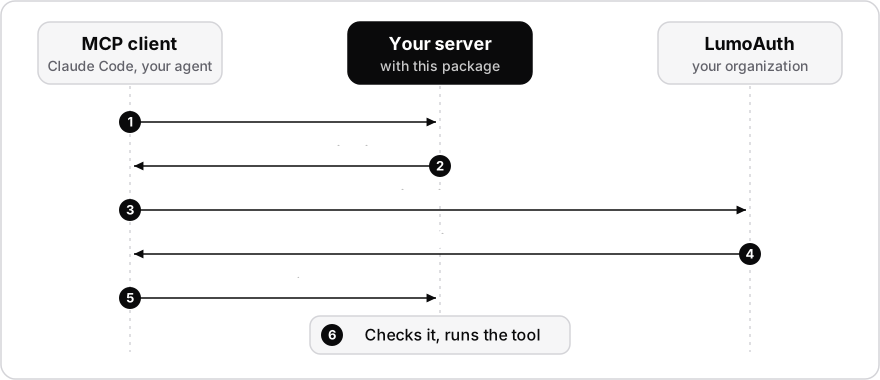
LumoAuth is the authorization server. It shows the consent screen and issues access tokens whose audience is your server's Resource URI. Your FastMCP server stays a resource server, and the provider gives it what the MCP specification asks of one:
- Discovery. The server publishes protected resource metadata at
/.well-known/oauth-protected-resource/.... This document names your LumoAuth organization as the authorization server. - Challenges. A request without a valid token gets
401with aWWW-Authenticateheader that points to that document. The challenge names the scopes that the registration advertises. It also states the real reason when a token is rejected: expired, wrong audience, replayed DPoP proof, and so on. - Verification. Tokens are verified locally: signature against the organization's keys, issuer, audience, expiry,
at+jwttype, and no portal test tokens. A DPoP-bound token must arrive with theDPoPscheme and a fresh proof for this request. - Identity. Tools get the verified caller: a user, an AI agent, or an agent acting for a user.
The provider reads the server's registration from LumoAuth once at start-up: the Resource URI, the advertised scopes, and whether only DPoP-bound tokens are accepted. Restart the server after you change the registration.
Authentication applies to HTTP transports. A server that runs over stdio is started by the user's own MCP client and has no OAuth step.
Who is calling
current_caller() returns the verified claims of the current request as lumoauth.verify.AccessTokenClaims. This is the same object that verify_access_token in the LumoAuth Python SDK returns.
from lumoauth_fastmcp import current_caller

@mcp.tool
def list_invoices() -> list[dict]:
    caller = current_caller()
    if caller.is_agent:
        log.info("agent %s", caller.agent_id)          # "agt_…"
    elif caller.is_delegated:
        log.info("agent %s for user %s", caller.actor, caller.sub)
    return invoices_for(caller.sub)
current_caller() returns None on transports without OAuth, such as stdio and in-memory clients.
Scopes and callers
Pass the checks to FastMCP's auth= argument or to AuthMiddleware:
from fastmcp.server.middleware import AuthMiddleware
from lumoauth_fastmcp import require_agent, require_scopes, require_user

@mcp.tool(auth=require_scopes("invoices:refund"))
def refund(invoice_id: str) -> str: ...

@mcp.tool(auth=require_user())                       # people only, no agents
def change_bank_details(iban: str) -> str: ...

@mcp.tool(auth=require_agent("billing.reminders"))   # agents with this capability
def send_reminder(invoice_id: str) -> str: ...
require_user(allow_delegation=True) also admits an agent that acts for a person.
Add a new scope in two places: the server's Scopes, and the Scopes of each application that may ask for it. The checks follow LumoAuth's rule: a granted scope that ends in :* (such as invoices:*) covers the scopes under it, such as invoices:refund. Every other scope compares exactly. Prefer narrow scopes, because the MCP security best practices list wildcard scopes as a common mistake.
A component-level check hides the component from callers who fail it. To get an insufficient_scope step-up instead, put the scope check in AuthMiddleware. The client can then ask the user for the missing scope.
mcp = FastMCP(
    "Invoices",
    auth=LumoAuthProvider(),
    middleware=[AuthMiddleware(auth=require_scopes("invoices:read"))],
)
Per-tool policy from LumoAuth
A valid token proves that the caller may reach the server. tool_policy() also asks LumoAuth about each tool. It hides the tools that a caller may not run, and it rejects calls to them.
auth = LumoAuthProvider()
mcp = FastMCP("Invoices", auth=auth, middleware=[auth.tool_policy()])
The server asks as itself. It never forwards the caller's token, which the MCP specification forbids.
Every tool is denied until you grant it. With the policy on and no grants, a caller gets an empty list of tools. Set it up once:
-
Create the server's own application. Open Applications, click New application and choose Machine to machine. Copy the Client ID and the Client secret, which is shown only once.
-
Allow the scope. On the application's Configuration tab, set Scopes to
mcp:authorize. The form also asks for a redirect URI, which this application does not use, so enter anyhttps://URL. Click Save configuration. -
Connect it to the MCP server. Edit the server. In the step Who may connect and how, select the application under Per-tool authorization.
-
Give the server its credentials, then restart it:
export LUMOAUTH_MCP_CLIENT_ID=...
export LUMOAUTH_MCP_CLIENT_SECRET=...
-
Grant access. Open Relationships. Under Namespaces, create the namespace that you need, with the relation
invoke. Then, under Tuples, add one relationship for each grant:To grant Object namespace Object ID Relation Subject Every tool on the server mcp_servermcp_0123456789abcdef01234567invokeuserand the user's idOne tool mcp_toolmcp_0123456789abcdef01234567/refundinvokeagentand the agent's id
Relationships are part of the Fine-grained authorization add-on. Without it, every tool is denied.
Decisions are cached for 30 seconds (tool_policy(cache_ttl=...)), so a change takes effect within that time. When LumoAuth cannot be reached, the tool is rejected.
DPoP
DPoP ties a token to the client's key, so a stolen copy cannot be replayed. Switch on Require DPoP sender-constrained tokens when all your clients can send proofs. Agents built on the LumoAuth JavaScript, Python and Go SDKs can do so. Claude Code, ChatGPT and the FastMCP client cannot.
With the switch on, the server accepts only DPoP-bound tokens and challenges with the DPoP scheme. Bound tokens are checked on every server, whatever the switch says.
Proof ids are stored per process to stop replays. With several workers, pass a shared store:
LumoAuthProvider(replay_cache=MyRedisReplayCache())
The store has one method, check_and_add(key, ttl). It returns True for a key that it already holds, which means a replay. Otherwise it stores the key for ttl seconds and returns False.
The proof's htu must equal the URL that the client called. The provider builds that URL from the origin of the Resource URI and the request path. This suits a TLS-terminating proxy that keeps paths. For a proxy that rewrites paths, pass request_url=.
Configuration
Every argument is optional and falls back to an environment variable.
| Argument | Environment variable | Default |
|---|---|---|
org_id |
LUMOAUTH_ORG_ID |
required unless issuer is set |
server_id |
LUMOAUTH_MCP_SERVER_ID |
none; without it pass resource |
resource |
LUMOAUTH_MCP_RESOURCE |
from the registration |
lumoauth_url |
LUMOAUTH_URL |
https://app.lumoauth.dev |
issuer |
LUMOAUTH_ISSUER |
{lumoauth_url}/orgs/{org_id}/api/v1 (set it for a custom domain) |
client_id, client_secret |
LUMOAUTH_MCP_CLIENT_ID, LUMOAUTH_MCP_CLIENT_SECRET |
only for tool_policy() |
base_url |
origin of the Resource URI | |
required_scopes |
none | |
scopes_supported |
the registration's basic scopes | |
require_dpop |
the registration's Require DPoP switch | |
authorization_server_metadata |
True: also serve LumoAuth's metadata at /.well-known/oauth-authorization-server for older clients |
Troubleshooting
| What you see | Why | What to do |
|---|---|---|
LumoAuthProvider needs the organization at start-up |
LUMOAUTH_ORG_ID is not set. |
Export it in the terminal that runs the server. |
LumoAuth has no active MCP server at start-up |
The server id or the organization slug is wrong. | Copy both again from the portal. |
Protected resource … does not match expected … |
The client connects to a URL that differs from the Resource URI. localhost and 127.0.0.1 count as different. |
Use the Resource URI exactly. FastMCP's start-up banner prints 127.0.0.1, which is not what you registered. |
invalid_dpop_proof or DPoP proof required |
Require DPoP is on and the client sends no proof. | Switch it off, then restart the server. |
invalid_scope … not allowed for this client |
The application does not allow a scope that the client asks for. | Add the scope to the application's Scopes. Many clients add offline_access on their own. |
Invalid Redirect URL on a LumoAuth page |
The client's redirect URI is not registered. LumoAuth accepts a changing port only on 127.0.0.1 and [::1], not on localhost. |
Create an application with the exact URI, and give the client a fixed callback port. |
Dynamic client registration is not enabled |
The client tried to register itself, which is off by default. | Give the client a client ID, as in step 4. |
| The list of tools is empty | tool_policy() is on and the caller has no grant. |
See Per-tool policy. |
| A registration change has no effect | The provider reads the registration once, at start-up. | Restart the server. |
Standards
| Plain name | Standard |
|---|---|
| Protected resource metadata | RFC 9728 |
| Resource indicators | RFC 8707 |
| DPoP | RFC 9449 |
JWT access tokens (at+jwt) |
RFC 9068 |
| Model Context Protocol authorization | MCP Authorization specification |
The MCP documentation explains how LumoAuth uses each one.
Requirements
Python 3.10 or later. The package installs FastMCP 4 (4.1 or later) and the LumoAuth Python SDK 1.2 or later, the first release with lumoauth.verify.
Development
python3 -m venv .venv
.venv/bin/pip install -e ".[dev]"
.venv/bin/python -m pytest
License
Apache-2.0
1 maintainer

Metadata
1 maintainer
Release files for lumoauth-fastmcp 1.2.0
For a detailed explanation of source distributions (sdists) and built distributions (wheels), please see the package formats documentation.
Source distribution (sdist)
| File | Size | Uploaded | Provenance | Actions |
|---|---|---|---|---|
| lumoauth_fastmcp-1.2.0.tar.gz | 30.7 kB | Without provenance | Details for lumoauth_fastmcp-1.2.0.tar.gz |
Built distribution (wheel)
| File | Interpreter | ABI | Platform | Actions Reset |
|---|---|---|---|---|
| lumoauth_fastmcp-1.2.0-py3-none-any.whl | Python 3 | none | any | Details for lumoauth_fastmcp-1.2.0-py3-none-any.whl |
Total release size: 58.3 kB
Release files / lumoauth_fastmcp-1.2.0.tar.gz
| Download URL | lumoauth_fastmcp-1.2.0.tar.gz |
|---|---|
| Size | 30.7 kB |
| Tags | Source |
|
SHA-256 checksum How to use checksums |
417d3768c5f3c947642fd6ec411728e1dac60dae21372a2e72c116c48cf319cb
|
|
BLAKE2b-256 checksum How to use checksums |
3a929330995f9ae3f47dc351c34f2e3a862cd3a627196900f80b58d56c2325c7
|
| Upload date | |
|
Uploaded using Trusted Publishing? What is trusted publishing? |
No |
| Uploaded via |
twine/7.0.0 CPython/3.14.4
|
Release files / lumoauth_fastmcp-1.2.0-py3-none-any.whl
| Download URL | lumoauth_fastmcp-1.2.0-py3-none-any.whl |
|---|---|
| Size | 27.6 kB |
| Tags | Python 3 |
|
SHA-256 checksum How to use checksums |
e6c6beb93687bdebc7d9b157271718572879602aa20e9a7606a6c9e536b616a1
|
|
BLAKE2b-256 checksum How to use checksums |
fed26dc372ca1edb005c156301bd484e69de3e4cd12202c6112b63f22adb1eeb
|
| Upload date | |
|
Uploaded using Trusted Publishing? What is trusted publishing? |
No |
| Uploaded via |
twine/7.0.0 CPython/3.14.4
|
Security for lumoauth-fastmcp 1.2.0
Provenance
Provenance describes where a file came from. On PyPI, provenance is shared via attestations, which provide a verifiable record of the build or publishing details. View details, limitations and caveats.
No provenance found
None of the files in this release were uploaded with provenance metadata.
A note on package security
PyPI is a repository for distributing packages, not a service for auditing them. While third-party security researchers and our staff do their best to detect and remove malicious packages, PyPI cannot guarantee the quality, security or suitability of any given package.
To learn more about protecting yourself from malicious actors, visit our package security documentation.














