
lumpur
learn to use methods for processing unclear response
contribute
- Learn the instructions on first-contributions.
- Apply to this repository what you learn there.
features
plot_binary()function inviz.plot.binarymodule.plot_polynomial()function inviz.plot.polynomialmodule.Polynomialclass innum.polynomialmodule.binary()function indat.clasdatamodule.abbr()function inuse.misc.infomodule.
examples
Following are some examples of lumpur.
polynomial
from lumpur.num.polynomial import Polynomial

p1 = Polynomial([1, 2, 3])
print('y1 =', p1)
p2 = Polynomial([0, -2, 5, 6, 9])
print('y2 =', p2)
p3 = p1 + p2
print('y3 =', p3)
y1 = 1 + 2x + 3x^2
y2 = -2x + 5x^2 + 6x^3 + 9x^4
y3 = 1 + 8x^2 + 6x^3 + 9x^4
from lumpur.num.polynomial import Polynomial

p1 = Polynomial([1, -2, 3])
print('y1 =', p1)
p2 = Polynomial([-2, 1])
print('y2 =', p2)
p3 = p1 * p2
print('y3 =', p3)
y1 = 1 - 2x + 3x^2
y2 = -2 + x^1
y3 = -2 + 5x - 8x^2 + 3x^3
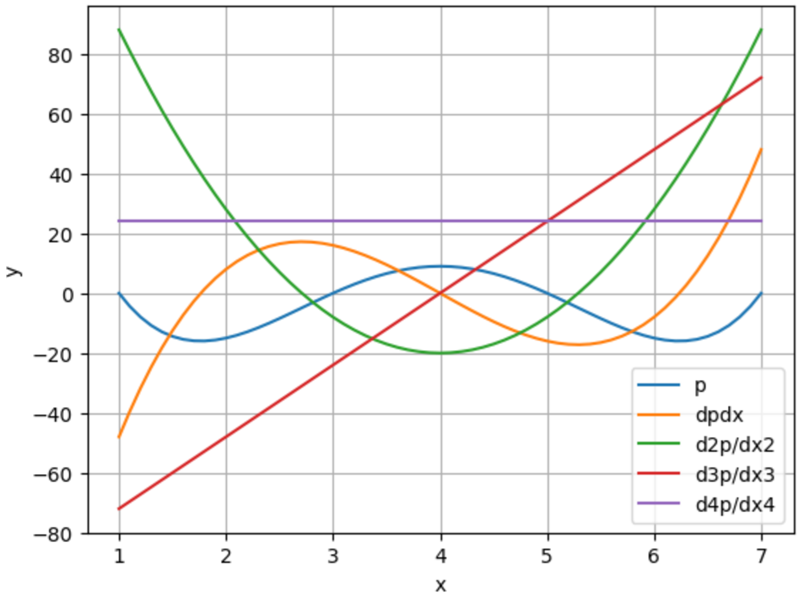
from lumpur.num.polynomial import Polynomial
from lumpur.viz.plot.polynomial import plot_polynomial

p1 = Polynomial([-1, 1])
p2 = Polynomial([-3, 1])
p3 = Polynomial([-5, 1])
p4 = Polynomial([-7, 1])
p = p1 * p2 * p3 * p4
dp = p.differentiate()
d2p = dp.differentiate()
d3p = d2p.differentiate()
d4p = d3p.differentiate()
d5p = d4p.differentiate()
x = [0.1*i for i in range(10, 71)]

plot_polynomial(x, p, label='p')
plot_polynomial(x, dp, label='dpdx')
plot_polynomial(x, d2p, label='d2p/dx2')
plot_polynomial(x, d3p, label='d3p/dx3')
plot_polynomial(x, d4p, label='d4p/dx4')
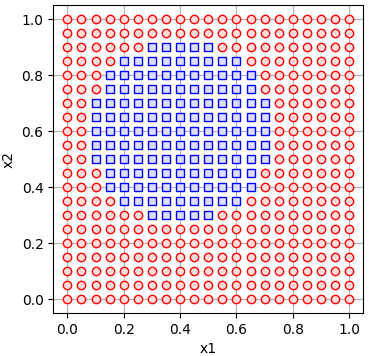
circular decision boundary
$$ 0.41 - 0.8x - 1.2y + x^2 + y^2 = 0 $$
import lumpur.dat.clasdata as ldc
from lumpur.viz.plot.binary import plot_binary

coeffs = [[0.41], [-0.8, -1.2], [1, 0, 1]]
r1 = [0, 1.05, 0.05]
r2 = [0, 1.05, 0.05]
df = ldc.binary(coeffs, r1=r1, r2=r2)
plot_binary(df)
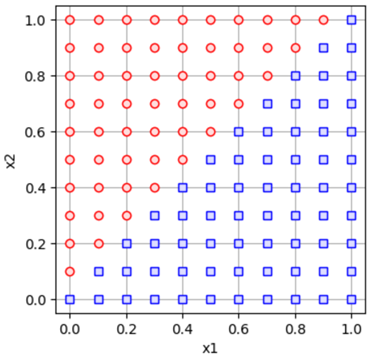
linear decision boundary
$$ -x + y = 0 $$
import lumpur.dat.clasdata as ldc
from lumpur.viz.plot.binary import plot_binary

coeffs = [[0], [-1, 1]]
df = ldc.binary(coeffs)
plot_binary(df)
abbreviation
import lumpur.use.misc.info as info

print(info.abbrv())
learn to use methods for processing unclear response
1 maintainer

Release files for lumpur 0.0.6
For a detailed explanation of source distributions (sdists) and built distributions (wheels), please see the package formats documentation.
Source distribution (sdist)
| File | Size | Uploaded | |
|---|---|---|---|
| lumpur-0.0.6.tar.gz | 11.9 kB | Details |
Built distribution (wheel)
| File | Interpreter | ABI | Platform | Reset |
|---|---|---|---|---|
| lumpur-0.0.6-py3-none-any.whl | Python 3 | none | any | Details |
Total release size: 30.7 kB
Release files / lumpur-0.0.6.tar.gz
| Download URL | lumpur-0.0.6.tar.gz |
|---|---|
| Size | 11.9 kB |
| Tags | Source |
|
SHA-256 checksum How to use checksums |
d317c226535de1845c89dd226c4c1fabc8abadae329ba92d6315187eb2e3b7ae
|
|
BLAKE2b-256 checksum How to use checksums |
2ebe2fcc042bed2a5a1e523c6a260db8dd13d7a500e26306838681b9782ba7cf
|
| Upload date | |
|
Uploaded using Trusted Publishing? What is trusted publishing? |
No |
| Uploaded via |
twine/6.0.1 CPython/3.9.21
|
Release files / lumpur-0.0.6-py3-none-any.whl
| Download URL | lumpur-0.0.6-py3-none-any.whl |
|---|---|
| Size | 18.8 kB |
| Tags | Python 3 |
|
SHA-256 checksum How to use checksums |
ff0cbf7c69494fe4f51fac5e20bfe6571bfc5fe6e06633598b641e80388455c6
|
|
BLAKE2b-256 checksum How to use checksums |
5fd59919d2704066e4dde94d8f4c7be884c06b8d5ec7475b126ce940ce21aff1
|
| Upload date | |
|
Uploaded using Trusted Publishing? What is trusted publishing? |
No |
| Uploaded via |
twine/6.0.1 CPython/3.9.21
|














