

Luna-Bench
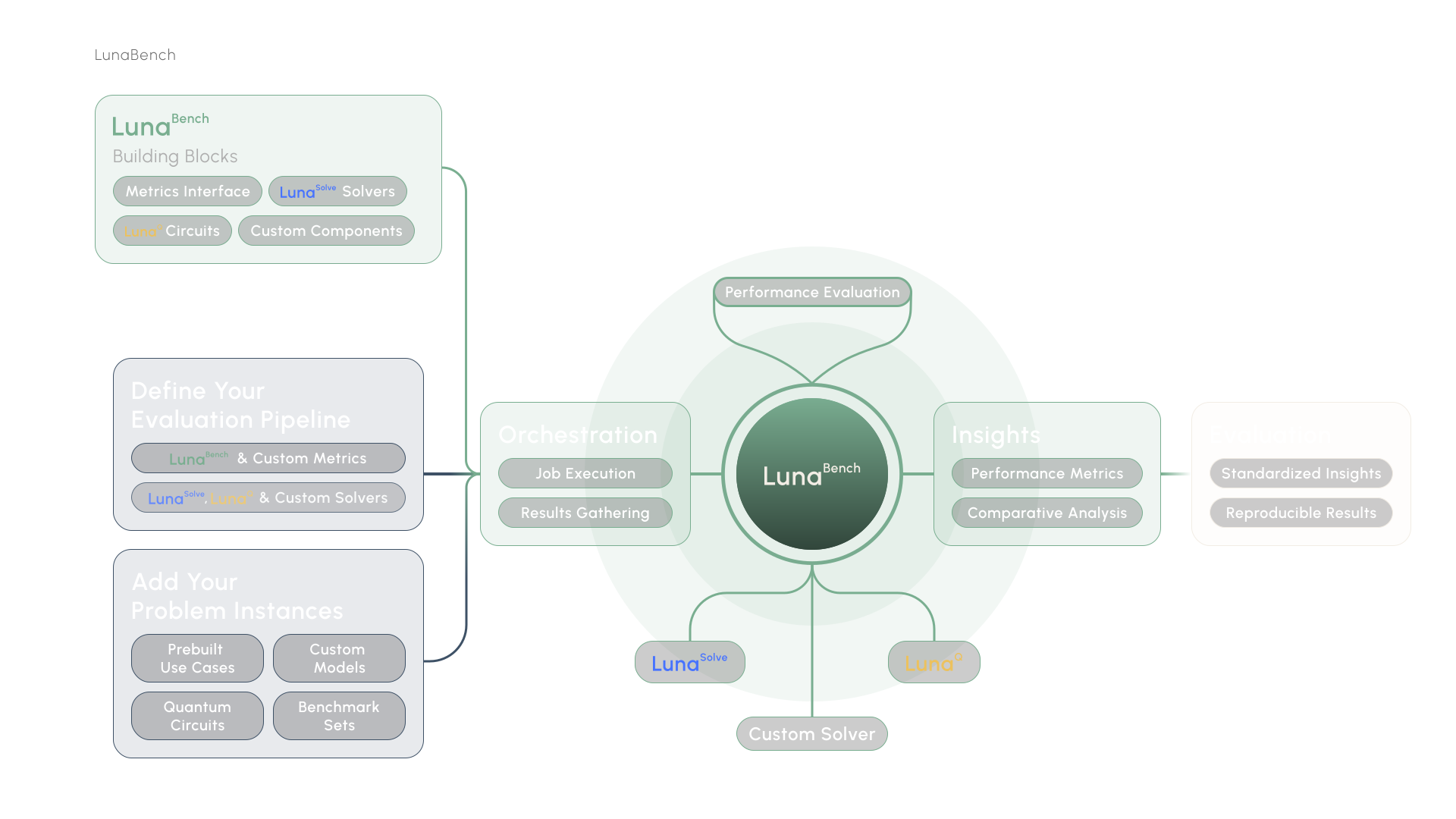
A framework for benchmarking optimization algorithms across quantum and classical domains. Define your models, plug in solvers, and compare results with predefined features and metrics. Add plots to visualize your benchmark results.
Alpha Notice: Luna-Bench is still in alpha. Many things are not final — for example, how metrics and features are accessed in plots is something we are still actively experimenting with to find the best approach. We highly welcome any user input and feedback! Feel free to open an issue or start a discussion.
Why
Benchmarking optimization algorithms is tedious. You end up writing the same infrastructure over and over: result storage, metric computation, plotting, managing model sets. Luna-Bench handles all of that so you can focus on the algorithms themselves. Features and metrics are tested and reused across benchmarks, which means fewer bugs and more consistent results.
- Compare quantum and classical solvers by adding algorithms easily from luna_quantum or add your own
- Persistent storage for results and configurations via SQLite
- Built-in metrics like approximation ratio, time to solution, and fraction of best solution
- Extensible through custom algorithms, metrics, features, and plots if desired
- Full type safety with Pydantic validation
- Reproducible benchmarks with database-backed result tracking
Installation
Requires Python 3.13+.
pip install luna-bench
Quick Start
Define your models
from luna_model import Model, Variable
from luna_bench import ModelSet

# Build a simple optimization model
model = Model("example")
with model.environment:
    x = Variable("x")
    y = Variable("y")
model.objective = x * y + x
model.constraints += x >= 0
model.constraints += y <= 5

# Group models into a set to share it across benchmarks
modelset = ModelSet.create("my_models")
modelset.add(model)

# Models can also come straight from disk. A path may point at a single
# .lp / .mps file or at a directory, in which case every .lp and .mps file
# inside it is added. Such models are named after their file stem, so
# data/max_cut.mps becomes the model "max_cut".
modelset.add("data/max_cut.mps")
modelset.add("data")
Run a benchmark
from luna_bench import Benchmark
from luna_bench.algorithms import ScipAlgorithm
from luna_bench.features import OptSolFeature
from luna_bench.metrics import ApproximationRatio
from luna_bench.plots import AverageFeasibilityRatioPlot
from luna_quantum.algorithms import FlexQAOA

benchmark = Benchmark.create("my_benchmark")
benchmark.set_modelset(modelset)

# Instead of the set_modelset call above, you could skip the ModelSet
# entirely and add models straight to the benchmark, which creates a
# modelset named after it. This works on any benchmark, including one
# read back from the database with Benchmark.load / Benchmark.open:
#   benchmark.add_model(model)
#   benchmark.add_model([model_a, model_b])
#   benchmark.add_model("data")  # every .lp / .mps file in the folder
# ModelSet remains the way to share the same models across benchmarks.
#
# Re-running this script is safe: existing benchmarks, modelsets and models
# are reused, and models already in the modelset are skipped with a warning
# instead of being duplicated.

# Add a solver
benchmark.add_algorithm("scip", ScipAlgorithm(max_runtime=60))

# Add any luna_quantum algorithm directly
benchmark.add_algorithm("flexqaoa", FlexQAOA())

# Add a feature that computes the optimal solution (used by metrics)
benchmark.add_feature("optimal_solution", OptSolFeature())

# Add a metric to evaluate solution quality
benchmark.add_metric("approx_ratio", ApproximationRatio())

# Add a plot to visualize metric results
benchmark.add_plot("approx_plot", AverageFeasibilityRatioPlot())

# Run everything: features, algorithms, metrics, plots
benchmark.run()
That's it. Luna-Bench runs your solvers against every model in the set, computes features, evaluates metrics, and stores the results.
Write your own algorithm
Subclass BaseAlgorithmSync and register it with the @algorithm decorator.
from luna_bench.custom import BaseAlgorithmSync
from luna_bench.custom import algorithm
from luna_model import Model, Solution


@algorithm()
class MyAlgorithm(BaseAlgorithmSync):
    max_iterations: int = 1000

    def run(self, model: Model) -> Solution:
        # Your solver logic here
        ...
Write your own feature
Features extract properties from models. They run before algorithms and metrics.
from luna_bench.custom import BaseFeature
from luna_bench.custom import feature
from luna_bench.types import FeatureResult
from luna_model import Model


class MyFeatureResult(FeatureResult):
    num_variables: int


@feature
class MyFeature(BaseFeature):
    def run(self, model: Model) -> MyFeatureResult:
        return MyFeatureResult(num_variables=model.num_variables)
Attach hand-assigned values to models
Some properties cannot be derived from a model — a problem category, a source dataset, a difficulty rating, a known
optimum. BaseValueLookupFeature turns a model → value mapping into a regular feature, so those values reach metrics
and plots through the same channel as computed ones. The type parameter fixes the value type and drives validation.
from enum import StrEnum

from luna_bench.custom import BaseValueLookupFeature, feature


class ProblemCategory(StrEnum):
    GRAPH = "graph"
    COMBINATORIAL = "combinatorial"
    ROUTING = "routing"


@feature
class ProblemCategoryFeature(BaseValueLookupFeature[ProblemCategory]):
    """Maps each model to a hand-assigned problem category."""


categories = ProblemCategoryFeature()
categories.add_model(max_cut_model, ProblemCategory.GRAPH)
categories.add_models({knapsack_model: ProblemCategory.COMBINATORIAL, tsp_model: ProblemCategory.ROUTING})

benchmark.add_feature(name="category", feature=categories)  # populate BEFORE this call
A metric reads the value like any other feature result:
category = feature_results.first(ProblemCategoryFeature).value
Notes:
- Models are keyed by
hash(model)— the same hash luna-bench already stores per model — so you never hash by hand. - A model with no entry raises
ModelLookupMissError, recorded as a failed feature result for that model only. Check coverage up front withcategories.covers(model). - Populate the feature before
add_feature: the benchmark serializes its configuration at that point and rebuilds it from the database at run time. - Need a richer result than a bare value, or a computed fallback on a miss? Subclass
BaseModelLookupFeature[TValue, TFeatureResult]and implementto_result, optionally overridingon_miss.
Write your own metric
Metrics evaluate solutions. They can depend on features for reference data like optimal solutions.
from luna_bench.custom import BaseMetric
from luna_bench.custom.data_types.feature_result_container import FeatureResultContainer
from luna_bench.custom import metric
from luna_bench.types import MetricResult
from luna_model import Solution


class MyMetricResult(MetricResult):
    score: float


@metric()
class MyMetric(BaseMetric):
    def run(self, solution: Solution, feature_results: FeatureResultContainer) -> MyMetricResult:
        score = solution.expectation_value()
        return MyMetricResult(score=score)
Development
# Install dependencies
uv sync

# Install pre-commit hooks (runs linting, formatting, type checking, and tests on each commit)
pre-commit run . --all-files
License
This project is licensed under the Apache License 2.0 - see the LICENSE file for details.
Acknowledgments
Built by the Aqarios team.
2 maintainers


Metadata
2 maintainers
Release files for luna-bench 0.2.1
For a detailed explanation of source distributions (sdists) and built distributions (wheels), please see the package formats documentation.
Source distribution (sdist)
| File | Size | Uploaded | |
|---|---|---|---|
| luna_bench-0.2.1.tar.gz | 194.4 kB | Details |
Built distribution (wheel)
| File | Interpreter | ABI | Platform | Reset |
|---|---|---|---|---|
| luna_bench-0.2.1-py3-none-any.whl | Python 3 | none | any | Details |
Total release size: 526.3 kB
Release files / luna_bench-0.2.1.tar.gz
| Download URL | luna_bench-0.2.1.tar.gz |
|---|---|
| Size | 194.4 kB |
| Tags | Source |
|
SHA-256 checksum How to use checksums |
f2e956d66d2eb4d2ac9cba2c3e59600aaecacc8fd54a0bec08179372b966bbba
|
|
BLAKE2b-256 checksum How to use checksums |
6fddf150b84b033178ad63b2c813c76f81f1a679d7b1c18bb11bfd34868331a2
|
| Upload date | |
|
Uploaded using Trusted Publishing? What is trusted publishing? |
No |
| Uploaded via |
uv/0.12.7 {"installer":{"name":"uv","version":"0.12.7","subcommand":["publish"]},"python":null,"implementation":{"name":null,"version":null},"distro":{"name":"Ubuntu","version":"24.04","id":"noble","libc":null},"system":{"name":null,"release":null},"cpu":null,"openssl_version":null,"setuptools_version":null,"rustc_version":null,"ci":true}
|
Release files / luna_bench-0.2.1-py3-none-any.whl
| Download URL | luna_bench-0.2.1-py3-none-any.whl |
|---|---|
| Size | 331.9 kB |
| Tags | Python 3 |
|
SHA-256 checksum How to use checksums |
f81788a20ae9f55775b8e55c2e12d49794becfa3ff625a79fcb969aa9c59a7d0
|
|
BLAKE2b-256 checksum How to use checksums |
b8e67420dc0da37b492f0de90c44e1c8a5feb3541482ba28dc565e2d1e1cfd7f
|
| Upload date | |
|
Uploaded using Trusted Publishing? What is trusted publishing? |
No |
| Uploaded via |
uv/0.12.7 {"installer":{"name":"uv","version":"0.12.7","subcommand":["publish"]},"python":null,"implementation":{"name":null,"version":null},"distro":{"name":"Ubuntu","version":"24.04","id":"noble","libc":null},"system":{"name":null,"release":null},"cpu":null,"openssl_version":null,"setuptools_version":null,"rustc_version":null,"ci":true}
|














