
lunchkey
Control Novation Launchkey MIDI keyboard with LED animations and MIDI functionality.
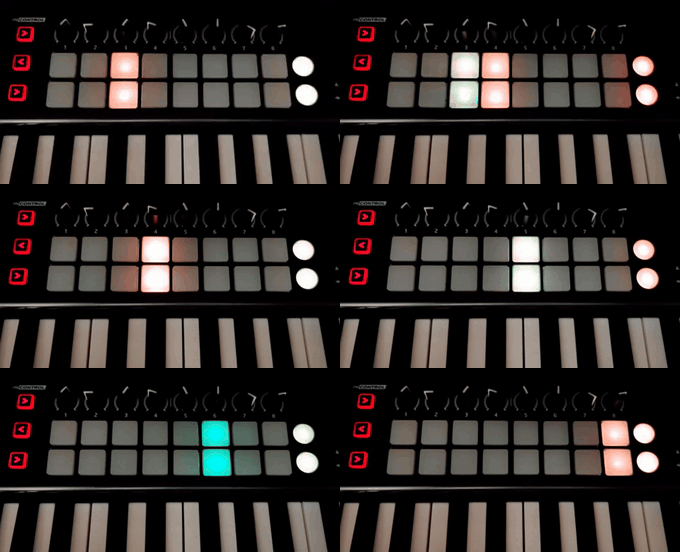
Description
lunchkey is a Python library and command-line tool for controlling Novation Launchkey MIDI keyboards. It provides functionality to:
- Connect to Launchkey devices via MIDI
- Control LED lights on the keyboard
- Run animated LED patterns
- Switch between Basic and InControl modes
- Automatically detect Launchkey models (MK1, MK2, MK3)
Features
- MIDI Integration: Uses
midoandpython-rtmidifor robust MIDI communication - LED Control: Full control over all 18 LED lights (9 per row)
- Animation System: Built-in LED sweep animation with customizable colors
- Model Detection: Automatic detection of Launchkey model for proper MIDI channel usage
- Port Management: Smart MIDI port connection with fallback strategies
- Command Line Interface: Easy-to-use CLI for quick testing and control
Requirements
- Python 3.10 or higher
- Novation Launchkey MIDI keyboard (MK1, MK2, or MK3)
- MIDI drivers installed on your system
Installation
Using uv (Recommended)
uv is a fast Python package installer and resolver.
-
Install uv (if not already installed):
# On Windows (PowerShell)
powershell -c "irm https://astral.sh/uv/install.ps1 | iex"

# On macOS/Linux
curl -LsSf https://astral.sh/uv/install.sh | sh
-
Clone and install the project:
git clone https://github.com/aminya/lunchkey.git
cd lunchkey
uv sync
-
Run Python scripts directly with uv:
# Run the main script
uv run python -m lunchkey.main

# Or activate the virtual environment for interactive use
uv shell
Usage
Command Line Interface
The main script provides several command-line options:
# List available MIDI ports
uv run python -m lunchkey.main --list-ports

# Connect to a specific MIDI port
uv run python -m lunchkey.main --port "MIDIOUT2"

# Connect without running animation (useful for testing)
uv run python -m lunchkey.main --port "MIDIOUT2" --no-animation

# Use default port (MIDIOUT2)
uv run python -m lunchkey.main
Python API
from mido.backends.backend import Backend
from lunchkey.main import Launchkey

# Initialize and connect
backend = Backend(name="mido.backends.rtmidi", load=True)
launchkey = Launchkey(backend)

# Connect to MIDI port
launchkey.connect_midi_output("MIDIOUT2")

# Detect model and enable InControl mode
launchkey.detect_launchkey_model()
launchkey.set_incontrol_mode(True)

# Control individual LEDs
launchkey.write_led(96, 127)  # Turn on first LED with full brightness

# Turn off all LEDs
launchkey.turn_off_all_leds()

# Clean up
launchkey.close()
MIDI Port Configuration
The tool automatically tries to connect to MIDI ports in this order:
- Direct connection: Uses the specified port name/index
- Pattern matching: Searches for ports containing the specified name
- Fallback: Attempts to connect to port index 0
Common MIDI port names for Launchkey devices:
MIDIOUT2(Windows)Launchkey MK3(macOS/Linux)Launchkey MK2(macOS/Linux)
Launchkey Models
The tool automatically detects your Launchkey model:
- MK1: Uses MIDI channel 0 for InControl mode
- MK2/MK3: Uses MIDI channel 15 for InControl mode
LED Layout
The Launchkey has 18 LEDs arranged in two rows:
- Row 1: Notes 96-104 (9 LEDs)
- Row 2: Notes 112-120 (9 LEDs)
LED colors are controlled via velocity values (0-127), with specific ranges for different colors.
Development
Project Structure
lunchkey/
├── lunchkey/
│   └── main.py          # Main implementation
├── pyproject.toml       # Project configuration
├── uv.lock             # Dependency lock file
└── README.md           # This file
Dependencies
mido>=1.3.3: MIDI library for Pythonpython-rtmidi>=1.5.8: Real-time MIDI backend
Running Tests
# Run tests directly with uv (recommended)
uv run pytest

# Or activate virtual environment first
uv shell
pytest
Troubleshooting
Common Issues
-
"No MIDI ports found"
- Ensure MIDI drivers are installed
- Check that your Launchkey is connected and powered on
- Try running
--list-portsto see available ports
-
"Failed to open port"
- Verify the port name with
--list-ports - Ensure no other applications are using the MIDI port
- Try using port index instead of name
- Verify the port name with
-
LEDs not responding
- Check that InControl mode is enabled
- Verify MIDI channel settings for your Launchkey model
- Ensure the device is in the correct mode
MIDI Setup
- Windows: Install Novation USB MIDI drivers
- macOS: Use built-in Core MIDI support
- Linux: Install
timidityor similar MIDI utilities
Contributing
- Fork the repository
- Create a feature branch
- Make your changes
- Add tests if applicable
- Submit a pull request
License
This project is licensed under the terms specified in the LICENSE file.
Acknowledgments
- Novation for the Launchkey hardware and the programmer's guide
- The
midoandpython-rtmidiprojects for MIDI functionality
1 maintainer

Metadata
1 maintainer
Release files for lunchkey 0.1.0
For a detailed explanation of source distributions (sdists) and built distributions (wheels), please see the package formats documentation.
Source distribution (sdist)
| File | Size | Uploaded | |
|---|---|---|---|
| lunchkey-0.1.0.tar.gz | 7.3 kB | Details |
Built distribution (wheel)
| File | Interpreter | ABI | Platform | Reset |
|---|---|---|---|---|
| lunchkey-0.1.0-py3-none-any.whl | Python 3 | none | any | Details |
Total release size: 15.1 kB
Release files / lunchkey-0.1.0.tar.gz
| Download URL | lunchkey-0.1.0.tar.gz |
|---|---|
| Size | 7.3 kB |
| Tags | Source |
|
SHA-256 checksum How to use checksums |
8c4f91d92e219f36c32a6daa016099a3221bfd096a53cb85cca85654d58c2152
|
|
BLAKE2b-256 checksum How to use checksums |
a9dc004e4dc6cfdee8d2e8a282a8f1975aa59852327c92153d5ac127fa48f261
|
| Upload date | |
|
Uploaded using Trusted Publishing? What is trusted publishing? |
No |
| Uploaded via |
twine/6.1.0 CPython/3.13.6
|
Release files / lunchkey-0.1.0-py3-none-any.whl
| Download URL | lunchkey-0.1.0-py3-none-any.whl |
|---|---|
| Size | 7.9 kB |
| Tags | Python 3 |
|
SHA-256 checksum How to use checksums |
b1ce434a85f8e35713efd7b45c4d19e26ca97d73ab605c304f19e7b6a76a9e55
|
|
BLAKE2b-256 checksum How to use checksums |
d287c299a692fee80ece74c5600adfeb23fb72c7082e83473d8252b2172fc304
|
| Upload date | |
|
Uploaded using Trusted Publishing? What is trusted publishing? |
No |
| Uploaded via |
twine/6.1.0 CPython/3.13.6
|













