

lv24-seo-optimizer




Free-first SEO control plane for humans and AI agents.
Your site's SEO, without a dashboard. Pull Search Console, Yandex Webmaster and Metrika, Bing, CrUX and your own crawl into one history — then get a weekly diff by email, an MCP server and a CLI that agents can actually use. No paid platform, no SERP scraping, no vendor account.
| 🚀 Start | 🧠 Use | 🛠 Operate |
|---|---|---|
| Install · See it work · Desktop | CLI · MCP tools · Skills | Scheduling · Data limits · Security |
One tool that pulls Google Search Console, Yandex Webmaster, Yandex Metrika, Bing Webmaster, Chrome UX Report and PageSpeed Insights into a single normalized model, crawls your site for technical SEO regressions, and turns all of it into scheduled email reports, MCP tools, CLI commands and agent skills.
No paid SEO platform required. Everything in the default path has a free tier.
┌──────────── data sources (free) ────────────┐      ┌──── surfaces ────┐
│ GSC · Yandex Webmaster · Metrika · Bing ·    │ ───▶ │ CLI (--json)     │
│ CrUX · PSI · your own crawl + nginx logs     │      │ MCP server       │
└──────────────────────────────────────────────┘      │ Skills / AGENTS  │
                                                      │ Email / Telegram │
                                                      │ SQLite history   │
                                                      └──────────────────┘
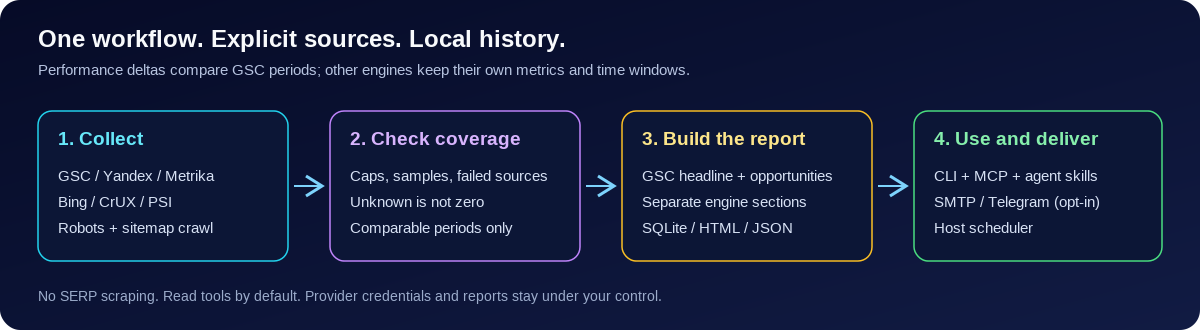
Why another SEO tool
- Free-first fusion. Existing MCP servers wrap one vendor each and hand raw vendor shapes to the model. We join GSC + Bing + Yandex + Metrika per property, and we say out loud what the APIs cannot give you (Yandex has no query×page join, GSC caps at 50k rows/day, data lags 2–3 days). Bounded provider responses expose coverage, freshness and limitations; unknown totals stay unknown.
- Comparable periods. The headline compares current and previous GSC windows. Yandex, Metrika, Bing, CrUX field data and PSI lab data keep separate sections. Opt-in delivery applies the configured significance thresholds and skips content already sent for the period.
- Agent-native. A small, stable MCP tool surface (no provider writes by default), a JSON envelope on every CLI command, and skills that encode audit → plan → fix → verify against a real repository.
- Zero spend. Public-repo CI, SQLite storage, SMTP/Telegram delivery, no SaaS in the default path. Paid-provider integrations are research/planned work, not dependencies or shipped adapters.
Status
Beta (v0.7.0, release candidate). Working today: six
provider adapters (GSC, Yandex Webmaster, Yandex Metrika, Bing/IndexNow, CrUX, PSI), a 30-rule
crawler, SQLite history, analysis (deltas, opportunities, indexing triage, multi-engine fusion,
nginx log analysis with UA-only bot triage, CWV by template), per-provider stats, report builders
- HTML/text/Markdown renderers with an attributed change digest and a Core Web Vitals section, the
finding/task lifecycle, portable backup bundles with two-phase restore, a read-only multi-site
portfolio scan, SMTP/Telegram delivery with idempotency, the 21-command CLI, the MCP server
(12 tools, 3 resources, 3 prompts) and scheduler generators. Canonical source ids, GSC-only
headline deltas, partial provider isolation and window/daily storage separation are enforced with
regression tests.
0.7.0is the coverage release (portfolio, restore, indexing events, CWV);0.6.0was the insights release and remains the latest published build until the release workflow runs. Seedocs/releases/0.7.0.mdanddocs/releases/0.6.0.md.
Still honest gaps before v1.0: GSC service-account auth (OAuth token only today),
sitemap submit / Yandex recrawl return an explicit WRITE_DISABLED (IndexNow really submits),
and raw_retention_days is reserved (no raw archives are written yet). See
docs/plans/2026-11-10-implementation-plan.md for
the wave status.
Install
# Python (recommended)
uvx --from lv24-seo lv24-seo doctor
pipx install "lv24-seo[secrets]"       # or: uv tool install "lv24-seo[secrets]"

# Node users: thin launcher over the same CLI
npx @lv24/seo doctor --json
lv24-seo init --property https://example.com   # writes seo.toml + data/
lv24-seo auth set --provider gsc --stdin       # token to the OS keychain (needs lv24-seo[secrets])
lv24-seo auth set --provider metrika --stdin   # Metrika has its own auth provider and token
lv24-seo gsc query --start 2026-11-01 --end 2026-11-07 --dimensions query,page
lv24-seo report weekly --days 7 --out reports/
lv24-seo report diff --markdown                 # week-over-week diff of stored snapshots
lv24-seo stats --days 7 --json                  # read-only per-provider dashboard snapshot
lv24-seo crawl --json                           # issues + sitemap↔crawl coverage diff
lv24-seo logs analyze --file /var/log/nginx/access.log --json   # bot rollups + crawl waste (read-only)
lv24-seo tasks list --json                      # local finding lifecycle (open → verified)
lv24-seo portfolio list --root "$HOME/sites" --json   # read-only roll-up over sibling projects
mkdir -p backups
lv24-seo backup create --out "$PWD/backups" --json   # portable zip: config + SQLite history
lv24-seo backup restore --file "$PWD/backups/lv24-seo-backup-<stamp>.zip" \
  --config "$PWD/seo.toml" --json                # plan; add --allow-write --confirm TOKEN to apply
lv24-seo export skills --out ./skills           # packaged agent skills from the wheel
lv24-seo mcp serve                              # stdio MCP server
lv24-seo install --client claude|opencode|vscode|cursor
npx @lv24/seorequires uv (or an installedlv24-seobinary): the npm package is a launcher, not a second implementation.
Desktop app
The same engine ships as LV24 SEO Optimizer Desktop 0.4.0 — a Tauri v2 shell with a dashboard,
weekly report view, configuration editor/diff/validation and a recommendations-to-agent workflow. It
bundles a pinned lv24-seo sidecar (0.6.0 in the current desktop build) and adds no provider logic
of its own.
| Platform | Assets | Auto-update |
|---|---|---|
| Windows 10/11 x64 | NSIS LV24.SEO.Optimizer_0.4.0_x64-setup.exe (+ .exe.sig), LV24-SEO-Optimizer_0.4.0_x64-portable.zip |
NSIS only |
| Linux x64 | LV24.SEO.Optimizer_0.4.0_amd64.AppImage (+ .AppImage.sig), LV24.SEO.Optimizer_0.4.0_amd64.deb, LV24.SEO.Optimizer-0.4.0-1.x86_64.rpm |
AppImage only |
| macOS 13+ arm64/x64 | LV24.SEO.Optimizer_0.4.0_aarch64.dmg, LV24.SEO.Optimizer_0.4.0_x64.dmg, .app.tar.gz (+ .sig) |
.app only |
deb, rpm and the portable ZIP are manual-only (MSI is not produced); 0.1.0 has no updater. The
0.2.x releases publish latest.json and SHA256SUMS.txt.
One secret store. The desktop and the CLI use the same OS keychain entry per provider (and per
delivery secret): service lv24-seo, usernames gsc_token, yandex_webmaster_token,
yandex_metrika_token, bing_api_key, crux_api_key, psi_api_key, smtp_password,
telegram_bot_token. A token entered with lv24-seo auth set in a terminal appears in the desktop's
auth status, and a token entered in the desktop is visible to the CLI. LV24_SEO_* environment
variables are inherited by the desktop's CLI runner. The opt-in <data-dir>/secrets.json fallback
(0600 on POSIX, ACLs on Windows) is shared only when both surfaces use the same workspace/data
directory.
Desktop repo: https://github.com/LevapVeeskela/lv24-seo-optimizer-desktop · design notes:
docs/plans/2026-11-14-seo-desktop.md.
See it work
$ lv24-seo doctor

[OK  ] python: 3.13.12
[OK  ] platform: win32
[OK  ] config: C:\work\seo.toml
[OK  ] cwd_writable: C:\work
[FAIL] tokens: none present; run `lv24-seo auth status`
doctor checks the runtime, config, data dir, working-directory writability and token presence only
— no network calls.
$ lv24-seo report weekly --days 7 --json --out reports/

# Writes report.json and report.html; the JSON envelope carries:
# meta.sources          successful providers
# meta.sources_failed   isolated source failures
# meta.complete         false for missing, capped or sampled inputs
# meta.limitations      caveats to read before interpreting the numbers
# No configured tokens: an explicit no-data report, with complete=false.
The same data is available as MCP tools (seo_weekly_report, gsc_search_analytics,
yandex_query_stats, seo_indexing_triage, …) and as three skills that encode
audit → plan → fix → verify.
What it will do
| Surface | Examples |
|---|---|
| Reports | weekly search performance + delta, indexing triage, striking-distance opportunities, content decay, technical regressions |
| MCP tools | 12 tools across GSC, Yandex, crawl, reports, logs and gated writes — see the table below |
| CLI | 21 top-level commands (14 groups + 7 commands): version, doctor, init, properties, stats, crawl, install, auth, config, gsc, yandex, sitemap, indexnow, report, schedule, export, logs, tasks, backup, portfolio, mcp; read commands accept --strict to exit 5 on truncated data |
| Skills | seo-weekly, seo-indexing-triage, seo-technical-audit — decision trees + tool recipes + output contracts (install from the wheel: lv24-seo export skills --out ./skills) |
| Automation | cron / systemd timer / Windows Task Scheduler generators and a GitHub Actions recipe |
MCP tools
Twelve tools, three resources and three prompts. Nine are read-class: seven pure read-only tools that
never change provider or local state, plus seo_crawl_site, seo_weekly_report and
yandex_indexing_state, which persist local snapshots or indexing events and therefore carry
readOnlyHint: false (they are not destructive). The two provider writes require allow_write=true,
are annotated destructiveHint: true, and use the same two-phase plan_hash / confirm_token flow
and LV24_SEO_WRITE_SECRET as the CLI; in this build the engine still has no recrawl/sitemap write
handler, so every call returns WRITE_DISABLED and nothing is sent.
| Tool | Kind | readOnlyHint |
destructiveHint |
What it does |
|---|---|---|---|---|
seo_properties |
read | true |
false |
Configured providers, targets and token presence |
gsc_search_analytics |
read | true |
false |
GSC query/page/country/device rows |
yandex_query_stats |
read | true |
false |
Top Yandex queries for the host |
yandex_indexing_state |
read | true |
false |
Indexing history, events and problems |
seo_crawl_site |
read + local state | false |
false |
Bounded crawl; stores pages and issues (off-loop, 600 s budget) |
seo_weekly_report |
read + local state | false |
false |
Weekly digest; stores a report snapshot |
seo_report_diff |
read | true |
false |
Diff two stored weekly snapshots |
seo_log_analysis |
read | true |
false |
One local nginx JSON log: bot rollups and crawl-waste share (UA-only triage) |
seo_indexing_triage |
read | true |
false |
Group indexing problems into an action list |
seo_opportunities |
read | true |
false |
Striking-distance and decay opportunities |
seo_recrawl_request |
write | false |
true |
Queue Yandex recrawl URLs (two-phase gate; WRITE_DISABLED in this build) |
seo_sitemap_submit |
write | false |
true |
Submit or delete a sitemap (two-phase gate; WRITE_DISABLED in this build) |
Resources: seo://config, seo://report/latest, seo://docs/tools. Prompts: weekly_seo_review,
indexing_triage, content_opportunities. The full inputs, outputs and limitations are in
docs/mcp.md; the generated contract is schemas/tools.json.
Supported sources
| Source | Free tier | Used for | Write operations |
|---|---|---|---|
| Google Search Console | yes (access token; service-account flow planned) | queries, pages, countries, devices; URL Inspection adapter | sitemap submit disabled |
| Yandex Webmaster | yes (OAuth) | queries, indexing history, diagnostics | recrawl disabled |
| Yandex Metrika | yes | sessions and users; filtered reports through adapter; separate metrika auth provider (yandex_metrika_token) |
— |
| Bing Webmaster + IndexNow | yes | queries, crawl issues, instant URL ping | IndexNow submit |
| Chrome UX Report | yes (API key) | origin-level field CWV | — |
| PageSpeed Insights | yes | lab audits per URL | — |
| Your site | — | crawl, robots, sitemap, JSON-LD, hreflang, links | — |
| nginx access logs | — | logs analyze + seo_log_analysis: bot/day rollups and crawl-waste share (UA-only triage, 100 MiB cap); nothing stored |
— |
Documents
- Implementation plan — waves, work packages, DoD
- Architecture — layers, data model, provider contracts
- Data sources & limits — what each API can and cannot do
- MCP tool surface — tool names, inputs, outputs, annotations
- CLI reference — commands, JSON envelope, exit codes
- Configuration —
seo.toml, env vars, secret storage - Scheduling & delivery — cron/systemd/Task Scheduler, SMTP, Telegram
- Agent skills — skill format and mirrors
- Release notes 0.7.0 — coverage release: portfolio, restore, indexing events, CWV
- Release notes 0.6.0 — insights release: logs, digest, tasks, backup
- Release notes 0.5.3 — P0 hardening release
- Desktop app — Tauri shell, 0.4.0 assets and update matrix
- Desktop plan — shell scope and milestones
- Security — token handling, read-only defaults, write gating
- Research 2026 — API limits, existing MCP servers, tool landscape
For AI agents
Read AGENTS.md first. It is the canonical contract: repo layout, how to run things,
what is read-only, how to propose a change. Machine-readable helpers:
schemas/tools.json— generated tool schemas (works without MCP)llms.txt— doc map for LLM crawlersskills/*/SKILL.md— portable skills (Claude Code, OpenCode, Codex)- MCP Registry:
io.github.LevapVeeskela/lv24-seo
License
Apache-2.0. See LICENSE and TRADEMARKS.md. Data pulled from Google/Yandex/Bing belongs to the property owner — this project never resells it.
1 maintainer

Metadata
1 maintainer
Release files for lv24-seo 0.7.0
For a detailed explanation of source distributions (sdists) and built distributions (wheels), please see the package formats documentation.
Source distribution (sdist)
| File | Size | Uploaded | Provenance | Actions |
|---|---|---|---|---|
| lv24_seo-0.7.0.tar.gz | 2.2 MB | With provenance | Details for lv24_seo-0.7.0.tar.gz |
Built distribution (wheel)
| File | Interpreter | ABI | Platform | Actions Reset |
|---|---|---|---|---|
| lv24_seo-0.7.0-py3-none-any.whl | Python 3 | none | any | Details for lv24_seo-0.7.0-py3-none-any.whl |
Total release size: 2.6 MB
Release files / lv24_seo-0.7.0.tar.gz
| Download URL | lv24_seo-0.7.0.tar.gz |
|---|---|
| Size | 2.2 MB |
| Tags | Source |
|
SHA-256 checksum How to use checksums |
c1dc26d4834911167300fccc48f4c262498ccd36904574904b9b581ad343a6f2
|
|
BLAKE2b-256 checksum How to use checksums |
5314d8e43128c2a6900c12fcfd41b1bed565b8402a259a592ad72d3f27383fa4
|
| Upload date | |
|
Uploaded using Trusted Publishing? What is trusted publishing? |
Yes |
| Uploaded via |
twine/7.0.0 CPython/3.13.16
|
Provenance
Provenance describes where a file came from. On PyPI, provenance is shared via attestations, which provide a verifiable record of the build or publishing details. View details, limitations and caveats.


PyPI Publish Attestation
PyPI verified that this artifact, at this checksum, originated from the publisher listed below.
Signed by GitHub Actions, verified by PyPI on Nov 16, 2026.
Transparency logRelease files / lv24_seo-0.7.0-py3-none-any.whl
| Download URL | lv24_seo-0.7.0-py3-none-any.whl |
|---|---|
| Size | 372.3 kB |
| Tags | Python 3 |
|
SHA-256 checksum How to use checksums |
18ec6b14d66e6364a25fc6417cb7da9d13024ded721fc0ccc8a6864d903b578c
|
|
BLAKE2b-256 checksum How to use checksums |
145305e2478acdc17c9fa53712c38091ea62b530ea9757224a9a7d1fdb2703cb
|
| Upload date | |
|
Uploaded using Trusted Publishing? What is trusted publishing? |
Yes |
| Uploaded via |
twine/7.0.0 CPython/3.13.16
|
Provenance
Provenance describes where a file came from. On PyPI, provenance is shared via attestations, which provide a verifiable record of the build or publishing details. View details, limitations and caveats.
PyPI Publish Attestation
PyPI verified that this artifact, at this checksum, originated from the publisher listed below.
Signed by GitHub Actions, verified by PyPI on Nov 16, 2026.
Transparency logSecurity for lv24-seo 0.7.0
Provenance
Provenance describes where a file came from. On PyPI, provenance is shared via attestations, which provide a verifiable record of the build or publishing details. View details, limitations and caveats.
Full provenance
Both files in this release have been uploaded with provenance metadata.
Attestation for lv24_seo-0.7.0.tar.gz
PyPI Publish Attestation
PyPI verified that this artifact, at this checksum, originated from the publisher listed below.
Signed by GitHub Actions, verified by PyPI on Nov 16, 2026.
Transparency logA note on package security
PyPI is a repository for distributing packages, not a service for auditing them. While third-party security researchers and our staff do their best to detect and remove malicious packages, PyPI cannot guarantee the quality, security or suitability of any given package.
To learn more about protecting yourself from malicious actors, visit our package security documentation.














