

LYNXgwas
Locus anaYsis and geNomic eXplorer


A local GWAS visualization and fine-mapping platform. Point it at your GWAS summary statistics and it identifies loci, recovers rsIDs, computes LD, runs a full fine-mapping suite, and gives you an interactive Manhattan/LD/gene-track viewer per locus — all in your browser, entirely on your own machine. No data ever leaves your computer, and no cloud account or upload step is involved.
Why LYNXgwas
Going from a raw GWAS summary-statistics file to a set of well-characterized, fine-mapped loci usually means stitching together several separate tools by hand — a clumping step, a liftover or rsID lookup, a manual LD calculation, one-off scripts for each fine-mapping method, and finally some plotting code to actually look at the result. LYNXgwas wraps that whole workflow into one local application with a UI: define a project once, and loci identification, LD, annotation, and fine-mapping all run through the same pipeline and land in the same interactive viewer — including comparing the same locus across multiple GWAS datasets, and cross-ancestry fine-mapping across projects at once.
Screenshots
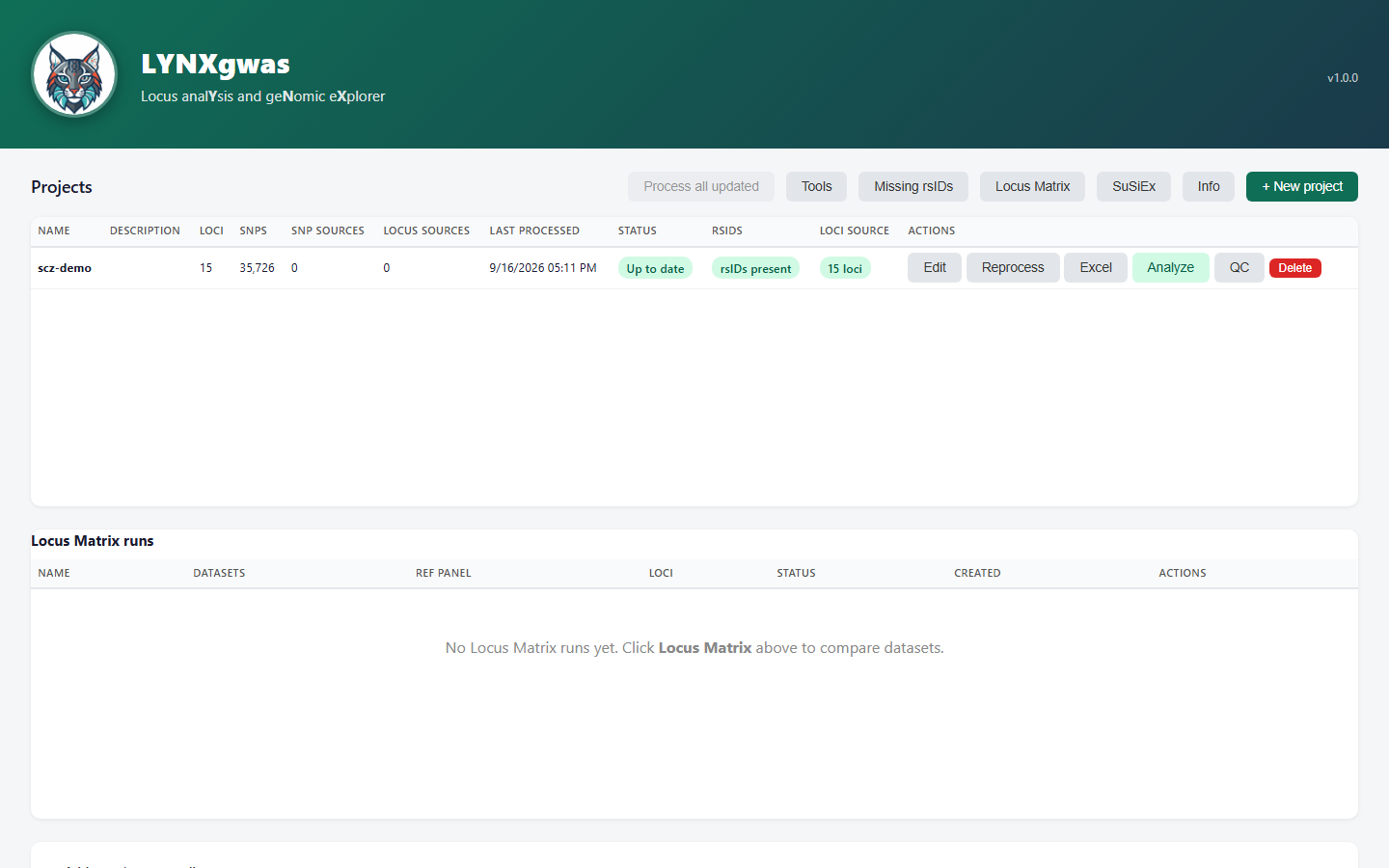
Home page — manage multiple GWAS projects, see status and locus/SNP counts at a glance:
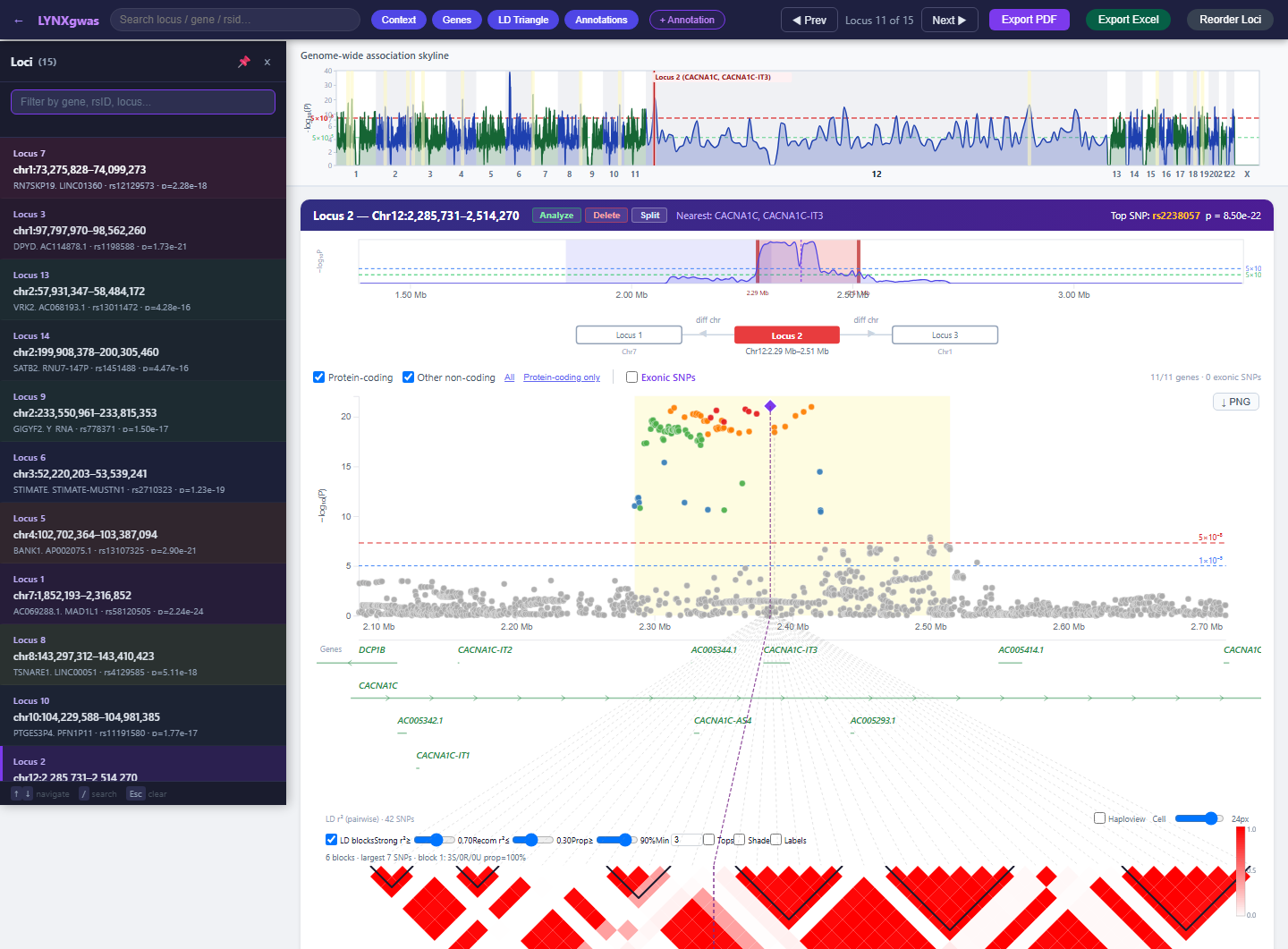
Locus viewer — Manhattan plot, gene track, and LD triangle for a single locus:
Install
pip install lynxgwas
Requires a Java 11+ runtime on your machine (Adoptium is a good source if you don't have one).
Quick start
lynxgwas
This starts the local server and opens http://localhost:8765/ in your browser. On first run it
will ask for (or offer to download) two things the pipeline needs:
- PLINK 1.9 — for LD computation and reference-panel subsetting (
--plink <path>to skip the prompt) - A GENCODE GFF3 annotation — for the gene track (
--gff3 <path>to skip the prompt)
Both are remembered afterward. From the home page, use + New project to point LYNXgwas at your own GWAS summary statistics and walk through the setup wizard.
What it does
Loci & annotation
- Automatic loci identification from GWAS summary stats via PLINK clumping (or supply your own
loci.txt) - rsID recovery from a local dbSNP VCF, with optional NCBI/gnomAD API completion for anything left unmatched
- Gene-track annotation from a GENCODE GFF3, with nearest-gene lookup outside the plotted window
- Custom annotation tracks from your own TSV files (point/bar/flag styles) via an in-viewer wizard
- Genome-wide QC triage: genomic inflation factor (λGC), with an optional LDSC-intercept comparison to separate genuine polygenicity from confounding
LD & fine-mapping
- LD computation and pairwise LD triangles per locus (PLINK reference-panel subsetting under the hood)
- SuSiE — Bayesian sum-of-single-effects fine-mapping with credible sets
- FINEMAP-style Wakefield ABF fine-mapping for single-causal-variant loci
- GCTA-COJO — conditional & joint SNP selection with an automatic reliability/artifact check
- coloc — colocalization against a second trait's summary stats (PP.H0–H4)
- GWAMA — meta-analysis pass-through
- SuSiEx — cross-ancestry joint fine-mapping across multiple LYNXgwas projects at once
- Locus Matrix — compare the same locus region across many GWAS datasets side by side
Viewer & output
- Interactive Manhattan plot, gene track, and LD triangle, all zooming together
- Live locus editing: resize, split, create, and reorder loci without re-running the whole pipeline
- Per-locus and whole-genome PDF export; full Excel export of all annotated SNPs
- Multi-project management from a single home page, with per-project staleness tracking
Requirements
| Requirement | Why | How it's handled |
|---|---|---|
| Java 11+ | Runs the backend | Install separately (bundled Java classes only) |
| PLINK 1.9 | LD, clumping, reference panel subsetting | Prompted for a path, or auto-downloaded |
| GENCODE GFF3 | Gene track annotation | Prompted for a path, or auto-downloaded |
A PLINK-format reference panel (.bed/.bim/.fam) |
LD computation | You supply this in the project wizard |
Documentation
Full architecture, Java package reference, API endpoints, and configuration keys:
docs/ARCHITECTURE.md
License
1 maintainer

Release files for lynxgwas 0.1.2
For a detailed explanation of source distributions (sdists) and built distributions (wheels), please see the package formats documentation.
Source distribution (sdist)
| File | Size | Uploaded | |
|---|---|---|---|
| lynxgwas-0.1.2.tar.gz | 8.9 MB | Details |
Built distribution (wheel)
| File | Interpreter | ABI | Platform | Reset |
|---|---|---|---|---|
| lynxgwas-0.1.2-py3-none-any.whl | Python 3 | none | any | Details |
Total release size: 17.8 MB
Release files / lynxgwas-0.1.2.tar.gz
| Download URL | lynxgwas-0.1.2.tar.gz |
|---|---|
| Size | 8.9 MB |
| Tags | Source |
|
SHA-256 checksum How to use checksums |
b88f45f01a52099c54fc7d6a186c4ce29df1672c2da3f0ac23109706dead787c
|
|
BLAKE2b-256 checksum How to use checksums |
14206645b015fbabf55ae283f0051df02440ba03e780e7b728809bfe9688e447
|
| Upload date | |
|
Uploaded using Trusted Publishing? What is trusted publishing? |
No |
| Uploaded via |
twine/7.0.0 CPython/3.12.10
|
Release files / lynxgwas-0.1.2-py3-none-any.whl
| Download URL | lynxgwas-0.1.2-py3-none-any.whl |
|---|---|
| Size | 9.0 MB |
| Tags | Python 3 |
|
SHA-256 checksum How to use checksums |
e3a445d1ca81415398b5e0dbe8702bfc3d68aa78d9d328fe576d997116c8eaae
|
|
BLAKE2b-256 checksum How to use checksums |
ca594f70a471abece1d2b7f247e75162c1c9f123bb794c91eff4d100b8dc6df1
|
| Upload date | |
|
Uploaded using Trusted Publishing? What is trusted publishing? |
No |
| Uploaded via |
twine/7.0.0 CPython/3.12.10
|














