
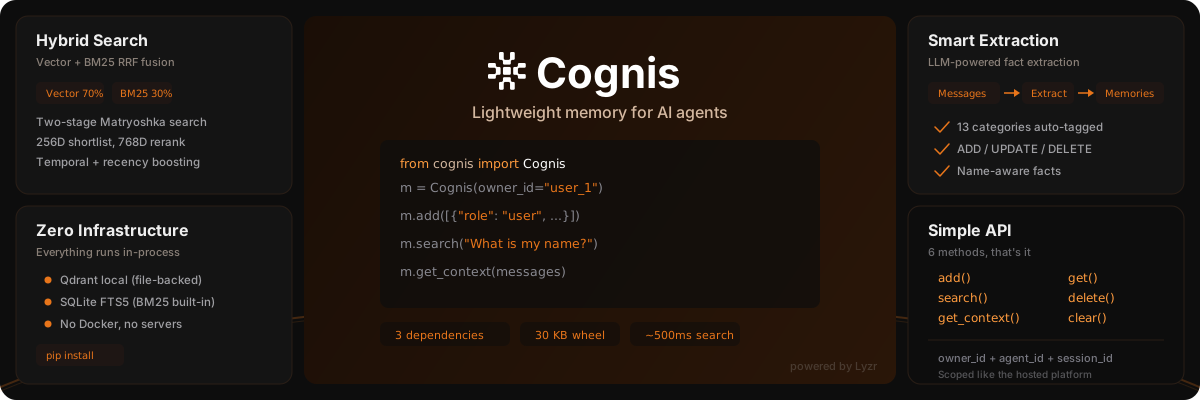
Lightweight memory for AI agents — local-first or hosted




Two ways to run
Cognis (local) |
CognisClient (hosted) |
|
|---|---|---|
| Where it runs | In-process: Qdrant local mode + SQLite | Lyzr memory service (memory.studio.lyzr.ai or your on-prem deployment) |
| Setup | pip install lyzr-cognis + Gemini/OpenAI keys |
pip install lyzr-cognis + a Lyzr Studio API key |
| Auth | None (your own API keys for embeddings/extraction) | x-api-key authn + org isolation + RBAC authz, enforced server-side |
| Data | On your disk (~/.cognis) |
In your Lyzr org, isolated per organization |
| Best for | Prototypes, single-machine agents, offline | Production, multi-service agents, teams, on-prem |
Both classes share the same method surface — add, search, get, get_all, delete, get_context, clear, count — and the same owner_id / agent_id / session_id scoping model, so you can start local and switch to hosted by changing one line.
Features
- Hosted mode — Point the same API at the Lyzr memory service with a single API key. Authentication, org-level data isolation, and RBAC are handled by the platform
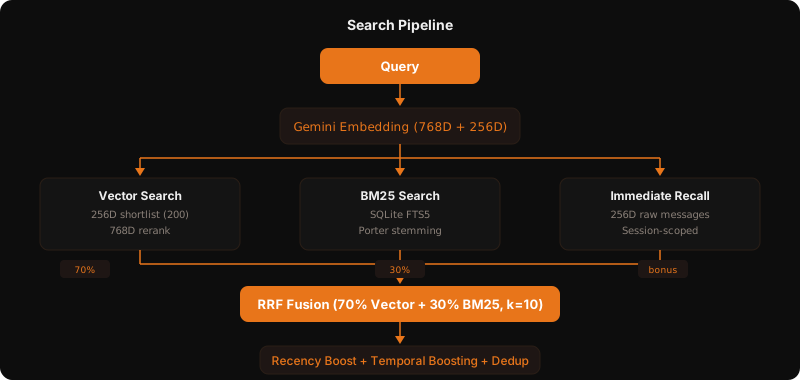
- Hybrid search — Two-stage Matryoshka vector search (256D shortlist, 768D rerank) + BM25 keyword matching, fused with RRF (70/30 split, tuned from ablation studies)
- Zero infrastructure (local mode) — Everything runs in-process. Qdrant local mode (file-backed) + SQLite. No Docker, no servers
- Smart extraction — LLM-powered fact extraction with 13 auto-tagged categories, memory versioning (ADD/UPDATE/DELETE), and name-aware facts
- Session management —
owner_id+agent_id+session_idscoping, identical across local and hosted. Memories are global, messages are session-scoped - Fast retrieval — ~500ms search latency (embedding API bottleneck), ~4ms with cache hits
Quick Start — Hosted (CognisClient)
1. Install
pip install lyzr-cognis
2. Set your Lyzr Studio API key
Grab an API key from Lyzr Studio and export it:
export LYZR_API_KEY="your-lyzr-api-key"
3. Use it
from cognis import CognisClient

m = CognisClient(owner_id="user_1")   # talks to https://memory.studio.lyzr.ai

# Add conversation messages — facts are extracted automatically server-side
m.add([
    {"role": "user", "content": "My name is Alice and I work at Google as a data scientist."},
    {"role": "user", "content": "I love hiking and I'm a huge fan of Taylor Swift."},
])

# Search memories
resp = m.search("Where does Alice work?")
for r in resp["results"]:
    print(f"  {r['content']}  (score: {r['score']})")

# Get context for your LLM
ctx = m.get_context([{"role": "user", "content": "Tell me about myself"}])
print(ctx["context_string"])

m.close()
Configuration
Resolution order is always parameter → environment variable → default:
| Setting | Parameter | Env var | Default |
|---|---|---|---|
| API key | api_key |
LYZR_API_KEY |
— (required) |
| Service URL | base_url |
BASE_MEMORY_URL |
https://memory.studio.lyzr.ai |
| Timeout | timeout |
— | 30.0 seconds |
On-prem / self-hosted deployments: point the client at your own lyzr-memory deployment — nothing else changes:
export BASE_MEMORY_URL="https://memory.your-company.internal"
# or explicitly:
m = CognisClient(api_key="...", base_url="https://memory.your-company.internal", owner_id="user_1")
Authentication & authorization
- Authn — every request carries your API key as an
x-api-keyheader. Invalid or missing keys raiseCognisAuthenticationError. - Org isolation — the service derives your organization from the API key; all reads and writes are scoped to it. Two orgs using the same
owner_idnever see each other's data. - Authz (RBAC) — write operations (
delete,update,clear) require thememory:writepermission on your key's policy. A denied permission raisesCognisPermissionErrorwith the missing permission named.
from cognis import (
    CognisAuthenticationError,  # bad/missing API key (401/403)
    CognisPermissionError,      # key valid, RBAC permission missing (403)
    CognisAPIError,             # other service errors (has .status_code, .detail)
    CognisConnectionError,      # network unreachable / timeout
)

try:
    m.delete("mem_abc123")
except CognisPermissionError as e:
    print(f"Ask your org admin for memory:write: {e}")
except CognisAuthenticationError:
    print("Check LYZR_API_KEY")
Quick Start — Local (Cognis)
1. Install and set your model API keys
pip install lyzr-cognis
export GEMINI_API_KEY="your-gemini-key"    # For embeddings
export OPENAI_API_KEY="your-openai-key"    # For extraction (gpt-4.1-mini)
2. Use it
from cognis import Cognis

m = Cognis(owner_id="user_1")

m.add([
    {"role": "user", "content": "My name is Alice and I work at Google as a data scientist."},
])

resp = m.search("Where does Alice work?")
for r in resp["results"]:
    print(f"  {r['content']}  (score: {r['score']})")

ctx = m.get_context([{"role": "user", "content": "Tell me about myself"}])
print(ctx["context_string"])

for mem in m.get_all()["memories"]:
    cat = mem["metadata"]["category"]
    print(f"  [{cat}] {mem['content']}")

m.close()
Architecture
API Reference
Constructors
Cognis(owner_id, agent_id, session_id, data_dir, config, gemini_api_key) — local mode
| Parameter | Type | Default | Description |
|---|---|---|---|
gemini_api_key |
str |
$GEMINI_API_KEY |
Gemini API key for embeddings |
owner_id |
str |
— | Memory owner identifier |
agent_id |
str |
None |
Agent identifier |
session_id |
str |
auto-generated | Session identifier |
data_dir |
str |
~/.cognis |
Local storage directory |
config |
CognisConfig |
defaults | Configuration overrides |
CognisClient(api_key, base_url, owner_id, agent_id, session_id, timeout) — hosted mode
| Parameter | Type | Default | Description |
|---|---|---|---|
api_key |
str |
$LYZR_API_KEY |
Lyzr Studio API key (required) |
base_url |
str |
$BASE_MEMORY_URL, then https://memory.studio.lyzr.ai |
Memory service URL |
owner_id |
str |
— | Memory owner identifier |
agent_id |
str |
None |
Agent identifier |
session_id |
str |
auto-generated | Session identifier |
timeout |
float |
30.0 |
Request timeout (seconds) |
At least one of owner_id, agent_id, or session_id is required for either class.
Methods
All methods accept optional owner_id, agent_id, session_id overrides per call.
| Method | Returns | Description |
|---|---|---|
add(messages) |
{"success", "message", ...} |
Add messages; facts are extracted (local returns memories inline; hosted returns session_message_count — pass sync_extraction=True to wait for extraction) |
search(query, limit) |
{"success", "results", "count", "query"} |
Hybrid RRF search |
get(memory_id) |
{"success", "memory"} |
Get single memory by ID |
get_all(limit, offset) |
{"success", "memories", "total", "limit", "offset"} |
List all memories |
delete(memory_id) |
{"success", "message"} |
Delete a memory (hosted: needs memory:write) |
update(memory_id, content, metadata, is_current) |
{"success", "message"} |
Hosted only. Update a memory's content/metadata/status (needs memory:write) |
get_context(messages) |
see below | Get LLM-ready context |
clear() |
{"success", "message"} |
Clear all memories (hosted: needs memory:write) |
count() |
int |
Count current memories |
health() |
{"status", ...} |
Hosted only. Service health check (no auth) |
get_context return shapes differ slightly:
- Local:
{"short_term": [...], "long_term": [...], "short_term_count", "long_term_count", "context_string"} - Hosted:
{"success", "context": [messages...], "has_long_term_memory", "short_term_count", "long_term_count", "context_string"}
Both include context_string, ready to prepend to your LLM prompt.
Session Management
Identical on both classes:
m.new_session()         # Generate new session ID
m.set_session("ses_x")  # Switch session
m.set_owner("user_2")   # Switch owner
m.set_agent("agent_2")  # Switch agent
Scoping rules:
- Extracted memories are global to
(owner_id, agent_id)— persist across sessions - Raw messages are scoped to
(owner_id, agent_id, session_id)— session-local - Search returns global memories + current session messages; pass an explicit
session_idto scope search to one session
Per-call ID overrides
Pass IDs at call time instead of (or in addition to) init:
m = Cognis(session_id="ses_1")          # or CognisClient(...)

# Different owners per call
m.add(messages, owner_id="alice", agent_id="bot_1")
m.add(messages, owner_id="bob", agent_id="bot_1")

# Search scoped to specific owner
m.search("query", owner_id="alice")

# Context for specific session
m.get_context(messages, session_id="ses_morning")
Configuration (local mode)
from cognis import Cognis, CognisConfig

config = CognisConfig(
    embedding_model="gemini/gemini-embedding-2-preview",
    embedding_full_dim=768,
    embedding_small_dim=256,
    vector_weight=0.70,       # RRF: 70% vector
    bm25_weight=0.30,         # RRF: 30% BM25
    rrf_k=10,                 # RRF constant
    similarity_threshold=0.3,
    llm_model="gpt-4.1-mini", # For fact extraction
)

m = Cognis(config=config, owner_id="user_1", data_dir="./my_data")
Memory Categories
Extracted facts are auto-categorized into 13 categories:
identity relationships work_career learning wellness lifestyle interests preferences plans_goals experiences opinions context misc
Dependencies
Only 4 core dependencies:
| Package | Size | Purpose |
|---|---|---|
qdrant-client |
3 MB | Vector store (local mode, no server) |
litellm |
55 MB | LLM + embedding provider abstraction |
pydantic |
7 MB | Config validation |
httpx |
1 MB | HTTP client (hosted mode) |
SQLite is Python stdlib.
What's new in 1.0.0
CognisClient— hosted mode against the Lyzr memory service, with API-key authentication (LYZR_API_KEY), org isolation, and RBAC-aware errorsBASE_MEMORY_URL— point the same client at any on-prem/self-hosted lyzr-memory deployment- Typed exceptions —
CognisAuthenticationError,CognisPermissionError,CognisAPIError,CognisConnectionError update()(hosted) — edit a memory's content, metadata, or current/historical status- New dependency:
httpx. The localCognisclass is unchanged and fully backward compatible.
Development
uv venv --python 3.12 .venv
uv pip install -e ".[dev]" python-dotenv openai
uv run pytest tests/ -v
License
Built by Lyzr
1 maintainer

Metadata
1 maintainer
Release files for lyzr-cognis 1.0.0
For a detailed explanation of source distributions (sdists) and built distributions (wheels), please see the package formats documentation.
Source distribution (sdist)
| File | Size | Uploaded | |
|---|---|---|---|
| lyzr_cognis-1.0.0.tar.gz | 58.6 kB | Details |
Built distribution (wheel)
| File | Interpreter | ABI | Platform | Reset |
|---|---|---|---|---|
| lyzr_cognis-1.0.0-py3-none-any.whl | Python 3 | none | any | Details |
Total release size: 107.5 kB
Release files / lyzr_cognis-1.0.0.tar.gz
| Download URL | lyzr_cognis-1.0.0.tar.gz |
|---|---|
| Size | 58.6 kB |
| Tags | Source |
|
SHA-256 checksum How to use checksums |
176fa17901b25a3921c535e1890fdfc1de35edffbcf665c2e40862a13e31d5fd
|
|
BLAKE2b-256 checksum How to use checksums |
e5509cf5009cac1df4fcf2bba9ed5a75f6f18417fa56c87d75083f9cfac52235
|
| Upload date | |
|
Uploaded using Trusted Publishing? What is trusted publishing? |
Yes |
| Uploaded via |
twine/7.0.0 CPython/3.13.14
|
Provenance
Provenance describes where a file came from. On PyPI, provenance is shared via attestations, which provide a verifiable record of the build or publishing details. View details, limitations and caveats.


PyPI Publish Attestation
PyPI verified that this artifact, at this checksum, originated from the publisher listed below.
Signed by GitHub Actions, verified by PyPI on Aug 25, 2026.
Transparency logRelease files / lyzr_cognis-1.0.0-py3-none-any.whl
| Download URL | lyzr_cognis-1.0.0-py3-none-any.whl |
|---|---|
| Size | 48.8 kB |
| Tags | Python 3 |
|
SHA-256 checksum How to use checksums |
8a74e0f44ddf79dc8832bed23fb5edfa1cab6392229bd4700ba025ec1678369c
|
|
BLAKE2b-256 checksum How to use checksums |
18a9e6265022fce57df721bbe86c3e6c637c1c5d409f0c3221eb2a2e93e4539f
|
| Upload date | |
|
Uploaded using Trusted Publishing? What is trusted publishing? |
Yes |
| Uploaded via |
twine/7.0.0 CPython/3.13.14
|
Provenance
Provenance describes where a file came from. On PyPI, provenance is shared via attestations, which provide a verifiable record of the build or publishing details. View details, limitations and caveats.
PyPI Publish Attestation
PyPI verified that this artifact, at this checksum, originated from the publisher listed below.
Signed by GitHub Actions, verified by PyPI on Aug 25, 2026.
Transparency log













