
M1-8 writer
Target Device
This script can write to LED name badge which ...
- has 12x48 LED matrix display (untested on 11x44).
- shows "M1-8" at startup.
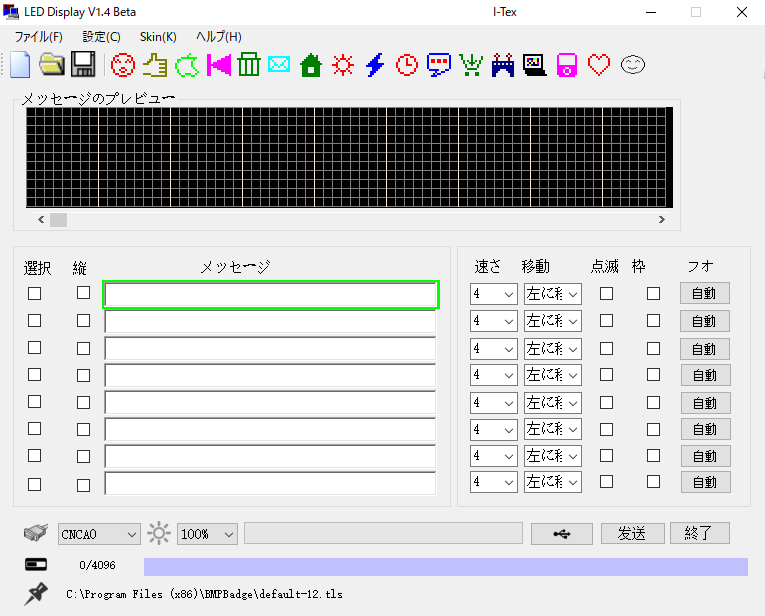
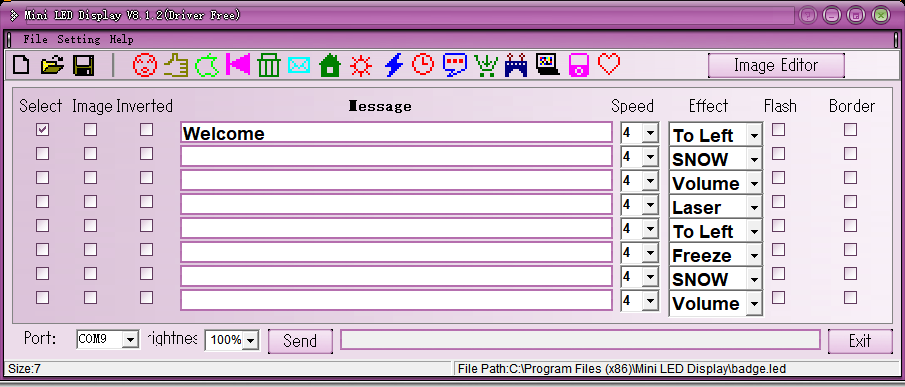
- can be written by "LED Display" and "Mini LED Display".
LED Display:
Mini LED Display:
Data Structure
Header
[
    0x41, 0x68, 0x65, 0x6c, 0x6c, 0x6f,  # magic number: Ahello
    0x00,  # brightness: the brightest 0x00 --- 0x01 --- 0x02 --- 0x03 the dimmest
    0x00,  # NOP
    # slot 1-8 have their own display modes
    # 0b10000000: show border
    # 0b01110000: speed
    # 0b00001000: blink
    # 0b00000111: motion (left/right/up/down/freeze/animation/snow/curtain)
    0b00110000,  # mode of slot 1
    0b00110110,  # mode of slot 2
    0b00110111,  # mode of slot 3
    0b00110000,  # mode of slot 4
    0b00110000,  # mode of slot 5
    0b00110100,  # mode of slot 6
    0b00110110,  # mode of slot 7
    0b00110111,  # mode of slot 8
    0x00,  # NOP
    # number of columns (8 pixels/column) and offset of slot 1-8
    0x00, 0, 0x00, 1,  # columns and offset of slot 1 bitmap
    0x00, 1, 0x00, 2,  # columns and offset of slot 2 bitmap
    0x00, 3, 0x00, 3,  # columns and offset of slot 3 bitmap
    0x00, 6, 0x00, 4,  # columns and offset of slot 4 bitmap
    0x00, 10, 0x00, 5,  # columns and offset of slot 5 bitmap
    0x00, 15, 0x00, 6,  # columns and offset of slot 6 bitmap
    0x00, 21, 0x00, 7,  # columns and offset of slot 7 bitmap
    0x00, 28, 0x00, 8,  # columns and offset of slot 8 bitmap
    # laser mode of slot 1-8
    # 0b00000001: laser on slot 1
    # 0b00000010: laser on slot 2
    # ...
    # 0b10000000: laser on slot 8
    # motion of laser mode slot must be 000 (otherwise stop on the slot)
    0b00001000,
    0x00, 0x00, 0x00, 0x00,  # NOP
]
Body
Bitmap data are splitted line by line from the top and each line is splitted every 8 pixels from the left. 8-pixel data is represented as 1-byte packet. The left pixel is the high-order bit.
# a 32px (=8*4) wide bitmap
[
    0b10101010, packet_002, packet_003, packet_004,  # line 1
    packet_005, packet_006, packet_007, packet_008,  # line 2
    packet_009, packet_010, packet_011, packet_012,  # line 3
    #         ... line by line ...
    0b10001000, 0b11001100, 0b11110000, 0b10110111
]
The first packet of data 0b10101010 represents * * * * in top left corner and the last packet of data 0b10110111 represents * ** *** in bottom right corner (* is lit pixel).
Each bitmap data is written in parallel line by line from the top.
bitmap_03_line_02 represents the 2nd line data of the 3rd bitmap.
# 4 bitmaps
[
    bitmap_01_line_01, bitmap_02_line_01, bitmap_03_line_01, bitmap_04_line_01,
    bitmap_01_line_02, bitmap_02_line_02, bitmap_03_line_02, bitmap_04_line_02,
    bitmap_01_line_03, bitmap_02_line_03, bitmap_03_line_03, bitmap_04_line_03,
    #                          ... line by line ...
    bitmap_01_line_nn, bitmap_02_line_nn, bitmap_03_line_nn, bitmap_04_line_nn,
]
NOTE: You need to insert 32 bytes of null after the 16 byte of body.
Feature
- Brightness: 1, 2, 3, 4 (for all bitmap)
- Write up to 8 bitmaps
- Motion: left, right, up, down, freeze, animation, snow, curtain, laser
- Speed: 1, 2, 3, 4, 5, 6, 7, 8
- Option: show border, blink
Usage
Write 1 bitmap to slot 1:
m18write image.png
... and show bitmap brightest:
m18write --brightness 4 image1.png
... and show bitmap in maximum speed:
m18write --speed1 8 image.png
... and move bitmap left to right:
m18write --motion1 right image.png
Write 4 bitmaps to slot 1, 2, 3 and 4:
m18write image1.png image2.png image3.png image4.png
Write 2 bitmaps to slot 1 and 2, blink bitmap 1 and show border bitmap 2:
m18write --blink1 --border2 image1.png image2.png
Show help:
m18write -h
Install
pip install m1-8-writer
Licence
Author
Related References
1 maintainer

Metadata
1 maintainer
Release files for m1-8-writer 0.9.2
For a detailed explanation of source distributions (sdists) and built distributions (wheels), please see the package formats documentation.
Built distribution (wheel)
| File | Interpreter | ABI | Platform | Reset |
|---|---|---|---|---|
| m1_8_writer-0.9.2-py3-none-any.whl | Python 3 | none | any | Details |
Release files / m1_8_writer-0.9.2-py3-none-any.whl
| Download URL | m1_8_writer-0.9.2-py3-none-any.whl |
|---|---|
| Size | 7.0 kB |
| Tags | Python 3 |
|
SHA-256 checksum How to use checksums |
30478b66cc90ee194196e51d73679003b45c044a771b782e08bc7899b72f53aa
|
|
BLAKE2b-256 checksum How to use checksums |
089332f67801e605a3772a247bffdd607283d33a88bcc261a7ccf3e706c778c5
|
| Upload date | |
|
Uploaded using Trusted Publishing? What is trusted publishing? |
No |
| Uploaded via |
twine/3.8.0 pkginfo/1.8.2 readme-renderer/34.0 requests/2.25.1 requests-toolbelt/0.9.1 urllib3/1.26.4 tqdm/4.63.0 importlib-metadata/4.11.3 keyring/21.8.0 rfc3986/2.0.0 colorama/0.4.4 CPython/3.9.4
|














