
English | 简体中文
m2w: Markdown to WordPress





:star2::star2::star2: Welcome m2w 2.7.2! LaTeX math rendering, tables, and GFM Admonition support now available. Custom post types (shuoshuo, page), URL aliases, status control, and title-based matching in v2.8. Current v2.7.2 also features rate limiting, resumable uploads, and batch processing for safe mass uploads of 1000+ articles!
Chinese tutorial: Docker系列 WordPress系列 WordPress上传或更新Markdown的最佳实践-m2w 2.0
Table of Contents
Background
m2w is a tool for automatically uploading or updating local Markdown to WordPress via Python, based on REST API (2.5+) or Password.
m2w has these features:
- Support REST API, which is safer then conventional password!
- Use
config/user.jsonto maintain the user information in a little different way comparing withm2w 1.0. - You can just keep your file structures locally as you like.
- You can manage lots of websites at the same time via multiple
legacy_*.json. - All you need to deal with is a single python script
myblog.pyinstead of two (update.pyandupload.pyinm2w 1.0). - Ignore repeated new markdown files for uploading (
v2.2.4+) - LaTeX math rendering (
v2.7.2+): Support for inline math ($...$) and display math ($$...$$,\begin...\end) formulas - Markdown tables (
v2.7.2+): Native table support for better content formatting - GFM Admonition (
v2.7.2+, optional): GitHub-style callout boxes (> [!NOTE],> [!TIP], etc.) - requirespip install m2w[admonition] - Custom post types (
v2.8+): Support for custom post types likeshuoshuo(status updates),page, etc. - URL alias (slug) (
v2.8+): Set custom URL aliases via frontmatterslugfield - Status control (
v2.8+): Modify article status (draft/publish) or delete articles via frontmatter - Rate limiting & batch processing (
v2.7+): Prevent server bans with configurable delays, batch processing, and exponential backoff for HTTP 429 errors - Resumable uploads (
v2.7+): Progress tracking saves your work—interrupt and resume without losing progress
What's new in 2.7.2 vs 2.7.1
- LaTeX math rendering: Full support for LaTeX formulas with
$...$for inline math and$$...$$or\begin...\endfor display math - Markdown tables: Native table support enabled by default
- GFM Admonition (optional): GitHub-style callout boxes with
> [!NOTE],> [!TIP],> [!IMPORTANT],> [!WARNING],> [!CAUTION]syntax - Thanks to @Mareep-YANG for contributing these enhancements via PR #20!
What's new in 2.8 vs 2.7
- Custom post types: Support for
post_typefield to create different content types (e.g.,shuoshuo,page) - URL aliases: Add
slugfield to customize article URLs - Status control: Modify article status via
statusfield, or delete articles withstatus: delete - Title-based matching: Articles are now matched by frontmatter
titleinstead of filename
What's new in 2.7 vs 2.6
- Rate limiting: Add configurable delays between requests to prevent server rate limiting (HTTP 429)
- Batch processing: Process files in configurable batches with delays between batches
- Exponential backoff: Automatic retry with exponential backoff when encountering HTTP 429 errors
- Resumable uploads: Progress tracking saves to file, allowing you to resume from interruptions
- Mass upload friendly: Safely upload 1000+ articles without getting banned
What's new in 2.6 vs 2.5
- REST API uploads are more reliable: unified taxonomy cache handling,
term_existsfixes, clearer errors, and no more infinite retries on updates. - REST requests now honor a configurable timeout (default 30s) so you can tune slow sites instead of hard failures.
- Password mode was refactored into
m2w.password.*modules while keepingup_passwordfor backward compatibility. - Project maintenance follows vibe coding practices to keep the codebase consistent and lightweight.
- You can exclude specific local files in
myblog.pyso they never enter the upload/update pipeline (useful for docs likeAGENTS.md,CLAUDE.md, etc.).
Install
Miniconda is recommended to manage Python version and related dependencies.
- Python >= 3.7.6
- Runtime dependencies:
python-frontmatter>=1.0.0,markdown>=3.3.6,python-wordpress-xmlrpc>=2.3,httpx>=0.24.0(seerequirements.txt) - Packaging now follows PEP 621 in
pyproject.toml(setuptools);setup.pyremains only for compatibility.
After 2022-12-10, m2w was uploaded onto PyPi. Install it via:
pip install m2w
# or pin a version
pip install -i https://pypi.org/simple m2w==2.7.2

# For GFM Admonition support (optional)
pip install m2w[admonition]
From source, you can use the modern build flow:
python -m pip install --upgrade build
python -m build                      # generate wheel + sdist under dist/
python -m pip install dist/m2w-*.whl # install the built artifact
# editable install for development
python -m pip install -e .
Usage
Enable REST API
This step is needed only when you want to use the REST API mode.
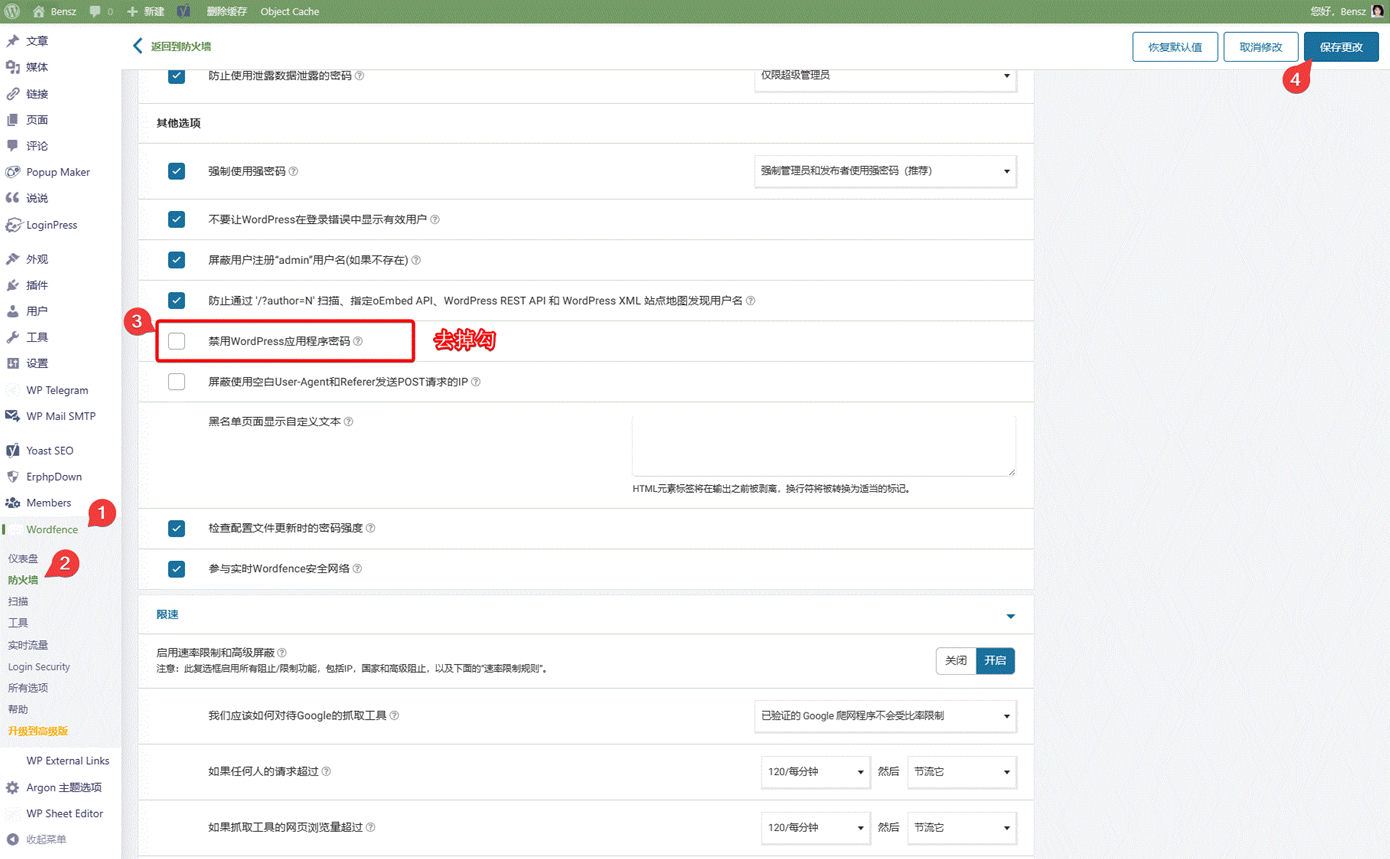
- If any, please allow Application password of WordPress in Wordfence:
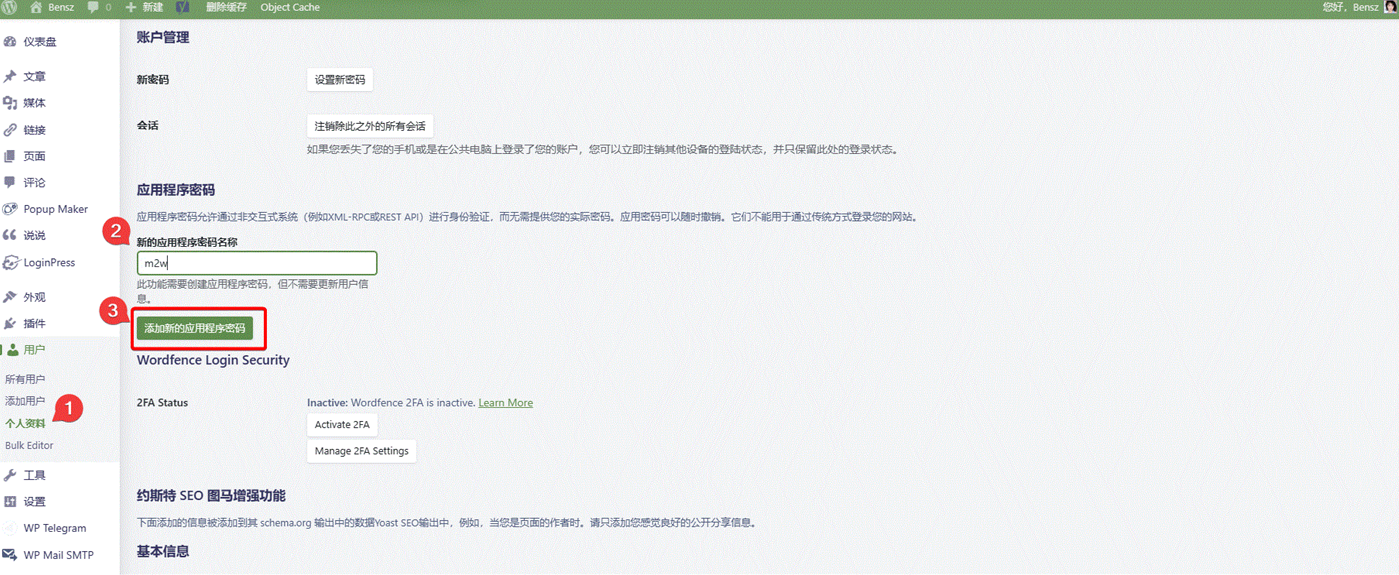
- Go to personal settings and add a new REST API:
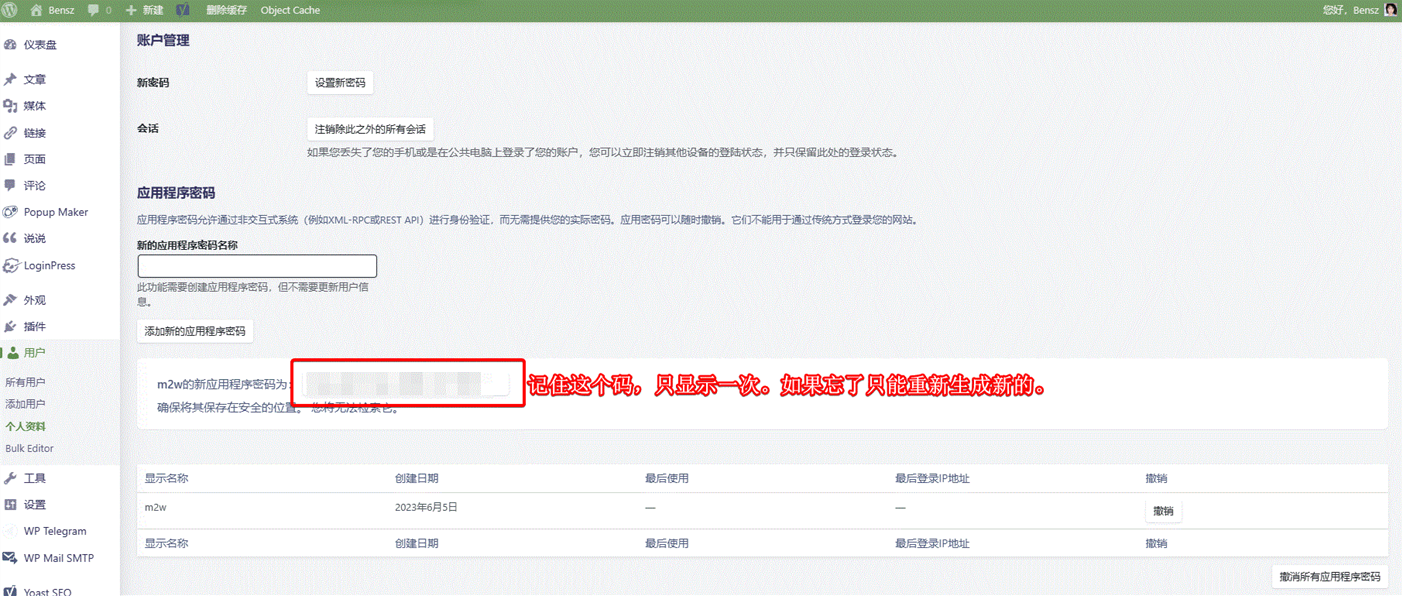
- Please record the new REST API in a safe place. If you forget it or suspect its safety, please remove the old API and create a new one:
Use m2w
- Install m2w from PyPi or this Github repotory.
- Build a
myblog.pyfile (or other names you like) in<path01>. Here is the demo. Create<path02>/config/user.jsonand setpath_m2was<path02>inmyblog.py:
path_m2w = '<path02>' # Absolute path of m2w config folder
- Define
<path02>/config/user.json. You can add many websites likeweb01! Please go to the demo for more details. Here are some interpretations:
- user.json for REST API mode:
"web01": {
        "domain": "https://domain-01.com",
        "username": "username-01",
        "application_password": "password-01",
        "path_markdown": [
            "E:/Github/m2w/@test/main",
            "E:/Github/m2w/@test/main2"
        ],
        "post_metadata": {
            "category": ["test"],
            "tag": ["test"],
            "status": "publish"
        },
        "path_legacy_json": "/config/legacy"
    }
- user.json for Password mode:
"web01": {
        "domain": "https://domain-01.com",
        "username": "username-01",
        "password": "password-01",
        "path_markdown": [
            "E:/Github/m2w/@test/main",
            "E:/Github/m2w/@test/main2"
        ],
        "post_metadata": {
            "category": ["test"],
            "tag": ["test"],
            "status": "publish"
        },
        "path_legacy_json": "/config/legacy"
    }
- domain, username, application_password/password: The information of your WordPress site and account.
application_passwordis REST API, andpasswordis the conventional passord of your account. if bothapplication_passwordandpasswordexit, onlyapplication_passwordis available for m2w. - path_markdown: Add as much top folders as you want!
- post_metadata/path_legacy_json: Set default if you don't know what they are.
- Run
myblog.pylike:
python <path01>/myblog.py
Need to ignore local helper files? In
myblog.pysetignore_files = ["AGENTS.md", "CLAUDE.md"](globs andre:regex supported). No user.json edits required.
Ignore unwanted files
- Default ignore list in
myblog.py:["AGENTS.md", "CLAUDE.md"](avoid uploading AI helper docs). - You can add globs (e.g.,
"**/draft-*.md","notes/**") or regex prefixed withre:(e.g.,"re:.*/temp-.*\\.md$"). - Leave
ignore_filesempty/remove it to scan all markdown files (backward compatible for older scripts).
Rate limiting and resumable uploads (v2.7+)
When uploading a large number of articles (e.g., 1000+), you may want to enable rate limiting to avoid server bans:
# In myblog.py
rate_limit_enabled = True      # Enable rate limiting
request_delay = 1.0            # Delay between requests (seconds)
batch_size = 10                # Files per batch
batch_delay = 5.0              # Delay between batches (seconds)
max_429_retries = 5            # Max retries on HTTP 429
initial_backoff = 2.0          # Initial backoff time (seconds)

progress_enabled = True        # Enable progress saving
progress_file = None           # None = same dir as legacy.json
Recommended configurations:
- Conservative (strict servers):
request_delay=2.0,batch_size=5,batch_delay=10.0 - Balanced (recommended):
request_delay=1.0,batch_size=10,batch_delay=5.0 - Aggressive (lenient servers):
request_delay=0.5,batch_size=20,batch_delay=3.0
Frontmatter options (v2.8+)
You can use frontmatter in your Markdown files to control article behavior:
---
title: Your Article Title
slug: custom-url-alias
status: publish
post_type: post
category: [Technology]
tag: [python, wordpress]
---
Available fields:
| Field | Description | Example |
|---|---|---|
title |
Article title (used for matching existing articles) | title: My First Post |
slug |
Custom URL alias | slug: my-custom-url |
status |
Article status: publish, draft, delete |
status: publish |
post_type |
Content type: post, page, or custom types like shuoshuo |
post_type: shuoshuo |
category |
Article categories | category: [Tech, Python] |
tag |
Article tags | tag: [code, tutorial] |
Examples:
Create a shuoshuo (status update):
---
title: Today's weather is nice!
post_type: shuoshuo
slug: shuoshuo-2025-01-24
status: publish
---
Set custom URL alias:
---
title: My Article
slug: my-custom-url
status: publish
---
Delete an article:
---
title: Old Article
status: delete
---
Note: When
status: deleteis set, the article will be deleted from WordPress and the local Markdown file will be removed. Use with caution!`
Demo
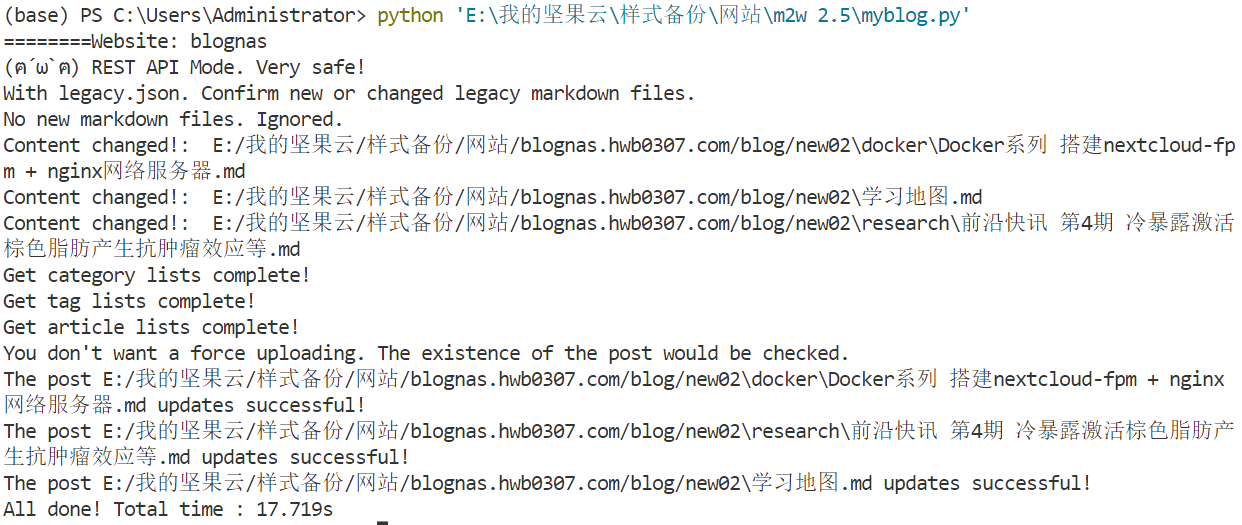
This demo is conducted in Win10 with VScode.
As shown in the following GIF, all changed or brand-new markdowns can be automatically updated/upload via just a simple command python myblog.py!
Changelog
See CHANGELOG.MD for the complete version history.
Current release: v2.7.2 (2026-01-24)
- LaTeX math rendering support ($...$ and $$...$$)
- Markdown tables support
- GFM Admonition support (optional, requires
pip install m2w[admonition]) - Thanks to @Mareep-YANG for contributing via PR #20!
Coming in v2.8.0:
- Custom post types (shuoshuo, page), URL aliases, status control
- Title-based article matching
- Thanks to @Shulelk for the inspiration!
TO-DO
-
shuoshuo and page update & upload (completed in v2.8.0)
-
Enhanced markdown support:
python-markdowntomarkdown-it-py -
Support Hexo-like YAML head:
title: I Love You
tags:
  - You
  - I
  - Love
categories:
  - Note
date: 2023-11-08 16:38:31
update: 2023-11-08 16:40:31
--
- Develop GUI across OS
Related Efforts
Maintainers
Contributing
Feel free to dive in! Open an issue or submit PRs. m2w follows the Contributor Covenant Code of Conduct.

License
This software depends on other packages that may be licensed under different open source licenses.
m2w is released under the MIT license. See LICENSE for details.
More
Applications similar to m2w
- nefu-ljw/python-markdown-to-wordpress: The root project of m2w!
- WordPressXMLRPCTools: Manage WordPress posts in Hexo way.
- markpress: Write WordPress in Markdown in Your Favorite Text Editor
- wordpress-markdown-blog-loader: This utility loads markdown blogs into WordPress as a post. It allows you to work on your blog in your favorite editor and keeps all your blogs in git.
1 maintainer

Metadata
1 maintainer
Release files for m2w 2.7.2
For a detailed explanation of source distributions (sdists) and built distributions (wheels), please see the package formats documentation.
Source distribution (sdist)
| File | Size | Uploaded | |
|---|---|---|---|
| m2w-2.7.2.tar.gz | 36.8 kB | Details |
Built distribution (wheel)
| File | Interpreter | ABI | Platform | Reset |
|---|---|---|---|---|
| m2w-2.7.2-py3-none-any.whl | Python 3 | none | any | Details |
Total release size: 76.0 kB
Release files / m2w-2.7.2.tar.gz
| Download URL | m2w-2.7.2.tar.gz |
|---|---|
| Size | 36.8 kB |
| Tags | Source |
|
SHA-256 checksum How to use checksums |
6abf0da6a0e46f3e69b618a2673dcb3a15ff4ddf498ed089b6382304263c7f73
|
|
BLAKE2b-256 checksum How to use checksums |
4d7367b2a84798a7d0278d9be863257c0ee7dc817052dc4f1ddac24ed2b13572
|
| Upload date | |
|
Uploaded using Trusted Publishing? What is trusted publishing? |
No |
| Uploaded via |
twine/6.2.0 CPython/3.12.7
|
Release files / m2w-2.7.2-py3-none-any.whl
| Download URL | m2w-2.7.2-py3-none-any.whl |
|---|---|
| Size | 39.1 kB |
| Tags | Python 3 |
|
SHA-256 checksum How to use checksums |
90b43bc42ddb298e6fdb17c07b877be903d81daf30af3cd6f32f2361a19bbce7
|
|
BLAKE2b-256 checksum How to use checksums |
e5fd3e79329c811d018ac463304aaa5029d87dba0f12248bcdbf98a2ee8a828c
|
| Upload date | |
|
Uploaded using Trusted Publishing? What is trusted publishing? |
No |
| Uploaded via |
twine/6.2.0 CPython/3.12.7
|














